VIOX Electric
Language

Month: July 2025

  • Terminal Box vs Junction Box: An Electrical Engineer’s Guide (2026)

    Terminal Box vs Junction Box: An Electrical Engineer’s Guide (2026)

    Key Takeaways

    • Fundamental Distinction: Terminal boxes utilize structured terminal blocks for organized, accessible connections and frequent maintenance, whereas junction boxes protect permanent wire splices and are rarely accessed after installation.
    • Code Compliance: Both enclosures must adhere to NEC Article 314, but terminal boxes often require stricter accessibility and working space clearances due to their role in active maintenance and testing.
    • Application Specificity: Specify terminal boxes for industrial control panels, automation systems, and instrumentation. Use junction boxes for general building wiring, power distribution branching, and splice protection.
    • ROI Consideration: While terminal boxes have a higher initial material cost, they significantly reduce troubleshooting time and operational downtime (OPEX), offering superior long-term value in complex industrial environments.

    Quick Answer: Terminal Box vs. Junction Box

    A terminal box is an electrical enclosure equipped with organized terminal blocks designed for frequent access, testing, and modification of connections. It serves as a control interface or distribution point in industrial systems. Conversely, a junction box is a protective enclosure used primarily to house permanent wire splices (typically joined by wire nuts or crimps) and protect them from environmental factors; it is not intended for regular operational access.

    Introduction

    In the precise world of industrial electrical engineering, the terms “terminal box” and “junction box” are often used interchangeably, yet they represent distinct components with vastly different functions, design philosophies, and code requirements. For procurement engineers and system designers, confusing these enclosures can lead to code violations, maintenance nightmares, and compromised system reliability.

    The choice between a terminal box and a junction box is not merely about housing wires—it is a strategic decision about accessibility, maintainability, and system lifecycle management. A junction box serves as a static shield for permanent connections, while a terminal box acts as a dynamic interface for active systems.

    This guide provides a definitive technical comparison for 2025, analyzing the specifications, NEC/NEMA requirements, and application criteria to ensure you specify the correct enclosure for your electrical installations.
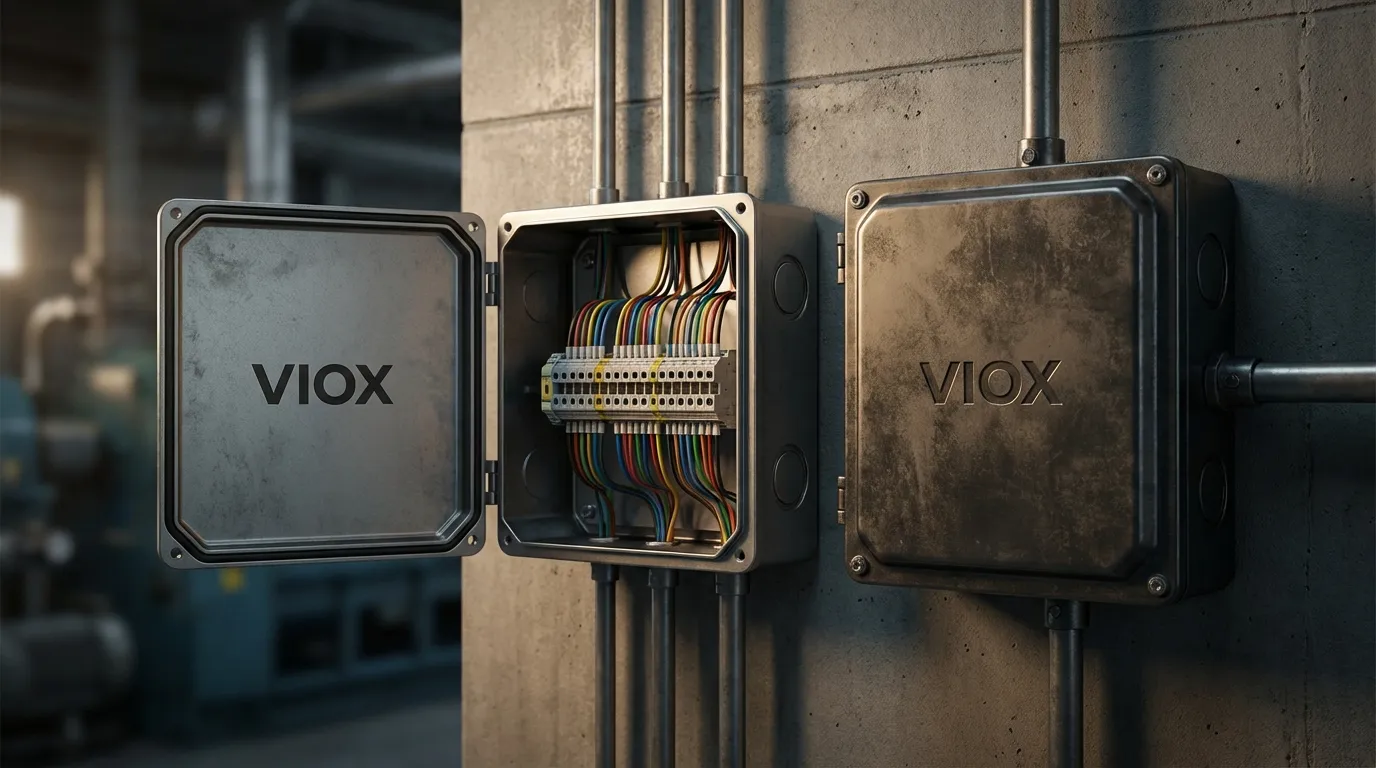
    High-end industrial control panel environment showing a VIOX-branded Terminal Box (left) and a standard Junction Box (right) mounted side-by-side on a factory wall.
    High-end industrial control panel environment showing a VIOX-branded Terminal Box (left) and a standard Junction Box (right) mounted side-by-side on a factory wall. The Terminal Box lid is open, revealing neat rows of DIN-rail mounted terminal blocks with colorful wiring.

    What Is a Terminal Box?

    A terminal box (often called a terminal enclosure or connection box) is a purpose-built enclosure designed to house electrical junction boxes with terminals. Its primary function is to provide a structured, organized, and accessible interface for connecting field wiring to control systems, machinery, or power distribution networks.

    Key Characteristics

    • Internal Components: Features DIN rails, terminal blocks (screw, spring-clamp, or push-in), and marking tags.
    • Accessibility: Designed with hinged doors, quick-release latches, or removable covers to facilitate frequent access.
    • Organization: Wires are terminated individually, labeled, and arranged logically for easy identification.
    • Maintenance: Allows for individual circuit isolation, testing, and modification without disturbing adjacent connections.

    Terminal boxes are the backbone of industrial automation, serving as the critical handover point between field sensors/actuators and the central control cabinet.
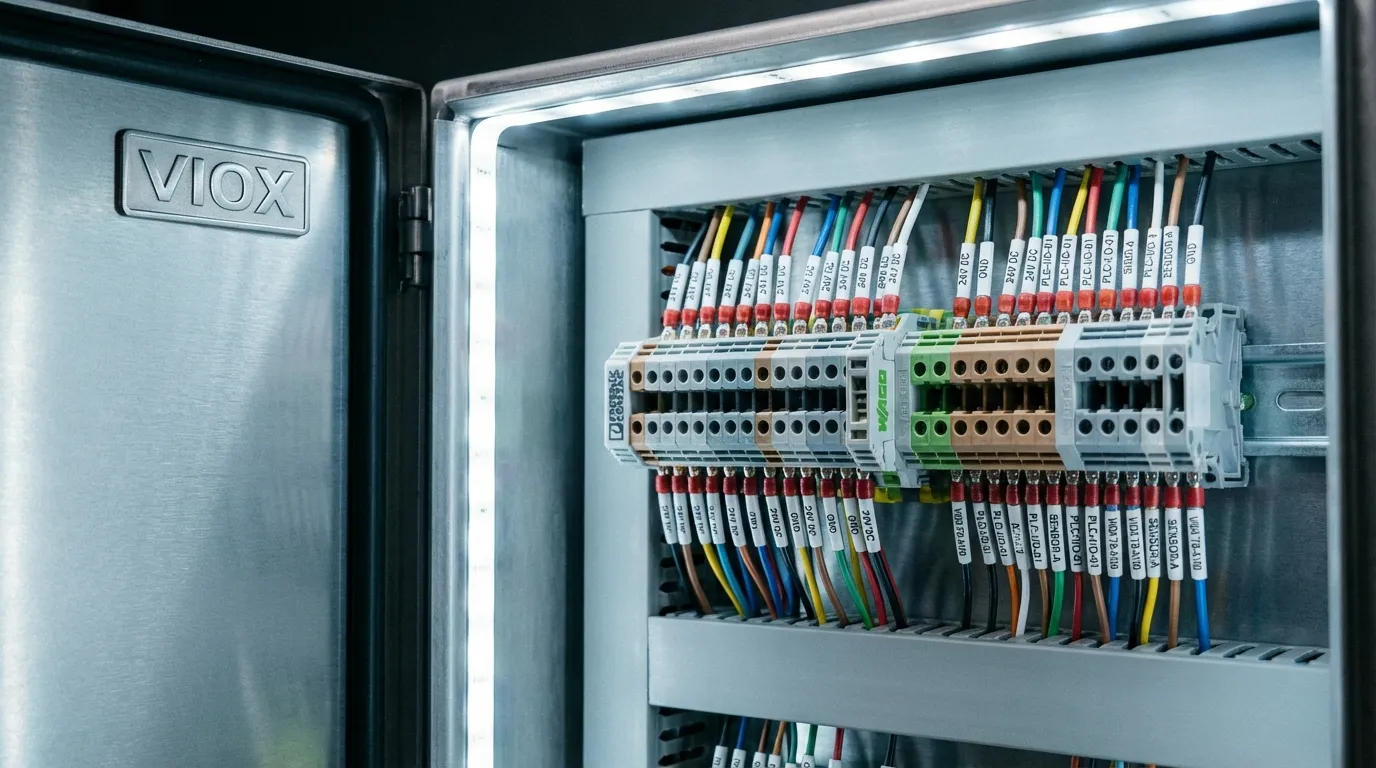
    Macro close-up shot of the interior of a VIOX Terminal Box showing high-quality terminal blocks mounted on a DIN rail.
    Macro close-up shot of the interior of a VIOX Terminal Box. Sharp focus on high-quality terminal blocks mounted on a DIN rail with perfectly ferruled and terminated wires.

    What Is a Junction Box?

    A junction box (J-box) is a protective enclosure used to interconnect wires, typically to split a power circuit to multiple outlets or to extend a run. Its primary role is containment and protection. Once installed, a junction box is rarely opened unless a fault occurs or a renovation is required.

    Key Characteristics

    • Internal Components: Contains wire splices joined by twist-on wire connectors (wire nuts), crimp caps, or simple busbars. Lacks organized terminal strips.
    • Accessibility: Often secured with screw-down covers; accessible but not designed for rapid entry.
    • Permanence: Connections are intended to be permanent. Modifying a circuit often requires cutting and re-splicing wires.
    • Simplicity: Focuses on protecting conductors from physical damage, dust, and moisture.

    For a deeper dive into the specific varieties, refer to our guide on understanding electrical junction box types.

    Terminal Box vs. Junction Box: The Core Differences

    To the untrained eye, both appear to be simple boxes. However, the engineering distinctions determine their suitability for specific environments.

    1. Connection Architecture

    The most significant difference lies in the connection method. Terminal boxes utilize terminal blocks, which provide a secure, vibration-resistant mechanical connection for each wire. This setup allows for AC junction box applications where circuit integrity is paramount. Junction boxes rely on free-floating splices, which can become disorganized and difficult to trace in complex circuits.

    2. Maintenance and Troubleshooting

    In an industrial fault scenario, time is money. A terminal box allows a technician to insert a multimeter probe directly into a terminal test point to verify voltage or continuity. In a junction box, the technician must unscrew the cover, untwist wire nuts, and physically separate wires to test a circuit—a process that is slow, invasive, and risks damaging the copper conductors.

    3. Space and Sizing

    Terminal boxes are typically larger relative to the wire count because they must accommodate the DIN rail, terminal blocks, and wire bending radii. Junction boxes are sized based on the volume of the conductors and splice devices, often resulting in a more compact footprint. Correct sizing is critical; consult our junction box sizing guide to ensure compliance.
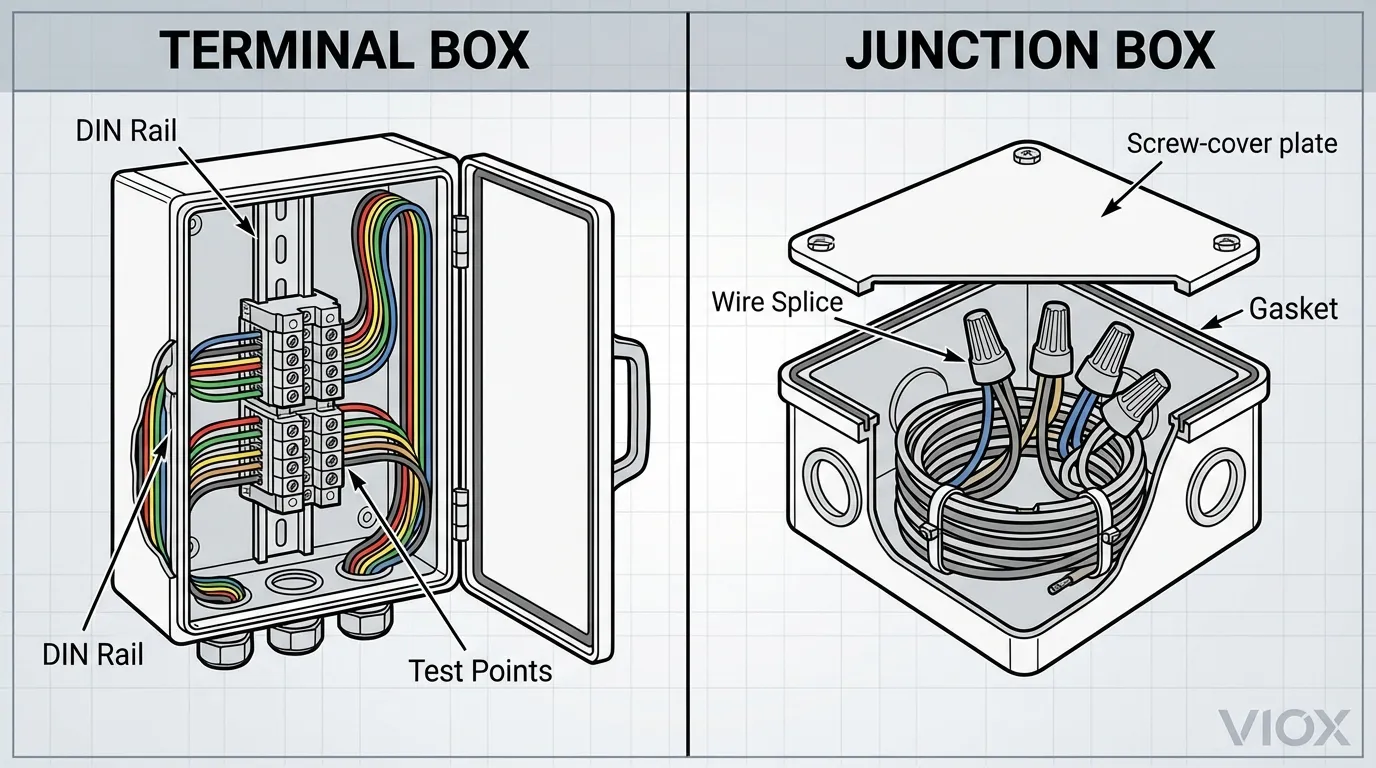
    Cross-section cutaway illustration comparing a Terminal Box vs. a Junction Box.
    Cross-section cutaway illustration comparing a Terminal Box vs. a Junction Box. Left side shows DIN rail, terminal blocks, and organized wire routing. Right side shows wire nuts and bundled wires.

    Comprehensive Comparison Guide

    Table 1: Technical Specifications & Features

    Feature Terminal Box Junction Box
    Primary Function Organized connection, testing, & maintenance Wire protection & branching
    Connection Method DIN-rail mounted terminal blocks Wire nuts, crimps, or splice blocks
    Access Frequency High (Regular maintenance/testing) Low (Permanent installation)
    Wire Organization High (Labeled, individual terminations) Low (Bundled splices)
    Troubleshooting Fast (Test points available) Slow (Requires undoing splices)
    Vibration Resistance Excellent (Secure clamping) Moderate (Depends on connector quality)
    Space Requirement Larger (Requires rail & bending space) Compact (Volume-based sizing)
    Cost Higher initial cost Lower initial cost
    Typical Voltage Low to High (24V – 1000V+) Low to Medium (120V – 600V)
    Current Capacity High (Up to 600A+ with blocks) Limited by wire nut/connector rating

    Table 2: Application Suitability Matrix

    Application Scenario Recommended Enclosure Rationale
    Industrial Control Panel Terminal Box Requires frequent testing, labeled circuits, and organized wiring.
    Residential Lighting Circuit Junction Box Simple branching, rarely accessed, cost-sensitive.
    Motor Termination Terminal Box High vibration environment; needs secure lugs/blocks.
    Outdoor Sensor Wiring Terminal Box Needs moisture protection and easy sensor replacement.
    Building Power Distribution Junction Box Permanent splices for long cable runs.
    Instrumentation Signals Terminal Box Shield grounding and signal integrity are critical.

    For a detailed breakdown of how these compare to distribution boxes, see our analysis on junction vs. distribution vs. terminal box.

    Table 3: Cost Analysis & ROI

    Cost Factor Terminal Box Junction Box
    Material Cost $$$ (Enclosure + DIN Rail + Blocks) $ (Enclosure + Wire Nuts)
    Installation Labor $$ (Requires mounting blocks & ferrule termination) $ (Fast twisting/splicing)
    Maintenance Labor $ (Rapid testing & modification) $$$ (Time-consuming troubleshooting)
    Downtime Risk Low (Quick fault isolation) High (Complex fault finding)
    Long-term ROI High for industrial/critical systems High for simple/static systems

    Detailed Selection Criteria

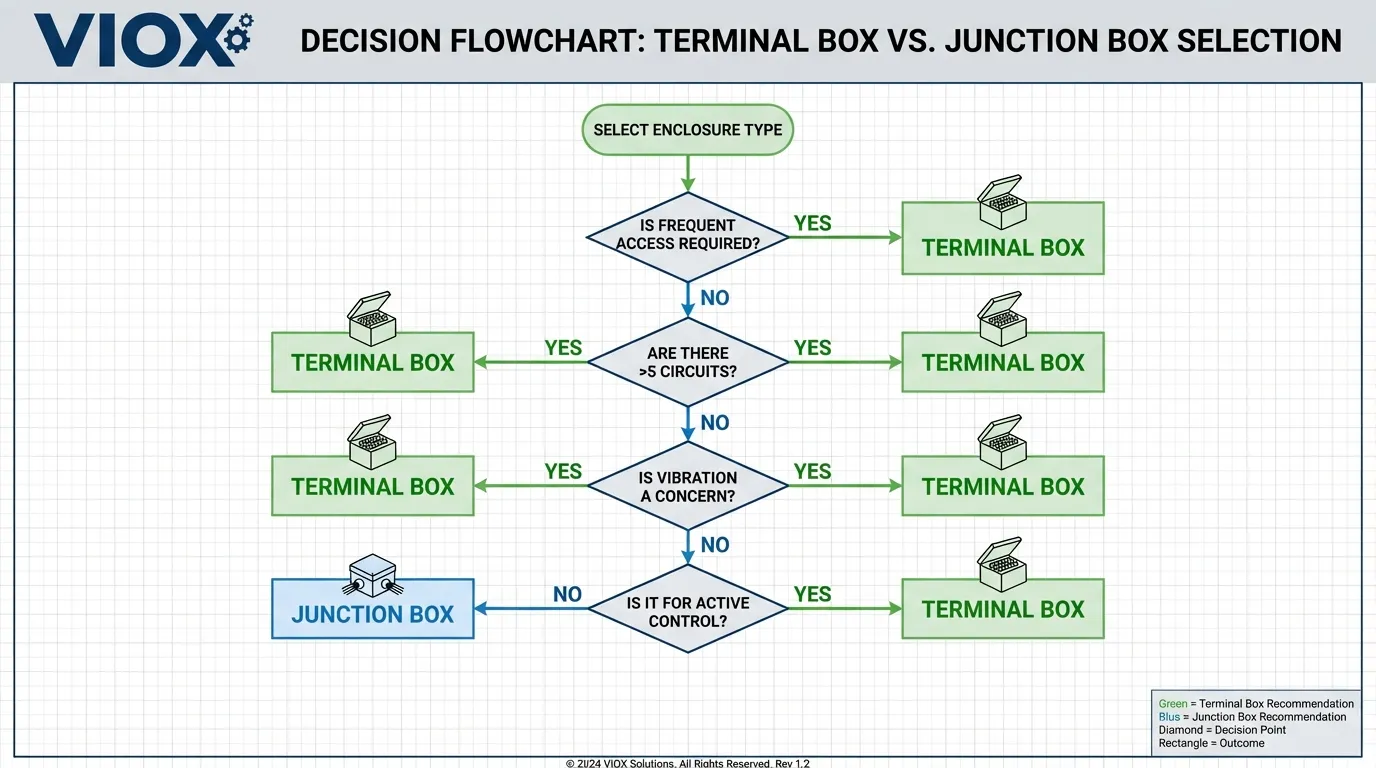
    Choosing the right box involves more than just price. Use this decision framework to select the optimal solution for your project.

    When to Choose a Terminal Box

    • Complex Wiring: If you have more than 4-5 circuits entering a single enclosure.
    • Future Expansion: If you anticipate adding sensors or modifying control logic.
    • Critical Systems: Where downtime must be minimized, and fault-finding speed is essential.
    • Signal Integrity: When managing sensitive 4-20mA signals or data cables that require shield termination.

    When to Choose a Junction Box

    • Static Installations: Lighting, receptacle power, or simple feeder splices that will not change.
    • Space Constraints: When fitting into tight ceiling voids or wall cavities.
    • Budget Constraints: For non-critical general purpose wiring where component cost is a primary driver.
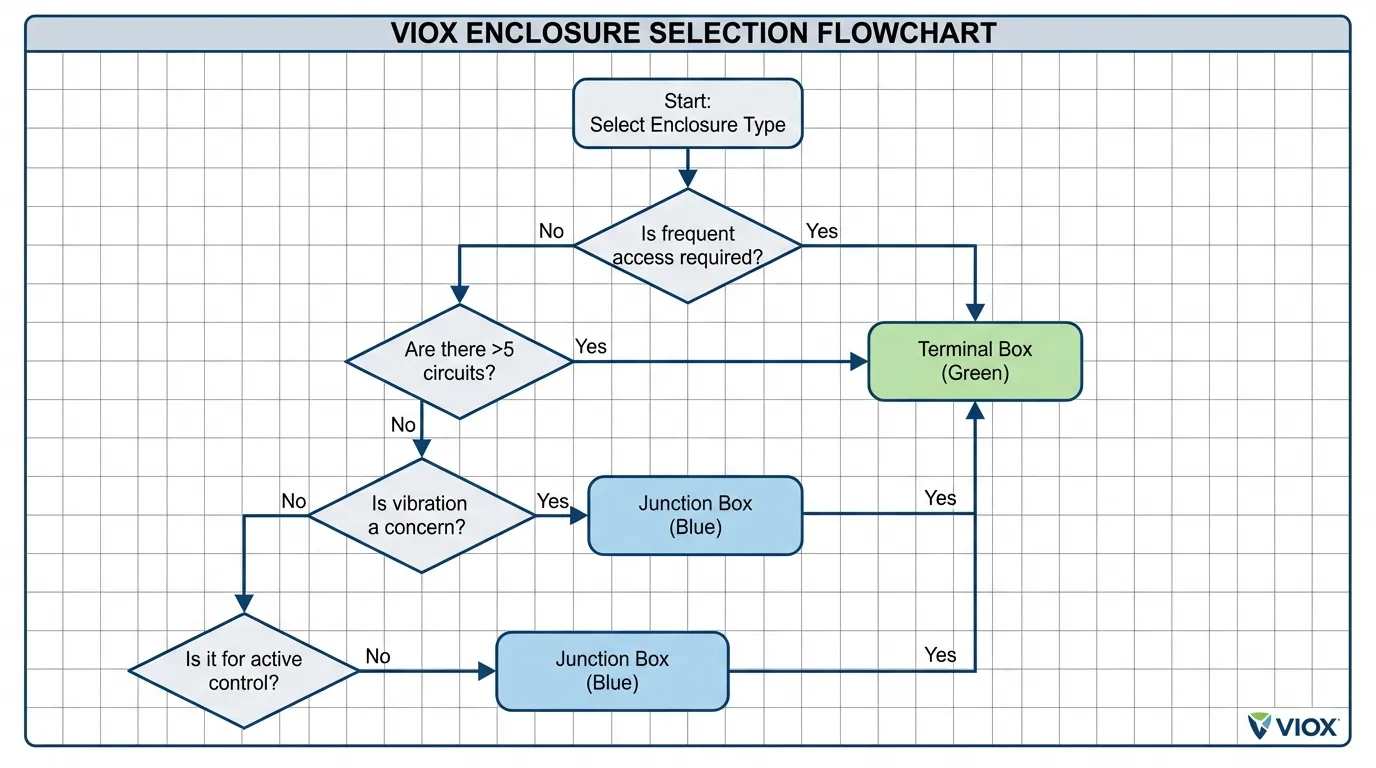
    Decision flowchart for selecting between a Terminal Box and a Junction Box.
    Decision flowchart for selecting between a Terminal Box and a Junction Box. Decision diamonds guide you based on access requirements, circuit count, and vibration concerns.

    Technical Standards and Code Compliance (NEC & NEMA)

    Compliance is non-negotiable. Both enclosure types must meet specific standards to ensure safety and legality.

    NEC Article 314 Requirements

    The National Electrical Code (NEC) Article 314 governs the installation of outlet, device, pull, and junction boxes.

    • Accessibility (314.29): All boxes must be accessible without removing part of the building structure. Terminal boxes, due to their maintenance nature, often require working space clearances similar to switchboards (NEC 110.26) if they contain energized components that may be serviced while live.
    • Box Fill (314.16): Junction boxes are strictly limited by conductor volume. Terminal boxes must be sized to accommodate the terminal blocks and adequate wire bending space (NEC 312.6).
    • Labeling: Terminal boxes require detailed circuit identification.

    For a comprehensive review of code specifics, read our guide on NEC code for junction boxes.

    NEMA Ratings for Environments

    Selecting the correct NEMA rating is critical for both types:

    • NEMA 1: Indoor, general purpose (Office/Warehouse).
    • NEMA 12: Indoor, dust-tight (Factory floor).
    • NEMA 4/4X: Outdoor/Washdown, watertight & corrosion-resistant (Food processing, Marine).
    • NEMA 7/9: Hazardous locations (Explosion-proof).

    When deciding between materials, consider the environment. Metal vs. plastic junction boxes offer different benefits regarding grounding, durability, and corrosion resistance.
    Schematic illustration of NEC code compliance requirements for electrical enclosures.
    Schematic illustration of NEC code compliance requirements. Shows a wall-mounted Terminal Box with labeled “Working Space” dimensions (NEC 110.26) and Junction Box “Box Fill Calculation” annotations (NEC 314.16).

    Installation and Troubleshooting Best Practices

    Installation Tips

    1. Labeling: In terminal boxes, label every wire and every terminal point. In junction boxes, label the wire bundles with circuit numbers.
    2. Spare Capacity: Always size terminal boxes with 20% spare DIN rail space for future expansion.
    3. Cable Entry: Use rated cable glands (strain relief) to maintain the NEMA rating of the enclosure.
    4. Grounding: Ensure the enclosure door of a terminal box is bonded to the ground, especially if it carries pilot lights or switches.

    Troubleshooting Common Issues

    • Loose Connections: Thermal cycling can loosen screws. Terminal boxes with spring-cage terminals mitigate this. Junction box wire nuts can loosen if not properly twisted.
    • Moisture Infiltration: Often caused by improper gasket seating or unsealed conduit entries.
    • Overcrowding: A common violation in junction boxes (box fill) leading to overheating. Terminal boxes prevent this by design through fixed spacing.

    Frequently Asked Questions (FAQ)

    Q1: Can I use a junction box as a terminal box?
    Technically, yes, if you install a DIN rail and terminal blocks inside. However, standard junction boxes may lack the depth or mounting bosses required for proper terminal block installation. It is better to purchase a purpose-built terminal enclosure.

    Q2: Do terminal boxes require more space than junction boxes?
    Yes. Terminal boxes require internal clearance for the terminal blocks and organized wire routing. A junction box can be more compact because wires are bundled together, but this sacrifices organization.

    Q3: Are terminal boxes required by code for industrial machinery?
    While not explicitly “required” to be a specific type, NFPA 79 (Electrical Standard for Industrial Machinery) strongly favors the use of terminal blocks for all field wiring connections to ensure safety, identification, and maintainability.

    Q4: Which is more expensive: a terminal box or a junction box?
    A terminal box has a higher BOM (Bill of Materials) cost due to the enclosure, rails, blocks, end plates, and markers. However, the labor savings during commissioning and troubleshooting often make it cheaper over the system’s life.

    Q5: Can I splice wires inside a terminal box?
    It is poor practice. If a wire is too short, use a feed-through terminal block to extend it. Avoid using wire nuts inside a terminal box as it defeats the purpose of an organized enclosure.

    Q6: How do I size a terminal box?
    Calculate the total width of all terminal blocks, end stops, and accessories. Add 20% for spares. Ensure there is sufficient depth for the blocks plus wire bending radius (typically 2-3 inches clearance from block to wall).

    Q7: Do I need a metal or plastic terminal box?
    Use metal (stainless or carbon steel) for high-impact areas, EMI shielding, or extreme heat. Use plastic (polycarbonate/fiberglass) for corrosive environments, Wi-Fi/RF transparency, and electrical insulation.

    Q8: What is the difference between a distribution box and a terminal box?
    A distribution box typically contains protective devices (fuses, breakers) to split power into subsidiary circuits. A terminal box is primarily for connecting/passing through wires without overcurrent protection, though some terminal blocks can include fuses.

    Conclusion

    The distinction between a terminal box and a junction box defines the operational philosophy of your electrical system. A junction box is a “set it and forget it” protective measure, ideal for static infrastructure. A terminal box is an active management tool, essential for the dynamic, high-reliability demands of modern industry.

    For industrial panels, automation, and critical power distribution, the terminal box is the superior choice, offering unparalleled organization, safety, and maintenance speed. While the upfront investment is higher, the return on investment through reduced downtime and enhanced safety is undeniable.

    Ready to upgrade your electrical infrastructure? VIOX Electric manufactures premium NEMA-rated terminal boxes and junction boxes tailored for the most demanding industrial applications. From custom-configured terminal enclosures to rugged explosion-proof junction boxes, our engineering team ensures your project meets every code and performance standard.

    Explore VIOX Terminal Box Solutions or Contact Our Engineers today for a free consultation on your next project.
  • Fuse Electrical Symbols: IEC, ANSI, DC and Fuse Type Chart

    Fuse Electrical Symbols: IEC, ANSI, DC and Fuse Type Chart

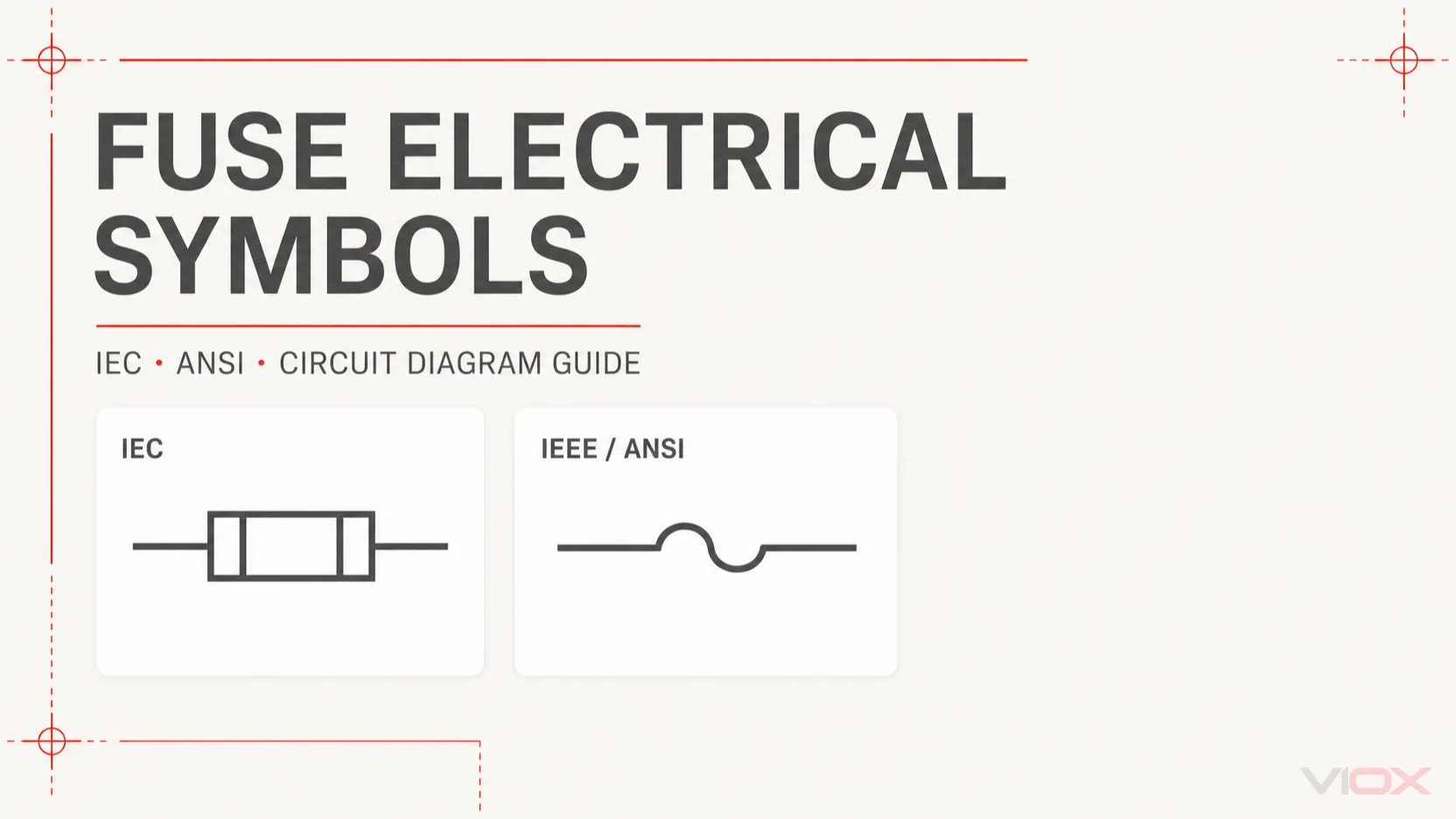
    A fuse electrical symbol identifies a fuse or fuse-related protective function in a circuit diagram. The basic symbol is placed in series with the conductor, but its exact shape can differ between IEC and ANSI/IEEE drawing systems. The symbol alone normally does not tell you the fuse’s current rating, voltage rating, breaking capacity, AC/DC suitability, or time-current characteristic. Those details must come from the nearby annotation, drawing schedule, fuse datasheet, or equipment documentation.

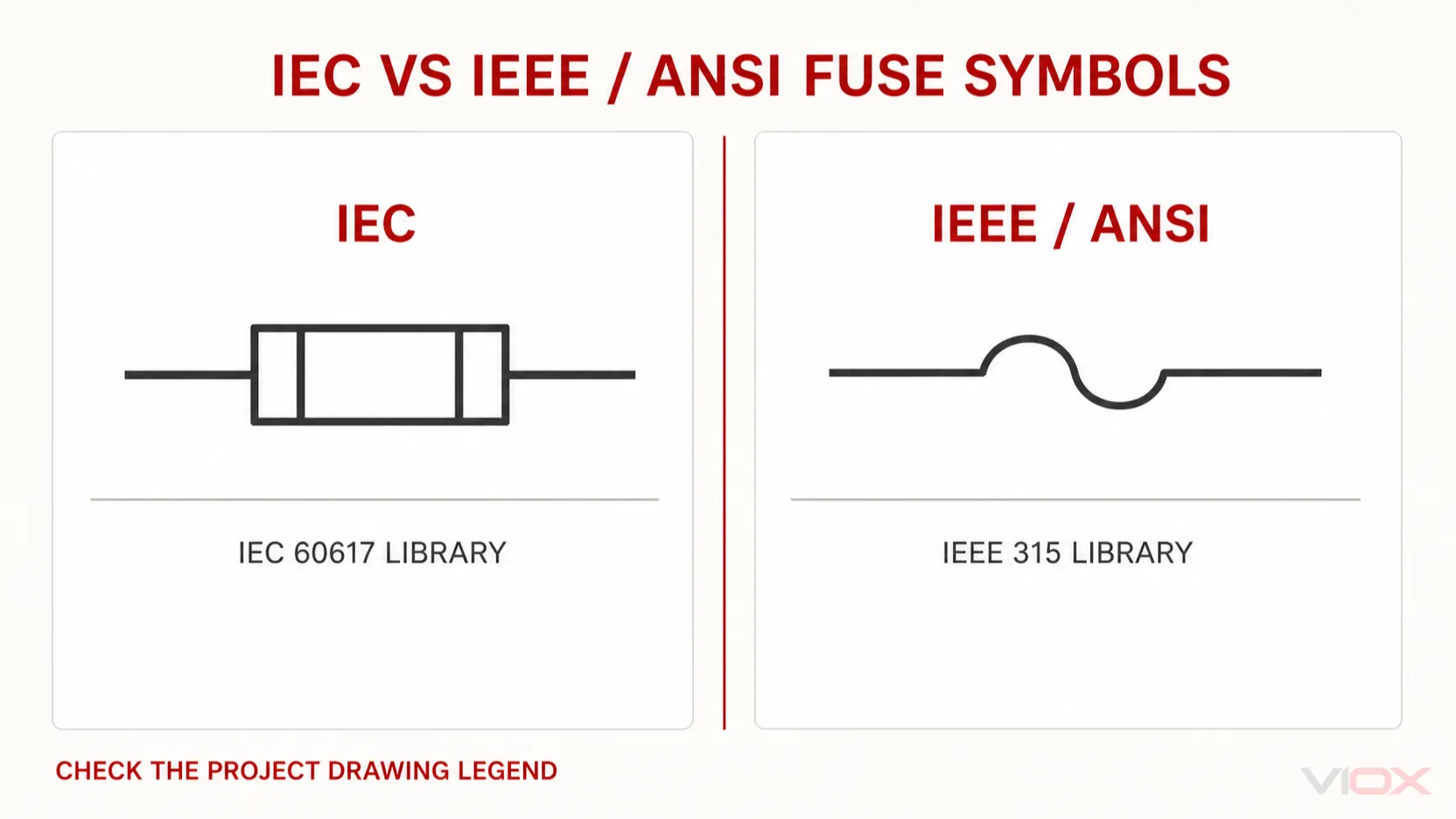
    IEC fuse symbol compared with the IEEE ANSI fuse symbol
    Common IEC and IEEE/ANSI representations of a fuse. Always use the drawing legend and the symbol library specified for the project.

    Fuse Electrical Symbol Quick Reference

    IEC 60617 contains more than one fuse symbol because a drawing may need to show a basic fuse, a striker mechanism, an alarm contact, or a combined switching and isolation function. The table below separates these functions instead of treating every rectangle in a schematic as the same device.

    Drawing function What the symbol communicates What it does not prove
    General fuse A replaceable fuse or fuse-link is connected in the current path Current, voltage, utilization category, breaking capacity, or AC/DC rating
    Fuse with striker Fuse operation can release a mechanical striker What the striker trips or signals unless the rest of the diagram shows it
    Fuse with alarm contact Fuse operation is associated with a signalling contact Contact voltage/current rating or the downstream alarm logic
    Fuse with separate alarm The fuse and alarm circuit are shown as related but electrically separate functions The exact alarm module or wiring arrangement
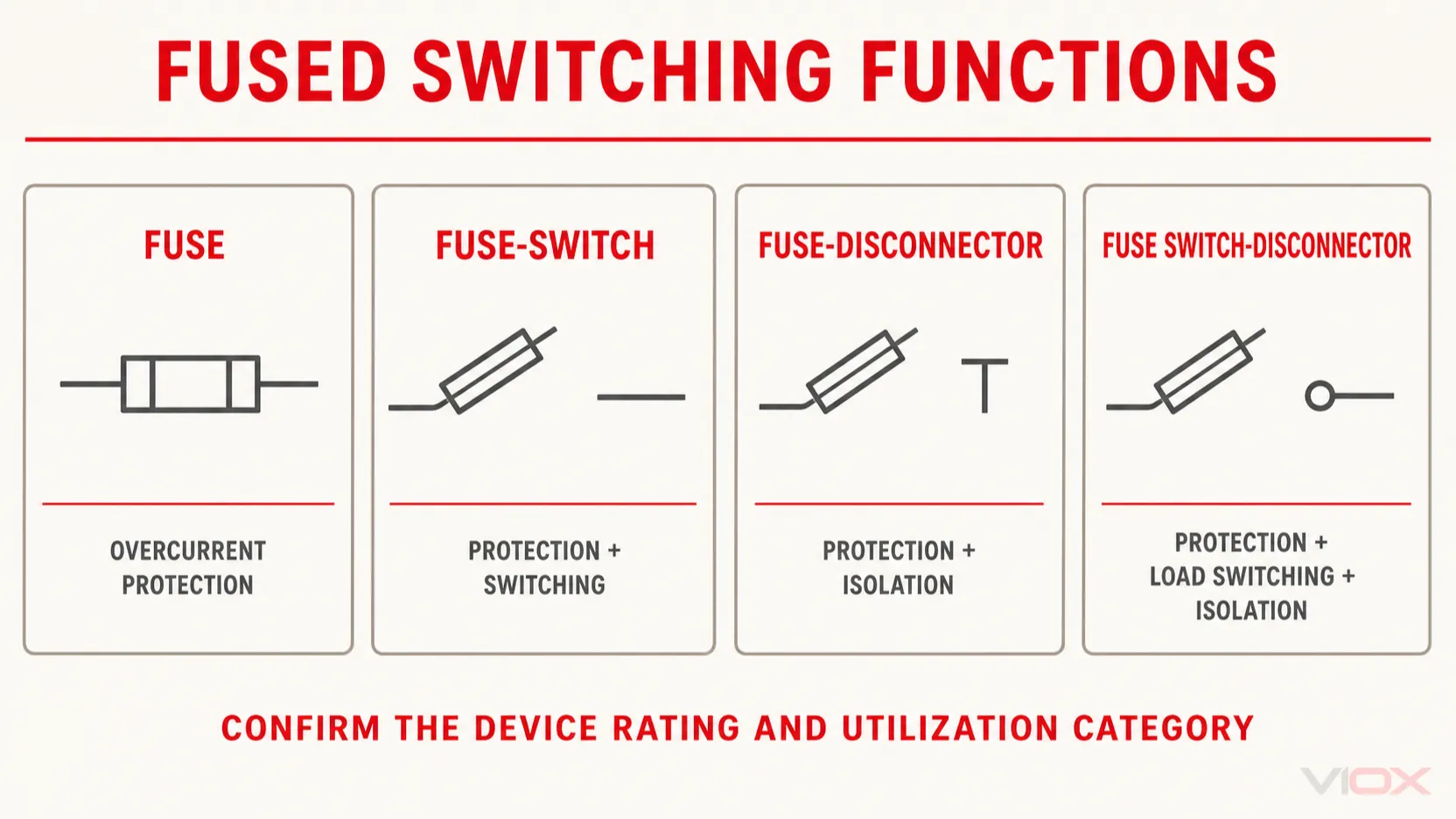
    Fuse-switch Fuse protection is combined with a switching function Suitability for load switching without confirming the device rating
    Fuse-disconnector / fuse isolator Fuse protection is combined with a disconnection or isolation function That the device may interrupt load current
    Fuse switch-disconnector Fuse protection, load switching, and isolation functions are combined The applicable utilization category or operational limits
    Thermal fuse / thermal cutoff A non-resetting device opens because of excessive temperature Conventional overcurrent protection or replaceability under all conditions

    This distinction matters in panel drawings. A fuse, fuse-switch, fuse-disconnector, and fuse switch-disconnector are not interchangeable names. Their symbols describe different functions, and the installed device must have ratings that support the intended operation. For the practical load-switching distinction, see Fuse Holder vs Fuse Switch Disconnector.

    IEC Fuse Symbol vs ANSI/IEEE Fuse Symbol

    The two main symbol systems encountered in international electrical documentation are IEC 60617 and IEEE/ANSI 315.

    Comparison point IEC drawings ANSI/IEEE drawings
    Primary reference IEC 60617 graphical-symbol database IEEE/ANSI 315
    Common visual convention A compact rectangular fuse element inserted in the conductor A curved, S-shaped, or other prescribed fuse representation may appear, especially in North American drawings
    Common markets International projects, Europe, and many Asian markets North American and legacy industrial documentation
    Orientation May be drawn horizontally or vertically May also be rotated to match the circuit direction
    Correct interpretation method Check the IEC library used by the drawing and read its legend Check the ANSI/IEEE library and drawing legend

    The official IEC 60617 database lists a general fuse symbol and additional entries for a fuse, striker fuse, fuse with alarm contact, fuse with separate alarm, fuse-switch, fuse-disconnector, and fuse switch-disconnector. IEEE/ANSI 315 provides the North American graphical-symbol framework.

    Do not identify the standard from one shape alone. CAD packages may use different approved variants, older plants may retain legacy libraries, and companies often maintain their own drawing legends. The legend on the drawing set is therefore the immediate authority for that project.
    How to Read the Information Around a Fuse Symbol

    The graphical symbol answers only the first question: what function is located here? The text around it identifies the component and its required performance.

    Consider an illustrative annotation such as:

    F1 – 32 A gG, 500 V AC

    Annotation Meaning
    F1 Reference designation used to find the same device in schedules, wiring lists, panel layouts, and bills of materials
    32 A Assigned fuse current rating for the documented component
    gG IEC utilization category for a general-purpose full-range fuse-link
    500 V AC Voltage and current type stated for that selected fuse

    F1, F2, and similar identifiers are common drafting practice, but reference-designation conventions can vary by organization and project. Never assume that the letter beside a symbol is a complete specification.
    Important parameters may be shown beside the symbol, in a fuse schedule, or only in the approved component list:

    • rated current;
    • rated voltage and AC/DC suitability;
    • rated breaking capacity;
    • utilization category, such as gG, aM, gPV, or another applicable class;
    • time-current characteristic;
    • physical fuse system and size;
    • coordination requirements;
    • manufacturer and part number.

    For industrial low-voltage fuse selection, use the IEC 60269 Fuse Guide rather than attempting to select a fuse from its schematic symbol.

    Does a DC Fuse Have a Different Symbol?

    Usually, the basic fuse symbol does not by itself prove that a fuse is suitable for DC. A drawing may identify a DC circuit through the supply symbol, circuit title, polarity marks, conductor labels, or text beside the fuse. The selected fuse must still carry an appropriate DC voltage rating and breaking capacity for the application.

    This is a critical safety distinction. DC arcs do not benefit from the periodic current zero crossings available in AC systems, so a fuse that is acceptable in an AC circuit cannot automatically be assumed suitable at the same numerical DC voltage.

    When reading a DC schematic, verify all of the following:

    1. The circuit voltage and polarity.
    2. The fuse’s DC voltage rating.
    3. The available prospective fault current.
    4. The required DC breaking capacity.
    5. The fuse utilization category and intended application.
    6. Any manufacturer restrictions on mounting or fuse-holder pairing.

    The AC Fuse vs DC Fuse guide explains why identical-looking fuse bodies may have different interruption capabilities.

    Fast-Acting, Time-Delay and Thermal Fuse Symbols

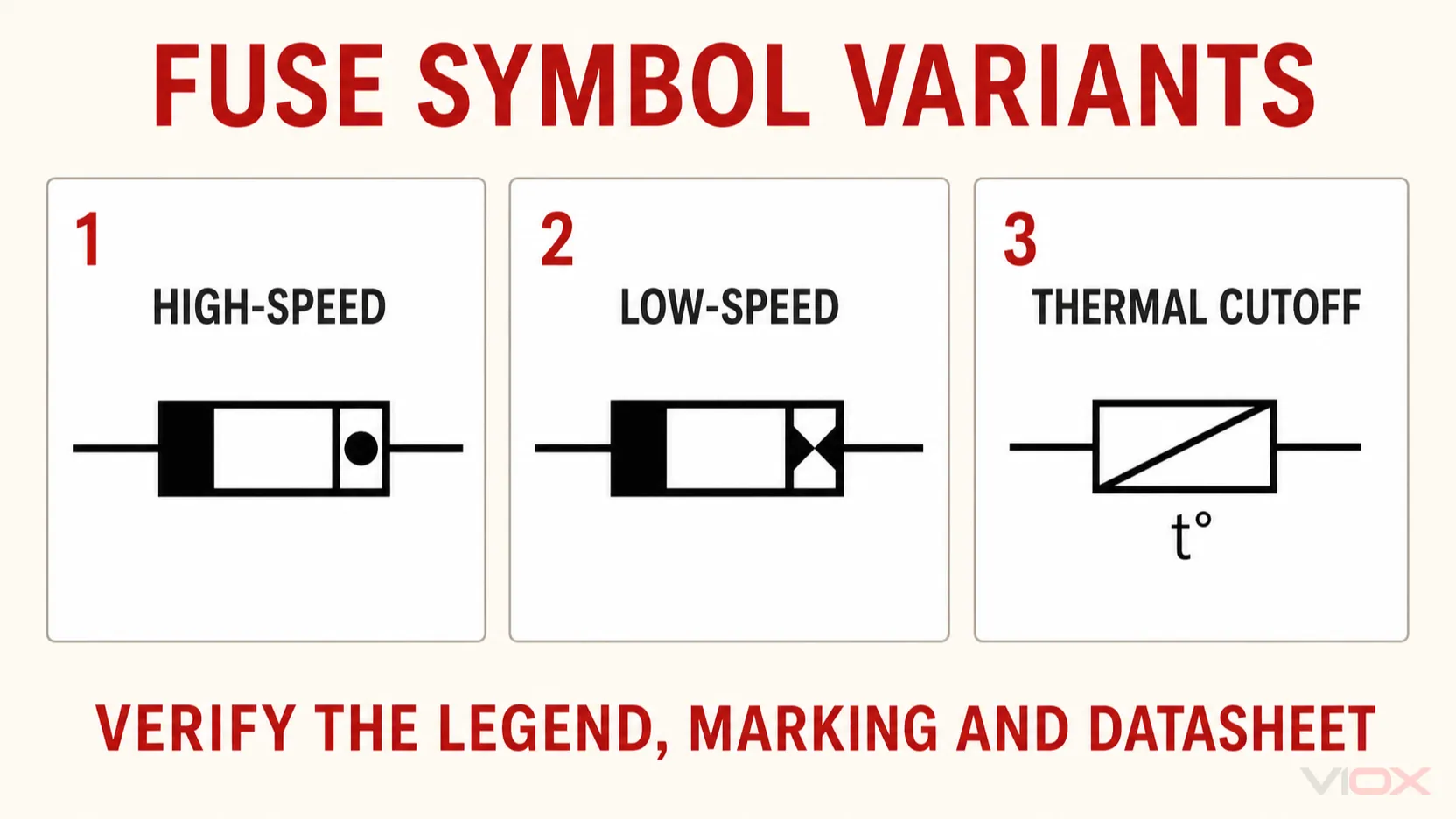
    High-speed, low-speed and thermal fuse symbols compared

    Fast-Acting and Time-Delay Fuses

    Do not assume that every fast-acting or time-delay fuse has a unique universal schematic shape. In many drawings, the same general fuse symbol is used and the operating characteristic is communicated by an annotation, component schedule, or part number.

    Letters such as F and T are commonly encountered on miniature fuse-links and may also be repeated in documentation to indicate operating characteristics. They should not be confused with IEC 60269 utilization categories such as gG, aM, or gPV. Miniature fuses are covered by the IEC 60127 series, while low-voltage power fuses are covered by IEC 60269.

    Therefore, a note such as T2A 250V on a miniature fuse and 32 A gG 500 V on an industrial fuse describe different classification systems. Neither should be reconstructed from symbol shape alone.

    Thermal Fuse or Thermal Cutoff

    A thermal fuse responds primarily to temperature at the device, not simply to current exceeding a rated value. It is generally a one-shot protective device: once its thermal element operates, the device must be replaced after the cause of overheating has been corrected.

    A thermal fuse symbol may combine a fuse-like element with a temperature qualifier or may be identified by nearby temperature information. Because symbol implementations vary, check the drawing legend and the component schedule before distinguishing a thermal cutoff from a thermal switch or overload device.

    Fuse, Fuse Holder and Switch-Fuse Symbols Are Different

    A fuse holder mechanically supports and connects the fuse-link, but many schematics show only the fuse’s electrical function. The holder may appear in a panel layout or bill of materials without receiving a separate symbol in the circuit schematic.

    Do not read a general fuse symbol as evidence that the assembly can be opened under load. A standard fuse holder is not automatically a load-break switch. Similarly, a fuse-disconnector provides an isolation function, but its ability to make or break load current depends on the complete device classification and ratings.

    Device shown Protection function Isolation function Load-switching function
    Fuse-link in fuse holder Yes, according to fuse rating Not established by the fuse symbol alone Not established
    Fuse-disconnector Fuse protection Yes, subject to device design and application Not automatically established
    Fuse-switch Fuse protection Depends on complete device classification Switching function is represented, but ratings must be checked
    Fuse switch-disconnector Fuse protection Yes Yes, within its rated utilization category
    Fuse, fuse-switch, fuse-disconnector and fuse switch-disconnector symbol functions

    If the drawing requires both overcurrent protection and safe maintenance isolation, confirm the complete switching-device function instead of adding assumptions to the basic fuse symbol.

    Fuse Symbol vs Circuit Breaker Symbol

    A fuse is a sacrificial overcurrent protective device: its fuse-link opens and normally requires replacement. A circuit breaker opens through a mechanical switching and tripping mechanism and is normally resettable after the fault has been investigated and the breaker remains serviceable.

    Their symbols must remain distinct because the maintenance action is different. When tracing a fault:

    • a fuse reference leads to a fuse-link and associated holder or fused switching device;
    • a circuit breaker reference leads to a resettable switching and protection device;
    • a combined symbol may communicate more than one function and must be read as a complete device.

    For the protection and selection differences, see Fuse vs Circuit Breaker.

    Common Fuse Symbol Interpretation Mistakes

    1. Treating the symbol as a complete fuse specification

    The symbol identifies function, not the full rating. Always verify the component schedule and datasheet.

    2. Assuming the symbol proves AC or DC suitability

    AC/DC suitability comes from the circuit documentation and fuse rating, not from the generic fuse symbol.

    3. Reading F, T, gG, and aM as equivalent codes

    These markings come from different fuse families and classification systems. Their meanings must be interpreted within the applicable standard.

    4. Confusing a fuse-disconnector with a load-break device

    Isolation capability and load-switching capability are separate functions. Verify the complete symbol, utilization category, and manufacturer rating.

    5. Ignoring the drawing legend

    Legacy symbols, company libraries, and CAD variants exist. The project legend resolves which convention the drawing uses.

    6. Replacing a fuse from the drawing alone

    A replacement must match the required current, voltage, breaking capacity, utilization category, dimensions, holder compatibility, and coordination duty. Similar appearance is not enough.

    Practical Drawing-Review Checklist

    Before approving or servicing a fused circuit, answer these questions:

    • Which symbol standard and drawing legend apply?
    • Is the device a fuse, fuse-switch, fuse-disconnector, or fuse switch-disconnector?
    • What is the reference designation?
    • Where are the current, voltage, breaking-capacity, and utilization-category requirements documented?
    • Is the circuit AC or DC?
    • Does the installed fuse match the approved schedule and fuse holder?
    • Is an alarm contact or striker shown, and where does it report or trip?
    • Is load switching permitted by the complete device rating?

    Frequently Asked Questions

    What is the electrical symbol for a fuse?

    It is a graphical symbol inserted in series with a conductor to show a fuse function. IEC and ANSI/IEEE systems use different representations, so the drawing legend should be checked before interpreting the exact shape.

    What is the IEC fuse symbol?

    IEC 60617 provides a general fuse symbol and related symbols for functions such as a striker fuse, alarm contact, fuse-switch, fuse-disconnector, and fuse switch-disconnector. Use the current IEC 60617 database or an approved IEC CAD library for the normative geometry.

    Is the ANSI fuse symbol the same as the IEC symbol?

    Not necessarily. ANSI/IEEE drawings can use a different curved or stylized representation. Older North American drawings may also use legacy variants. Confirm the drawing’s IEEE/ANSI symbol library and legend.

    Is there a separate DC fuse symbol?

    The basic fuse symbol often remains the same. DC service is usually identified by the surrounding circuit and annotations. The physical fuse must have a suitable DC voltage rating and DC breaking capacity.

    Does F1 mean a fast-acting fuse?

    Usually F1 is a reference designation identifying one device in the drawing. It should not be confused with an F operating-characteristic marking on certain miniature fuse-links. Check the drawing schedule and applicable fuse standard.

    How is a slow-blow fuse shown on a circuit diagram?

    Many drawings use the general fuse symbol plus a time-delay annotation, component code, or part number. Do not rely on a supposedly universal slow-blow symbol without checking the legend.

    Is a thermal fuse the same as an ordinary fuse?

    No. A conventional fuse responds to overcurrent according to its time-current characteristic. A thermal fuse or thermal cutoff opens when its temperature threshold is reached. The two devices protect against different primary conditions.

    Can a fuse holder be used as an isolation switch?

    Not automatically. A fuse holder’s ability to provide safe isolation or load switching must be explicitly supported by the device design, ratings, applicable standard, and manufacturer instructions.

    Conclusion

    The fastest way to read a fuse circuit symbol correctly is to separate four layers of information:

    1. Graphical symbol: the electrical function shown in the circuit.
    2. Reference designation: the device identity, such as F1.
    3. Annotation or schedule: current, voltage, AC/DC service, utilization category, and other required ratings.
    4. Product documentation: the verified fuse, holder, switching function, breaking capacity, and installation limits.

    The symbol tells you where the protective function is located. It does not replace the fuse schedule or datasheet. When evaluating the VIOX fuse range or another supplier’s fused assembly, submit the system voltage, AC/DC duty, load current, prospective fault current, utilization category, fuse format, and required switching or isolation function.

    Sources and Standards

  • Difference Between a Combiner Box and a Junction Box

    Difference Between a Combiner Box and a Junction Box

    The primary difference between a combiner box and a junction box is their function: a combiner box combines multiple electrical inputs from sources like solar panels into a single output with built-in safety protection, while a junction box simply protects wire connections and splices without combining power sources.

    Understanding this distinction is crucial for electrical safety, code compliance, and system efficiency. Choosing the wrong type can compromise both safety and performance while violating electrical codes.

    Quick Reference: Key Differences

    Feature Combiner Box Junction Box
    Primary Function Combines multiple power inputs into one output Protects and houses wire connections
    Power Combination Yes – merges electrical sources No – does not combine power
    Built-in Protection Fuses, circuit breakers, surge protection None – protection only
    Applications Solar PV systems, renewable energy General electrical wiring
    Voltage Range High voltage (up to 600V DC) Low to medium voltage
    Cost Higher investment Budget-friendly
    Environment Outdoor rated, weatherproof Indoor/outdoor options

    Combiner Box: Definition and Purpose

    dc combiner box fuse and mcb

    A combiner box is a specialized electrical enclosure designed for renewable energy systems that combines multiple power inputs into a single output while providing overcurrent and surge protection.

    Key Components of a Combiner Box

    Combiner boxes are more than simple junction boxes—they’re packed with important safety components including:

    • Circuit Breakers and Fuses: Provide the first line of defense against overcurrent situations, with fuses that blow to cut off power and circuit breakers that can be reset rather than replaced
    • DC Surge Protection Devices (SPDs): Shield systems from lightning strikes and voltage spikes
    • DC Disconnect Switch: Enables quick system shutdown during maintenance or emergencies
    • Monitoring Capabilities: Track individual string performance in advanced models
    • Weatherproof Enclosure: Minimum NEMA 3R rating, with NEMA 4 and 4X enclosures more common for outdoor installations

    Primary Applications for Combiner Boxes

    Combiner boxes are essential for renewable energy projects with multiple power sources:

    1. Solar PV Systems: Combining multiple solar panel strings into parallel configuration before feeding to the inverter
    2. Wind Energy Installations: Consolidating outputs from multiple turbines
    3. Large Commercial Arrays: Projects with anywhere from four to 4,000 strings require combiner boxes for efficient power management
    4. Residential Solar: While not required for 2-3 string systems, combiner boxes provide centralized disconnect and maintenance advantages

    Junction Box: Definition and Function

    A junction box is a general-purpose electrical enclosure that houses and protects wire connections, splices, and electrical joints in residential, commercial, and industrial wiring systems.

    Essential Characteristics of Junction Boxes

    • Wire Protection: Protects connections from accidental damage and helps contain sparks and heat from loose connections or short circuits
    • Code Compliance: Must be made of non-combustible materials like metal or plastic, suitable for specific environmental conditions
    • Accessibility: All junction boxes must be accessible according to NEC 314.29
    • Size Requirements: Volume must be sufficient for conductors, devices, and cable clamps per NEC 314.16

    Common Junction Box Applications

    Junction boxes serve diverse electrical connection needs:

    • Residential Wiring: Lighting fixtures, switches, and power outlets
    • Commercial Buildings: Electrical systems in offices, retail shops, and warehouses
    • Industrial Settings: Protection against machinery and equipment damage
    • Outdoor Installations: Weatherproof models for garden lighting and external connections

    Technical Specifications Comparison

    Voltage and Current Handling

    Specification Combiner Box Junction Box
    Voltage Range Up to 600V DC (solar applications) 120V-240V AC (typical residential)
    Current Capacity 63A to 630A with DC MCCBs for high-power systems Varies by wire gauge and application
    Power Combination Multiple inputs to single output No power combination capability
    Protection Devices Built-in fuses, breakers, SPDs External protection required

    Environmental Ratings

    Combiner Box Environmental Standards:

    • Minimum NEMA 3R for outdoor use, with NEMA 4X non-metallic preferred for harsh conditions
    • UV-resistant materials for prolonged sun exposure
    • Temperature considerations for equipment cooling

    Junction Box Environmental Standards:

    • IP65 or higher rating for outdoor/damp installations
    • Weatherproof or waterproof boxes required for damp locations to prevent corrosion and electrical shock
    • Material selection based on environmental exposure

    Safety Requirements and Code Compliance

    National Electrical Code (NEC) Requirements

    For Junction Boxes:

    • Materials: Non-combustible construction (metal or approved plastic)
    • Sizing: Minimum volume calculations based on conductor count and size per Section 314.16
    • Grounding: Required per Section 250.110 to provide fault current return path
    • Accessibility: Must maintain 36-inch depth and 30-inch width clearance per Section 110.26
    • Support: Proper mounting to prevent shifting or loosening

    For Combiner Boxes:

    • Overcurrent Protection: Fuses rated according to string current, circuit breakers for system protection
    • Surge Protection: SPDs required for lightning and overvoltage protection
    • Grounding: Comprehensive grounding system for safety
    • Labeling: Clear identification of circuits and safety warnings

    ⚠️ Critical Safety Warning

    Not installing a junction box is probably the biggest mistake people make. Junction boxes hold connected wires together and keep them away from combustible materials like wood, helping prevent electrical fires and accidental damage.


    Selection Criteria: When to Use Each Type

    Choose a Combiner Box When:

    • ✅ You Need to Combine Multiple Power Sources
      • Solar PV installations with 4+ strings
      • Wind energy systems with multiple turbines
      • Any renewable energy project requiring power consolidation
    • ✅ High-Power DC Applications
      • Systems handling high-power, DC, and multi-group line convergence
      • Voltage levels approaching 600V DC
      • Current requirements exceeding standard residential capacity
    • ✅ Outdoor Renewable Energy Projects
      • Systems requiring weatherproof and UV-resistant protection for harsh outdoor conditions
      • Installations needing integrated safety features
      • Projects requiring monitoring capabilities

    Choose a Junction Box When:

    • ✅ General Electrical Wiring Needs
      • Residential home decoration requiring hidden wiring with safe branching points
      • Commercial building electrical distribution
      • Industrial equipment wiring protection
    • ✅ Wire Splicing and Connection Protection
      • Cable transitions from conduit to open wiring
      • Wire gauge changes or routing modifications
      • Temporary or permanent electrical connections
    • ✅ Budget-Conscious Applications
      • Cost-effective solutions for general electrical applications
      • Standard residential and commercial projects
      • Non-renewable energy electrical systems

    Installation Best Practices

    Combiner Box Installation Guidelines

    Location Selection:

    • Mount on north-facing walls where shade is available to limit direct sunlight exposure and reduce internal component temperatures
    • Ensure accessibility for maintenance and inspection
    • Maintain proper clearances per manufacturer specifications

    Size Considerations:

    • Larger enclosures allow greater air volume and surface area for cooling internal components while making field wiring easier
    • Plan for future expansion or additional strings
    • Consider local climate conditions for temperature management

    Junction Box Installation Guidelines

    Proper Sizing:

    • Calculate minimum box volume using NEC 314.16 requirements based on conductor size and quantity
    • Allow adequate space for wire manipulation
    • Avoid overfilling boxes to prevent overheating and short circuit risks

    Mounting Requirements:

    • In drywall and noncombustible materials, boxes can sit back 1/4 inch; must be flush with wood paneling and flammable surfaces
    • Secure mounting to prevent movement during use
    • Proper cable clamping to prevent wire damage

    Common Installation Mistakes to Avoid

    Critical Errors with Junction Boxes

    • ❌ Making Connections Outside the Box Making electrical connections outside of a junction box damages wiring and increases risk of heat and sparks, potentially causing fires
    • ❌ Using Undersized Boxes When wires are crammed into small spaces, overheating and short-circuiting become more likely, creating fire hazards
    • ❌ Poor Wire Length Planning Short wires cause connection difficulties and safety hazards – NEC requires six inches of free conductor at every electrical box

    Critical Errors with Combiner Boxes

    • ❌ Incorrect Cable Orientation Improper mounting with incorrect positive and negative wire orientation can damage the combiner box or inverter
    • ❌ Undersized Wiring Connecting undersized wires results in excessive heat loss and reduced system efficiency
    • ❌ Poor Grounding Practices Poorly grounded systems may lead to electrical shock or fires – always follow correct grounding practices

    Professional Installation Recommendations

    When to Contact a Licensed Electrician

    For Combiner Boxes:

    • High-voltage DC systems (over 48V)
    • Complex multi-string solar installations
    • Commercial or utility-scale projects
    • Any installation requiring electrical permits

    For Junction Boxes:

    • When unsure about any aspect of installation, code compliance, or safety requirements
    • Electrical work in hazardous locations
    • Modifications to existing electrical systems
    • Complex wiring scenarios or troubleshooting

    ? Expert Tip: System Planning

    For residential systems with 2-3 strings, combiner boxes aren’t required by code, but they provide valuable centralized disconnection and maintenance benefits that justify the investment


    Frequently Asked Questions

    What makes a combiner box different from a regular junction box?

    A combiner box serves three specific purposes: transition to conduit, overcurrent protection through fuses or circuit breakers, and combining strings into parallel configuration. A junction box only provides the transition to conduit function.

    Can I use a junction box instead of a combiner box for solar panels?

    No, junction boxes do not have the specific components necessary to combine power inputs safely. Using inappropriate boxes compromises safety and system efficiency in solar applications.

    What size junction box do I need for my project?

    Calculate minimum volume using NEC requirements: for 14 AWG wire, allow 2 cubic inches per conductor, plus 4 cubic inches per device, plus 2 cubic inches for all ground wires combined.

    Are junction boxes required to be accessible?

    Yes, NEC 314.29 requires all boxes to be accessible. You cannot conceal junction boxes in walls, ceilings, or non-accessible areas.

    When do solar systems require combiner boxes?

    Combiner boxes become necessary for larger projects with four or more strings, though they provide benefits in smaller residential installations for centralized maintenance and disconnection.

    What protection level should I choose for outdoor installations?

    Select junction boxes with IP54 rating or higher for damp areas, while combiner boxes should have IP65 or above to prevent rainwater and dust entry.


    Bottom Line: Making the Right Choice

    For renewable energy projects requiring power source combination with built-in safety protection, choose a combiner box. For general electrical wiring that needs connection protection without power combination, select a junction box.

    The key is matching the device to your specific application requirements, environmental conditions, and electrical code compliance needs. When in doubt, consult with a licensed electrician to ensure safety and code compliance.

    Remember: Both types of electrical boxes are critical safety components. Proper selection, installation, and maintenance protect both your electrical system and personal safety. Never compromise on quality or code compliance to save costs.

    Related

    What Is an AC Junction Box

    Distribution Boxes vs. Combiner Boxes: Key Differences and Uses in Electrical Systems

    The Ultimate Guide to Solar Combiner Boxes: From Basics to Advanced Technologies

    Understanding Electrical Junction Box Types

  • Understanding Ground Fault Protection

    Understanding Ground Fault Protection

    Ground fault protection is an electrical safety system that instantly cuts power when it detects current leakage of 4-6 milliamps, preventing electrocution and electrical fires by shutting off electricity in less than 0.025 seconds. These life-saving devices have reduced electrical fatalities by 83% since widespread adoption began, making them one of the most critical safety advances in residential electrical systems.

    For DIY homeowners worldwide, understanding ground fault protection is essential for electrical safety, code compliance, and protecting both people and property. Whether you need GFCI outlets for kitchens and bathrooms or RCD protection for international applications, this comprehensive guide covers installation, troubleshooting, and maintenance across all electrical standards.

    Bottom Line: Ground fault protection devices detect dangerous electrical leakage faster than human reflexes can react, preventing over 70,000 electrical fires annually and saving thousands of lives through near-instantaneous power disconnection.

    Credit to Restovate Ltd

    What is ground fault protection and how does it work?

    Ground fault protection monitors electrical current flowing through circuits, comparing electricity going out through the “hot” wire with current returning through the “neutral” wire. When these amounts differ by more than 4-6 milliamps (GFCI) or 30 milliamps (RCD), the device cuts power within 25 milliseconds.

    Here is a table that shows how ground fault protection devices work:

    Detection Method Current Difference Response Time Protection Level
    Current Monitoring Compares hot vs neutral wire flow Continuous Real-time
    Imbalance Detection 4-6mA (GFCI) or 30mA (RCD) threshold <0.001 seconds Instant alert
    Power Interruption Complete circuit disconnection <0.025 seconds Total protection
    Manual Reset Required User must restore power manually N/A Prevents auto-restart

    ? Expert Tip: The 4-6 milliamp sensitivity of GFCI devices is specifically calibrated to human safety thresholds – this tiny current level can be felt but won’t cause ventricular fibrillation or death.

    Ground fault protection is now mandatory worldwide in wet locations including bathrooms, kitchens, outdoor areas, and garages. The 2023 National Electrical Code expanded requirements to ALL kitchen receptacles, representing the most significant residential safety update in decades.

    What are the key differences between GFCI, RCD, and other protection devices?

    Understanding the differences between ground fault protection devices helps you select the right technology for your location and application. Each device type serves specific regional standards and safety requirements.

    Complete device comparison matrix

    Device Type Region Trip Current Response Time Primary Use Typical Cost
    GFCI North America 4-6 mA <25 ms Personnel protection $15-60
    RCD Type A International 30 mA <300 ms General protection $25-80
    RCD Type F Europe 30 mA <300 ms Variable frequency drives $40-120
    GFPE Commercial/Industrial 30+ mA 100-500 ms Equipment protection $200-2000+
    AFCI/GFCI Combo North America 5 mA <25 ms Arc + ground fault $60-90

    Regional standards and certification requirements

    ⚠️ Safety Warning: Always verify local electrical codes before installation. Using incorrect device types can result in code violations and insurance issues.

    North American Standards (UL Listed)

    • NFPA 70 (NEC) mandates Class A GFCI protection
    • CSA C22.1 (CEC) requires equivalent Canadian standards
    • UL 943 certification for GFCI devices
    • Self-test capability required since 2015

    International Standards (IEC Certified)

    • IEC 61008 for standalone RCDs
    • IEC 61009 for RCBO (RCD + overcurrent protection)
    • Type A minimum for AC and pulsating DC detection
    • CE marking required for European market

    ? Expert Tip: When working internationally, verify both device compatibility and local installation requirements – a UL-listed GFCI won’t meet European CE marking requirements.

    Where is ground fault protection required by code?

    Code requirements for ground fault protection have expanded significantly, with 2023 representing major changes in residential applications.

    Current code requirements by location

    Kitchen Applications (Major 2023 Update)

    • Previous requirement: Countertop receptacles only
    • Current requirement: ALL kitchen receptacles
    • Impact: Affects refrigerator circuits, disposal outlets, and island receptacles
    • Compliance deadline: Immediate for new work, renovation trigger for existing

    Bathroom and Wet Location Requirements

    • Universal requirement: All receptacles within 6 feet of water sources
    • International standard: 30mA RCD protection minimum
    • Enhanced option: 10mA high-sensitivity for bathrooms
    • Special consideration: Medical facilities may require isolated power

    Outdoor and Garage Protection

    • Comprehensive coverage: All outdoor receptacles regardless of use
    • Garage requirement: All receptacles except dedicated appliance circuits
    • Weather resistance: WR-rated devices mandatory for wet locations
    • Seasonal considerations: Heating options for freezing climates

    Commercial and industrial code requirements

    Here is a table that shows commercial ground fault protection requirements:

    Application Device Type Trip Level Special Requirements
    Food Service GFCI 5-6 mA Stainless steel compatibility
    Healthcare GFCI/Isolated 5-6 mA Life support exemptions
    Manufacturing GFPE 30-1200 mA Time delay coordination
    Marine/Dock GFCI-Marine 5-6 mA Corrosion resistance

    ? Expert Tip: Commercial applications often require engineering analysis to balance safety with operational requirements – consult qualified electrical engineers for complex installations.

    How do you install ground fault protection devices step-by-step?

    Proper installation ensures reliable protection and code compliance. DIY installation is appropriate for basic outlet replacement, while panel work requires professional expertise.

    Pre-installation safety and assessment

    ⚠️ Safety Warning: Always turn off power at the circuit breaker and verify with a voltage tester before beginning any electrical work. Electrocution can occur instantly with improper procedures.

    Essential tools and materials checklist:

    • ✅ Non-contact voltage tester (mandatory)
    • ✅ Multimeter for circuit verification
    • ✅ Wire strippers and needle-nose pliers
    • ✅ GFCI outlet matching circuit amperage
    • ✅ GFCI outlet tester for verification
    • ✅ Electrical tape and wire nuts

    Step-by-step GFCI outlet installation

    Step 1: Power shutdown and verification

    1. Turn off circuit breaker for target outlet
    2. Use non-contact voltage tester to verify no power
    3. Test the tester on known live circuit for validation
    4. Place tape over breaker to prevent accidental restoration
    5. Remove outlet cover plate and mounting screws

    Step 2: Wire identification (critical for proper protection)

    1. Identify LINE wires: Bring power TO the GFCI from panel
    2. Identify LOAD wires: Carry power FROM GFCI to downstream outlets
    3. Take photos of existing connections before disconnecting
    4. Mark LINE wires clearly with electrical tape
    5. Temporarily restore power to verify hot wires with tester

    ? Expert Tip: LINE/LOAD reversal is the #1 installation error – reversed connections eliminate all ground fault protection while appearing to work normally.

    Step 3: GFCI device connection

    1. Connect LINE wires first:
      • Black (hot) → Brass LINE terminal
      • White (neutral) → Silver LINE terminal
      • Green/bare (ground) → Green ground screw
    2. Connect LOAD wires (if protecting downstream outlets):
      • Black → Brass LOAD terminal
      • White → Silver LOAD terminal
      • If no load wires: Tape over unused LOAD terminals

    Step 4: Installation completion and testing

    1. Carefully fold wires into electrical box (check NEC fill requirements)
    2. Secure GFCI outlet with provided mounting screws
    3. Install cover plate ensuring proper fit
    4. Restore power at circuit breaker
    5. Immediate testing: Press TEST (should kill power), then RESET (should restore)
    6. Verification testing: Use GFCI outlet tester for comprehensive check

    When to call a professional electrician

    Professional installation required for:

    • ❌ Panel or breaker replacement work
    • ❌ Circuits over 20 amperes
    • ❌ Shared neutral or multi-wire branch circuits
    • ❌ Commercial or industrial applications
    • ❌ Code compliance uncertainty

    ⚠️ Safety Warning: Panel work exposes you to potentially lethal voltages. Licensed electricians have specialized training and insurance for this high-risk work.

    What causes GFCI devices to trip and how do you troubleshoot them?

    Understanding common ground fault protection issues prevents safety hazards and ensures reliable operation. Proper troubleshooting identifies real problems versus nuisance conditions.

    Common problems and diagnostic solutions

    Problem 1: GFCI won’t reset after tripping

    Symptoms: Reset button won’t stay engaged, no power restored

    Causes: Active ground fault, moisture infiltration, device failure, improper wiring

    Step-by-step troubleshooting:

    1. Eliminate ground faults: Unplug all devices and appliances
    2. Attempt reset: If successful, test each device individually
    3. Check for moisture: Inspect outlet box and connections for water
    4. Verify wiring: Confirm LINE/LOAD connections are correct
    5. Replace device: If 10+ years old or testing fails

    Problem 2: Frequent nuisance tripping

    Symptoms: Regular tripping without apparent electrical faults

    Environmental factors: High humidity, temperature extremes, cumulative leakage

    Diagnostic approach:

    1. Individual appliance testing: Connect one device at a time
    2. Leakage current measurement: Use clamp meter (professional tool)
    3. Environmental assessment: Check humidity, moisture, temperature
    4. Load redistribution: Consider circuit modifications or GFCI breaker

    ? Expert Tip: Outdoor GFCI devices fail 3x more frequently than indoor units due to weather exposure – consider GFCI breakers for harsh environments.

    Problem 3: GFCI passes power but won’t trip during testing

    ⚠️ Safety Warning: This condition provides NO electrical protection – replace the device immediately and discontinue use until replacement.

    Immediate actions required:

    1. Stop using outlet immediately – no protection present
    2. Turn off circuit breaker to eliminate electrical hazard
    3. Schedule professional inspection for wiring verification
    4. Replace with properly tested device before restoration

    Troubleshooting quick reference guide

    Symptom Most Likely Cause Immediate Action Long-term Solution
    Won’t reset Ground fault present Unplug all devices Test each appliance
    Frequent trips Environmental/appliance Check moisture/devices Load redistribution
    Won’t trip on test Device failure Stop use immediately Replace device
    No power Wiring/breaker issue Check panel breaker Professional inspection

    How do you select the right ground fault protection for your needs?

    Choosing appropriate protection depends on application, environment, local codes, and reliability requirements. The right selection ensures safety without operational problems.

    Application-specific selection guide

    Kitchen Applications (2023 Code Updates)

    • Standard choice: 20-amp GFCI outlets for small appliance circuits
    • Refrigerator consideration: Dedicated circuit recommended to prevent food loss
    • Professional recommendation: GFCI breakers for multiple kitchen circuits
    • Cost analysis: GFCI outlets ($20-35) vs GFCI breakers ($60-120)

    Bathroom and Wet Area Requirements

    • Minimum standard: 20-amp GFCI protection
    • Enhanced option: 10mA high-sensitivity where available
    • Installation preference: Accessible GFCI outlets for easy testing
    • Special consideration: Ventilation coordination to prevent moisture buildup

    Outdoor and Harsh Environment Applications

    • Device requirement: Weather-resistant (WR) GFCI outlets mandatory
    • Protection enhancement: In-use weatherproof covers required
    • Reliability upgrade: GFCI breakers eliminate outdoor device exposure
    • Climate planning: Consider freeze protection and drainage

    Cost-benefit analysis framework

    Here is a table that shows ground fault protection cost comparisons:

    Solution Type Initial Cost Annual Maintenance Reliability Rating Best Applications
    GFCI Outlets $15-35 Low Good (7-10 years) Single circuits, accessible areas
    GFCI Breakers $50-120 Medium Excellent (15+ years) Multiple circuits, harsh environments
    RCD Protection $100-300+ Low Excellent (15+ years) International/whole-house protection
    Portable GFCIs $30-80 High Fair (3-5 years) Temporary/construction use

    ? Expert Tip: While GFCI breakers cost more initially, they often provide better long-term value in challenging environments due to reduced failure rates and easier maintenance access.

    Professional vs DIY decision matrix

    DIY installation appropriate when:

    • ✅ Simple outlet replacement (like-for-like)
    • ✅ Properly grounded three-wire circuits
    • ✅ Single outlet at end of circuit run
    • ✅ Basic electrical knowledge and proper tools
    • ✅ Local codes permit homeowner electrical work

    Professional installation required when:

    • ❌ Panel or main breaker modifications needed
    • ❌ Complex multi-wire or shared neutral circuits
    • ❌ Commercial, industrial, or high-amperage applications
    • ❌ Uncertainty about safety procedures or code compliance
    • ❌ Local jurisdiction requires licensed electrician

    Frequently asked questions about ground fault protection

    How often should you test GFCI outlets and devices?
    Test monthly using the TEST and RESET buttons. Press TEST – the outlet should immediately lose power and any connected devices should shut off. Press RESET – power should restore normally. If either action fails, replace the device immediately as it provides no protection.

    What’s the difference between GFCI and GFI devices?
    GFCI (Ground Fault Circuit Interrupter) and GFI (Ground Fault Interrupter) are the same technology with different naming conventions. GFCI is the current industry standard term used in codes and technical specifications.

    Can you install GFCI outlets yourself or do you need an electrician?
    DIY installation is possible for simple outlet replacement on properly grounded circuits. However, panel work, complex wiring scenarios, and high-amperage circuits require professional electrician services. Always verify local electrical code requirements first.

    Why does my GFCI outlet keep tripping frequently?
    Common causes include faulty appliances with current leakage, moisture infiltration in electrical boxes, aging devices with degraded components, or cumulative leakage from multiple connected devices. Test each appliance individually and check for environmental moisture.

    Do you need GFCI protection for refrigerator circuits?
    While codes permit exemptions for dedicated refrigerator circuits to prevent food spoilage, GFCI protection is recommended for safety. If nuisance tripping occurs, consider a dedicated circuit with GFCI breaker protection rather than eliminating protection entirely.

    How long do GFCI devices typically last before replacement?
    GFCI outlets typically last 10-15 years in normal indoor environments, 7-10 years in challenging outdoor conditions. Replace immediately if monthly testing fails or frequent nuisance tripping occurs regardless of age.

    Can GFCI outlets work on circuits without ground wires?
    Yes, GFCI outlets can provide personnel protection on two-wire circuits without equipment grounding. However, they cannot protect downstream outlets and must be marked “No Equipment Ground.” Professional installation recommended for two-wire applications.

    What should you do if a GFCI outlet won’t reset?
    First, unplug all connected devices and attempt reset. If unsuccessful, check for moisture in the outlet box and verify proper wiring connections. If the device still won’t reset, replace it immediately as internal components may have failed.

    Are GFCI outlets required in all bathroom locations?
    Yes, all bathroom receptacles require GFCI protection regardless of distance from water sources. Some jurisdictions recommend 10mA high-sensitivity devices for enhanced bathroom safety, though standard 5-6mA GFCI protection meets minimum code requirements.

    What causes GFCI devices to fail prematurely?
    Environmental factors (moisture, temperature extremes), electrical surges, mechanical stress from frequent testing, and normal component aging. Self-test technology in newer devices helps identify failures before they compromise safety.

    Quick reference guides and maintenance checklists

    Monthly GFCI testing checklist

    • [ ] Press TEST button – device should immediately cut power
    • [ ] Verify all connected devices lose power completely
    • [ ] Press RESET button – power should restore normally
    • [ ] Check that downstream outlets regain power (if applicable)
    • [ ] Document any abnormal operation for professional evaluation
    • [ ] Schedule replacement if device fails any test

    Installation verification checklist

    • [ ] Power turned off and verified with voltage tester
    • [ ] LINE vs LOAD wires properly identified and marked
    • [ ] Connections made to correct terminals (LINE to power source)
    • [ ] All wire connections tight and properly insulated
    • [ ] Device tested successfully before final installation
    • [ ] Cover plate installed and properly secured
    • [ ] Monthly testing schedule established and documented

    Troubleshooting quick reference

    • Device won’t reset: Check for active ground faults, moisture, and proper wiring connections
    • Frequent tripping: Test appliances individually, assess environmental conditions, consider load redistribution
    • Won’t trip on test: Replace immediately – device provides no protection
    • No power after reset: Verify circuit breaker position and LINE wire connections

    Professional maintenance schedule

    • Monthly: Homeowner testing of all GFCI devices
    • Quarterly: Visual inspection for physical damage or environmental issues
    • Annually: Professional electrical system evaluation and testing
    • As needed: Device replacement based on age, test failures, or environmental damage

    Emergency response procedures

    1. If GFCI won’t reset: Stop using outlet immediately, check for ground faults
    2. If frequent tripping occurs: Identify and isolate problem appliances
    3. If device won’t trip during test: Discontinue use and replace immediately
    4. If electrical shock occurs: Seek medical attention and have system professionally inspected

    ? Expert Tip: Keep a log of GFCI test dates and any issues encountered. This documentation helps identify patterns and ensures compliance with safety maintenance requirements.

    Understanding ground fault protection empowers DIY homeowners to make informed safety decisions while recognizing when professional expertise is essential. Proper selection, installation, and maintenance of these life-saving devices ensures reliable protection for decades, preventing electrical accidents and providing peace of mind for you and your family.

    This comprehensive guide serves as your definitive resource for ground fault protection across all international standards and applications. Whether upgrading existing electrical systems or planning new installations, following these evidence-based guidelines ensures optimal safety, code compliance, and long-term reliability for your electrical protection systems.

    Related

    RCD vs. MCB: Understanding the Key Differences in Electrical  Protection Devices  

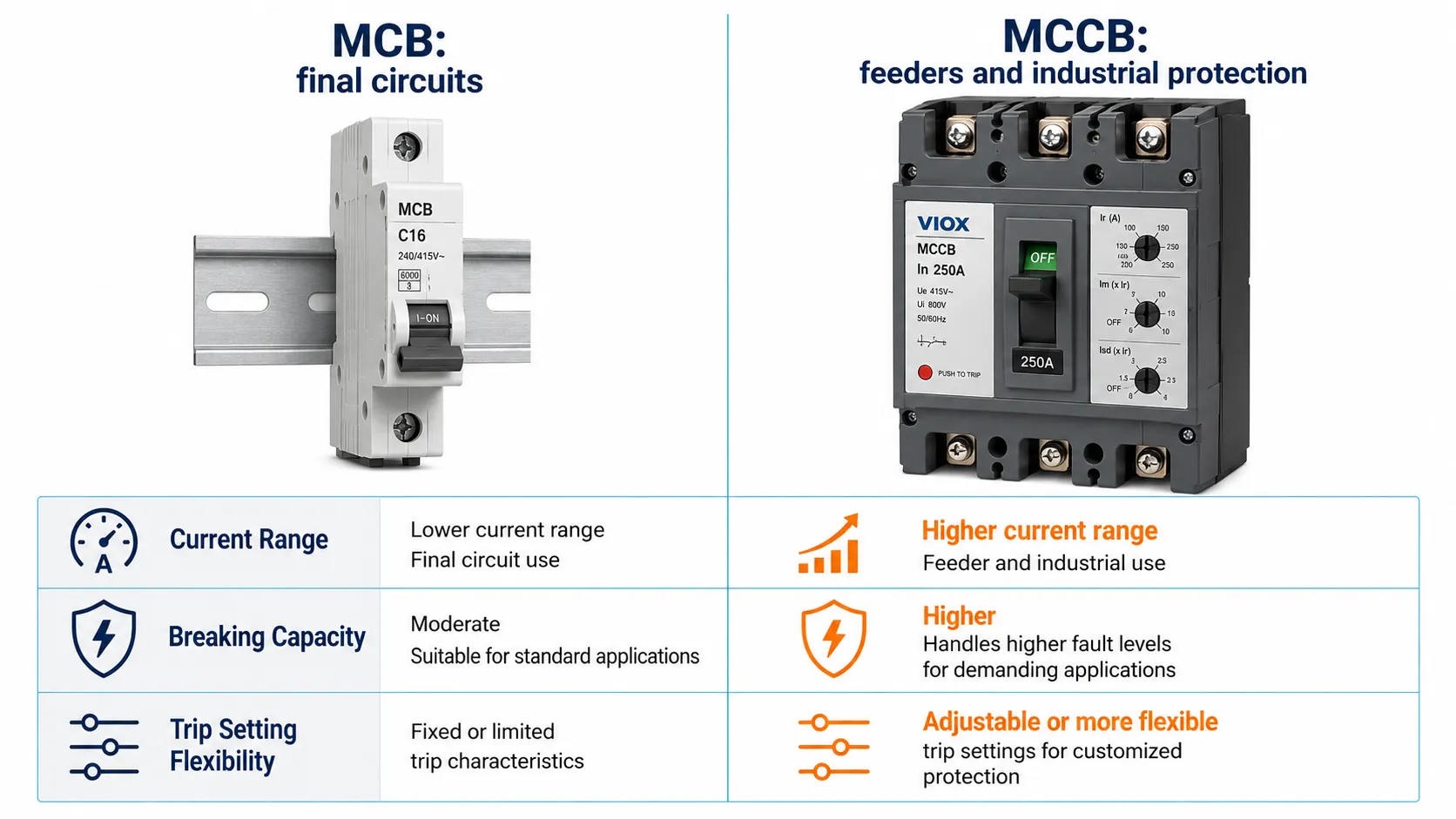
    What Is the Difference Between MCB, MCCB, RCB, RCD, RCCB, and RCBO? Complete 2025

  • Circuit Breaker Trip Curve Explained: How to Read Time-Current Curves

    Circuit Breaker Trip Curve Explained: How to Read Time-Current Curves

    Direct Answer: What Is a Circuit Breaker Trip Curve?

    A circuit breaker trip curve, also called a time-current curve or TCC, shows how long a breaker takes to trip at different levels of overcurrent. The horizontal axis usually represents current as a multiple of the breaker’s rated current, while the vertical axis represents trip time. The curve helps engineers choose a breaker that can ride through normal inrush current but still disconnect overloads and short circuits safely.

    In simple terms, a trip curve answers this question:

    If the current rises above normal, how fast will this breaker open the circuit?

    That answer matters for MCBs, MCCBs, RCBOs, motor circuits, transformers, LED lighting groups, control panels, and industrial distribution systems. A breaker that trips too early causes nuisance trips. A breaker that trips too late may fail to protect cables, equipment, or people from fault energy.


    Key Takeaways

    • A trip curve is a graph of current vs trip time.
    • The horizontal axis usually shows current as a multiple of rated current, such as 1 x In, 5 x In, or 10 x In.
    • The vertical axis shows the expected operating time, often on a logarithmic scale.
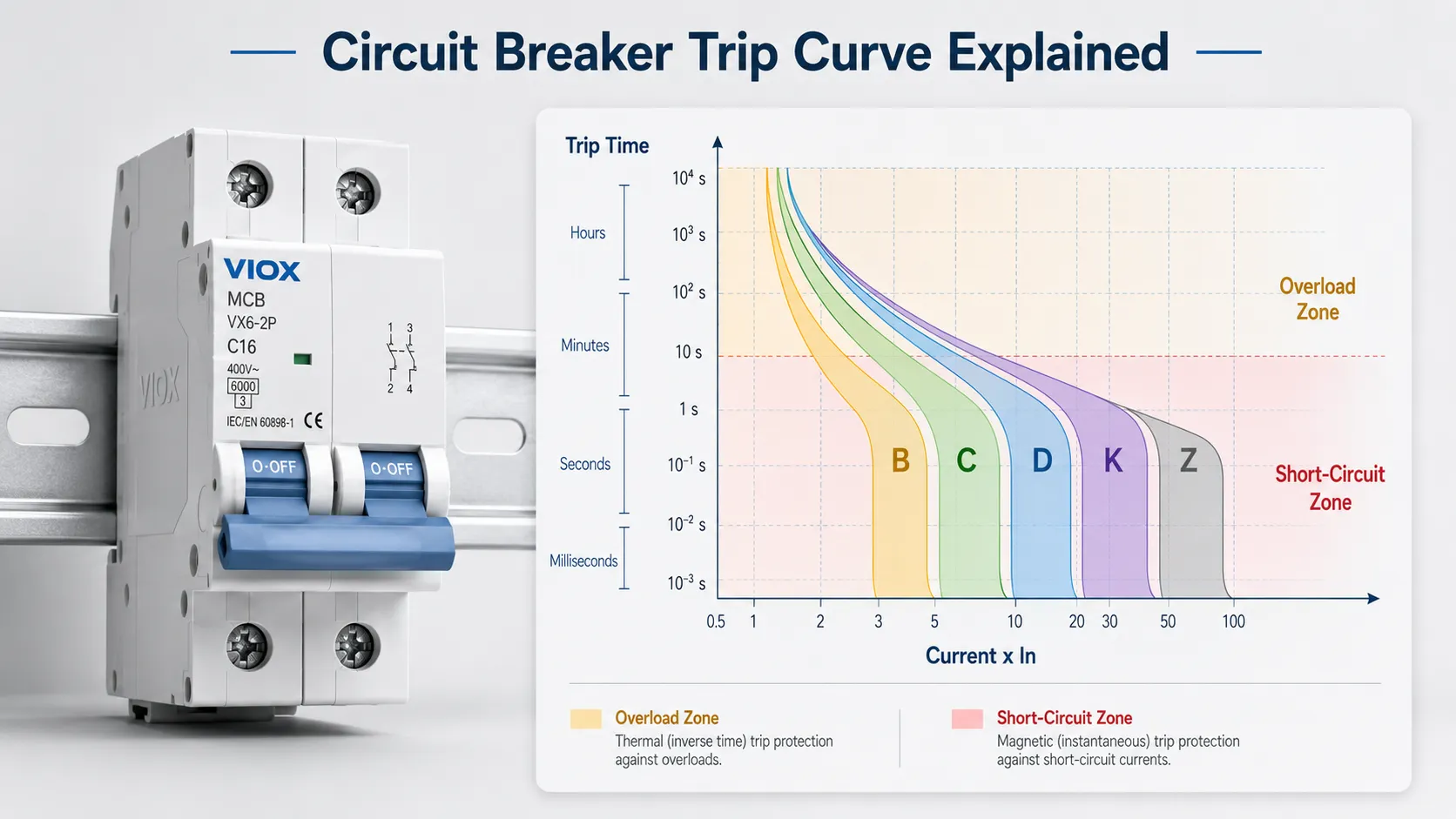
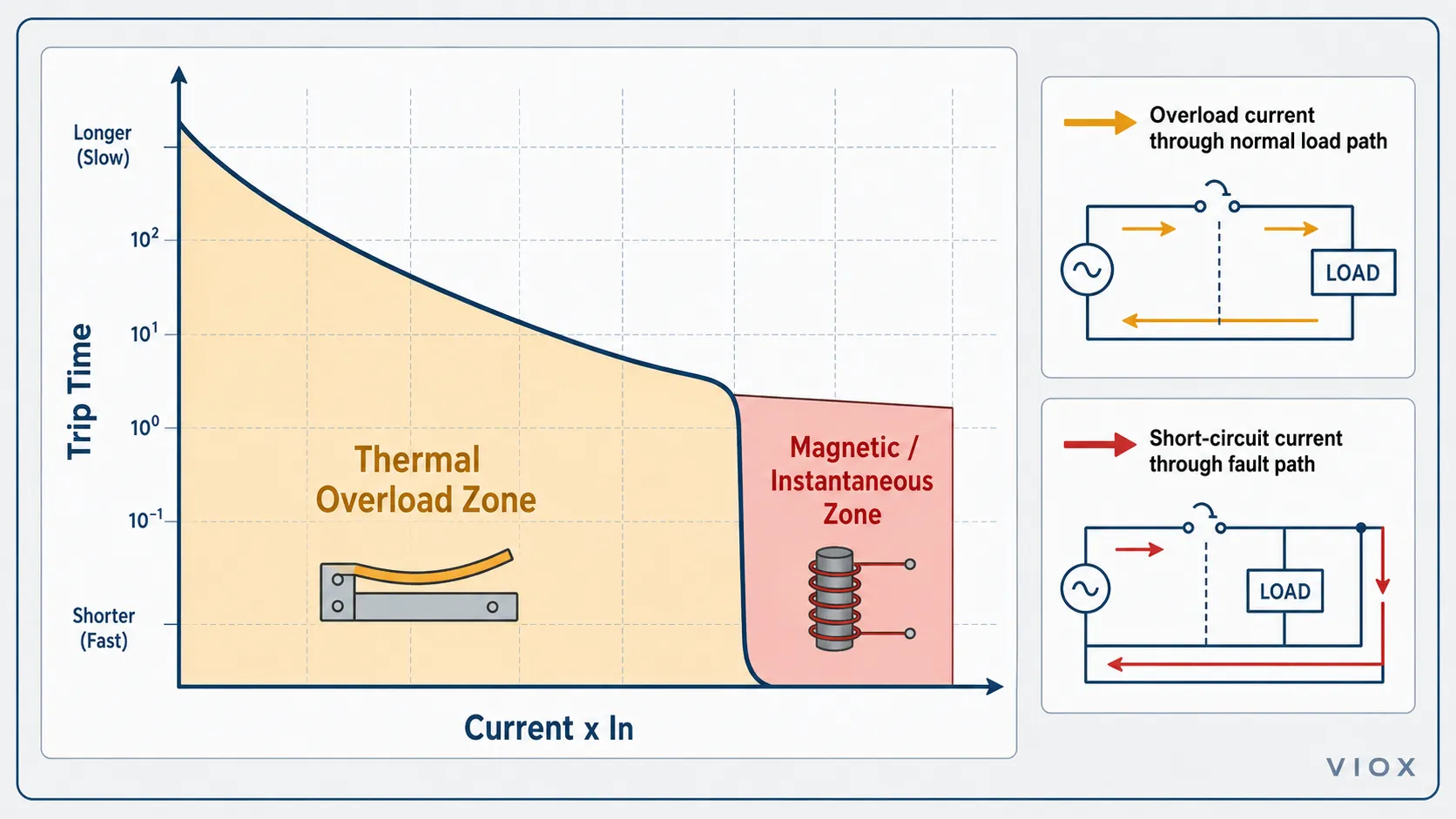
    • The lower left area represents overload behavior; the high-current region represents magnetic or instantaneous tripping.
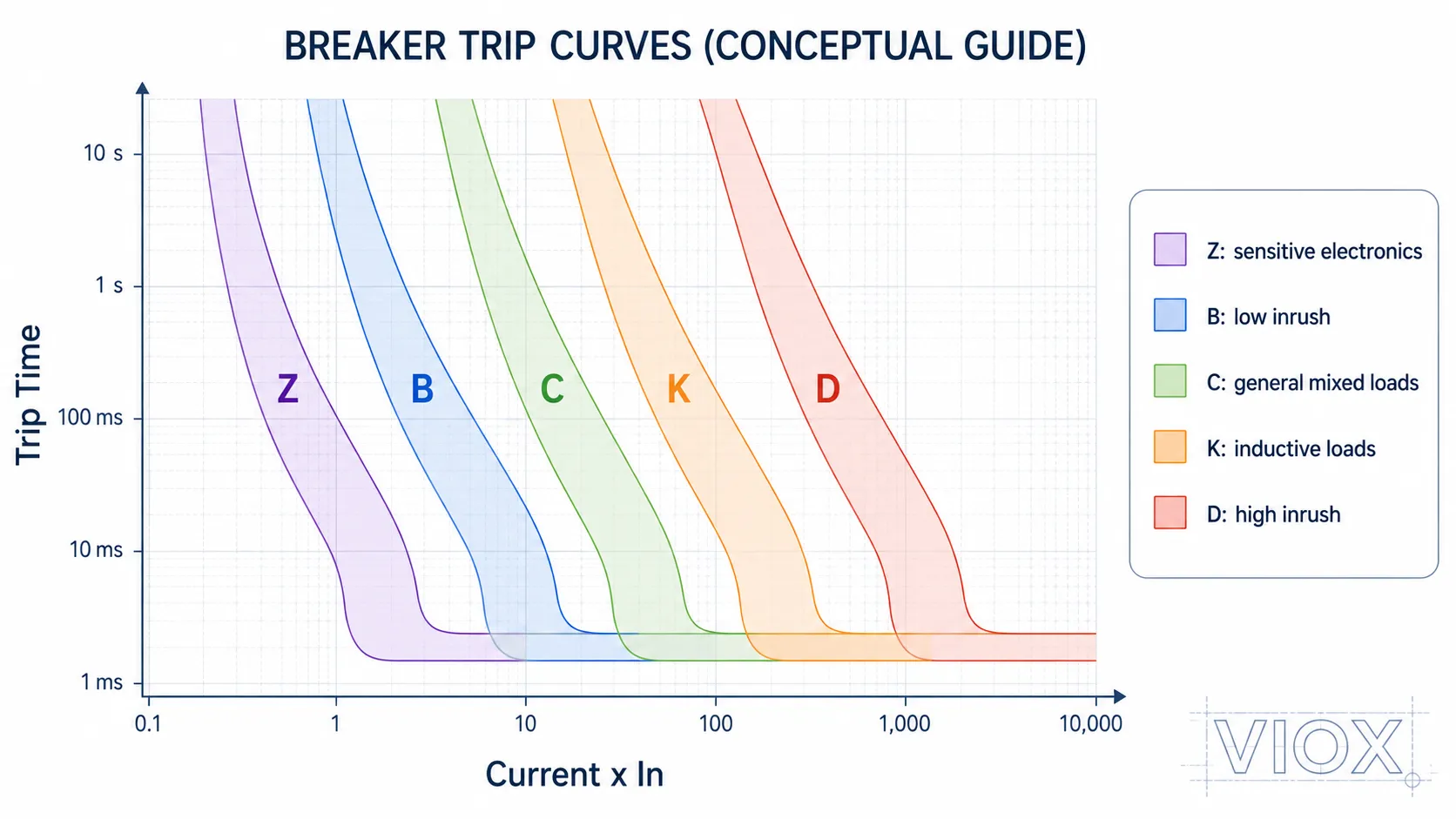
    • B, C, D, K, and Z curves describe different instantaneous trip ranges, mainly for miniature circuit breakers and similar devices.
    • The curve letter does not change the rated current. A B16, C16, and D16 are all 16A devices; their short-duration trip behavior is different.
    • Always check the manufacturer’s actual time-current curve, product standard, breaking capacity, and available fault current before final selection.

    Circuit Breaker Trip Curve Chart at a Glance

    Curve Type Typical Magnetic Trip Range Inrush Tolerance Common Application Main Risk if Misused
    Z Curve About 2-3 x In, depending on manufacturer Very low Sensitive electronics, semiconductor circuits, control equipment Nuisance tripping on loads with startup current
    B Curve About 3-5 x In Low Residential lighting, low-inrush resistive loads, final circuits May trip during motor, transformer, or LED driver inrush
    C Curve About 5-10 x In Medium Commercial circuits, small motors, HVAC, LED lighting groups, mixed loads May trip too slowly if available fault current is low
    K Curve Often about 8-12 x In, depending on manufacturer Medium-high Motors, inductive loads, control circuits Less universal; exact behavior must be checked by datasheet
    D Curve About 10-20 x In High Transformers, welders, large motors, high-inrush industrial loads Can fail fast disconnection if fault current is not high enough

    These ranges are practical reference values used in many IEC-style discussions. They are not a substitute for the manufacturer’s published curve, installation rules, or project specification. Type K and Type Z especially vary by product family.

    For a broader MCB classification guide, see Types of MCB: B, C, D, K, Z Curves, Ratings, Poles, and Applications.


    Trip Curve vs Time-Current Curve vs TCC

    In circuit protection, these terms are closely related:

    Term Meaning Typical Use
    Trip curve General term for how fast a breaker trips at different currents Common in MCB and breaker selection
    Time-current curve More technical name for the current-vs-time characteristic Engineering, datasheets, coordination studies
    TCC Abbreviation for time-current curve Protection coordination and selectivity studies
    Time-current characteristic curve Formal wording often used in technical documents Standards, manufacturer documentation

    For most practical breaker selection, trip curve, time-current curve, and TCC refer to the same idea: a graphical relationship between current magnitude and operating time.


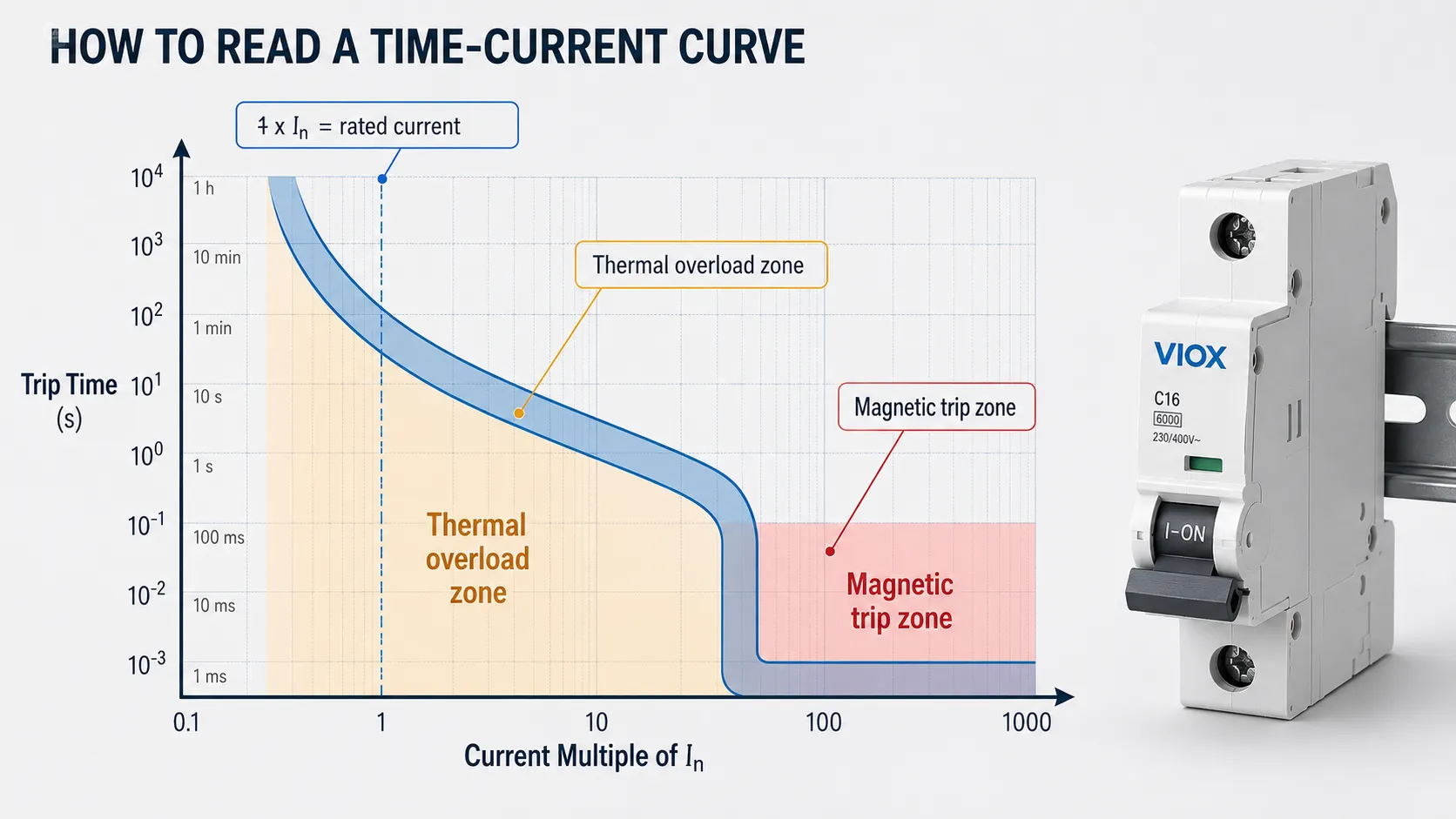
    How to Read a Time-Current Curve

    A time-current curve is usually drawn with logarithmic axes. This can feel confusing at first, but the reading method is simple.

    How to read a circuit breaker time-current curve with current and trip time axes.
    How to read a circuit breaker time-current curve using current multiples on the horizontal axis and trip time on the vertical axis.

    Step 1: Find the Current on the Horizontal Axis

    The horizontal axis represents current. In many breaker trip curve charts, current is shown as a multiple of rated current:

    • 1 x In means rated current
    • 2 x In means twice rated current
    • 5 x In means five times rated current
    • 10 x In means ten times rated current

    For example, if a breaker is rated 20A, then:

    Multiple of In Current for 20A Breaker
    1 x In 20A
    2 x In 40A
    5 x In 100A
    10 x In 200A

    This is why two breakers with the same ampere rating can behave differently during startup or fault conditions. Their curve shapes may be different.

    Step 2: Find the Trip Time on the Vertical Axis

    The vertical axis represents time. It may show seconds, milliseconds, minutes, or a logarithmic time scale. At low overload levels, the breaker may take longer to trip. At high fault current, the breaker may trip much faster.

    This is intentional. A breaker should not trip instantly every time a motor starts or a capacitor charges. But it must trip fast enough when the current indicates a real fault.

    Step 3: Read the Curve Band, Not a Single Thin Line

    Many breaker curves appear as a band rather than one exact line. That band represents manufacturing tolerance, temperature effects, and the allowed operating range of the device.

    Do not assume the breaker always trips at one exact second or one exact current. For final design, use the manufacturer’s published curve and the applicable standard.

    Step 4: Separate the Thermal and Magnetic Zones

    Most low-voltage thermal-magnetic breakers have two main trip behaviors:

    Curve Zone What It Means Typical Fault Type
    Thermal overload zone Delayed tripping caused by sustained overcurrent heating the bimetal element Overload
    Magnetic or instantaneous zone Fast tripping caused by high current operating an electromagnetic mechanism Short circuit or very high inrush

    The exact curve shape depends on breaker type, frame, trip unit, standard, and manufacturer design.


    Thermal Trip Zone: Overload Protection

    Thermal overload trip zone and magnetic short-circuit trip zone in a circuit breaker curve.
    Thermal overload trip zone and magnetic short-circuit trip zone in a circuit breaker time-current curve.

    The thermal part of the curve protects against overloads. An overload is current above the allowed value that usually stays in the normal conductive path.

    Examples include:

    • too many loads on one circuit
    • motor running under excessive mechanical load
    • cable carrying more current than it should
    • heater or equipment drawing more than expected
    • poor ventilation causing heat buildup in a panel

    Thermal tripping is intentionally delayed. If a load briefly exceeds rated current, the breaker may not trip immediately. If the overload continues long enough to create unsafe heating, the breaker should open.

    For a deeper explanation of overload as a fault condition, see What Is a Circuit Overload?.


    Magnetic Trip Zone: Short Circuit and High Inrush

    The magnetic or instantaneous region responds to high current. This is the part of the curve most closely connected to B, C, D, K, and Z trip types.

    High current can come from two very different situations:

    • a dangerous short circuit
    • a normal but temporary inrush current

    The breaker cannot “know” whether the high current is a healthy transformer energizing or a real short circuit. It only sees current and time. The curve must therefore be selected so normal inrush does not cause nuisance tripping, while real fault current still causes fast disconnection.

    This is the central tradeoff behind breaker curve selection.


    B, C, D, K, and Z Trip Curves Explained

    B, C, D, K, and Z circuit breaker trip curve comparison chart.
    B, C, D, K, and Z circuit breaker trip curve comparison chart showing different instantaneous trip ranges and inrush tolerance.

    B Curve Breaker

    A B curve breaker typically trips magnetically at about 3 to 5 times rated current.

    It is usually considered for:

    • low-inrush final circuits
    • residential lighting
    • resistive loads
    • general socket or branch circuits where local practice allows
    • circuits where available fault current may be limited

    The risk is nuisance tripping on motors, transformers, large LED driver groups, and power supplies with high inrush.

    C Curve Breaker

    A C curve breaker typically trips magnetically at about 5 to 10 times rated current.

    It is commonly used for:

    • commercial circuits
    • mixed loads
    • small motors
    • HVAC equipment
    • LED lighting groups with moderate inrush
    • general control panels

    C curve is often the practical middle ground, but it still requires enough available fault current for reliable tripping during short-circuit conditions.

    D Curve Breaker

    A D curve breaker typically trips magnetically at about 10 to 20 times rated current.

    It is used for higher-inrush loads such as:

    • transformers
    • larger motors
    • welders
    • some industrial machines
    • loads with high magnetizing or capacitive inrush

    Do not choose D curve only to stop nuisance tripping. If the cable run is long or the fault-loop impedance is high, the available fault current may not be enough for fast magnetic tripping.

    K Curve Breaker

    K curve breakers are often associated with inductive loads and motor circuits, but the exact behavior depends heavily on the manufacturer and product range. Check the datasheet before using K curve as a direct substitute for C or D curve.

    Z Curve Breaker

    Z curve breakers are more sensitive and may be used for electronics, measurement circuits, semiconductor-related protection, and low-inrush control applications. They can trip too easily if the load has startup current.


    Example: B16 vs C16 vs D16

    A common mistake is thinking a C16 breaker is “stronger” than a B16 breaker. That is not the right way to think about it.

    A B16, C16, and D16 breaker all have the same nominal rated current: 16A. The difference is their instantaneous magnetic trip threshold.

    Breaker Rated Current Typical Magnetic Trip Range What It Means
    B16 16A About 48-80A Sensitive to high startup current
    C16 16A About 80-160A Tolerates moderate inrush
    D16 16A About 160-320A Tolerates high inrush but needs high fault current for fast trip

    If a B16 trips when a motor starts, replacing it with C16 may reduce nuisance trips. But before moving to D16, check available fault current, cable length, fault-loop impedance, breaking capacity, and local rules.

    For an inrush-focused guide, see MCB B, C, and D Curves Explained.


    Circuit Breaker Curve Chart vs Fuse Time-Current Curve

    Fuse time-current curves and circuit breaker time-current curves are not always the same shape.

    Point of Comparison Fuse Time-Current Curve Circuit Breaker Trip Curve
    Operating principle Melting element Thermal-magnetic or electronic trip mechanism
    Reset after operation Usually no Usually yes, after fault correction
    Current limitation Can be strong with current-limiting fuse types Depends on breaker design
    Curve shape Depends on fuse class and element design Depends on breaker trip unit and mechanism
    Selection focus Fuse class, voltage, current, I²t, breaking capacity Curve type, rated current, breaking capacity, coordination

    For more detail on fuse clearing time and breaker response time, see Fuse vs MCB Response Time.


    Trip Curve and Breaking Capacity Are Not the Same

    Trip curve and breaking capacity are related to protection, but they are not the same rating.

    Term What It Answers
    Trip curve How fast will the breaker trip at a given overcurrent?
    Rated current How much current can the device carry under specified conditions?
    Breaking capacity What maximum short-circuit current can the device safely interrupt?
    Voltage rating At what system voltage can the device interrupt safely?

    A breaker may have the right curve but the wrong breaking capacity. That is unsafe. If the prospective short-circuit current at the installation point exceeds the breaker’s interrupting rating, the breaker may fail during a severe fault.

    For MCB applications, see 6kA vs 10kA MCB Breaking Capacity. For industrial breaker rating terms, see Icu vs Ics vs Icw vs Icm Circuit Breaker Ratings.


    IEC 60898-1 vs IEC 60947-2: Why the Standard Matters

    The same curve letter does not always tell the whole story. Product standard and device family matter.

    Standard Context Typical Device Scope Trip Curve Relevance
    IEC 60898-1 Circuit breakers for household and similar overcurrent protection Common context for B, C, and D curve MCB discussions
    IEC 60947-2 Industrial low-voltage circuit breakers Industrial breakers may use manufacturer-specific time-current curves and trip unit settings
    UL 489 Molded-case and similar circuit breakers for North American applications North American breaker selection may not use the same B/C/D labeling convention

    Do not assume that every breaker curve chart can be compared directly across standards, brands, or product families. The final reference should always be the manufacturer’s datasheet and the applicable project standard.

    For a deeper standards comparison, see IEC 60898-1 vs IEC 60947-2.


    How Ambient Temperature Affects Trip Curves

    Ambient temperature mainly affects the thermal overload region of a thermal-magnetic breaker curve. The thermal trip element uses a bimetal mechanism, so heat inside the distribution board can influence when the breaker trips under sustained overload.

    In practical panel work, nuisance tripping is sometimes blamed on the wrong curve when the real issue is heat:

    • breakers installed in tightly packed DIN-rail rows
    • high ambient temperature inside an outdoor enclosure
    • poor ventilation in a control cabinet
    • multiple loaded circuits grouped together
    • nearby heat-generating components such as contactors, power supplies, VFDs, or transformers

    Higher ambient temperature can make the thermal part of the breaker operate earlier than expected. Lower ambient temperature can delay thermal response. This does not usually change the instantaneous magnetic threshold in the same way, but it can affect how the breaker behaves in the overload zone of the curve.

    The correct response is not automatically to move from B curve to C curve or from C curve to D curve. First check the enclosure temperature, grouping, load current, cable size, and the manufacturer’s derating data.


    How to Choose the Right Trip Curve

    Trip curve selection guide for LED lighting, motors, transformers, data center UPS, and solar inverter circuits.
    Trip curve selection guide for LED lighting, motors, transformers, data center UPS circuits, solar inverter outputs, and other high-inrush loads.

    Start with the load and the fault conditions, not just the curve letter.

    Application Common Starting Point What to Verify
    Low-inrush lighting or resistive loads B curve Local wiring rules, cable protection, available fault current
    Commercial mixed loads C curve LED driver inrush, socket loads, fault-loop impedance
    LED lighting groups C curve is often considered when inrush is significant Driver inrush, grouping, switching method, nuisance trip history
    Small motors and pumps C curve or motor-specific protection Starting current, overload protection, short-circuit protection
    Transformers D curve or dedicated transformer protection Magnetizing inrush, available fault current, upstream coordination
    Data center UPS or PDU circuits Manufacturer-specific breaker selection UPS input/output behavior, selectivity, available fault current, coordination
    Solar inverter AC output Follow inverter and local grid-side protection requirements Inverter startup behavior, AC output current, fault contribution, anti-islanding/protection design
    Sensitive electronics Z curve where available Inrush, nuisance tripping, manufacturer guidance
    Motor and inductive loads C, D, or K depending on system Motor starting current, coordination, datasheet curve
    Long cable runs Often needs more careful curve verification Fault-loop impedance, voltage drop, disconnection time, cable thermal withstand
    RCBO circuits B, C, or D curve plus residual-current type Do not confuse trip curve with RCD Type AC/A/F/B

    For RCBO selection, remember that B/C/D is an overcurrent trip curve, while Type AC/A/F/B is a residual-current waveform classification. See RCBO Type AC vs Type A vs Type F vs Type B for the residual-current side.


    Common Mistakes When Reading Trip Curves

    Mistake 1: Reading the Curve as an Exact Trip Time

    A breaker trip curve is usually a band or tolerance zone, not one exact trip point. Ambient temperature, product tolerance, installation conditions, and device design can affect operation.

    Mistake 2: Choosing D Curve to Stop Every Nuisance Trip

    D curve may reduce nuisance trips, but it also requires higher fault current for fast magnetic operation. If the available fault current is too low, the breaker may not clear faults as expected.

    Mistake 3: Confusing Rated Current with Trip Curve

    A C20 breaker is not simply “bigger” than a B20 breaker. Both are 20A devices. The curve changes how the breaker responds to short-duration high current.

    Mistake 4: Ignoring Cable Protection

    The breaker protects the cable as well as the load. Changing the curve or current rating without checking cable size and installation method can create a fire risk.

    Mistake 5: Comparing Curves Across Brands Without Datasheets

    Two breakers with similar curve letters may not have identical time-current behavior. Manufacturer curves matter, especially for coordination studies.

    Mistake 6: Treating MCB Curves and RCD Types as the Same Thing

    Type B MCB and Type B RCCB/RCBO do not mean the same thing. One relates to overcurrent trip behavior. The other relates to residual-current waveform detection.


    Quick Reading Checklist

    Before using a circuit breaker curve chart, check:

    • breaker rated current In
    • curve type or trip unit setting
    • thermal overload region
    • magnetic or instantaneous trip region
    • current multiple on the horizontal axis
    • trip time on the vertical axis
    • tolerance band
    • rated voltage
    • breaking capacity
    • product standard
    • manufacturer’s datasheet
    • available fault current at the installation point
    • cable size and installation method
    • upstream/downstream coordination

    FAQ

    What is a circuit breaker trip curve?

    A circuit breaker trip curve is a chart showing how long a breaker takes to trip at different current levels. It is also called a time-current curve or TCC.

    What does the horizontal axis of a time-current curve represent?

    The horizontal axis represents current, often shown as a multiple of the breaker’s rated current. For example, 5 x In means five times rated current.

    What does the vertical axis of a time-current curve represent?

    The vertical axis represents trip time. It shows how long the breaker may take to operate at a given current level.

    What is the difference between B, C, and D curve breakers?

    B curve trips magnetically at a lower current range, C curve tolerates more inrush, and D curve tolerates high inrush. Moving from B to C to D generally increases the current required for instantaneous tripping.

    Is a trip curve the same as a TCC curve?

    In most breaker selection contexts, yes. TCC means time-current curve. It is the technical graph used to show trip time at different current levels.

    Are fuse time-current curves and breaker trip curves the same shape?

    No. Fuses and breakers operate by different mechanisms, so their time-current curves are not always the same shape. Current-limiting fuses can also behave very differently from thermal-magnetic breakers under high fault current.

    Why does a D curve breaker need more fault current?

    A D curve breaker has a higher magnetic trip threshold. That helps it ride through high inrush, but it also means the circuit must provide enough fault current for fast tripping during a short circuit.

    Can I replace a B curve breaker with a C curve breaker?

    Only after checking load inrush, cable size, fault-loop impedance, available fault current, breaking capacity, and local rules. Replacing the curve may solve nuisance tripping, but it can also reduce fault-clearing performance.

    What is the best trip curve for motors?

    There is no universal answer. Small motors often use C curve in many installations, while higher-inrush loads may require D curve, K curve, MPCB, or a coordinated motor starter design. Motor overload protection must also be considered.

    Does trip curve affect breaking capacity?

    No. Trip curve describes operating time at different currents. Breaking capacity describes the maximum short-circuit current the device can safely interrupt. Both must be correct.
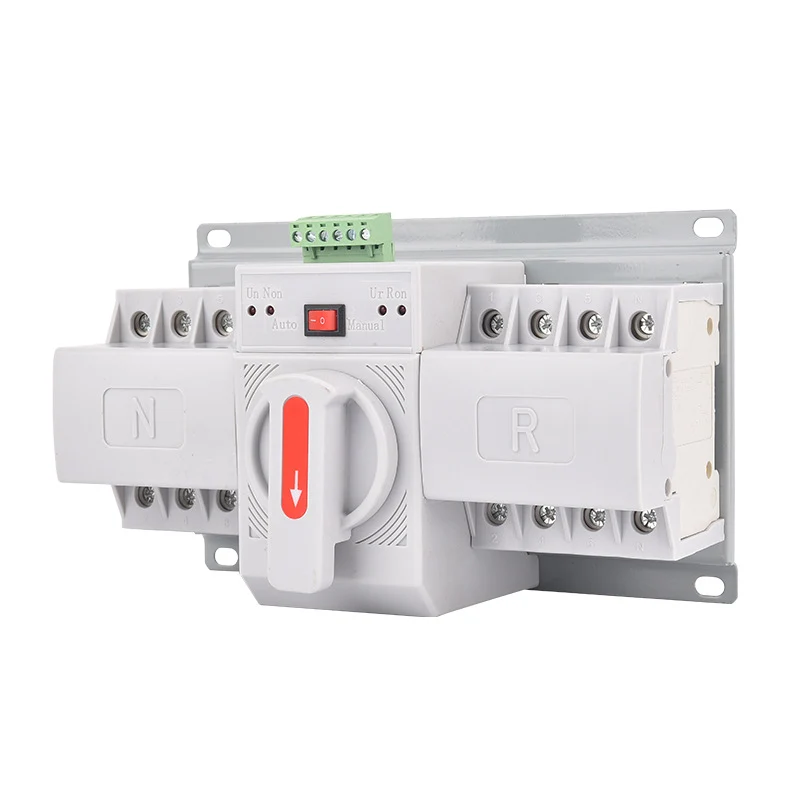

    Conclusion

    A circuit breaker trip curve is not just a chart for electricians. It is the link between load behavior, nuisance tripping, overload protection, short-circuit protection, and system coordination.

    Use the curve to answer three practical questions:

    1. Will the breaker tolerate normal inrush current?
    2. Will it trip quickly enough during a real fault?
    3. Does the device still have the correct voltage rating, breaking capacity, standard marking, and cable protection?

    For VIOX circuit protection selection, start with the application, then choose the correct MCB, RCBO, or MCCB family by rated current, trip curve, breaking capacity, pole configuration, and applicable standard.

  • Understanding Timer Switch Types, Functions & Applications

    Understanding Timer Switch Types, Functions & Applications

    A timer switch is an electrical control device that automatically turns electrical circuits on and off at predetermined times, providing convenient automation for lighting, heating, cooling, and other electrical systems. Timer switches save energy, improve security, and eliminate the need for manual operation of electrical devices, making them essential components in modern residential, commercial, and industrial applications.

    Understanding timer switch types, functions, and applications helps you choose the right automation solution for your specific needs while ensuring safety, compliance, and optimal performance.

    What Is a Timer Switch and How Does It Work?

    digital timer switch viox

    A timer switch replaces conventional wall switches to provide automated control of electrical circuits. These devices operate by using internal timing mechanisms—either mechanical clockwork, digital microprocessors, or smart connectivity—to control when electrical power flows to connected devices.

    Key Components of Timer Switches:

    inside of timer switch

    • Timing Mechanism: Controls when switching occurs (mechanical, digital, or smart)
    • Switch Contacts: Heavy-duty contacts that handle electrical loads
    • Control Interface: Programming method (dials, buttons, or apps)
    • Power Supply: Internal power source for timing functions
    • Load Terminals: Connection points for electrical circuits

    Timer Switch Types: Complete Comparison Guide

    Mechanical Timer Switches

    How They Work: Mechanical timer switches use a synchronous motor that drives a gear train at constant speed, similar to a clock mechanism. Removable pins or tabs around a rotating dial determine when the switch activates.

    Key Features:

    • Accuracy: ±2-5 minutes typical deviation
    • Programming: Manual adjustment via rotating dial with removable pins
    • Power Consumption: 1-2 watts, some models operate without electricity
    • Lifespan: 15-20 years typical service life
    • Load Capacity: 15-30 amps for resistive loads

    Best Applications:

    • Pool pump filtration cycles
    • Outdoor equipment operation
    • Simple daily lighting schedules
    • Applications where power outages are common

    Digital/Electronic Timer Switches

    How They Work: Digital timer switches use microcontrollers with quartz crystal oscillators for precise timing. They feature LCD/LED displays and allow multiple daily and weekly programs.

    Key Features:

    • Accuracy: ±2 seconds per day precision
    • Programming: Multiple daily/weekly programs (up to 16-32 ON/OFF cycles)
    • Advanced Features: Battery backup, holiday mode, manual override, countdown functions
    • Power Consumption: Approximately 2 watts per hour
    • Display: Clear digital readouts showing time and program settings

    Best Applications:

    • Complex lighting schedules
    • Indoor automation systems
    • Security lighting with varied patterns
    • Commercial building automation

    Astronomical Timer Switches

    How They Work: Astronomical timers calculate sunrise and sunset times using stored algorithms based on geographic coordinates. They automatically adjust for seasonal changes and daylight saving time.

    Key Features:

    • Auto-Adjustment: Automatically compensates for seasonal daylight changes
    • Accuracy: ±1 minute with self-adjusting capability
    • Programming: Requires latitude/longitude input or GPS auto-detection
    • Seasonal Compensation: Eliminates manual adjustments throughout the year

    Best Applications:

    • Outdoor security lighting
    • Landscape illumination
    • Street lighting systems
    • Energy-efficient building exteriors

    Smart/IoT Timer Switches

    How They Work: Smart timer switches connect to home networks via Wi-Fi, Zigbee, or Z-Wave protocols, enabling remote control and advanced automation features through smartphone apps.

    Key Features:

    • Connectivity: Wi-Fi, Zigbee, Z-Wave, or Bluetooth protocols
    • Integration: Compatible with Alexa, Google Home, Apple HomeKit, Samsung SmartThings
    • Advanced Features: Voice control, geofencing, energy monitoring, machine learning optimization
    • Power Consumption: 2-5 watts depending on connectivity

    Best Applications:

    • Smart home integration
    • Remote monitoring and control
    • Energy optimization systems
    • Modern residential automation

    Timer Switch Comparison Table

    Feature Mechanical Digital Astronomical Smart/IoT
    Accuracy ±2-5 minutes ±2 seconds/day ±1 minute ±1 second
    Daily Programs 1 1-16 1-16 Unlimited
    Weekly Programs No Yes Yes Yes
    Seasonal Adjustment Manual Manual Automatic Automatic
    Remote Control No No Limited Yes
    Installation Complexity Low Medium Medium High
    Power Consumption 1-2W ~2W 2-3W 2-5W
    Typical Lifespan 15-20 years 8-12 years 10-15 years 5-10 years
    Price Range $6-40 $20-120 $30-80 $30-150

    Timer Switch Functions and Benefits

    Primary Functions

    Automated Scheduling: Timer switches eliminate the need for manual operation by automatically controlling electrical circuits based on predetermined schedules. This provides consistent operation regardless of occupancy or user availability.

    Energy Management: By controlling when electrical devices operate, timer switches prevent unnecessary energy consumption during unoccupied periods or when equipment isn’t needed.

    Security Enhancement: Automated lighting schedules create the appearance of occupancy, deterring potential intruders. Random or varied lighting patterns provide enhanced security benefits.

    Equipment Protection: Controlled operation cycles extend the lifespan of electrical equipment by preventing continuous operation and reducing wear on motors, bulbs, and other components.

    Key Benefits by Application

    Residential Applications:

    • Energy Savings: 4-9% automatic electricity savings with proper programming
    • Convenience: Eliminates manual switching for daily routines
    • Security: Varied lighting patterns simulate occupancy during vacations
    • Cost Reduction: Pool timer switches can save $200-400 annually on energy costs

    Commercial Applications:

    • Code Compliance: ASHRAE 90.1 energy efficiency requirements
    • Operational Efficiency: 15-20% reduction in utility costs for controlled equipment
    • Maintenance Reduction: Scheduled operation reduces equipment wear
    • Brand Consistency: Automated scheduling ensures consistent lighting presentation

    Industrial Applications:

    • Process Control: Precise timing for manufacturing and chemical processes
    • Safety Systems: Automated testing schedules for emergency equipment
    • Energy Optimization: Up to 50% energy savings potential in lighting and HVAC systems
    • Quality Control: Consistent automated schedules ensure reliable processes

    Timer Switch Applications Guide

    Residential Applications

    Lighting Control Systems

    Indoor Automation

    • Security Lighting: Deter intruders with varied lighting patterns
    • Convenience Scheduling: Automatic operation for daily routines
    • Energy Management: Prevent lights from being left on unnecessarily
    • Recommended Type: Digital programmable timers for complex schedules

    Outdoor Lighting

    • Landscape Illumination: Automatic dusk-to-dawn operation
    • Security Lighting: Motion-activated backup with timer override
    • Holiday Decorations: Seasonal scheduling with easy programming
    • Recommended Type: Astronomical timers for automatic seasonal adjustment

    Pool and Spa Equipment

    Filtration Systems

    • Optimal Operation: 6-8 hours daily for water quality maintenance
    • Energy Efficiency: Prevents 24/7 pump operation
    • Equipment Protection: Controlled cycles extend pump lifespan
    • Cost Savings: $200-400 annual energy cost reduction

    Heating and Chemical Systems

    • Precise Timing: Coordinate heating with filtration cycles
    • Chemical Dosing: Automated chemical system operation
    • Safety Features: Prevent overheating and chemical overdosing

    HVAC and Water Heating

    Water Heater Control

    • Demand Management: Heat during off-peak hours
    • Energy Efficiency: Reduce standby losses during low-demand periods
    • Cost Optimization: Take advantage of time-of-use electricity rates

    Ventilation Systems

    • Bathroom Fans: Automatic operation for humidity control
    • Attic Ventilation: Temperature-based operation schedules
    • Air Quality Management: Consistent ventilation cycling

    Commercial Applications

    Office Building Automation

    Lighting Systems

    • Parking Lot Control: Astronomical timers with photocell integration
    • Interior Lighting: Stairwell, corridor, and conference room automation
    • Energy Compliance: Meet ASHRAE 90.1 code requirements
    • Cost Benefits: 15-20% reduction in lighting energy costs

    HVAC Coordination

    • Occupancy-Based Control: Operate systems only during business hours
    • Temperature Setbacks: Automatic temperature adjustments for unoccupied periods
    • Fresh Air Management: Scheduled ventilation for indoor air quality

    Retail and Signage

    Display Lighting

    • Storefront Windows: Attractive evening illumination
    • Billboard Control: Automated sign lighting schedules
    • Promotional Lighting: Seasonal and special event programming

    Operational Efficiency

    • Energy Management: Timer-photocell combinations for optimal operation
    • Maintenance Reduction: Scheduled operation reduces bulb replacement frequency
    • Brand Consistency: Reliable automated lighting presentation

    Industrial Applications

    Manufacturing Systems

    Production Equipment

    • Warm-up Cycles: Automated machinery preparation
    • Conveyor Systems: Precise timing for production lines
    • Quality Control: Consistent automated testing schedules

    Process Control

    • Chemical Dosing: Precise timing for treatment processes
    • Safety Systems: Automated emergency equipment testing
    • Environmental Control: Ventilation and temperature management

    Energy Management

    Demand Control

    • Load Scheduling: Coordinate high-demand equipment operation
    • Peak Shaving: Reduce utility demand charges
    • Power Factor Correction: Automated capacitor bank switching

    Efficiency Optimization

    • Equipment Cycling: Prevent unnecessary continuous operation
    • Maintenance Scheduling: Automated lubrication and cleaning cycles
    • Energy Monitoring: Track and optimize consumption patterns

    Timer Switch Selection Guide

    Load Capacity Requirements

    Resistive Loads (Heating, Incandescent Lighting)

    • Residential: 15-20 amp capacity typical
    • Commercial: 20-30 amp capacity required
    • Industrial: 30+ amp capacity for heavy equipment

    Inductive Loads (Motors, Fluorescent Lighting)

    • Motor Loads: Require 25-40% higher capacity than nameplate rating
    • Fluorescent Lighting: Check ballast compatibility and inrush current
    • LED Lighting: Verify minimum load requirements and compatibility

    Capacitive Loads (Electronic Equipment)

    • LED Drivers: Check for minimum load requirements
    • Electronic Ballasts: Verify compatibility with timer switching
    • Power Supplies: Consider inrush current characteristics

    Environmental Considerations

    Indoor Applications

    • Standard Conditions: NEMA 1 or IP20 protection sufficient
    • Humid Environments: IP44 rating for bathrooms and kitchens
    • Temperature Extremes: Verify operating temperature ranges

    Outdoor Applications

    • Weather Protection: Minimum IP65 rating required
    • Extreme Conditions: IP67 for temporary immersion protection
    • Corrosive Environments: Stainless steel or corrosion-resistant materials

    Feature Requirements

    Basic Applications

    • Simple Scheduling: Mechanical timers for straightforward on/off control
    • Limited Programs: Single daily cycle sufficient
    • Cost Sensitive: Mechanical timers provide best value

    Advanced Applications

    • Multiple Programs: Digital timers with 16+ daily programs
    • Seasonal Adjustment: Astronomical timers for automatic changes
    • Remote Control: Smart timers for app-based operation

    Installation and Safety Guidelines

    Pre-Installation Safety Requirements

    ⚠️ Safety Warning: Always turn off power at the circuit breaker before installation. Use a voltage tester to verify power is off, and test the voltage tester on a known live circuit to ensure it’s working properly.

    Required Safety Steps:

    1. Power Disconnection: Turn off power at circuit breaker
    2. Voltage Verification: Test with digital multimeter or voltage tester
    3. Equipment Testing: Verify test equipment on known live circuit
    4. Wire Identification: Label all wires (line, load, neutral, ground)
    5. Reference Documentation: Take photos of existing wiring

    Installation Process

    Step 1: Preparation

    • Remove existing switch and inspect wire condition
    • Verify wire gauge matches timer switch requirements
    • Check for adequate box depth and wire length

    Step 2: Wiring Connections

    • Connect ground wire to timer switch ground terminal
    • Connect neutral wire if required by timer type
    • Connect line wire to line terminal (usually black)
    • Connect load wire to load terminal (usually red)

    Step 3: Installation Completion

    • Fold wires carefully into electrical box
    • Secure timer switch to mounting ears
    • Install cover plate and restore power
    • Test functionality and program settings

    Code Compliance Requirements

    National Electrical Code (NEC) 2023

    • Neutral Wire Requirement: NEC 404.2(C) mandates neutral conductors at switch locations in bathrooms, hallways, stairways, and habitable rooms
    • GFCI Protection: Required for timer switches in wet locations
    • Proper Grounding: All timer switches must be properly grounded

    Local Code Variations

    • Permit Requirements: Check local requirements for electrical work
    • Inspection Needs: Some jurisdictions require inspection for timer switch installation
    • Professional Installation: May be required for complex installations

    Troubleshooting Common Timer Switch Problems

    7-Step Troubleshooting Process

    Step 1: Verify Programming

    • Check correct day and time settings
    • Ensure unused time groups display “–:–“
    • Verify AM/PM settings on 12-hour displays

    Step 2: Check Operating Mode

    • Confirm switch is in “AUTO” mode, not “MANUAL”
    • Test manual override function
    • Verify program enable/disable settings

    Step 3: Inspect Power Supply

    • Check for proper voltage at timer terminals
    • Verify secure wire connections
    • Test for voltage drops under load

    Step 4: Test Internal Components

    • Check and replace blown fuses (typically 0.1A-0.3A rating)
    • Replace battery backup if applicable
    • Verify display function and clarity

    Step 5: Load Compatibility

    • Ensure load doesn’t exceed timer capacity
    • Check for LED compatibility issues
    • Verify minimum load requirements

    Step 6: Environmental Factors

    • Check for moisture ingress in outdoor installations
    • Verify operating temperature ranges
    • Inspect for corrosion or damage

    Step 7: Professional Consultation

    • Contact manufacturer technical support
    • Consider professional electrical inspection
    • Plan for timer replacement if necessary

    Common Problems and Solutions

    Problem Likely Cause Solution
    Timer not switching at set times Incorrect programming Verify time, day, and program settings
    Losing settings after power outage Failed battery backup Replace battery or upgrade to non-volatile memory timer
    Lights flickering with LED loads Incompatible timer type Use LED-compatible timer with proper minimum load
    Timer display dark or erratic Power supply issues Check voltage supply and wire connections
    Manual override not working Faulty switch contacts Professional replacement required
    Inconsistent operation Mechanical wear Replace with new timer switch

    Expert Tips for Timer Switch Success

    Programming Best Practices

    Tip 1: Plan Your Schedule

    Map out desired operation times before programming. Consider seasonal changes and daylight saving time. Account for equipment warm-up and cool-down periods.

    Tip 2: Use Overlap Protection

    Avoid programming conflicts between different timers. Ensure adequate time between switching operations. Consider load startup characteristics.

    Tip 3: Test Thoroughly

    Run through complete program cycles before relying on automation. Verify operation during power outages if battery backup is installed. Document program settings for future reference.

    Energy Optimization Strategies

    Tip 4: Coordinate with Utility Rates

    Program high-consumption equipment during off-peak hours. Take advantage of time-of-use electricity rates. Consider demand charges for commercial installations.

    Tip 5: Integrate with Other Controls

    Combine timers with photocells for optimal outdoor lighting. Use with occupancy sensors for maximum efficiency. Coordinate with building automation systems.

    Maintenance and Longevity

    Tip 6: Regular Inspection

    Check programming accuracy seasonally. Verify physical condition annually. Replace batteries in backup systems as needed.

    Tip 7: Professional Integration

    Consult electricians for complex installations. Consider system integration for multiple timers. Plan for future expansion and upgrades.

    Frequently Asked Questions

    Basic Operation Questions

    Q: What is the difference between mechanical and digital timer switches?
    A: Mechanical timer switches use clockwork mechanisms with physical pins for programming, offering simplicity and long life (15-20 years) but limited accuracy (±2-5 minutes). Digital timer switches use microprocessors with precise quartz timing (±2 seconds/day) and allow multiple complex programs but have shorter lifespans (8-12 years).

    Q: How do I know if my timer switch is compatible with LED lights?
    A: Check the timer specifications for LED compatibility and minimum load requirements. Many older timers require a minimum load that LED lights don’t provide, causing flickering or failure to operate. Look for timers specifically rated for LED loads or those with electronic low-voltage compatibility.

    Q: Can I install a timer switch myself, or do I need an electrician?
    A: Simple timer switch replacement typically doesn’t require an electrician if you’re comfortable with basic electrical work. However, professional installation is recommended for new circuits, complex three-way configurations, outdoor installations, or when local codes require permits and inspections.

    Technical and Safety Questions

    Q: What does the neutral wire requirement mean for timer switches?
    A: The 2023 National Electrical Code requires neutral wires at switch locations in bathrooms, hallways, stairways, and habitable rooms. Many smart and digital timers require neutral connections for proper operation, especially with LED loads. If no neutral wire is present, you may need professional installation of new cable.

    Q: How do astronomical timer switches know when to turn lights on and off?
    A: Astronomical timers contain computer algorithms that calculate sunrise and sunset times based on your geographic location (latitude and longitude). They automatically adjust throughout the year for seasonal changes and daylight saving time, eliminating manual reprogramming.

    Q: What should I do if my timer switch stops working after a power outage?
    A: First, check if the display shows the correct time and reprogram if necessary. If the timer has battery backup, replace the battery. For timers without backup, reprogram all settings. If problems persist, the internal components may have been damaged by power surges, requiring replacement.

    Selection and Application Questions

    Q: Which timer switch type is best for pool equipment?
    A: For pool pumps and filtration systems, mechanical timer switches are often preferred because they’re reliable, don’t require neutral wires, and continue operating during power outages. Program for 6-8 hours daily operation, typically during off-peak electricity hours to minimize costs.

    Q: Can I use a timer switch with a three-way light setup?
    A: Yes, but it requires special three-way timer switches (like the Intermatic ST01) or installation at the power source end of the circuit. Standard timer switches don’t work in three-way configurations. Consider consulting an electrician for proper installation.

    Q: How much energy can I save with timer switches?
    A: Residential applications typically see 4-9% automatic electricity savings with proper programming. Pool timer switches can save $200-400 annually. Commercial buildings can achieve 15-20% reductions in controlled equipment costs. Actual savings depend on current usage patterns and electricity rates.

    —

    Ready to automate your electrical systems? Timer switches provide reliable, cost-effective automation that saves energy, improves security, and simplifies daily routines. Choose the right type for your application, follow proper installation and safety procedures, and enjoy the benefits of intelligent electrical control. For complex installations or when in doubt about electrical work, consult a qualified electrician to ensure safe, code-compliant operation.

    Related

    How to Choose the Right Timer Relay

    Full Guide to Timer Switch

    The Ultimate Guide to Digital Timer Switches: Enhancing Efficiency and Automation in Your Home and Business

  • Does a Battery Disconnect Switch Go on Positive or Negative?

    Does a Battery Disconnect Switch Go on Positive or Negative?

    Quick Answer: A battery disconnect switch should be installed on the negative terminal of your battery for maximum safety. This prevents sparks, reduces electrical hazards, and follows industry best practices. However, some specific applications may require positive side installation.

    Understanding where to install your battery disconnect switch is crucial for vehicle safety, preventing battery drain, and protecting your electrical system. This comprehensive guide explains exactly why placement matters and how to make the right choice for your specific application.

    What is a Battery Disconnect Switch?

    Battery Isolator Switch

    A battery disconnect switch (also called a battery cut-off switch or battery isolator) is a mechanical device that completely interrupts the electrical connection between your battery and vehicle’s electrical system. You use this switch to:

    • Prevent battery drain during storage
    • Enhance vehicle security
    • Meet racing safety requirements
    • Perform electrical maintenance safely
    • Comply with marine and RV regulations

    Expert Tip: Professional mechanics install over 90% of battery disconnect switches on the negative terminal due to superior safety benefits.

    Key Differences: Negative vs Positive Terminal Installation

    Installation Location Safety Level Spark Risk Ground Protection Professional Preference
    Negative Terminal Highest Minimal Complete 90% of installations
    Positive Terminal Moderate Higher Partial 10% of installations

    Detailed Comparison of Installation Methods

    Factor Negative Terminal Installation Positive Terminal Installation
    Spark Prevention Eliminates spark risk completely High spark risk when switching
    Short Circuit Protection Full protection against ground shorts Limited protection
    Installation Difficulty Easier – fewer connections More complex – multiple cables
    NHRA Compliance Meets all racing requirements May not meet certain standards
    Cost Standard switches work May need specialized switches
    Maintenance Access Simple single-point disconnect Multiple connection points

    Why Negative Terminal Installation is Recommended

    1. Maximum Safety Benefits

    Installing on the negative terminal eliminates the risk of accidental sparks when you operate the switch. Since the negative terminal connects to the vehicle’s ground, disconnecting it removes all potential for electrical flow.

    2. Complete Circuit Interruption

    When you disconnect the negative terminal, you break the ground connection for the entire electrical system. This means:

    • No current can flow anywhere in the vehicle
    • All electrical components are completely isolated
    • Zero risk of parasitic drain

    3. Professional Standards Compliance

    Major automotive organizations recommend negative terminal installation:

    • NHRA (National Hot Rod Association): Requires negative side disconnect for racing
    • ABYC (American Boat and Yacht Council): Specifies negative terminal for marine applications
    • RV Industry Association: Recommends negative side for recreational vehicles

    Safety Warning: Always disconnect the negative terminal first when working on any vehicle electrical system to prevent sparks and potential battery explosion.

    When to Use Positive Terminal Installation

    How to Install Battery Disconnect Switch

    While negative terminal installation is standard, certain situations require positive side placement:

    Marine Applications with Multiple Batteries

    Application Terminal Choice Reason
    Single battery systems Negative Standard safety protocol
    Dual battery with common ground Positive Maintains ground reference
    House/starter battery setup Positive on house Preserves starter function

    Special Vehicle Requirements

    • Emergency vehicles: May need positive disconnect to maintain radio memory
    • Classic cars with positive ground: Require positive terminal disconnect
    • Some European vehicles: Factory specifications may require positive placement

    Step-by-Step Installation Guide

    Installing on Negative Terminal (Recommended)

    1. Gather Required Tools
      • Battery disconnect switch
      • Wire cutters/strippers
      • Wrenches (typically 10mm and 13mm)
      • Safety glasses and gloves
      • Dielectric grease
    2. Prepare the Battery
      • Turn off all electrical accessories
      • Remove keys from ignition
      • Open hood and locate battery
    3. Disconnect Battery Cables
      • Always remove negative cable first
      • Then remove positive cable
      • Secure positive cable away from battery
    4. Install the Switch
      • Cut negative cable 6-8 inches from battery terminal
      • Strip 1/2 inch of insulation from each end
      • Connect battery side to switch “BAT” terminal
      • Connect vehicle side to switch “GND” terminal
    5. Test Installation
      • Reconnect positive cable first
      • Reconnect negative cable to battery
      • Test switch operation with multimeter
      • Verify all electrical systems work properly

    Expert Tip: Apply dielectric grease to all connections to prevent corrosion and ensure long-term reliability.

    Common Applications and Use Cases

    Vehicle Storage Solutions

    You need a battery disconnect switch when storing vehicles for extended periods:

    • Classic cars: Prevents vintage electrical system drain
    • Boats: Meets Coast Guard requirements for safety
    • RVs: Eliminates parasitic drain from onboard electronics
    • Farm equipment: Protects batteries during seasonal storage

    Racing and Performance Requirements

    Racing Organization Requirement Terminal Specification
    NHRA Mandatory for 11.99 ET or faster Negative terminal only
    IHRA Required for specific classes Negative preferred
    SCCA Recommended for all race cars Negative terminal

    Security and Theft Prevention

    Installing a hidden battery disconnect switch provides:

    • Additional theft deterrent beyond standard alarms
    • Quick disable method for long-term parking
    • Protection against hot-wiring attempts

    Selection Guide: Choosing the Right Switch

    Key Specifications to Consider

    Specification Minimum Requirement Professional Grade
    Amperage Rating 100 amps 250+ amps
    Continuous Duty 50 amps 125+ amps
    Terminal Size 3/8 inch 1/2 inch
    Housing Material Plastic Marine-grade brass
    Weatherproofing Basic seal IP67 rated

    Switch Types and Their Best Uses

    1. Rotary Switches
      • Best for: Easy access applications
      • Amperage range: 100-300 amps
      • Price range: $15-50
    2. Knife Switches
      • Best for: High-amperage applications
      • Amperage range: 200-500 amps
      • Price range: $30-100
    3. Remote/Electronic Switches
      • Best for: Hidden installations
      • Amperage range: 100-250 amps
      • Price range: $50-200

    Troubleshooting Common Issues

    Problem: Switch Gets Hot During Use

    Causes and Solutions:

    • Undersized switch: Upgrade to higher amperage rating
    • Loose connections: Retighten and apply dielectric grease
    • Corrosion: Clean terminals with battery cleaner

    Problem: Electrical Systems Don’t Fully Disconnect

    Diagnostic Steps:

    1. Test with multimeter across switch terminals
    2. Check for alternative ground paths
    3. Verify switch is on negative terminal
    4. Inspect for bypassed circuits

    Safety Warning: Never work on electrical systems without proper safety equipment. Batteries contain sulfuric acid and can produce explosive gases.

    Professional Installation Tips

    Wire Gauge Selection

    Vehicle Type Recommended Wire Gauge Maximum Current
    Passenger cars 4 AWG 150 amps
    Trucks/SUVs 2 AWG 200 amps
    RVs/Boats 1/0 AWG 300 amps
    Racing applications 2/0 AWG 400 amps

    Placement Considerations

    • Install switch within 18 inches of battery
    • Mount in accessible but protected location
    • Avoid areas with extreme heat or moisture
    • Consider using a waterproof cover for outdoor installations

    Frequently Asked Questions

    What makes negative terminal installation safer than positive?

    Negative terminal installation is safer because it completely eliminates the ground connection, preventing any possibility of sparks when operating the switch. The negative terminal connects to the vehicle’s chassis ground, so disconnecting it breaks the circuit entirely without risk of arcing.

    Can I install disconnect switches on both terminals?

    While technically possible, installing switches on both terminals is unnecessary and not recommended. A single switch on the negative terminal provides complete disconnection. Dual switches add complexity without additional safety benefits.

    How do I know what amperage rating I need?

    You need a switch rated for at least 1.5 times your maximum electrical load. Most passenger vehicles require 125-175 amp switches, while trucks and RVs need 200-300 amp ratings. Check your alternator output for guidance.

    Will a battery disconnect switch prevent all battery drain?

    A properly installed negative terminal disconnect switch prevents 99% of battery drain. However, some batteries have minimal self-discharge (1-3% per month) that occurs internally regardless of external connections.

    Do I need a special switch for marine applications?

    Yes, marine applications require ignition-protected, waterproof switches that meet ABYC standards. Look for switches specifically rated for marine use with proper IP67 or higher water resistance ratings.

    What should I look for when buying a battery disconnect switch?

    Look for appropriate amperage rating (minimum 125 amps for cars), quality terminals that accept your cable size, weatherproof construction for your application, and safety certifications like UL or CE marking.

    How often should I operate my battery disconnect switch?

    You should operate your disconnect switch monthly to prevent contact corrosion and ensure smooth operation. Apply dielectric grease annually to maintain optimal performance and prevent seizing.

    Can a battery disconnect switch damage my vehicle’s computer?

    When properly installed on the negative terminal and operated with the ignition off, battery disconnect switches won’t damage vehicle computers. Always turn off the ignition before disconnecting to protect sensitive electronics.

    Quick Reference Guide

    Installation Checklist

    •  Choose negative terminal installation (recommended)
    •  Select switch with 1.5x your max amperage need
    • Gather all tools and safety equipment
    • Disconnect negative cable first
    •  Install switch within 18 inches of battery
    •  Apply dielectric grease to all connections
    • Test operation before finalizing installation
    •  Add weatherproof cover if needed

    Safety Protocol

    1. Always wear safety glasses and gloves
    2. Remove jewelry before working on battery
    3. Disconnect negative terminal first
    4. Keep metal tools away from positive terminal
    5. Work in well-ventilated area
    6. Have baking soda nearby for acid spills

    Professional Recommendations and Next Steps

    Installing a battery disconnect switch on the negative terminal provides maximum safety and functionality for 90% of applications. This simple upgrade protects your battery, enhances security, and can meet various regulatory requirements.

    When to Seek Professional Installation:

    • If you’re uncomfortable working with electrical systems
    • For complex multi-battery configurations
    • When local codes require certified installation
    • If your vehicle has specialized electrical requirements

    Remember that proper installation ensures years of reliable operation and maximum safety benefits. Whether you’re storing a classic car, meeting racing requirements, or preventing battery drain in your RV, choosing negative terminal installation follows industry best practices and professional standards.

    For specific vehicle applications or to ensure compliance with local regulations, consult with a certified automotive electrician who can assess your unique requirements and ensure proper installation.

    Related

    How to Install Battery Disconnect Switch

    How to Choose the Right DC Isolator Switch:A Complete Guide

  • How to Properly Fuse a Solar Photovoltaic System

    How to Properly Fuse a Solar Photovoltaic System

    To properly fuse a solar system, you must install DC-rated fuses sized at 156% of the array’s short-circuit current (Isc × 1.56) in the positive conductors of parallel-connected strings, following NEC Article 690 requirements for overcurrent protection. This protects against dangerous electrical faults while ensuring your system operates safely and meets electrical code requirements.

    Solar fusing is mandatory when three or more strings connect in parallel, when the combined short-circuit current exceeds the module’s maximum series fuse rating, or in battery-based systems. The fusing process involves calculating proper fuse sizes, selecting DC-rated components, installing them in appropriate locations, and maintaining them according to safety standards. Understanding these requirements prevents electrical fires, equipment damage, and ensures your solar investment operates safely for decades.

    What is Solar PV Fusing and Why Does It Matter?

    two DC fuse

    Solar PV fusing provides overcurrent protection for photovoltaic systems by automatically disconnecting circuits when electrical current exceeds safe levels. Unlike household AC fuses, solar fuses must handle direct current (DC) electricity, which creates persistent electrical arcs that are harder to extinguish than AC current.  AC Fuse vs DC Fuse

    Overcurrent protection prevents electrical fires by stopping dangerous current flow before wires overheat. When multiple solar panels connect in parallel, one faulty panel can receive dangerous “backfeed” current from healthy panels, potentially causing fires or equipment damage.

    DC fusing differences are critical to understand. DC current flows continuously in one direction without the natural zero-crossing points that help AC fuses extinguish arcs. This means DC fuses require specialized construction with enhanced arc-quenching chambers and higher voltage ratings than equivalent AC fuses.

    Key electrical concepts include:

    • Short-circuit current (Isc): Maximum current a solar panel can produce, found on the nameplate
    • Maximum series fuse rating: The largest fuse that can safely protect a solar panel, also on the nameplate
    • Continuous current factor: The 125% safety margin required by electrical codes for continuous loads
    • Backfeed current: Dangerous current flow from parallel panels into a faulted string

    Essential Fuse Types for Solar Systems

    Fuse Type Voltage Rating Current Range Best Applications Typical Cost
    Cartridge Fuses (10x38mm) 1000-1500VDC 1A-30A String protection, combiner boxes $8-25 each
    Blade Fuses (ATO/ATC) 32-100VDC 1A-30A Small DC loads, 12V/24V systems $2-5 each
    ANL Fuses 32-300VDC 35A-750A Battery-to-inverter connections $15-35 each
    Class J Fuses 1000VDC 70A-450A Large commercial systems $150-400 each

    What makes DC fuses different from AC fuses?

    DC fuses require specialized construction to safely interrupt direct current. While AC current naturally crosses zero 120 times per second (helping extinguish arcs), DC current flows continuously, creating persistent arcs that can exceed the supply voltage.

    Enhanced arc extinction in DC fuses includes:

    • Extended melamine or ceramic bodies for better heat dissipation
    • Specialized fuse links with silver or copper elements
    • Higher voltage ratings (30-40% above AC equivalents)
    • Increased interrupt capacity (typically 20-50kA)

    Never substitute AC fuses in DC applications. AC fuses cannot safely interrupt DC current and may fail to protect your system, creating fire hazards and violating electrical codes.

    Comprehensive Fuse Sizing and Selection

    System Configuration Fuse Sizing Formula Example Calculation Standard Fuse Size
    Single String Not required 300W panel, 11.7A Isc None needed
    Two Parallel Strings Check: 2 × Isc × 1.56 vs Max Series Rating 2 × 11.7A × 1.56 = 36.5A 20A (if panel max = 20A)
    Three Parallel Strings Panel Max Series Rating or Isc × 1.56 11.7A × 1.56 = 18.3A 20A
    Combiner Output Total Isc × Strings × 1.56 11.7A × 6 × 1.56 = 109.6A 125A

    How do you calculate proper fuse sizes?

    NEC Article 690.8 requires a two-step calculation process:

    Step 1: Calculate Maximum Circuit Current
    Maximum Current = Isc × Number of Parallel Strings × 1.25
    

    The 1.25 factor accounts for enhanced solar irradiance conditions.

    Step 2: Apply Continuous Load Factor
    Nominal Current = Maximum Current × 1.25
    Total Safety Factor = 1.25 × 1.25 = 1.56
    

    Practical example: A 300W solar panel with 11.7A short-circuit current in a 3-string parallel configuration:

    • Maximum Current = 11.7A × 1 × 1.25 = 14.6A
    • Nominal Current = 14.6A × 1.25 = 18.3A
    • Select 20A fuse (next standard size up)

    Temperature derating may increase these values. Rooftop installations add 33°C to ambient temperature per NEC 310.15(B)(2), potentially requiring larger fuses.

    When is Solar Fusing Required by Code?

    NEC Article 690.9 mandates fusing in specific configurations:

    Fusing IS required when:

    • Three or more parallel strings connect together
    • Array short-circuit current exceeds the module’s maximum series fuse rating
    • Battery-based systems (all strings require individual fusing)
    • Combined string current could damage conductors or equipment

    Fusing is NOT required when:

    • Single string installations (no parallel backfeed risk)
    • Two identical strings IF their combined short-circuit current doesn’t exceed the module’s maximum series fuse rating
    • Properly sized conductors can handle all potential fault currents
    ⚠️ Safety Warning: Even when not required by code, fusing provides additional protection and is often recommended for system reliability.

    Step-by-Step Solar Fusing Installation Guide

    Pre-Installation Safety Protocol

    ⚠️ CRITICAL: Solar panels generate electricity whenever light hits them. There’s no way to completely shut off a solar panel – even moonlight can create dangerous voltage.

    1. Implement lockout/tagout procedures
    2. Wear proper PPE: Insulated gloves, safety glasses, non-conductive footwear
    3. Use DC-rated tools appropriate for your system voltage
    4. Plan fall protection for rooftop installations
    5. Check weather conditions – avoid work in wet or windy conditions

    Step 1: System Assessment and Planning

    Calculate your fusing requirements:

    1. Find the short-circuit current (Isc) on your solar panel nameplate
    2. Count the number of parallel strings in your system
    3. Locate the maximum series fuse rating on the panel nameplate
    4. Calculate required fuse size using the 1.56 safety factor

    Example calculation:

    • Panel: 300W, Isc = 11.7A, Max Series Fuse = 20A
    • System: 4 strings of 8 panels each
    • String fuse: 11.7A × 1.56 = 18.3A → 20A fuse
    • Combiner output: 11.7A × 4 × 1.56 = 73.1A → 80A fuse

    Step 2: Combiner Box Installation

    Location requirements:

    • Mount within 10 feet of the solar array (varies by jurisdiction)
    • Ensure IP65 or NEMA 4X rating for outdoor installations
    • Maintain required clearances for maintenance access
    • Consider firefighter access requirements for rooftop installations

    Installation process:

    1. Mount combiner box securely to prevent vibration
    2. Install DIN rail inside the enclosure
    3. Mount fuse holders according to manufacturer specifications
    4. Install grounding bar and connect equipment grounding conductor
    5. Apply proper labeling for each circuit

    Step 3: String Fuse Installation

    Individual string protection:

    1. Install positive conductor fuses only (never fuse negative conductors in grounded systems)
    2. Use DC-rated fuses with proper voltage and current ratings
    3. Ensure proper contact – loose connections cause overheating
    4. Apply proper torque according to manufacturer specifications

    MC4 inline fuses for string-level protection:

    • Install in positive conductor as close to parallel connection as possible
    • Use fuse rating equal to module maximum series fuse rating
    • Ensure proper environmental protection

    Step 4: System Integration and Testing

    Final connections:

    1. Connect output fusing for combined array current
    2. Install monitoring equipment if required
    3. Complete all grounding connections
    4. Install proper labeling for all circuits

    Testing procedure:

    1. Visual inspection of all connections
    2. Continuity testing of all fuse circuits
    3. Insulation resistance testing to verify safety
    4. Functional testing under load conditions

    Common Solar Fusing Problems and Solutions

    Frequently Blown Fuses

    Symptoms: Fuses blow repeatedly, system performance drops

    Common causes:

    • Ground faults in the solar array
    • Incorrect fuse sizing (too small)
    • Loose connections causing arcing
    • Lightning strikes or power surges

    Troubleshooting steps:

    1. Safety first – verify system is properly de-energized
    2. Test each string individually to isolate the problem
    3. Check for ground faults using insulation resistance testing
    4. Inspect all connections for damage or corrosion
    5. Verify proper fuse sizing against NEC calculations

    Nuisance Fuse Blowing

    Symptoms: Fuses blow under normal operating conditions

    Root causes:

    • Fuses undersized for application
    • High ambient temperatures affecting fuse performance
    • Poor connections creating voltage drops
    • Wrong fuse type for solar application

    Solutions:

    1. Recalculate fuse sizing using proper NEC formulas
    2. Check ambient temperature ratings and apply derating factors
    3. Tighten all connections to manufacturer specifications
    4. Use only DC-rated fuses designed for solar applications

    Ground Fault Issues

    Symptoms: Ground fault detection interrupts system operation

    Detection process:

    1. Visual inspection for obvious damage or water intrusion
    2. Voltage testing from positive and negative conductors to ground
    3. Isolation testing by disconnecting strings systematically
    4. Professional inspection if ground fault persists

    ⚠️ Safety Warning: Ground faults indicate potential shock hazards. Never ignore ground fault indicators.

    Professional Installation vs DIY: Making the Right Choice

    When Professional Installation is Required

    Mandatory professional work:

    • Electrical interconnection to your home’s main panel
    • Utility interconnection and net metering setup
    • Building permit applications in most jurisdictions
    • High-voltage systems over 600V DC

    State-specific requirements:

    • California, Massachusetts, Maine, and Texas require licensed electricians
    • Many states require contractor licenses for systems over specific dollar amounts
    • Insurance and warranty coverage often requires professional installation

    DIY Installation Limitations

    Legal restrictions:

    • Building permits typically require licensed contractor signatures
    • Electrical permits often need licensed electrician approval
    • Utility interconnection agreements mandate professional installation
    • Code violations can result in fines and insurance claim denial

    Safety considerations:

    • Fall hazards from rooftop work (leading cause of solar installation injuries)
    • Electrical shock risks from always-energized solar panels
    • Fire hazards from improper electrical connections
    • Complex calculations required for proper system sizing

    ⚠️ Strong Recommendation: Given the complexity and safety risks, professional installation by certified contractors is strongly recommended for all solar PV systems.

    Safety Protocols and Code Compliance

    NEC Requirements for Solar Fusing

    Article 690.9 mandates specific overcurrent protection requirements:

    • Fuses must be DC-rated and UL 248-19 listed for photovoltaic applications
    • Voltage ratings must exceed maximum system voltage including temperature corrections
    • Current ratings must handle 156% of calculated maximum current
    • Interrupt capacity must exceed available fault current

    Equipment grounding per NEC 690.41-690.47:

    • Equipment grounding conductor sized per Table 250.122
    • Grounding electrode system connection to building grounding system
    • Bonding of all metallic components including fuse holders

    OSHA Safety Standards

    Fall protection requirements:

    • 6-foot rule for construction work requiring fall protection
    • 4-foot rule for maintenance activities
    • Proper equipment: Harnesses, lanyards, anchor points, guardrails

    Electrical safety requirements:

    • Personal protective equipment: Insulated gloves, safety glasses, non-conductive footwear
    • Insulated tools rated for system voltage
    • Lockout/tagout procedures for all electrical work

    Maintenance and Inspection Requirements

    Regular Inspection Schedule

    Monthly checks:

    • Visual inspection of combiner boxes for damage
    • Performance monitoring review for anomalies
    • Check indicator lights on disconnect switches

    Quarterly inspections:

    • Thermal imaging of connections and combiner boxes
    • Tighten connections as needed
    • Clean enclosures and check seals
    • Test ground fault circuit interrupters

    Annual comprehensive inspection:

    • Complete electrical testing of all fuse circuits
    • Insulation resistance testing
    • Torque verification of all connections
    • Fuse replacement as needed

    Signs of Fuse Failure

    Visual indicators:

    • Blown fuse window showing melted element
    • Discoloration or burn marks on fuse body
    • Cracked housing or physical damage
    • Melted terminals indicating overheating

    Electrical testing:

    • Continuity testing: Good fuses read near 0 ohms
    • Voltage drop testing: Excessive voltage across fuse terminals
    • Current measurement: Reduced current flow indicates possible fuse degradation

    Selection Criteria for Solar Fuses

    Decision-Making Framework

    Step 1: System voltage classification

    • 600VDC: Basic residential systems
    • 1000VDC: Standard commercial systems
    • 1500VDC: Modern high-efficiency systems

    Step 2: Current rating calculation

    • String current: Use module maximum series fuse rating
    • Combiner output: Calculate total array current × 1.56
    • Battery connections: Size for maximum expected current × 1.25

    Step 3: Environmental considerations

    • Temperature ratings: Account for ambient conditions plus solar heating
    • Moisture protection: IP65 minimum for outdoor installations
    • UV resistance: Critical for exposed installations

    Step 4: Certification requirements

    • UL 248-19 listing: Mandatory for photovoltaic applications
    • IEC 60269-6 compliance: International standard for PV fuses
    • Local code approval: Check with electrical inspector

    Recommended Manufacturers

    Top-tier manufacturers:

    • Littelfuse: SPF series for comprehensive solar applications
    • Eaton (Bussmann): gPV series with multiple form factors
    • Schneider Electric: TeSys series for modular installations
    • Mersen: A6PV series for harsh environments

    Frequently Asked Questions

    What size fuse do I need for my solar system?

    Calculate fuse size using your solar panel’s short-circuit current (Isc) multiplied by 1.56. For example, a 300W panel with 11.7A Isc requires an 18.3A fuse, so you’d select a 20A fuse (next standard size up). For multiple parallel strings, use the panel’s maximum series fuse rating (found on the nameplate) for individual string protection.

    Can I use regular automotive fuses in my solar system?

    No, never use automotive fuses in solar systems. Solar systems require DC-rated fuses specifically designed for photovoltaic applications (UL 248-19 listed). Automotive fuses are designed for 12V DC systems and cannot safely interrupt the higher voltages and currents in solar systems.

    How often should I check my solar fuses?

    Monthly visual inspections are recommended, with quarterly detailed inspections including thermal imaging. Annual comprehensive testing should include electrical testing, connection tightening, and fuse replacement as needed. Always check fuses immediately if you notice reduced system performance.

    Do I need fuses if I have only two solar panels?

    Usually not required for two identical panels IF their combined short-circuit current doesn’t exceed the module’s maximum series fuse rating. However, NEC requires fusing when three or more strings connect in parallel, or when the array’s short-circuit current exceeds the module’s maximum series fuse rating.

    What happens if I install the wrong size fuse?

    Oversized fuses won’t protect your system properly and may allow dangerous currents to flow, potentially causing fires or equipment damage. Undersized fuses will blow repeatedly under normal conditions, causing system shutdowns and frustration. Always use NEC calculations to determine proper fuse sizing.

    Where exactly should fuses be installed in my solar system?

    Install fuses in the positive conductors of each parallel string (never in negative conductors for grounded systems), typically in combiner boxes or using MC4 inline fuses. Additional fuses are needed between combiner boxes and charge controllers/inverters, and between batteries and inverters in battery-based systems.

    Can I replace a blown fuse with a higher rating?

    Never increase fuse ratings beyond calculated values. Fuses are sized to protect specific conductors and equipment. Using larger fuses removes protection and creates fire hazards. Always determine why the fuse blew and fix the underlying problem before replacing with the same rating.

    What’s the difference between fast-acting and time-delay fuses?

    Fast-acting fuses (most common for solar) react quickly to overcurrent conditions, typically within 1-3 milliseconds. Time-delay fuses allow brief overcurrents (like motor starting) but still protect against sustained overcurrents. Solar systems typically use fast-acting fuses since solar panels don’t have inrush current.

    Conclusion: Proper solar PV fusing requires understanding NEC requirements, calculating appropriate fuse sizes using the 1.56 safety factor, selecting DC-rated components, and following professional installation practices. While DIY installation is possible in some jurisdictions, the complexity of electrical calculations, safety risks, and code requirements make professional installation strongly recommended. Regular maintenance and inspection ensure your fusing system continues protecting your solar investment for decades to come.

    Related

    How to Test a Bad DC Fuse in PV System

    How Does a Fuse Holder Work?

    What Does a Solar Combiner Box Do?

    What Causes Solar Panels to Catch Fire? A Complete Safety Guide

  • What Is an MCCB? Molded Case Circuit Breaker Meaning, Working Principle, Ratings, and Applications

    What Is an MCCB? Molded Case Circuit Breaker Meaning, Working Principle, Ratings, and Applications

    Direct Answer: What Is an MCCB?

    An MCCB, or molded case circuit breaker, is a low-voltage circuit breaker used to protect feeders, motors, distribution panels, generators, and industrial equipment from overloads and short circuits. Compared with an MCB, an MCCB usually supports higher current ratings, higher breaking capacity, adjustable trip settings, and more accessories for commercial and industrial power distribution.

    The word molded case refers to the insulated molded housing that contains the contacts, trip unit, operating mechanism, terminals, and arc-extinguishing structure. The housing makes the breaker compact, enclosed, and suitable for panel and switchboard installation.

    If you need the product range rather than the educational explanation, see the VIOX MCCB product page.

    Key Takeaways

    • MCCB means molded case circuit breaker.
    • MCCBs protect low-voltage circuits against overload and short-circuit current.
    • MCCBs are commonly used where an MCB is too small for the current rating, fault level, or trip-setting requirement.
    • Key MCCB ratings include rated current In, rated operational voltage Ue, breaking capacity Icu and Ics, pole count, and trip-unit type.
    • MCCB internal parts are important, but this page only summarizes them. For a full diagram and parts explanation, see the VIOX MCCB internal parts and structure guide.

    MCCB Meaning and Full Form

    MCCB stands for Molded Case Circuit Breaker.

    Term Meaning
    M Molded
    C Case
    C Circuit
    B Breaker

    The term is used globally, although spelling differs by region:

    • Molded case circuit breaker is common in American English.
    • Moulded case circuit breaker is common in British English and some IEC-market documentation.

    Both terms refer to the same general product category.

    If the user only needs the acronym explanation, the shorter page MCCB Full Form: Molded Case Circuit Breaker can support that intent. This page focuses on meaning, operation, ratings, and application.


    MCCB vs MCB: Main Difference

    MCCB vs MCB comparison showing higher current capacity, breaking capacity, and trip flexibility
    MCCB vs MCB comparison for higher current capacity, breaking capacity, and trip-setting flexibility.

    MCCBs and MCBs are both circuit breakers, but they are not used for the same duty level.

    Feature MCCB MCB
    Full name Molded case circuit breaker Miniature circuit breaker
    Typical role Feeder, larger branch, motor, and industrial protection Final circuits and smaller branch circuits
    Current range Usually higher Usually lower
    Breaking capacity Usually higher Usually lower
    Trip settings Fixed or adjustable depending on model Usually simpler and less adjustable
    Accessories Often supports shunt trip, auxiliary contact, undervoltage release, motor operator More limited depending on series
    Typical installation Distribution panels, switchboards, machinery panels DIN rail boards and final distribution

    The practical difference is simple: use an MCB for smaller final circuits; use an MCCB when the circuit needs higher current capacity, higher short-circuit capability, adjustable trip behavior, or accessory integration.

    For a dedicated comparison, see VIOX’s MCCB vs MCB guide.


    How Does an MCCB Work?

    MCCB working principle showing trip unit, contacts, arc chute, and fault interruption sequence
    MCCB working principle showing the trip unit, contacts, arc chute, and fault interruption sequence.

    An MCCB carries normal load current continuously within its rated conditions. When current exceeds the allowed limit, the breaker trips and opens the circuit.

    The operating sequence is:

    Normal current flows → overload or short circuit occurs → trip unit detects fault → mechanism releases → contacts open → arc chute extinguishes arc → circuit is interrupted

    Most MCCBs use one of two trip technologies:

    Trip Technology How It Works Typical Advantage
    Thermal-magnetic MCCB Thermal element responds to overload; magnetic element responds to short circuit Simple, robust, cost-effective
    Electronic trip MCCB Sensors and electronic logic measure current and control trip functions More adjustable settings, better coordination options, possible metering or communication

    For the deeper technology comparison, see VIOX’s Electronic vs Thermal-Magnetic MCCB guide.


    MCCB Working Principle

    The working principle of an MCCB depends on the fault type.

    Overload Protection

    During overload, current is higher than normal but not as severe as a short circuit. In a thermal-magnetic MCCB, a bimetal element heats and bends until it releases the trip mechanism. This provides time-delay behavior so the breaker does not trip instantly for every short inrush event.

    Short-Circuit Protection

    During short circuit, current rises rapidly. The magnetic element or electronic trip unit responds much faster and releases the mechanism. The moving contacts separate, an arc forms, and the arc chute splits and cools the arc until current is interrupted.

    Arc Extinction

    Arc extinction is one reason an MCCB is more than a simple switch. When contacts open under fault current, the device must safely manage the arc inside its rated breaking capacity. The molded case, contact system, arc runners, and arc chute all contribute to this interruption process.


    Key MCCB Ratings and Specifications

    MCCB ratings chart explaining In, Ue, Icu, and Ics for molded case circuit breaker selection
    MCCB ratings chart explaining In, Ue, Icu, and Ics for molded case circuit breaker selection.

    MCCB selection is not only about amperes. Buyers and engineers should check the main ratings on the datasheet or nameplate.

    MCCB Rating Meaning Why It Matters
    Rated current In Current the breaker is designed to carry under defined conditions Must match load and cable protection requirements
    Rated operational voltage Ue System voltage the breaker can operate at Must match AC or DC system voltage
    Ultimate breaking capacity Icu Maximum short-circuit current the breaker can interrupt under defined test conditions Must exceed available fault current
    Service breaking capacity Ics Short-circuit rating related to continued service after interruption Important for industrial continuity and reliability
    Number of poles 2P, 3P, 4P, or other configurations depending on system Must match wiring system and neutral treatment
    Trip unit type Thermal-magnetic or electronic Affects adjustability, coordination, and features
    Frame size Physical and current-frame platform Affects installation and available trip range
    Accessories Shunt trip, auxiliary contact, alarm contact, undervoltage release, motor operator Needed for control, signaling, and automation

    For a detailed nameplate explanation, see VIOX’s MCCB nameplate reading guide. For short-circuit ratings, see the guide to Icu, Ics, Icw, and Icm.


    Why Icu Alone Is Not Enough

    One common MCCB selection mistake is choosing a breaker only by Icu. Icu is the ultimate short-circuit breaking capacity under defined test conditions. It tells you the maximum fault current the breaker can interrupt. But for industrial panels, Ics is often just as important because it relates to service breaking capacity and continued usability after a short-circuit event.

    In panel reviews, a typical problem looks like this: the MCCB has an impressive Icu value, so it appears suitable for the available fault current. After a serious short circuit, the breaker interrupts the fault, but the maintenance team cannot assume the device remains suitable for continued service if the required Ics level was ignored. The result can be unexpected replacement, downtime, and a failed project review even though the breaker “had enough kA” on paper.

    For general building circuits, a buyer may focus on current and voltage first. For production lines, data centers, OEM machinery, and critical distribution boards, the better question is: what breaking capacity is required, and what level of post-fault service continuity does the project expect?


    Temperature and Altitude Derating

    MCCB selection factors including temperature derating, altitude derating, and selective coordination
    MCCB selection factors including temperature derating, altitude derating, and selective coordination.

    MCCB ratings are tested under defined conditions. Real panels are not always installed under ideal conditions. Ambient temperature, cabinet temperature rise, grouping, ventilation, and altitude can all affect breaker performance.

    Condition Why It Matters What to Check
    High ambient temperature Can affect thermal trip behavior and continuous current carrying ability Manufacturer derating table
    Hot enclosure or poor ventilation Raises internal temperature around the breaker Panel layout, spacing, heat sources
    Multiple breakers grouped together Can increase local heat buildup Grouping factor or installation guidance
    High altitude Can reduce air insulation and cooling performance Altitude correction data from manufacturer
    Large cable or busbar terminations Heat at terminals can affect reliability Torque, lug fit, conductor size, ventilation

    Do not treat the printed current rating as a guarantee in every enclosure. In a hot control cabinet, a breaker that is acceptable on paper may need derating, a larger frame, better ventilation, or a different installation layout. Always check the manufacturer’s derating data for high temperature or high-altitude installations.


    Selective Coordination: Avoid Tripping the Wrong Breaker

    MCCB selection is not only about protecting one cable. In a real distribution system, the MCCB must coordinate with upstream and downstream protection devices. Selective coordination means the device closest to the fault should trip first, while upstream breakers remain closed when possible.

    Poor coordination can cause a small downstream fault to trip a main feeder breaker, shutting down a much larger part of the facility. This is especially important in:

    • production lines
    • data centers
    • hospitals and critical buildings
    • generator-backed systems
    • transfer-switch distribution
    • large motor control panels

    Electronic trip MCCBs are often selected when more adjustable long-time, short-time, instantaneous, or ground-fault settings are needed for coordination studies. Thermal-magnetic MCCBs can still be effective, but their setting flexibility is usually more limited. For trip-unit comparison, see VIOX’s Electronic vs Thermal-Magnetic MCCB guide.


    Types of MCCB

    MCCBs can be classified in several ways.

    By Trip Unit

    • Thermal-magnetic MCCB
    • Electronic trip MCCB

    This is one of the most important classifications because it affects coordination, adjustability, accuracy, and advanced protection functions.

    By Pole Count

    • 2-pole MCCB
    • 3-pole MCCB
    • 4-pole MCCB

    Pole count depends on system wiring, load type, and whether the neutral must be switched or protected.

    By Application

    • Feeder protection MCCB
    • Motor circuit MCCB
    • Generator MCCB
    • Distribution panel MCCB
    • DC-rated MCCB where the product is specifically designed and rated for DC use

    Do not assume an AC MCCB can be used in a DC circuit. DC interruption requires appropriate product design and ratings.


    Where Are MCCBs Used?

    MCCBs are widely used in low-voltage power distribution. Typical applications include:

    • industrial distribution panels
    • commercial main and sub-main feeders
    • motor control centers
    • HVAC equipment
    • generator output protection
    • transfer-switch and backup-power systems
    • machinery panels
    • larger branch circuits
    • solar, battery, or DC systems when a correctly rated DC MCCB is specified

    In many panels, the MCCB is the bridge between smaller branch protection and larger switchgear-level protection.


    How to Choose an MCCB

    For basic selection, start with these questions:

    Selection Question What to Check
    What is the load current? Choose rated current and frame size correctly
    What is the system voltage? Match Ue and AC/DC rating
    What is the available short-circuit current? Select adequate Icu and Ics
    What is the load type? Feeder, motor, transformer, generator, DC circuit
    Is coordination required? Check upstream and downstream trip curves
    What is the installation environment? Check temperature, enclosure heat rise, grouping, and altitude derating
    Is adjustable protection needed? Consider electronic trip MCCB
    Are accessories required? Check shunt trip, auxiliary contact, UV release, motor operator
    What enclosure or panel is used? Check mounting, terminals, spacing, and heat dissipation

    For detailed sizing, use the VIOX MCCB panel selection guide.


    Common MCCB Selection Mistakes

    Mistake Risk
    Selecting only by current rating Breaker may not match fault level, voltage, or coordination needs
    Looking only at Icu and ignoring Ics Breaker may interrupt the fault but not meet the required service-continuity expectation
    Ignoring temperature or altitude derating Breaker may nuisance trip or run hotter than expected in the real enclosure
    Ignoring selective coordination A downstream fault may trip an upstream feeder and shut down more equipment than necessary
    Treating MCCB and MCB as interchangeable Installation may lack current capacity, fault rating, or adjustability
    Ignoring trip-unit type Thermal-magnetic and electronic MCCBs behave differently
    Using AC-rated MCCB in DC circuit without approval DC arc interruption may be unsafe
    Forgetting accessories Control, signaling, remote trip, or interlock functions may be missing
    Oversizing the breaker Cable and equipment protection may be weakened

    MCCB FAQ

    What is MCCB?

    MCCB stands for molded case circuit breaker. It is a low-voltage circuit breaker used for feeder, machinery, motor, and industrial distribution protection.

    What is the difference between MCCB and MCB?

    An MCB is usually used for smaller final circuits. An MCCB is used for higher current, higher breaking capacity, adjustable trip settings, and more demanding commercial or industrial protection.

    What is inside an MCCB?

    An MCCB contains a molded case, fixed and moving contacts, operating mechanism, trip unit, arc chute, terminals, and optional accessories. For a detailed diagram, see the MCCB internal parts guide.

    What are the main MCCB ratings?

    The main ratings include rated current In, rated voltage Ue, breaking capacity Icu and Ics, pole count, frame size, and trip-unit type.

    Where is an MCCB used?

    MCCBs are used in distribution panels, switchboards, motor circuits, generator feeders, HVAC equipment, machinery panels, and larger commercial or industrial circuits.

    Is an MCCB suitable for DC?

    Only if the specific MCCB is rated and approved for DC voltage and interruption duty. Do not use an AC-only MCCB in a DC system without manufacturer documentation.


    Conclusion

    An MCCB is a molded case circuit breaker used when a circuit needs more current capacity, breaking capacity, trip flexibility, or accessory support than a typical MCB can provide. It protects low-voltage feeders, industrial panels, motors, generators, and larger distribution circuits from overloads and short circuits.

    For a basic definition, remember this: an MCCB is the heavier-duty low-voltage breaker used between small MCB branch protection and larger switchgear-level protection. For real selection, always check current, voltage, Icu, Ics, trip-unit type, pole count, accessories, and coordination requirements.

  • How MCB Changeover Switches Ensure Continuous Power During Outages

    How MCB Changeover Switches Ensure Continuous Power During Outages

    MCB changeover switches automatically maintain continuous power supply by instantly switching between your main electrical grid and backup power sources like generators or UPS systems when outages occur. These critical electrical safety devices prevent power interruptions that could damage sensitive equipment, disrupt business operations, or compromise safety systems.

    Understanding how MCB changeover switches work is essential for anyone designing reliable power systems, whether for residential backup power, commercial facilities, or industrial applications where uninterrupted power is mission-critical.

    What Are MCB Changeover Switches?

    An MCB (Miniature Circuit Breaker) changeover switch is an automatic electrical switching device that seamlessly transfers power loads between two different power sources. When your primary power source fails, the changeover switch immediately detects the outage and switches to your secondary power source, typically a generator or battery backup system.

    MCB-Changeover-3P

    The “MCB” component provides overcurrent protection for both power sources, while the “changeover” mechanism ensures only one power source feeds your electrical loads at any given time, preventing dangerous back-feeding that could damage equipment or injure utility workers.

    Key Components and Operation

    MCB changeover switches integrate several critical components:

    • Detection circuit: Monitors primary power source voltage and frequency
    • Switching mechanism: Physical contactors that transfer load between sources
    • Control logic: Automated decision-making system for source selection
    • Protection elements: MCBs for overcurrent protection on both sources
    • Indication systems: Visual and audible alerts for power source status

    Types of MCB Changeover Switches

    Switch Type Response Time Best Applications Typical Cost Range
    Manual Changeover 30-60 seconds Small residential, non-critical loads $50-$200
    Automatic Changeover 3-10 seconds Commercial facilities, critical equipment $200-$800
    Motorized Changeover 5-15 seconds Industrial applications, remote operations $300-$1,200
    Electronic Changeover 0.1-3 seconds Data centers, medical facilities, sensitive equipment $500-$2,500

    Manual vs. Automatic Changeover Switches

    Manual changeover switches require human intervention to transfer between power sources. You must physically operate the switch handle to change from grid power to generator power and back again. These are suitable for non-critical applications where brief power interruptions are acceptable.

    Dual Power Automatic Transfer Switch 03

    Automatic changeover switches detect power failures and switch sources without human intervention. They continuously monitor your primary power supply and automatically transfer to backup power when voltage drops below preset thresholds or during complete outages.

    How MCB Changeover Switches Ensure Continuous Power

    The continuous power protection process follows these critical steps:

    1. Continuous Power Source Monitoring

    The changeover switch constantly monitors your primary power source, typically measuring:

    • Voltage levels: Detecting undervoltage, overvoltage, or complete loss
    • Frequency stability: Ensuring proper 50Hz or 60Hz operation
    • Phase balance: Monitoring three-phase systems for phase loss
    • Power quality: Detecting voltage spikes, harmonics, or disturbances

    2. Automatic Fault Detection

    When power anomalies occur, the detection circuit triggers based on preset parameters:

    • Undervoltage threshold: Typically 85-90% of nominal voltage
    • Overvoltage threshold: Usually 110-115% of nominal voltage
    • Frequency deviation: Generally ±2-5% of nominal frequency
    • Detection delay: 0.5-5 second delays prevent false switching from brief disturbances

    3. Backup Power Source Activation

    Upon detecting primary power failure, the system:

    • Sends start signal to backup generator or activates UPS system
    • Waits for stabilization ensuring backup power reaches proper voltage/frequency
    • Performs pre-transfer checks verifying backup power quality and safety conditions
    • Coordinates timing to minimize load interruption during transfer

    4. Load Transfer Execution

    The actual power transfer process involves:

    • Opening primary source contacts to disconnect failed power supply
    • Brief interruption period typically lasting 0.1-10 seconds depending on switch type
    • Closing backup source contacts connecting loads to stable backup power
    • Load balancing ensuring proper distribution across backup power capacity

    5. Restoration Monitoring and Retransfer

    The switch continues monitoring for primary power restoration:

    • Quality verification ensuring restored power meets stability requirements
    • Stabilization period typically 5-30 minutes before considering retransfer
    • Automatic retransfer switching back to primary power when conditions are met
    • Backup shutdown safely stopping generator or returning UPS to standby mode

    Critical Safety Features and Code Compliance

    ⚠️ SAFETY WARNING: MCB changeover switch installation and maintenance must be performed by qualified electricians following local electrical codes. Improper installation can cause electrocution, fire, or equipment damage.

    Essential Safety Protection Features

    Safety Feature Purpose Code Reference
    Anti-Parallel Protection Prevents simultaneous connection of power sources NEC 702.6
    Earth Fault Protection Detects ground faults and disconnects power IEC 60947-6-1
    Overcurrent Protection MCBs protect against short circuits and overloads NEC 240.4
    Voltage Monitoring Prevents transfer to unstable power sources IEEE 1547
    Manual Override Allows emergency manual operation NEC 702.7

    Code Compliance Requirements

    Your MCB changeover switch installation must comply with relevant electrical standards:

    • National Electrical Code (NEC): Articles 700, 701, 702 for emergency and standby systems
    • IEC 60947-6-1: International standard for automatic transfer switching equipment
    • UL 1008: Safety standard for transfer switches in North America
    • Local electrical codes: Municipal and state regulations may impose additional requirements

    Applications and Use Cases

    Residential Applications

    Home backup power systems use MCB changeover switches to automatically maintain power during utility outages:

    • Whole-house generators: 10-20kW systems protecting entire home electrical loads
    • Critical load panels: Selective backup for essential circuits like refrigeration, heating, lighting
    • Solar+battery systems: Seamless transition between grid, solar, and battery power sources

    Commercial Applications

    Business continuity systems rely on changeover switches for uninterrupted operations:

    • Retail establishments: Maintaining point-of-sale, security, and refrigeration systems
    • Office buildings: Protecting computer networks, elevators, and emergency lighting
    • Restaurants: Ensuring food safety through continuous refrigeration and cooking equipment power

    Industrial Applications

    Mission-critical facilities require sophisticated changeover systems:

    • Manufacturing plants: Preventing production line shutdowns and product spoilage
    • Data centers: Maintaining server operations and cooling systems during power events
    • Healthcare facilities: Ensuring life support equipment and critical medical device operation
    • Water treatment plants: Continuous operation of pumps, controls, and safety systems

    Selection Criteria for MCB Changeover Switches

    Load Capacity Requirements

    Calculate your total electrical load requirements:

    Step 1: Inventory Connected Loads

    • List all equipment that must remain powered during outages
    • Record nameplate power ratings for each device
    • Account for motor starting currents (typically 3-6x running current)
    • Include future load expansion in your calculations

    Step 2: Determine Transfer Capacity

    • Residential: Typically 100-400 amperes at 240V
    • Commercial: Often 400-800 amperes at 480V
    • Industrial: May require 800+ amperes or multiple switches

    Response Time Requirements

    Application Type Maximum Acceptable Interruption Recommended Switch Type
    Non-critical loads 30+ seconds Manual changeover
    Standard commercial 10-30 seconds Automatic transfer switch
    Critical equipment 3-10 seconds Fast automatic transfer
    Ultra-sensitive loads <1 second Electronic transfer + UPS

    Environmental Considerations

    Indoor installations typically use standard NEMA 1 enclosures, while outdoor applications require weatherproof NEMA 3R or NEMA 4 enclosures with appropriate temperature ratings.

    Corrosive environments such as coastal areas or chemical plants may require stainless steel construction or special coatings to prevent degradation.

    Installation and Setup Guidelines

    ⚠️ PROFESSIONAL INSTALLATION REQUIRED: Changeover switch installation involves high-voltage electrical work that requires licensed electrician expertise and local electrical permits.

    Pre-Installation Planning

    Before installation, you must:

    1. Obtain electrical permits from your local authority having jurisdiction
    2. Coordinate with utility company for any meter or service modifications
    3. Size backup power source to match changeover switch capacity
    4. Plan conduit routes for power and control wiring
    5. Select appropriate location with adequate clearances and environmental protection

    Installation Process Overview

    The installation typically follows this sequence:

    1. Power disconnection: Utility power must be shut off during installation
    2. Changeover switch mounting: Secure installation per manufacturer specifications
    3. Primary power connection: Wire from utility service to switch input
    4. Load circuit connection: Connect protected circuits to switch output
    5. Backup power connection: Wire generator or UPS to alternate input
    6. Control wiring: Install monitoring and control cables
    7. Testing and commissioning: Verify proper operation under all conditions

    Critical Installation Requirements

    • Proper grounding: All equipment must be grounded per NEC requirements
    • Adequate clearances: Maintain required working space around electrical equipment
    • Environmental protection: Use appropriate enclosures for installation location
    • Labeling: Clear identification of power sources and switch positions
    • Documentation: Maintain wiring diagrams and operation instructions

    Troubleshooting Common Issues

    Switch Won’t Transfer to Backup Power

    Possible Causes and Solutions:

    Problem Potential Cause Solution
    No transfer on outage Backup power not available Verify generator operation and fuel supply
    Transfer delay too long Detection settings incorrect Adjust voltage/time delay parameters
    Switch mechanically stuck Corrosion or debris Clean contacts and lubricate mechanisms
    Control power lost Control circuit fuse blown Replace control fuses and check wiring

    Nuisance Switching or False Transfers

    Diagnostic Steps:

    1. Monitor utility power quality using power quality analyzers
    2. Check detection threshold settings – may be too sensitive
    3. Verify control wiring integrity for loose connections or interference
    4. Inspect for voltage transients that could trigger false detection

    Failed Retransfer to Utility Power

    Common Issues:

    • Utility power quality poor after restoration – extend monitoring delay
    • Synchronization problems – verify voltage and frequency match requirements
    • Mechanical wear – inspect contactors and replace if necessary
    • Control logic failure – test control circuits and replace faulty components

    Maintenance and Testing Requirements

    Routine Maintenance Schedule

    Maintenance Task Frequency Required Actions
    Visual Inspection Monthly Check for corrosion, loose connections, damage
    Contact Cleaning Quarterly Clean switch contacts and check operation
    Transfer Testing Semi-annually Test automatic transfer and retransfer operation
    Torque Checking Annually Verify all electrical connections are tight
    Comprehensive Service Every 2-3 years Professional inspection and component replacement

    Testing Procedures

    Monthly Transfer Test:

    1. Simulate utility power failure by opening upstream breaker
    2. Verify automatic transfer to backup power within specified time
    3. Check all protected loads remain energized
    4. Restore utility power and verify automatic retransfer
    5. Document transfer times and any abnormal operation

    Annual Comprehensive Test:

    • Test under actual load conditions
    • Verify all protective functions operate correctly
    • Check backup power source coordination
    • Inspect electrical connections for heating or corrosion
    • Update maintenance records and schedule any needed repairs

    Expert Tips for Optimal Performance

    ? EXPERT TIP: Size your changeover switch 25% larger than your calculated load to accommodate motor starting currents and future expansion without compromising transfer reliability.

    ? EXPERT TIP: Install power quality monitoring equipment to track utility power disturbances and optimize detection threshold settings for your specific location.

    ? EXPERT TIP: Regular exercise of backup power systems improves reliability – test your complete system monthly rather than relying on annual testing alone.

    ? EXPERT TIP: Keep detailed maintenance logs to track performance trends and identify potential issues before they cause system failures.

    Frequently Asked Questions

    How long does it take for an MCB changeover switch to restore power during an outage?

    Automatic MCB changeover switches typically restore power within 3-10 seconds of detecting a utility outage. The exact time depends on the backup power source startup time and switch response characteristics. Electronic switches can transfer in under 1 second, while standard automatic switches may take 5-15 seconds including generator startup time.

    Can I install an MCB changeover switch myself?

    No, MCB changeover switch installation requires a licensed electrician and electrical permits. The work involves high-voltage connections, utility coordination, and code compliance verification that requires professional expertise to ensure safety and proper operation.

    What’s the difference between a changeover switch and a transfer switch?

    MCB changeover switches and automatic transfer switches serve the same basic function but differ in protection methods. Changeover switches include integrated MCB overcurrent protection, while transfer switches may use separate protective devices. Both prevent parallel operation of power sources and provide automatic switching capability.

    How do I know what size changeover switch I need?

    Calculate your total electrical load by adding the amperage of all circuits you want to protect during outages. Include motor starting currents and add 25% safety margin. Residential systems typically need 100-400 amp switches, while commercial applications often require 400+ amp capacity.

    What maintenance does an MCB changeover switch require?

    Monthly visual inspections, quarterly contact cleaning, semi-annual transfer testing, and annual torque checking of electrical connections. Professional comprehensive service every 2-3 years helps ensure reliable operation and extends equipment life.

    Can changeover switches work with solar power systems?

    Yes, modern MCB changeover switches can integrate with solar+battery systems, grid power, and backup generators. Advanced switches provide seamless transitions between multiple power sources based on availability and priority settings.

    What happens if both power sources fail simultaneously?

    If both utility and backup power fail, the changeover switch will disconnect all loads to prevent damage when power is restored. The switch typically includes status indicators showing which sources are available and will automatically restore power when a valid source becomes available.

    How long do MCB changeover switches last?

    Quality MCB changeover switches typically last 15-25 years with proper maintenance. The mechanical contacts may require replacement every 10-15 years depending on switching frequency and load conditions. Electronic components may need replacement sooner in harsh environments.

    Professional Installation and Safety Recommendations

    ⚠️ CRITICAL SAFETY NOTICE: MCB changeover switches must be installed by qualified electrical contractors following all local electrical codes and utility requirements. Improper installation can result in electrocution, fire, equipment damage, or injury to utility workers.

    When to Consult Professionals

    Immediate professional consultation required for:

    • Any installation involving utility service modifications
    • Systems protecting life-safety equipment
    • Commercial or industrial applications
    • Integration with existing emergency power systems
    • Troubleshooting of existing changeover switch problems

    Certification and Training Requirements

    Installers should hold appropriate electrical licenses and training in:

    • NECA/NEMA transfer switch installation standards
    • Generator system integration and controls
    • Power quality analysis and monitoring
    • Emergency and standby power system design

    MCB changeover switches provide essential protection for continuous power applications when properly selected, installed, and maintained. Following professional installation guidelines and regular maintenance schedules ensures reliable operation when you need backup power most. For complex applications or any safety concerns, always consult with qualified electrical professionals who can design and install systems meeting your specific requirements and local code compliance needs.

    Related

    What is a Dual Power Automatic Transfer Switch

    What is a Changeover Switch: The Complete Guide