VIOX Electric
Language

Month: July 2025

  • NEMA Full Form in Electrical: Meaning, Standards, and Uses

    NEMA Full Form in Electrical: Meaning, Standards, and Uses

    What Does NEMA Stand For?

    NEMA stands for National Electrical Manufacturers Association. In electrical systems, NEMA is best known as a US-based electrical industry organization that develops standards and technical documents for electrical equipment, including enclosures, motors, plugs, receptacles, lighting systems, industrial controls, and power distribution products.

    If you searched for NEMA full form, NEMA meaning, or what does NEMA stand for in electrical, the direct answer is:

    Search Term Direct Answer
    NEMA full form National Electrical Manufacturers Association
    NEMA meaning A US electrical industry standards organization
    NEMA meaning in electrical NEMA standards and ratings used for electrical equipment
    NEMA standards Technical standards for electrical and medical imaging products
    NEMA rating Usually refers to enclosure environmental protection types
    NEMA certification Often misunderstood; NEMA publishes standards, while product certification or listing depends on the applicable testing route
    NEMA logo The organization logo; it is not automatically proof that a product is certified
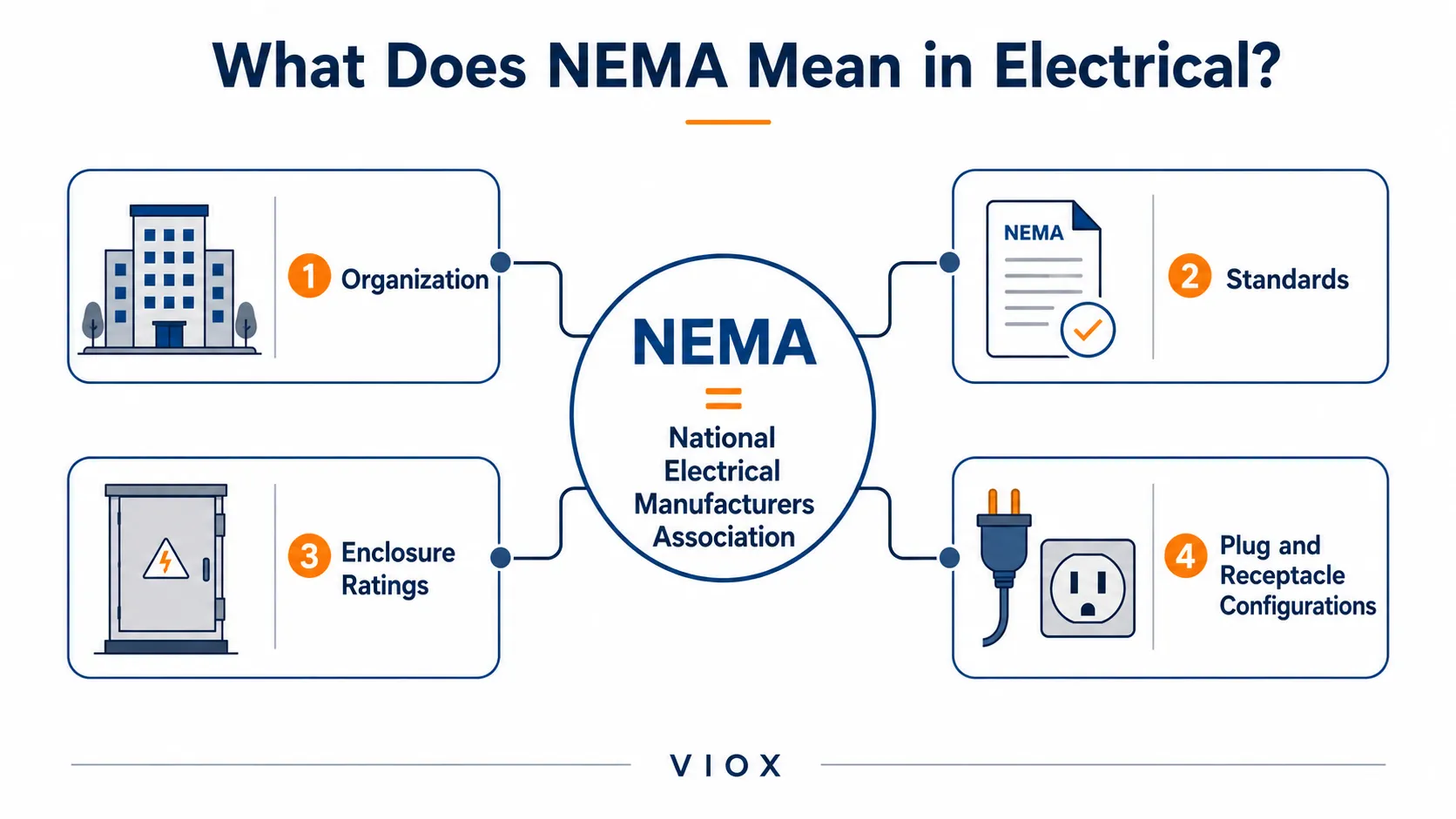
    NEMA meaning map showing organization, standards, enclosure ratings, and plug configurations
    NEMA meaning map: the organization, its standards, enclosure ratings, and plug configurations all sit under one terminology ecosystem.

    What Does NEMA Mean in Electrical?

    In electrical engineering and product selection, NEMA usually refers to one of four things:

    1. The organization: National Electrical Manufacturers Association.
    2. NEMA standards: technical standards developed for electrical products and systems.
    3. NEMA enclosure ratings: environmental protection types for electrical enclosures.
    4. NEMA plug and receptacle configurations: North American plug and outlet patterns.

    That is why the word “NEMA” can be confusing. A buyer may ask for a “NEMA box,” an engineer may specify a “NEMA 4X enclosure,” and an electrician may refer to a “NEMA plug.” These are related to the same standards ecosystem, but they do not mean the same thing.

    For VIOX readers, the most important practical meaning is this:

    NEMA helps define how certain electrical products are described, rated, and selected in North American electrical markets.


    NEMA Standards Explained

    NEMA develops standards for many electrical product categories. According to NEMA, its standards have played a role in the design, installation, and operation of technologies used to power, connect, protect, and light electrical systems. NEMA also describes itself as an ANSI-accredited standards developer.

    NEMA standards may relate to:

    • electrical enclosures
    • motors and motor controls
    • plugs and receptacles
    • lighting systems
    • industrial control equipment
    • power distribution equipment
    • medical imaging equipment
    • electrical infrastructure products

    NEMA standards are especially common in North American projects. In international projects, buyers often need to compare NEMA terminology with IEC terminology, because IEC standards are more common in many global markets.


    Is NEMA a Standard or a Certification?

    This is one of the most common misunderstandings.

    NEMA is an organization. NEMA standards are technical documents. A product described as meeting a NEMA standard is not automatically “NEMA certified” unless the manufacturer provides the required listing, test report, declaration, or conformity documentation required by the project or market.

    For example:

    Term What It Means Buyer Risk
    NEMA standard A technical standard or publication Do not assume compliance without documentation
    NEMA rating Commonly used for enclosure environmental protection type Must match installation environment
    NEMA certified Often used loosely in marketing Ask what certification, listing, or test report supports the claim
    NEMA logo Refers to the organization identity Not the same as product approval

    For procurement teams, the better question is not “Is it NEMA certified?” but:

    Which NEMA standard or rating is claimed, and what documentation proves that the product meets it?


    NEMA Ratings vs NEMA Standards

    NEMA ratings and NEMA standards are related, but they are not identical terms.

    Item Meaning Example
    NEMA standard A technical document covering product requirements, definitions, or test methods NEMA 250 for electrical enclosures
    NEMA rating A practical rating or type used to describe product suitability NEMA Type 1, 3R, 4, 4X, 12
    NEMA enclosure type Environmental protection classification for an enclosure NEMA 4X corrosion-resistant watertight enclosure
    NEMA plug configuration Plug/receptacle geometry and electrical configuration NEMA 5-15, NEMA L6-30

    When someone says “NEMA rating,” they are usually talking about enclosure protection, not the entire NEMA standards system.
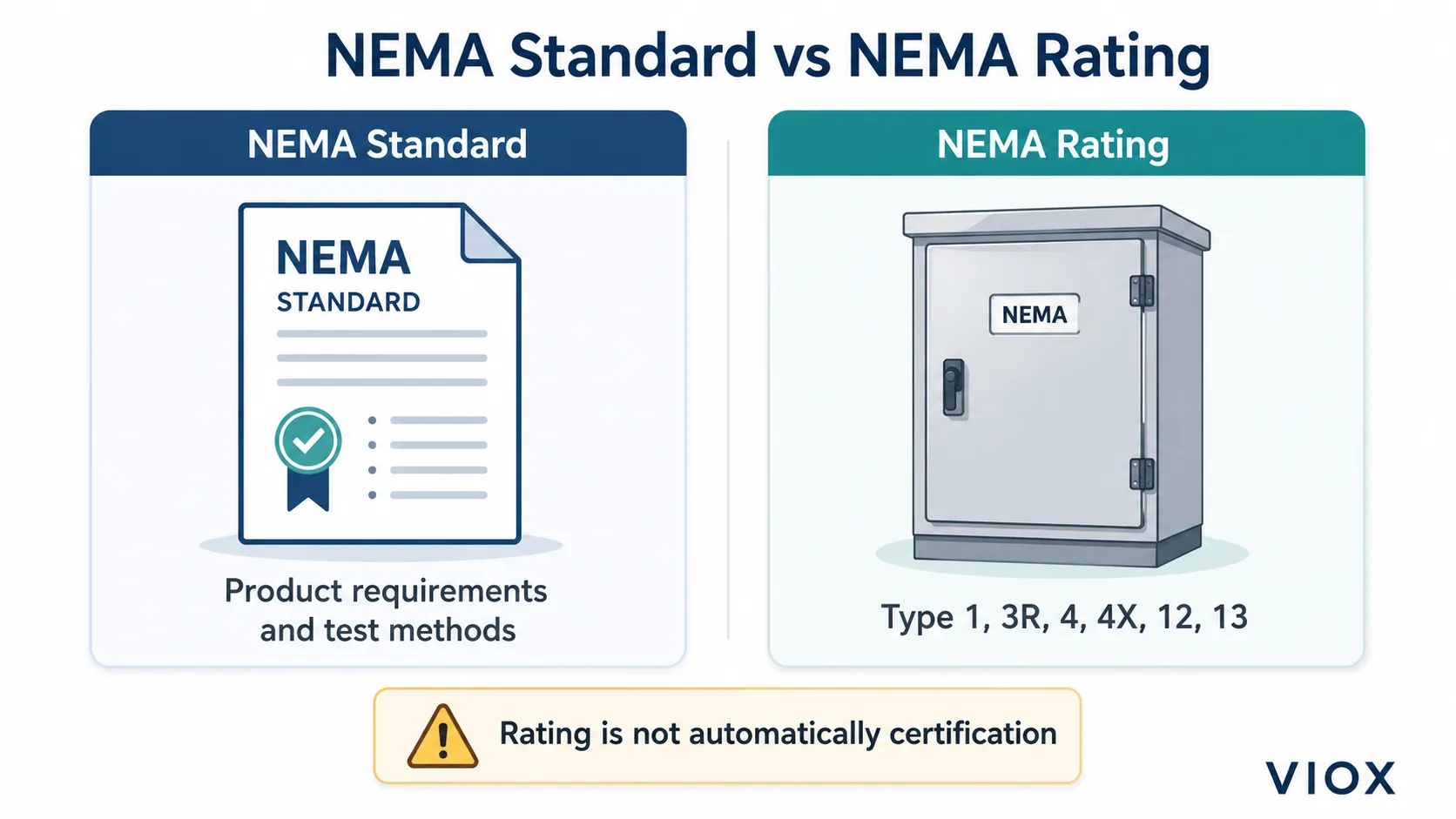
    NEMA standard versus NEMA rating comparison explaining standards documents and enclosure type ratings
    NEMA standard versus NEMA rating: standards are technical documents, while ratings are practical enclosure type classifications.

    For a deeper enclosure-specific explanation, see the VIOX guide to NEMA enclosure ratings.


    NEMA Enclosure Ratings at a Glance

    NEMA enclosure ratings describe the environmental conditions an electrical enclosure is intended to protect against. This may include contact with hazardous parts, dust, rain, hose-directed water, corrosion, oil, coolant, or other installation conditions depending on the type.

    Common examples include:

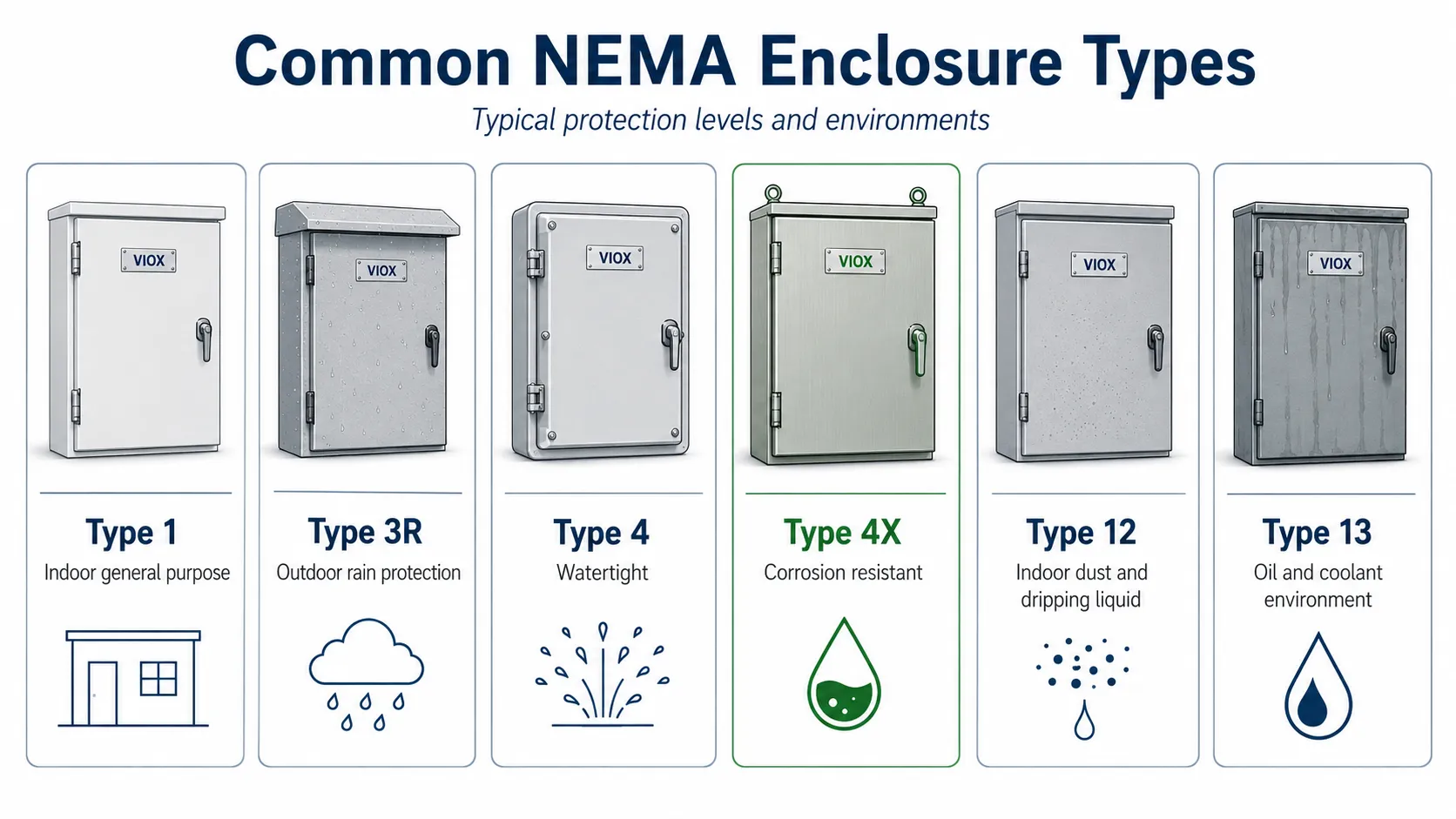
    NEMA Type General Meaning Typical Use
    Type 1 Indoor general-purpose protection Basic indoor electrical enclosures
    Type 3R Outdoor rain and sleet protection Outdoor panels where dust-tight protection is not required
    Type 4 Watertight protection Washdown areas, outdoor equipment
    Type 4X Watertight plus corrosion resistance Marine, chemical, wastewater, corrosive environments
    Type 12 Indoor dust, dirt, and dripping non-corrosive liquid protection Industrial control cabinets
    Type 13 Indoor dust, spraying water, oil, and non-corrosive coolant protection Machine tool and industrial environments
    Common NEMA enclosure types including Type 1, 3R, 4, 4X, 12, and 13 with typical applications
    Common NEMA enclosure types: Type 1, 3R, 4, 4X, 12, and 13, each matched to typical indoor, outdoor, washdown, and corrosive applications.

    The exact rating must be selected according to the installation environment. Do not assume that a higher number always means “better.” NEMA types are application-specific.


    NEMA vs IP Ratings

    NEMA ratings and IP ratings are both used to describe enclosure protection, but they are not the same system.

    Comparison Point NEMA IP Rating
    Common market North America International / IEC markets
    Main focus Environmental and application protection type Ingress protection against solids and water
    Format Type 1, 3R, 4, 4X, 12, 13, etc. IP54, IP65, IP66, IP67, etc.
    Scope May include corrosion, oil, coolant, icing, and other conditions depending on type Defined by digit-based solid and water ingress tests
    Direct conversion? Not always exact Not always exact
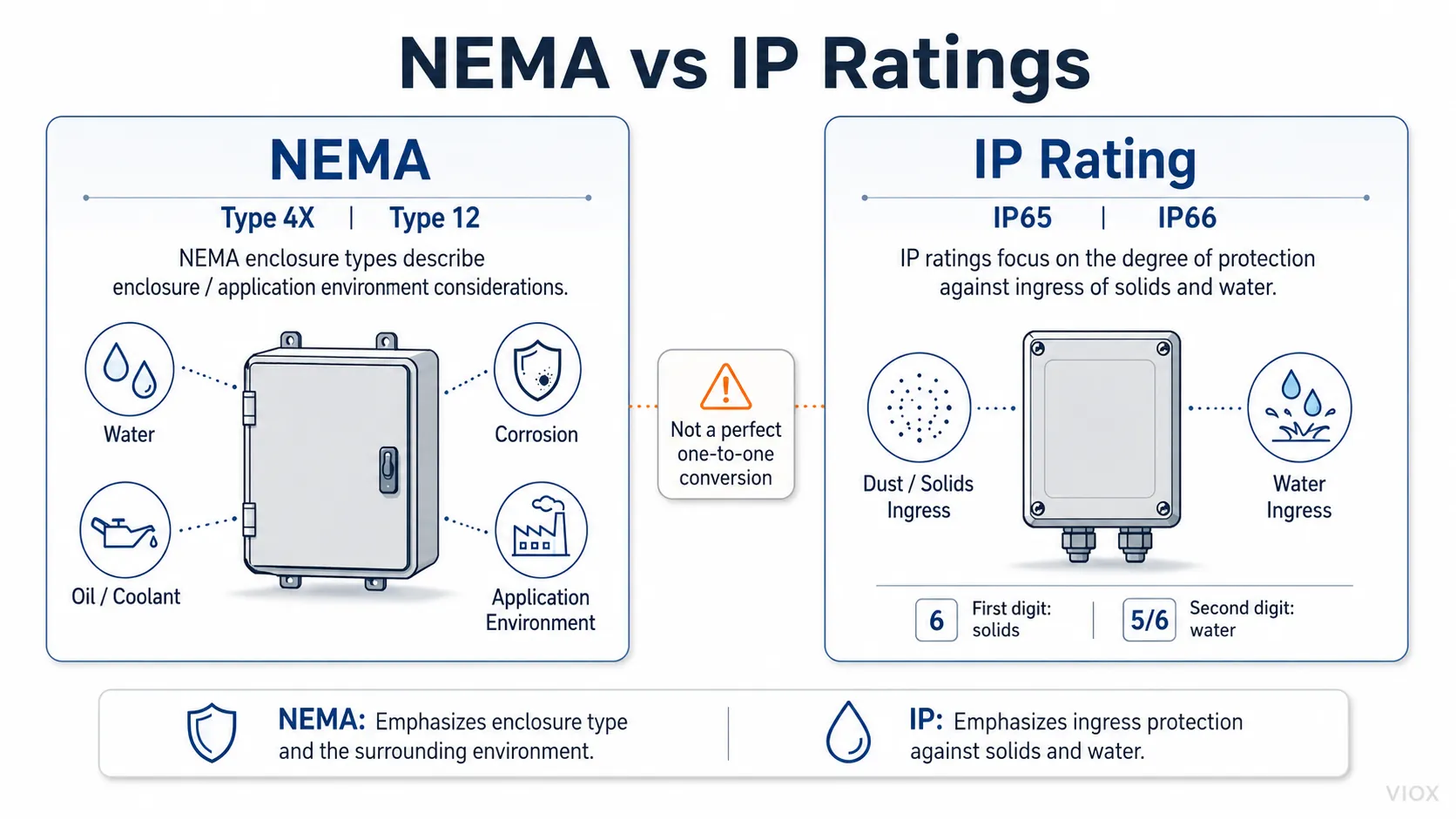
    NEMA vs IP rating comparison showing enclosure environment types and ingress protection differences
    NEMA vs IP ratings: NEMA types cover environmental and application conditions, while IP ratings focus on solid and water ingress.

    An IP rating should not be treated as a perfect one-to-one replacement for a NEMA type. For example, a project that specifies NEMA 4X may care not only about water protection but also corrosion resistance.


    Where NEMA Is Used in Electrical Products

    NEMA terminology appears across many electrical categories.

    Electrical Enclosures

    NEMA enclosure types are widely used for control panels, distribution boxes, junction boxes, industrial cabinets, motor control equipment, and outdoor electrical enclosures. The enclosure rating helps determine whether the box is suitable for indoor, outdoor, wet, dusty, corrosive, or washdown environments.

    For enclosure product selection, also see VIOX’s electrical enclosure mounting plate guide.

    Plugs and Receptacles

    In North America, NEMA configurations are commonly used to describe plug and receptacle types. For example, many people recognize NEMA designations for household and locking plugs. These are different from NEMA enclosure ratings.

    Motors and Motor Controls

    NEMA terminology also appears in motor and overload relay contexts. For example, NEMA trip classes are often compared with IEC trip classes in motor protection discussions. For more detail, see VIOX’s NEMA Class 20 vs IEC Class 10 overload relay guide.

    Distribution Equipment

    In North American terminology, a load center, panelboard, and distribution board may be discussed differently than in IEC-based markets. For the naming difference, see Load Center vs Distribution Board: NEMA vs IEC Difference.


    NEMA vs IEC: What Is the Difference?

    NEMA and IEC are both important in electrical product terminology, but they come from different standards environments.

    Item NEMA IEC
    Full name National Electrical Manufacturers Association International Electrotechnical Commission
    Common market North America International
    Typical use NEMA ratings, plug configurations, motor/control terminology Global product standards, IP ratings, switchgear standards
    Product language Common in US electrical specifications Common in global and IEC-based specifications

    For exporters, OEMs, and panel builders, this distinction matters. A buyer may ask for a NEMA-rated enclosure, while another may ask for an IEC/IP-rated enclosure. The two requests may sound similar but require different documentation and technical confirmation.


    Common Mistakes When Reading NEMA Terms

    Mistake 1: Treating NEMA as a product brand

    NEMA is not a product brand. It is an industry association and standards developer. A “NEMA enclosure” usually means an enclosure designed to a NEMA type rating, not an enclosure made by NEMA.

    Mistake 2: Assuming NEMA rating equals certification

    A NEMA type marking or claim should be supported by documentation. Depending on the project, this may involve test reports, UL listings, manufacturer declarations, or other compliance evidence.

    Mistake 3: Converting NEMA to IP too casually

    NEMA and IP ratings are not perfect equivalents. Some NEMA types include environmental considerations not captured by IP digits alone.

    Mistake 4: Confusing NEMA enclosure ratings with NEMA plugs

    NEMA 4X and NEMA 5-15 are not the same kind of designation. One relates to enclosures, while the other relates to plug and receptacle configuration.

    Mistake 5: Using NEMA terminology in an IEC project without clarification

    Global projects often require IEC-based documentation. If a project specification uses NEMA language, confirm whether the buyer also needs IP ratings, IEC test references, or local conformity documents.


    Quick Reference: NEMA Meaning by Context

    If You See This Term It Usually Means What to Check
    NEMA National Electrical Manufacturers Association Whether the context is standards, ratings, plugs, or organization
    NEMA full form National Electrical Manufacturers Association Use the full name on first mention
    NEMA electrical NEMA-related electrical standards or ratings Product category and applicable standard
    NEMA rating Usually enclosure environmental type Type number and installation environment
    NEMA 4X Watertight and corrosion-resistant enclosure type Material, gasket design, test documentation
    NEMA plug Plug/receptacle configuration Voltage, amperage, locking/non-locking type
    NEMA certification Often imprecise wording Ask for listing, test report, or conformity evidence

    FAQ

    What is the full form of NEMA?

    The full form of NEMA is National Electrical Manufacturers Association.

    What does NEMA stand for in electrical?

    In electrical contexts, NEMA stands for National Electrical Manufacturers Association. It is associated with standards and ratings for electrical products, especially in North American markets.

    What is NEMA meaning in electrical?

    NEMA meaning in electrical usually refers to standards, ratings, or classifications developed by the National Electrical Manufacturers Association for electrical equipment such as enclosures, motors, controls, plugs, and power distribution products.

    Is NEMA a standard or certification?

    NEMA is an organization, and NEMA standards are technical documents. A product is not automatically certified simply because it references a NEMA standard. Buyers should check the applicable standard, test report, listing, or manufacturer documentation.

    What is a NEMA rating?

    A NEMA rating usually refers to an enclosure type rating that describes environmental protection, such as indoor use, outdoor rain protection, watertight protection, corrosion resistance, dust protection, or oil and coolant resistance.

    What is NEMA 4X?

    NEMA 4X is an enclosure type commonly associated with watertight protection and corrosion resistance. It is often used in outdoor, washdown, marine, wastewater, or corrosive environments.

    Is NEMA the same as IP rating?

    No. NEMA and IP are different rating systems. IP ratings focus on solid and water ingress protection. NEMA enclosure types may also include additional environmental conditions such as corrosion, oil, coolant, or icing depending on the type.

    Is NEMA used outside the United States?

    NEMA terminology is most common in North America, but international buyers may encounter it when sourcing equipment for US-market projects or North American-style electrical specifications.

    Does the NEMA logo mean a product is certified?

    Not by itself. The NEMA logo refers to the organization. Product approval depends on the specific standard, test evidence, listing, or conformity documentation required for the application.


    Conclusion

    NEMA stands for National Electrical Manufacturers Association. In electrical work, the term matters because it appears in standards, enclosure ratings, plug configurations, motor-control terminology, and North American product specifications.

    For most buyers and engineers, the key is to identify what “NEMA” means in the specific context. A NEMA enclosure rating, a NEMA plug configuration, and a NEMA standard are related to the same standards ecosystem, but they are not the same thing. When specifying or sourcing electrical products, always check the exact NEMA type, standard reference, application environment, and supporting documentation before assuming a product is suitable.

  • Why Does Power Go Out During Storms? Complete Guide to Power Outages and Protection

    Why Does Power Go Out During Storms? Complete Guide to Power Outages and Protection

    Power outages during storms occur when severe weather damages electrical infrastructure, interrupts power lines, or forces utility companies to shut off electricity for safety reasons. Understanding why this happens and how to prepare can keep you safe and minimize disruption during severe weather events.

    What Causes Power Outages During Storms?

    Power goes out during storms

    Power goes out during storms due to five primary causes: falling trees and branches damaging power lines, high winds toppling utility poles, flooding damaging electrical equipment, lightning strikes overloading systems, and preventive shutoffs by utility companies to prevent fires or equipment damage.

    Key Storm-Related Power Outage Causes

    Cause How It Happens Storm Types Prevention Measures
    Falling Trees/Branches Heavy winds or ice cause trees to fall on power lines Thunderstorms, ice storms, hurricanes Tree trimming, underground lines
    High Winds Sustained winds over 39 mph can topple poles and lines Hurricanes, derechos, severe thunderstorms Reinforced infrastructure, guy wires
    Flooding Water damages transformers and underground equipment Hurricanes, flash floods, heavy rain Elevated equipment, waterproof housing
    Lightning Strikes Direct hits overload and damage electrical components Thunderstorms, severe weather Lightning arresters, surge protection
    Ice Accumulation Ice weight breaks power lines and poles Ice storms, freezing rain De-icing systems, stronger materials
    Preventive Shutoffs Utilities cut power to prevent fires or damage High fire risk conditions, severe weather Advanced monitoring, sectional shutoffs

    How Different Storm Types Affect Power Systems

    Thunderstorms and Power Outages

    Thunderstorms cause power outages through multiple mechanisms. Lightning creates electromagnetic pulses that can damage sensitive equipment even without direct strikes. Wind gusts exceeding 58 mph can snap power lines, while microbursts create concentrated downdrafts that topple entire sections of electrical infrastructure.

    ⚠️ Safety Warning: Never touch downed power lines during or after storms. Always assume they are energized and can cause electrocution.

    Hurricane Power Outages

    Hurricanes create widespread, long-lasting outages due to their size and sustained wind speeds. Category 1 hurricanes (74+ mph winds) can cause scattered outages, while Category 3+ storms (111+ mph) typically result in regional blackouts lasting weeks.

    Hurricane Category Wind Speed Typical Outage Duration Infrastructure Damage
    Category 1 74-95 mph 1-3 days Scattered line damage
    Category 2 96-110 mph 3-7 days Significant pole damage
    Category 3 111-129 mph 1-3 weeks Widespread infrastructure damage
    Category 4+ 130+ mph 3-8 weeks Complete system rebuilding required

    Ice Storm Power Outages

    Ice storms create particularly dangerous conditions for power systems. Just 1/4 inch of ice accumulation can snap power lines, while 1/2 inch can bring down large tree branches. Ice storms often cause longer outages than wind storms because repair crews must wait for safe conditions before beginning restoration work.

    ? Expert Tip: Ice storms are often more destructive to power grids than hurricanes because ice accumulation affects every surface uniformly, creating widespread simultaneous failures.

    How Power Systems Work and Why They’re Vulnerable

    Understanding the Electrical Grid

    The electrical grid operates as an interconnected network where power flows from generation sources through transmission lines (high voltage) to distribution lines (lower voltage) that serve individual customers. This interconnected design means that damage at any point can affect service to thousands of customers.

    Critical Vulnerability Points

    1. Overhead Power Lines: Exposed to wind, falling debris, and weather
    2. Transformers: Sensitive to flooding, surges, and physical damage
    3. Switching Equipment: Contains delicate electronics vulnerable to water and power surges
    4. Substations: Central hubs that affect large service areas when damaged
    5. Underground Cables: Vulnerable to flooding and ground saturation

    Storm Preparation: Protecting Your Power Supply

    Before the Storm: Preparation Checklist

    Essential Power Outage Preparation:

    1. Assemble emergency kit with flashlights, batteries, and battery-powered radio
    2. Charge all electronic devices and portable power banks
    3. Fill bathtubs and containers with water (electric pumps may fail)
    4. Stock non-perishable food requiring no cooking
    5. Locate manual can opener and paper plates/cups
    6. Test backup power sources (generators, UPS systems)
    7. Know locations of main electrical panel and gas shutoffs

    Backup Power Options Comparison

    Power Source Runtime Cost Range Best Applications Safety Considerations
    Portable Generator 8-12 hours per tank $300-$3,000 Essential appliances Never use indoors – carbon monoxide risk
    Standby Generator Continuous (natural gas) $3,000-$15,000 Whole house backup Professional installation required
    Battery Backup (UPS) 15 minutes-2 hours $50-$500 Electronics protection Limited capacity
    Power Banks 1-3 device charges $20-$200 Phone/tablet charging Requires pre-charging
    Solar Generators Varies with sun/battery $500-$5,000 Quiet, renewable option Weather dependent

    ⚠️ Critical Safety Warning: Never operate gas generators indoors or in enclosed spaces. Carbon monoxide is invisible, odorless, and deadly.

    During Power Outages: Safety and Management

    Immediate Actions When Power Goes Out

    1. Check if outage is widespread: Look outside to see if neighbors have power
    2. Report outage to utility company: Use mobile app or phone hotline
    3. Turn off major appliances: Prevent damage from power surges when electricity returns
    4. Use flashlights, not candles: Reduce fire risk
    5. Keep refrigerator and freezer doors closed: Maintain food safety
    6. Monitor weather updates: Stay informed about storm progression

    Food Safety During Extended Outages

    Time Without Power Refrigerator Items Freezer Items Action Required
    0-4 hours Safe if doors stay closed Safe if doors stay closed Monitor temperature
    4-24 hours Discard perishables Usually safe if full Check temperatures
    24+ hours Discard most items Evaluate case by case Use food thermometer

    ? Expert Tip: A full freezer maintains safe temperatures twice as long as a half-full freezer. Fill empty space with water containers before storms.

    Power Restoration Process

    How Utility Companies Restore Power

    Power restoration follows a priority system designed to restore service to the greatest number of customers in the shortest time. This process involves four key phases:

    1. Damage Assessment: Crews survey damage using helicopters, drones, and ground teams
    2. Transmission Repair: High-voltage lines serving multiple areas get priority
    3. Distribution Repair: Neighborhood and street-level repairs follow
    4. Individual Service: House-by-house restoration happens last

    Restoration Priority Order

    Priority Level Customer Type Typical Restoration Time
    Level 1 Hospitals, emergency services 0-12 hours
    Level 2 Large commercial areas 12-24 hours
    Level 3 High-density residential 1-3 days
    Level 4 Rural and isolated customers 3-7 days

    Long-Term Storm Protection Strategies

    Home-Level Improvements

    Electrical System Upgrades:

    • Install whole-house surge protector ($150-$400)
    • Upgrade to underground electrical service where possible
    • Add transfer switch for generator connection ($500-$1,500)
    • Consider battery backup systems for critical circuits

    Community-Level Solutions

    Modern utility companies are implementing smart grid technologies that automatically reroute power around damaged sections, significantly reducing outage duration and scope. These systems use advanced sensors and automated switching to isolate problems and restore service faster.

    ⚡ Professional Recommendation: Have a licensed electrician inspect your electrical panel annually and install GFCI protection in areas prone to water exposure.

    Quick Reference: Storm Power Outage Guide

    Emergency Contact Information to Keep Handy

    • Utility company outage hotline
    • Local emergency services
    • Insurance company claim hotline
    • Generator service/repair company

    72-Hour Outage Survival Kit

    • Water (1 gallon per person per day)
    • Non-perishable food for 3 days
    • Battery-powered or hand-crank radio
    • Flashlights and extra batteries
    • First aid kit and medications
    • Whistle for signaling help
    • Dust masks and plastic sheeting
    • Manual can opener and paper goods

    Frequently Asked Questions About Storm Power Outages

    Why does my power go out before the storm hits?

    Utility companies sometimes shut off power preemptively when high winds are forecast to prevent downed lines from starting fires or to protect workers who might need to make emergency repairs. This practice, called “preemptive shutoffs,” prioritizes public safety over convenience.

    How long do power outages typically last after storms?

    Power outage duration depends on storm severity, infrastructure damage, and utility response capabilities. Typical timeframes range from 2-8 hours for thunderstorms, 1-5 days for moderate wind storms, and 1-4 weeks for major hurricanes or ice storms with extensive infrastructure damage.

    Why does my neighbor have power when I don’t?

    Power distribution systems divide neighborhoods into sections served by different transformers and circuits. Your neighbor may be on a different electrical circuit that wasn’t damaged, or their section may have been prioritized for faster restoration due to infrastructure accessibility.

    Can I use my generator to power my whole house?

    Only if you have a properly installed transfer switch and a generator sized for your electrical load. Never connect a portable generator directly to your home’s electrical system without a transfer switch – this creates dangerous “back-feed” that can electrocute utility workers.

    Should I unplug appliances during a storm?

    Yes, unplug sensitive electronics during storms to protect them from power surges. However, leave one lamp plugged in so you’ll know when power returns. Major appliances like refrigerators can stay plugged in but should be turned off to prevent damage from power fluctuations.

    How can I tell if my area is prone to frequent outages?

    Check your utility company’s reliability statistics, typically available online. Look for System Average Interruption Duration Index (SAIDI) and System Average Interruption Frequency Index (SAIFI) data. Higher numbers indicate more frequent or longer outages.

    What should I do if I smell gas during a power outage?

    Leave the area immediately and call your gas company’s emergency line from a safe location away from the building. Never use open flames or electrical switches near suspected gas leaks. Natural gas leaks often occur when storms damage underground utilities.

    Why do some areas get power back faster than others?

    Restoration priority depends on several factors: number of customers affected, critical infrastructure needs (hospitals, schools), accessibility for repair crews, and extent of damage. Areas with underground utilities typically restore faster than those with overhead lines.

    Conclusion: Staying Safe and Prepared

    Power outages during storms are inevitable, but understanding why they occur and how to prepare minimizes their impact on your safety and comfort. The key to weathering storm-related outages lies in advance preparation, appropriate backup power solutions, and following safety protocols during restoration.

    Remember that utility crews work around the clock in dangerous conditions to restore your power. Report outages promptly, be patient during restoration efforts, and never attempt electrical repairs yourself. Professional electricians and utility workers have the training and equipment to safely restore power to your community.

    Take Action Now: Create your storm preparedness plan before the next severe weather event. Assemble your emergency kit, identify backup power needs, and establish communication plans with family members. Preparation today prevents panic tomorrow.

    Related

    How to Tell if a Surge Protector is On

  • Can Junction Boxes Be Behind Drywall

    Can Junction Boxes Be Behind Drywall

    Direct Answer: No, junction boxes cannot be completely hidden behind drywall. According to the National Electrical Code (NEC), all junction boxes must remain accessible without removing any part of the building structure or finish materials. This critical safety requirement prevents electrical hazards and ensures proper maintenance access.

    wire under drywall

    Understanding junction box accessibility requirements is essential for safe electrical installations, code compliance, and avoiding costly repairs. Whether you’re a homeowner planning renovations or a professional electrician, this guide provides everything you need to know about proper junction box placement and access requirements.

    What Are Junction Boxes and Why Accessibility Matters

    A junction box is an electrical enclosure that contains wire connections, splices, or electrical devices. These boxes serve as critical safety components by:

    • Containing electrical arcs and sparks
    • Protecting wire connections from physical damage
    • Preventing electrical fires from spreading
    • Providing organized access points for electrical systems

    Why Junction Boxes Must Remain Accessible:

    The NEC mandates accessibility because electrical connections can fail over time, requiring inspection, maintenance, or repair. Hidden junction boxes create dangerous situations where:

    • Faulty connections can’t be quickly identified
    • Emergency shutoffs become impossible
    • Fire hazards remain undetected
    • Electrical troubleshooting becomes extremely difficult

    NEC Code Requirements for Junction Box Accessibility

    Article 314.29: Junction Box Access Requirements

    The National Electrical Code clearly states in Article 314.29 that junction boxes must be accessible. Here’s what this means:

    “Accessible” Definition According to NEC:

    • Admitting close approach
    • Not permanently closed in by building structure
    • Not requiring removal of panels, doors, or similar building elements
    • Easily reached for inspection and maintenance

    Key Code Compliance Points

    Requirement Code Section Practical Application
    Must be accessible 314.29 No drywall covering allowed
    Behind removable panels 314.29 Exception Cabinet or fixture panels only
    Proper marking/labeling 110.22 Clear identification required
    Working space clearance 110.26 30-inch minimum access space
    Equipment grounding 250.148 Proper grounding continuity

    ⚠️ Safety Warning: Covering junction boxes with drywall violates electrical codes and creates serious fire and electrocution hazards. Always consult a licensed electrician for electrical work.

    What Makes a Junction Box “Accessible” vs “Hidden”

    Understanding the difference between accessible and hidden installations is crucial for code compliance:

    Accessible Installation Requirements

    Proper Access Methods:

    1. Surface-mounted boxes on finished walls
    2. Recessed boxes with removable cover plates
    3. Boxes behind removable panels (cabinet doors, access panels)
    4. Ceiling-mounted boxes with drop-down access
    5. Basement or crawl space installations with clear pathways

    Prohibited Hidden Installations

    Code Violations Include:

    • Junction boxes drywalled over completely
    • Boxes behind permanently fixed walls
    • Installations requiring structural demolition for access
    • Boxes covered by flooring or ceiling materials
    • Hidden splices without proper junction box enclosure

    Comparison: Accessible vs Hidden Junction Box Installations

    Aspect Accessible Installation Hidden Installation
    Code Compliance ✅ NEC Compliant ❌ Code Violation
    Safety Level ✅ High – Easy inspection ❌ Dangerous – No access
    Maintenance ✅ Simple repairs/updates ❌ Requires demolition
    Fire Safety ✅ Quick problem identification ❌ Hidden fire hazards
    Insurance Coverage ✅ Full coverage ❌ May void claims
    Resale Value ✅ Increases home value ❌ Reduces marketability
    Inspection Compliance ✅ Passes electrical inspections ❌ Fails inspections
    Professional Installation ✅ Meets electrician standards ❌ Requires correction

    Proper Junction Box Placement Solutions

    Option 1: Surface-Mounted Installations

    Best For: Finished basements, utility rooms, commercial spaces

    Installation Process:

    1. Mount junction box directly to wall surface
    2. Install appropriate cover plate
    3. Ensure 30-inch working clearance
    4. Label box contents clearly
    5. Maintain proper conductor lengths

    Option 2: Recessed Behind Access Panels

    Best For: Living spaces requiring aesthetic considerations

    Requirements:

    • Removable access panels only
    • No tools required for panel removal
    • Clear marking of electrical access
    • Panels must open to full box access
    • Cannot be permanent cabinet installations

    Option 3: Basement or Crawl Space Mounting

    Best For: New construction and major renovations

    Code Requirements:

    • Adequate headroom (minimum 6 feet where possible)
    • Safe access pathway
    • Proper lighting for inspection
    • Protection from physical damage
    • Appropriate environmental rating

    Step-by-Step Guide: Making Hidden Junction Boxes Code-Compliant

    Step 1: Locate All Hidden Boxes

    1. Turn off power at the main breaker
    2. Use a stud finder with electrical detection
    3. Check for warm spots on walls (may indicate hidden connections)
    4. Trace wire paths from panels and fixtures
    5. Document locations with photos and measurements

    Step 2: Create Proper Access

    1. Mark box locations accurately
    2. Cut drywall to expose box completely
    3. Install appropriate junction box if missing
    4. Ensure proper wire connections and secure splices
    5. Verify adequate working space clearances

    Step 3: Install Access Solutions

    1. Option A: Install removable access panel
    2. Option B: Relocate box to accessible location
    3. Option C: Replace with surface-mounted installation
    4. Ensure all connections meet current code requirements
    5. Test electrical continuity and proper grounding

    Step 4: Final Inspection and Documentation

    1. Schedule electrical inspection if required
    2. Update electrical panel directory
    3. Photograph final installation for records
    4. Ensure all access points are clearly marked
    5. Provide documentation to homeowner

    ? Expert Tip: When relocating junction boxes, always use appropriately sized conductors and maintain proper splice techniques. Oversized boxes provide better accessibility and future expansion capabilities.

    Common Junction Box Access Violations and Solutions

    Violation 1: Boxes Covered by Drywall

    Problem: Complete concealment behind finished walls
    Solution: Cut access opening and install removable panel
    Cost Impact: $150-$300 per box correction

    Violation 2: Inadequate Working Space

    Problem: Less than 30-inch clearance for access
    Solution: Relocate box or remove obstructions
    Code Reference: NEC 110.26

    Violation 3: Unmarked Access Panels

    Problem: Hidden panels without electrical identification
    Solution: Install proper electrical warning labels
    Requirement: NEC 110.22 identification standards

    Violation 4: Tool-Required Access

    Problem: Panels requiring screwdrivers or special tools
    Solution: Install finger-pull or quarter-turn fasteners
    Standard: Quick access without tools

    Safety Considerations and Professional Recommendations

    Critical Safety Points

    ⚠️ Fire Hazard Prevention:

    • All wire splices must occur inside approved junction boxes
    • Proper conductor sizing prevents overheating
    • Ground fault protection where required by code
    • Regular inspection schedules for older installations

    ⚠️ Electrocution Prevention:

    • Always turn off power before electrical work
    • Test circuits with approved voltage testers
    • Maintain proper grounding continuity
    • Use appropriate personal protective equipment

    When to Call a Professional

    Require Licensed Electrician:

    • Moving junction boxes to new locations
    • Upgrading electrical panels or circuits
    • Installing new branch circuits
    • Working with 240-volt circuits
    • Any work requiring electrical permits

    Professional Benefits:

    • Code compliance guarantee
    • Proper permit acquisition
    • Insurance liability coverage
    • warranty on electrical work
    • Expert safety protocols

    Cost Analysis: Junction Box Access Solutions

    Solution Type Material Cost Labor Cost Total Investment Timeline
    Access Panel Installation $25-$50 $100-$200 $125-$250 1-2 hours
    Surface Mount Conversion $40-$80 $150-$300 $190-$380 2-3 hours
    Box Relocation $60-$120 $200-$400 $260-$520 3-4 hours
    New Circuit Installation $150-$300 $300-$600 $450-$900 4-6 hours

    ? Cost-Saving Tip: Address multiple junction box violations during single service call to reduce labor costs. Many electricians offer package pricing for multiple box corrections.

    Quick Reference: Junction Box Access Checklist

    Pre-Installation Checklist

    • Verify electrical code requirements
    • Plan accessible locations only
    • Ensure adequate working clearances
    • Select appropriate box sizes
    • Confirm proper environmental ratings

    Post-Installation Verification

    • All boxes easily accessible
    • Proper cover plates installed
    • Clear identification labeling
    • Code compliance verification
    • Electrical inspection scheduled

    Maintenance Schedule

    • Annual visual inspection
    • Check for loose connections
    • Verify cover plate security
    • Test GFCI protection where applicable
    • Update electrical documentation

    Frequently Asked Questions

    Can I install a junction box behind a removable panel?

    Yes, junction boxes can be installed behind removable panels as long as the panel doesn’t require tools for removal and provides complete access to the box. The panel must be clearly marked as electrical access.

    What happens if I drywall over a junction box?

    Covering junction boxes with drywall violates electrical codes, creates fire hazards, and can void homeowner’s insurance. You must create proper access or relocate the box to an accessible location.

    How much clearance is required around junction boxes?

    The NEC requires minimum 30-inch clearance in front of electrical equipment for safe access and maintenance. Side clearances depend on the specific installation requirements.

    Can junction boxes be in walls between rooms?

    Junction boxes can be installed in interior walls if they remain accessible from at least one side. Both sides don’t need access, but complete concealment is prohibited.

    What’s the difference between junction boxes and outlet boxes?

    Junction boxes contain only wire splices and connections, while outlet boxes house receptacles, switches, or fixtures. Both must remain accessible, but outlet boxes naturally provide access through their devices.

    Do all wire splices need junction boxes?

    Yes, all wire splices must be contained in approved electrical boxes. Direct splices in walls, attics, or other concealed spaces without proper enclosures violate electrical codes.

    How do I find hidden junction boxes in my home?

    Use electrical circuit tracers, thermal imaging, or hire an electrician with professional detection equipment. Check areas where multiple circuits might converge, such as room corners or ceiling fixtures.

    Can I use a cabinet as access for junction boxes?

    Removable cabinet panels can provide junction box access, but permanent cabinet installations don’t qualify. The access must be easily removable without tools and clearly marked.

    Expert Recommendations and Best Practices

    Professional Installation Standards

    Industry Best Practices:

    1. Oversized boxes provide better access and future expansion
    2. Consistent labeling systems improve maintenance efficiency
    3. Strategic placement considers both access and aesthetics
    4. Quality materials ensure long-term reliability and safety
    5. Proper documentation assists future electrical work

    Future-Proofing Strategies

    Smart Installation Planning:

    • Install extra junction boxes during construction
    • Use larger boxes to accommodate future circuits
    • Plan accessible routes for electrical upgrades
    • Consider smart home wiring requirements
    • Maintain detailed electrical drawings

    ? Expert Tip: Always photograph electrical installations before closing walls. This documentation proves invaluable for future modifications and troubleshooting.

    Conclusion: Ensuring Safe and Code-Compliant Junction Box Installations

    Junction boxes must never be hidden behind drywall or other permanent building materials. The NEC’s accessibility requirements exist to protect lives and property by ensuring electrical connections remain inspectable and serviceable. Whether you’re dealing with existing violations or planning new installations, always prioritize safety and code compliance.

    For complex electrical work or code compliance questions, consult with a licensed electrician who can ensure your installation meets all local and national electrical standards. Proper junction box accessibility is an investment in your home’s safety, value, and electrical system reliability.

    Take Action: If you suspect hidden junction boxes in your home, schedule a professional electrical inspection to ensure code compliance and safety. Don’t compromise on electrical safety—the risks are simply too great.

    Related

    Complete Guide to Circuit Breaker Symbols

    Terminal Box vs Junction Box

    Difference Between a Combiner Box and a Junction Box

    Understanding Electrical Junction Box Types

  • What Size Wire for a 30 Amp Breaker?

    What Size Wire for a 30 Amp Breaker?

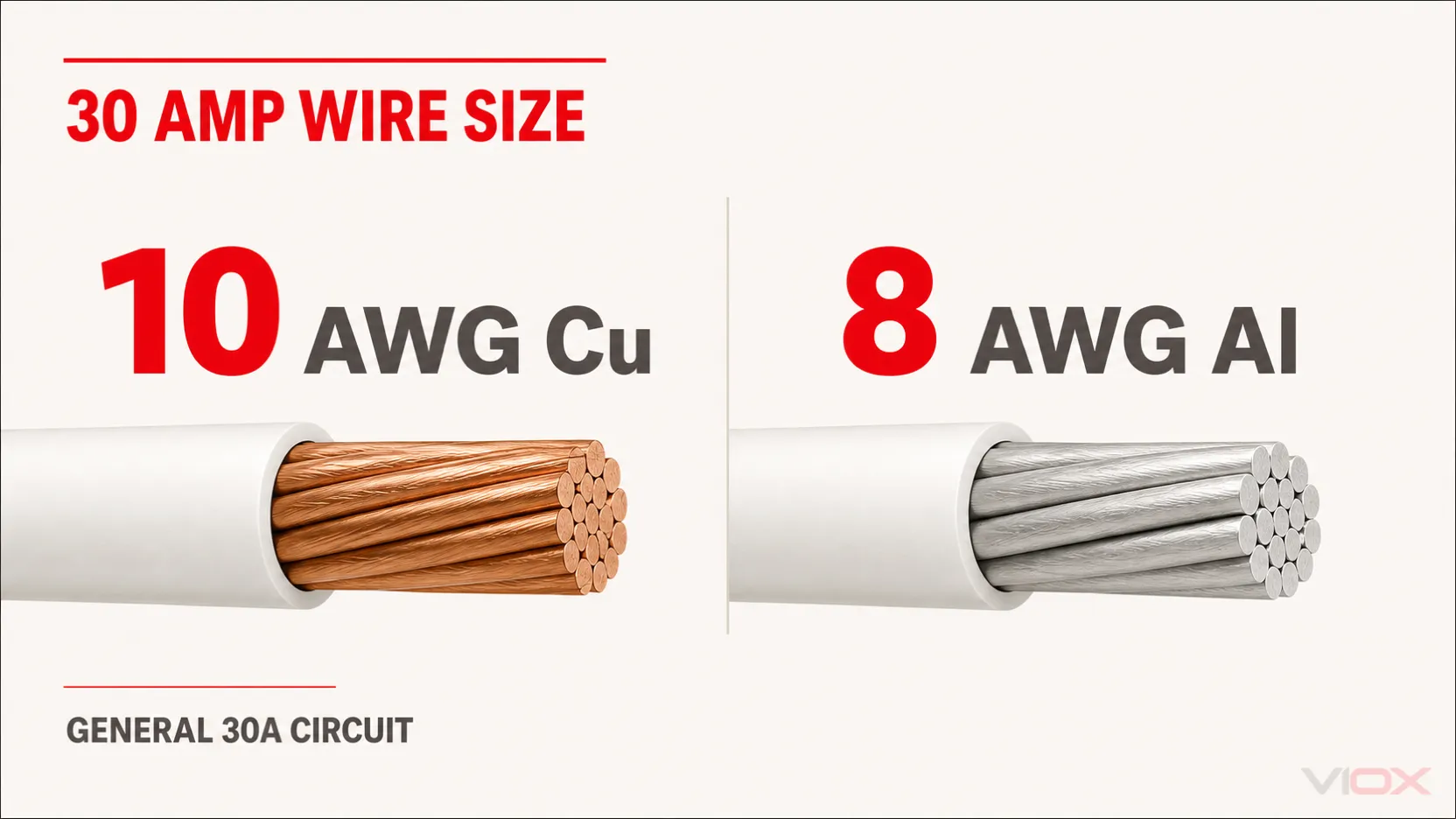
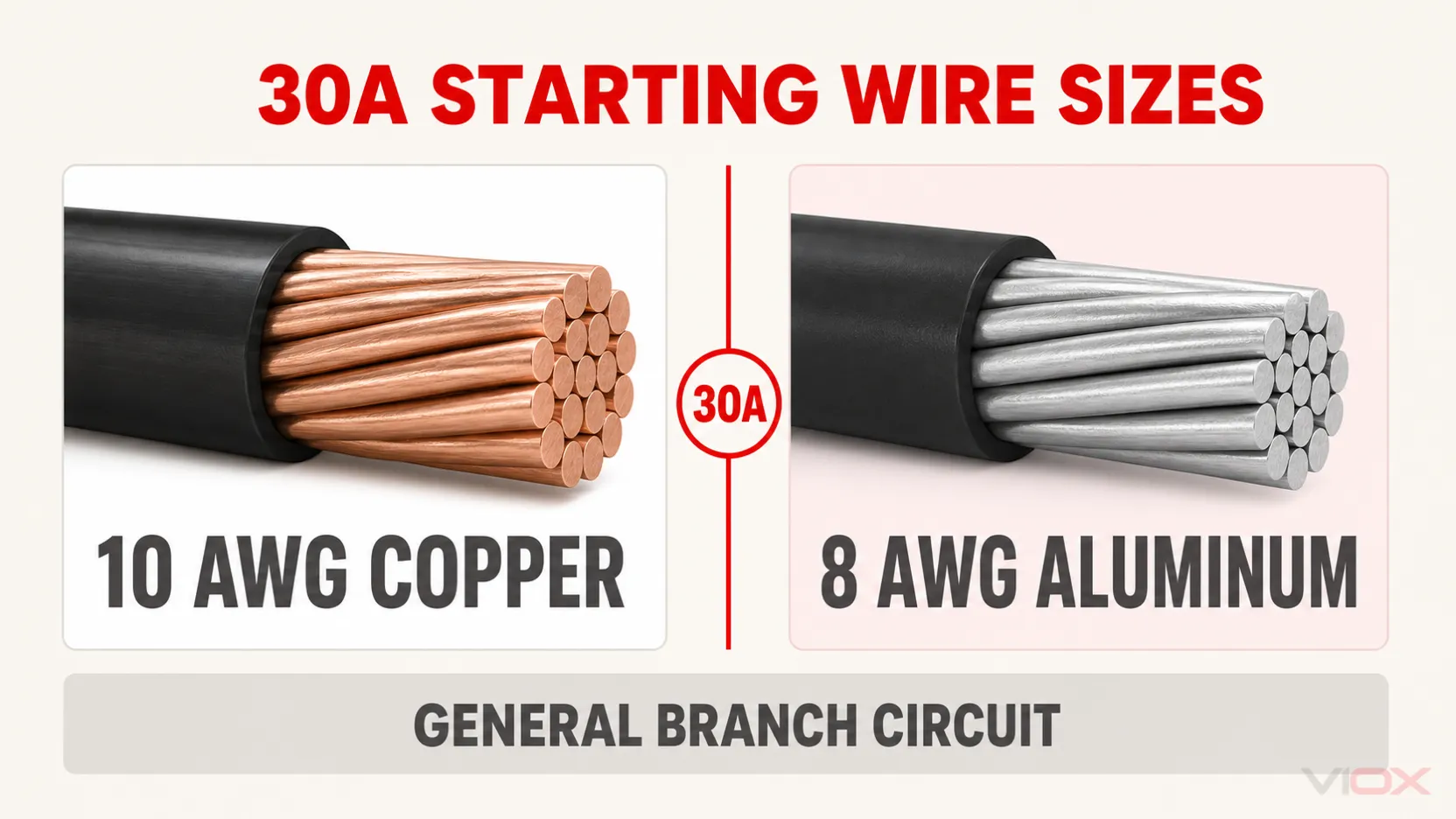
    For most ordinary 30 amp circuits, use 10 AWG copper wire or 8 AWG aluminum wire. A standard 30A circuit normally supports no more than 24A of continuous load, because 24A × 125% = 30A.

    That is the correct first-screen answer, not a universal installation prescription. The final 30 amp wire size still depends on the load calculation, conductor material, wiring method, terminal temperature ratings, ambient temperature, the number of current-carrying conductors, voltage drop, and any equipment-specific instructions.

    Safety note: Branch-circuit design and panel work are code-dependent and can expose workers to lethal voltage and arc-flash hazards. Use the code adopted by the local authority having jurisdiction (AHJ), the equipment instructions, and a qualified electrician or electrical engineer for the final design and installation.

    Code edition note: NFPA publishes the 2026 National Electrical Code (NEC), NFPA 70 as the current edition, but jurisdictions adopt different editions on different schedules. The 2026 edition also reorganized parts of the code. Where this article identifies a 2023 NEC section or table, treat the number as edition-specific and verify the equivalent rule in the edition enforced for the project.

    30 Amp Wire Size at a Glance

    Proposed conductor or condition Normal 30A decision Why
    10 AWG copper NM-B Yes, for a typical dry-location 30A circuit before any required correction or adjustment NM-B ampacity is limited to the 60°C value; #10 copper is 30A at 60°C
    10 AWG copper THHN/THWN-2 in raceway Yes, subject to terminals and installed conditions Table ampacity may be higher, but the ordinary small-conductor overcurrent limit remains 30A
    12 AWG copper THHN/THWN-2 No for an ordinary general-purpose 30A circuit The 90°C table value does not override the normal small-conductor protection limit
    10 AWG aluminum or copper-clad aluminum No for an ordinary 30A circuit The 2023 NEC small-conductor rule normally limits it to 25A
    8 AWG aluminum XHHW-2 or THHN/THWN-2 Common aluminum starting size, if both ends accept aluminum Manufacturer data shows at least 30A ampacity under the relevant temperature conditions; terminals and product listing still control
    HVAC equipment with MCA/MOCP markings Use the nameplate calculation Special equipment rules can permit a conductor-to-breaker relationship that a general lookup table would reject

    This table selects a starting conductor size. It does not by itself specify cable type, raceway, wet-location suitability, breaker compatibility, conductor count, grounding, or the load equipment’s connection requirements.

    Comparison of 10 AWG copper and 8 AWG aluminum wire for a 30 amp circuit

    Key Takeaways

    • 10 AWG copper is the normal answer for a general 30A branch circuit.
    • 8 AWG aluminum is the normal aluminum starting size. Ten AWG aluminum is generally limited to 25A for ordinary branch-circuit protection.
    • A normal 30A circuit supports up to 24A of continuous load. A load that draws 30A continuously requires at least 37.5A of circuit capacity before other factors are applied.
    • The 35A or 40A table ampacity shown for some 10 AWG copper insulation does not normally authorize a 35A or 40A breaker.
    • NM-B, THHN/THWN-2, and XHHW-2 are not interchangeable labels. Their permitted locations and usable ampacity conditions differ.
    • There is no universal “100 ft maximum.” The same conductor and load have twice the voltage-drop percentage at 120V that they have at 240V.
    • HVAC, motor, welder, and other special loads may follow equipment-specific rules. Read the nameplate and installation instructions before applying the general answer.

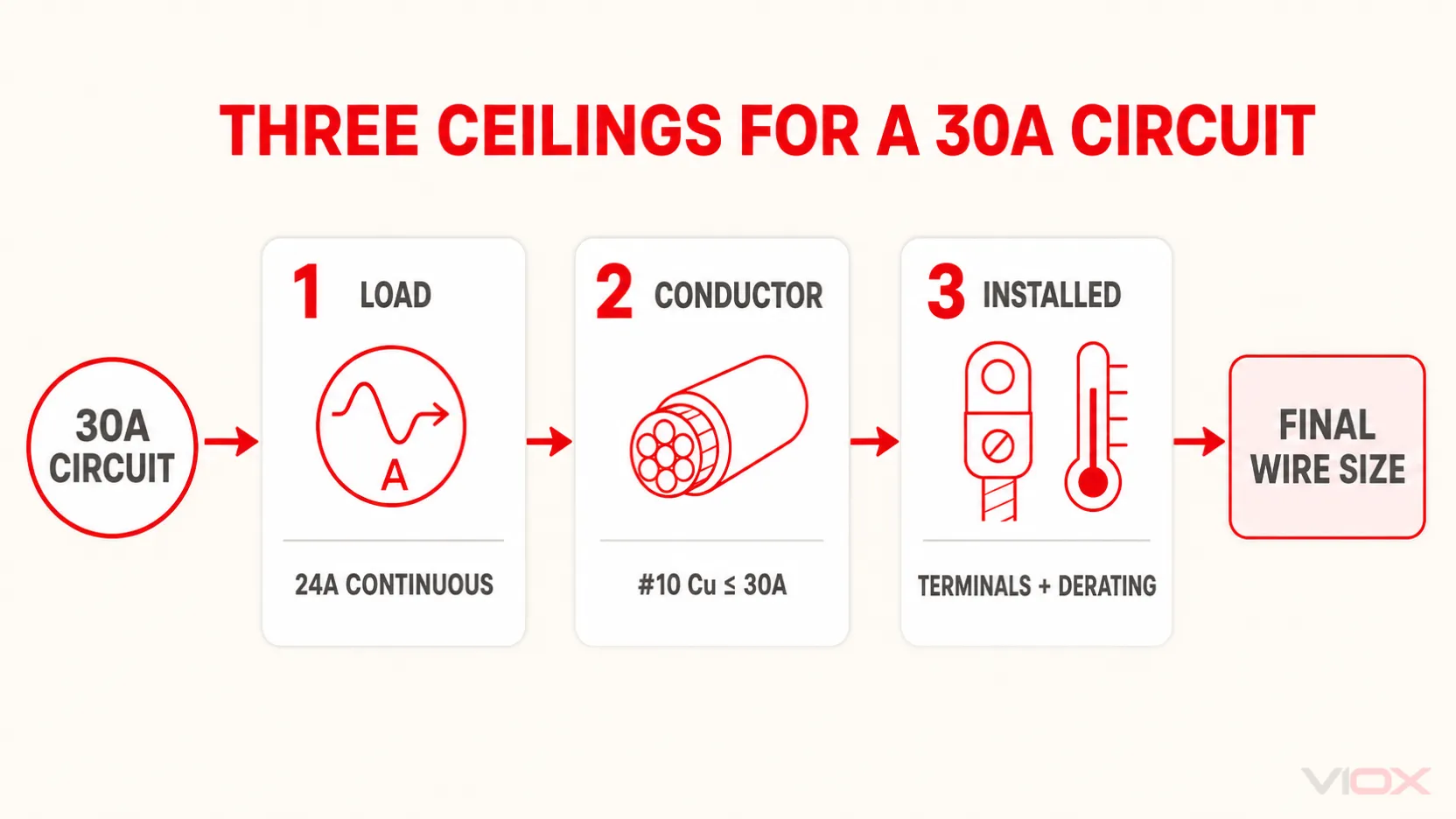
    The Three Ceilings That Control 30 Amp Wire Size

    A useful 30A conductor specification must pass three independent ceilings. Passing only one is not enough.

    Ceiling Question to answer 30A pass condition
    1. Load ceiling What ampacity does the calculated load require? Non-continuous load plus 125% of continuous load, or the applicable equipment calculation, does not exceed circuit capacity
    2. Conductor ceiling What ampacity and overcurrent protection does this conductor actually permit? The conductor passes its ampacity table, wiring-method rule, and small-conductor protection limit
    3. Installed ceiling Do terminals and field conditions reduce the usable result? Both ends accept the material/size/temperature basis, and adjusted ampacity remains adequate
    Three-ceiling framework for selecting wire size for a 30 amp breaker

    VIOX’s broader wire gauge and circuit breaker sizing chart shows the surrounding ampere ratings. This article goes deeper on the exact boundary that makes 10 AWG copper valid—or invalid—for a 30A circuit.

    Ceiling 1: Calculate the Load Before Selecting the Wire

    For a typical branch circuit containing continuous and non-continuous loads, the general sizing relationship is:

    Required circuit ampacity = non-continuous load + 125% of continuous load

    A continuous load is generally one expected to operate at maximum current for three hours or more. For an ordinary 30A circuit:

    30A ÷ 1.25 = 24A maximum continuous load

    The practical power limits at that continuous current are:

    • 120V × 24A = 2,880W
    • 240V × 24A = 5,760W

    Voltage does not change the conductor’s basic ampacity, but it changes the available power and the percentage impact of voltage drop.

    If a load itself draws 30A continuously:

    30A × 1.25 = 37.5A required capacity

    That load does not belong on an ordinary 30A circuit. It normally leads to a 40A-or-larger circuit design, with the conductor, overcurrent device, terminals, and equipment configuration recalculated together. Do not keep 10 AWG wire and simply increase the breaker. The VIOX guide to circuit-breaker load calculation explains the upstream sizing process.

    Do Not Apply 125% Twice

    Some equipment provides a required branch-circuit rating, Minimum Circuit Ampacity (MCA), or another value that already incorporates an equipment-specific calculation. Follow the nameplate, installation instructions, and applicable code method. Adding another 125% without checking the basis can oversize the circuit and still fail to follow the equipment rule.

    Ceiling 2: Understand Why 10 AWG Copper Stops at 30A

    The ampacity table and the maximum permitted breaker are related but not identical.

    Under the 2023 NEC Table 310.16 reference conditions, 10 AWG copper is listed at:

    Temperature column 10 AWG copper table ampacity
    60°C 30A
    75°C 35A
    90°C 40A

    It is tempting to read the 75°C or 90°C value and conclude that 10 AWG THHN can use a 35A or 40A breaker. For ordinary circuits, that conclusion is wrong. 2023 NEC 240.4(D) generally limits 10 AWG copper to 30A overcurrent protection, after any required correction or adjustment factors are applied, unless a specific permission or equipment rule applies.

    Southwire’s copper THHN/THWN-2 data makes this distinction explicit: its table ampacities are based on 2023 NEC Table 310.16, while its note separately identifies the 30A overcurrent-protection limit for 10 AWG copper.

    The 90°C insulation rating still has value. It may be used as the starting ampacity for required correction or adjustment calculations when the applicable rules permit. It does not automatically upgrade the breaker, the equipment terminal, or the final usable ampacity.

    The 10 AWG Copper Pass/Fail Check

    Proposed use Pass or fail for ordinary 30A design? Technical reason
    10 AWG copper NM-B, dry location, no derating below 30A Pass The 60°C ceiling is 30A and matches the breaker
    10 AWG copper THHN/THWN-2, permitted raceway, qualifying terminals Pass Table ampacity is adequate and the breaker remains within the 30A small-conductor limit
    10 AWG copper THHN on a 40A breaker because the insulation is 90°C Fail The 90°C table value does not erase the ordinary 30A protection limit
    10 AWG copper with correction/adjustment result below 30A Fail Installed allowable ampacity is insufficient
    10 AWG copper on HVAC equipment where nameplate MCA is satisfied and MOCP permits 30A Equipment-specific Apply the HVAC rules and nameplate, not the general-purpose shortcut

    This distinction is especially important when evaluating an existing installation. A 30A breaker and 10 AWG copper may be a valid general pairing, but the pairing alone does not prove the circuit passes the load calculation or installed-condition checks.

    NM-B vs THHN/THWN-2 for a 30 Amp Circuit

    Wire gauge is only one part of the specification. The wiring method determines where the conductor can be installed and which ampacity limitations apply.

    10 AWG Copper NM-B

    Type NM-B cable is widely used for residential branch circuits in dry locations. Southwire states that its copper NM-B cable is limited to the 60°C conductor ampacity, even though the individual conductor insulation inside the cable is rated 90°C.

    For 10 AWG copper, that final 60°C ampacity is 30A. This makes 10 AWG copper NM-B a direct match for a normal 30A circuit, but it has no remaining ampacity above 30A after the wiring-method ceiling. If high ambient temperature or conductor grouping reduces the allowable ampacity below 30A, the design needs a larger conductor or a different installation arrangement.

    NM-B is for dry locations. It is not made into a wet-location conductor by pulling it through outdoor or underground conduit. Also, the individual insulated conductors removed from an NM-B jacket are not separately listed as THHN/THWN-2.

    10 AWG Copper THHN/THWN-2

    Individual THHN/THWN-2 copper conductors are commonly installed in an approved raceway. Southwire identifies its THHN/THWN-2 product for dry and wet locations under the applicable temperature conditions and lists the higher 75°C and 90°C ampacities.

    Those higher values provide useful derating headroom, but three limits remain:

    1. the ordinary 30A overcurrent limit for 10 AWG copper;
    2. the temperature rating of the breaker and load terminals; and
    3. the corrected and adjusted ampacity under the actual installation conditions.

    Therefore, the technically correct statement is not “10 AWG THHN is a 40 amp wire.” It is: 10 AWG copper THHN/THWN-2 can have a 40A 90°C table ampacity while still being normally protected at no more than 30A in a general branch circuit.

    Why 8 AWG Is the Normal Aluminum Wire Size for 30 Amps

    Ten AWG aluminum is not the aluminum equivalent of 10 AWG copper. Under the 2023 small-conductor protection rule, 10 AWG aluminum and copper-clad aluminum are generally limited to 25A, so they are not the standard choice for a 30A breaker.

    Eight AWG aluminum is the normal starting size. The following values show the relevant 8 AWG aluminum boundary:

    Aluminum conductor example 60°C 75°C 90°C 30A implication
    2023 NEC Table 310.16, 8 AWG aluminum/copper-clad aluminum 30A 40A 45A The 60°C value directly meets 30A before installed-condition checks
    Southwire 8 AWG aluminum XHHW-2 — 40A 45A Manufacturer data confirms the 75°C/90°C values for this conductor family

    Ampacity is only the first check. Verify at both ends:

    • the terminal is identified for aluminum, commonly with an AL or CU/AL marking;
    • the terminal accepts 8 AWG conductors;
    • the permitted temperature basis matches the calculation;
    • the connector and preparation method follow the product instructions; and
    • the selected aluminum conductor type is listed for the location and wiring method.

    Do not assume that a receptacle or appliance terminal accepts aluminum just because the breaker terminal does. If the load equipment is copper-only, the design may require a listed transition method or a different conductor choice.

    Ceiling 3: Verify Terminals and Installed Conditions

    The usable ampacity is controlled by the most restrictive applicable part of the complete circuit—not by the highest number printed on the wire insulation.

    Terminal Temperature and Conductor Compatibility

    Before choosing an ampacity column, verify:

    • breaker terminal temperature rating;
    • load, disconnect, receptacle, or equipment terminal temperature rating;
    • permitted conductor material: copper, aluminum, or both;
    • accepted conductor size range; and
    • any conductor requirement in the equipment installation instructions.

    A larger wire is not automatically installable. If voltage drop or derating leads to an upsized conductor, confirm that it physically fits and is permitted at every termination, or use a listed transition solution designed for the application.

    Ambient Temperature and Current-Carrying Conductors

    Ampacity tables assume stated reference conditions. High ambient temperature and multiple current-carrying conductors grouped in a raceway or cable can reduce allowable ampacity.

    For THHN/THWN-2, the 90°C value may provide the starting point for correction or adjustment when permitted, but the final result must still respect the 30A small-conductor limit, terminal ratings, and other installation ceilings. For 10 AWG copper NM-B, the final allowable ampacity cannot exceed its 30A 60°C ceiling.

    The correct sequence is:

    1. identify the wiring method and insulation rating;
    2. apply required temperature and conductor-count factors;
    3. compare the result with the terminal and wiring-method limits; and
    4. confirm the final allowable ampacity is at least the calculated load requirement.

    Voltage Drop: Why 10 AWG Is Good for 100 Feet Is Not a Rule

    Voltage drop is a performance calculation, not a substitute for ampacity. A distance recommendation is meaningless without the voltage, current, one-way route length, conductor resistance, and acceptable performance target.

    Southwire publishes an AC resistance of approximately 1.253 ohms per 1,000 ft at 75°C for its 10 AWG copper building wire. Consider a 24A continuous load located 100 ft one way from the panel.

    Using a simplified single-phase resistance calculation:

    Voltage drop = 2 × one-way length × current × resistance per foot
    VD = 2 × 100 ft × 24A × 1.253 Ω/1,000 ft = 6.01V

    The same 6.01V loss produces very different percentages:

    Circuit voltage Calculated drop Percentage drop
    120V 6.01V 5.01%
    240V 6.01V 2.51%

    At 150 ft one way, the same 10 AWG copper and 24A assumptions produce about 9.02V of drop: approximately 7.52% at 120V or 3.76% at 240V.

    Upsizing to 8 AWG copper, for which Southwire publishes approximately 0.786 ohm per 1,000 ft at 75°C, reduces the 150 ft example to about 5.66V: approximately 4.72% at 120V or 2.36% at 240V.

    These are transparent engineering examples, not universal distance limits. Actual results vary with load current, conductor temperature, power factor, circuit geometry, connection resistance, and equipment requirements. The key lesson is that a 100 ft rule can appear acceptable at 240V and perform poorly at 120V under the same current and conductor assumptions.

    Equipment Boundaries That Can Change the General Answer

    24A EV Charger on a 30A Circuit

    Electric vehicle supply equipment (EVSE) is a useful continuous-load example. ChargePoint identifies a 24A charging setting with a 30A circuit breaker for its Home Flex product, confirming the 24A × 125% = 30A relationship. Its 30A configuration is hardwired, which also demonstrates why a current rating alone does not determine the connection method.

    Use the actual EVSE installation instructions for conductor material, terminal range, breaker configuration, grounding, and commissioning. Do not assume every charger accepts the same wiring or settings.

    Dryer, Water Heater, or Other Fixed Appliance

    A 30A appliance circuit often uses 10 AWG copper, but the conductor count comes from the appliance—not the breaker number.

    • A straight 240V load may require two ungrounded conductors plus an equipment grounding conductor.
    • A 120/240V appliance may also require a neutral.
    • The installation instructions may specify a dedicated circuit, conductor material, connection method, or minimum circuit rating.

    This is why “10/2 or 10/3?” cannot be answered from 30 amps alone. Check the wiring diagram and nameplate before ordering cable.

    HVAC Equipment with MCA and MOCP

    Air-conditioning and refrigeration equipment can show a Minimum Circuit Ampacity (MCA) that permits a conductor smaller than a generic breaker chart suggests while the Maximum Overcurrent Protection (MOCP) permits a 30A breaker. The overcurrent device may be sized to accommodate compressor starting current while the conductor follows the equipment-specific ampacity calculation.

    For HVAC equipment, size the conductor from the nameplate MCA and applicable equipment rules, and keep the breaker at or below the marked MOCP. A 30A breaker over 12 AWG copper is not a general permission—it can be valid only when the specific equipment calculation and installation satisfy the applicable rules.

    Motors, welders, and certain other loads also have special sizing provisions. Do not turn an equipment-specific exception into a general wire-size shortcut.

    Ground Wire, Neutral, and Conductor Count

    For a 30A overcurrent device, the common 2023 NEC Table 250.122 starting point for a wire-type equipment grounding conductor is 10 AWG copper or 8 AWG aluminum/copper-clad aluminum. Other conditions can change the grounding design, and the reorganized 2026 edition uses different numbering, so verify the adopted code.

    The neutral is determined by how the equipment uses voltage, not by breaker amperage:

    • a 120V circuit normally requires one ungrounded conductor, a neutral, and equipment grounding;
    • a straight 240V circuit may not require a neutral;
    • a 120/240V circuit normally includes two ungrounded conductors, a neutral, and equipment grounding.

    Whether the neutral counts as a current-carrying conductor for adjustment depends on how it carries load current. Confirm the actual circuit arrangement before applying conductor-count factors.

    30 Amp Wire Size Project Worksheet

    Complete every row before reducing the design to one AWG number:

    Required input Project value Decision produced
    Equipment voltage and phase ___ Pole count and conductor arrangement
    Non-continuous load ___ A Base calculated load
    Continuous load ___ A Include at 125% where applicable
    Equipment MCA/MOCP or specified branch-circuit rating ___ Confirms whether special equipment rules control
    Copper or aluminum ___ Selects ampacity values and terminal material requirements
    NM-B, THHN/THWN-2, XHHW-2, or other wiring method ___ Establishes location and ampacity limitations
    Breaker terminal ___ °C; CU/AL; ___ AWG Sets one end’s usable material, column, and fit
    Load terminal ___ °C; CU/AL; ___ AWG Sets the other end’s usable material, column, and fit
    Ambient temperature ___ Correction-factor check
    Current-carrying conductors ___ Adjustment-factor check
    One-way route length ___ ft Voltage-drop calculation
    Neutral and grounding requirements ___ Final conductor count and grounding specification

    If one of these inputs is unknown, the project is not ready for a final conductor specification.

    Final Selection Rule

    Use 10 AWG copper or 8 AWG aluminum as the normal starting wire size for a 30 amp breaker in a US NEC-style installation.

    Then apply the three ceilings:

    1. Load: confirm the calculated load fits, including the 24A continuous-load limit for an ordinary 30A circuit.
    2. Conductor: confirm the wiring method, ampacity, and small-conductor protection rules permit the proposed pairing.
    3. Installation: verify terminal ratings, copper/aluminum compatibility, ambient temperature, conductor count, voltage drop, and equipment instructions.

    Do not use a larger breaker to solve a load problem without recalculating and verifying the conductor and equipment. If the proposed change is from 20A to 30A, use the VIOX guide to changing a 20 amp breaker to a 30 amp breaker before treating it as a component swap.

    For adjacent circuit ratings, compare the dedicated VIOX guides to 50 amp wire size and 60 amp breaker wire size. Once the electrical specification is established, engineers and panel builders can review the VIOX miniature circuit breaker family for application-appropriate product evaluation.

    FAQ

    Can 12 gauge wire be used on a 30 amp breaker?

    Not for an ordinary general-purpose 30A branch circuit. The small-conductor protection rules normally limit 12 AWG copper to 20A, even when a 90°C insulation table shows a higher ampacity. A properly engineered motor, HVAC, welder, or other special-equipment circuit may follow different rules; that exception is specific to the equipment and calculation.

    Is 10 gauge wire always enough for 30 amps?

    No. Ten AWG copper is the normal starting size, but it can fail if the calculated load exceeds circuit capacity, correction or adjustment reduces allowable ampacity below the requirement, voltage drop is unacceptable, or the equipment instructions require a different conductor. Ten AWG aluminum is not the general 30A answer.

    Can 10 AWG THHN carry 35 or 40 amps?

    Its ampacity table may show 35A at 75°C and 40A at 90°C, but ordinary overcurrent protection for 10 AWG copper is generally limited to 30A. The higher insulation value can support permitted derating calculations; it does not automatically authorize a larger breaker.

    What size aluminum wire is needed for a 30 amp breaker?

    Use 8 AWG aluminum as the normal starting size, then verify the conductor type, terminal temperature ratings, aluminum compatibility, wire range, correction/adjustment factors, and equipment instructions at both ends. Ten AWG aluminum is generally limited to 25A for an ordinary circuit.

    Is 10/2 or 10/3 needed for a 30 amp circuit?

    It depends on the load. A straight 240V load may not need a neutral, while a 120/240V appliance normally does. In common cable naming, the equipment grounding conductor is not included in the “2” or “3” count. Follow the equipment wiring diagram rather than selecting cable from amperage alone.

    How many watts can a 30 amp circuit support?

    At the full non-continuous circuit rating, the arithmetic is 3,600W at 120V or 7,200W at 240V. For an ordinary continuous load, use 24A as the working limit: 2,880W at 120V or 5,760W at 240V. Equipment-specific rules and the actual load calculation still control.

    What size ground wire is used with a 30 amp breaker?

    The common 2023 NEC table starting point is 10 AWG copper or 8 AWG aluminum/copper-clad aluminum for a wire-type equipment grounding conductor associated with a 30A overcurrent device. Verify the locally adopted code and any condition that changes grounding-conductor sizing.

    Should a long 30 amp run use 8 AWG copper?

    Possibly, but length by itself does not decide. Calculate voltage drop using the actual voltage, load current, one-way route length, conductor resistance, and equipment needs. In the worked example, 10 AWG copper at 24A and 100 ft produces about 5.01% drop at 120V but only 2.51% at 240V, so a single distance rule is unreliable.

    Technical References

  • APFC Full Form in Electrical

    APFC Full Form in Electrical

    APFC stands for Automatic Power Factor Correction – a sophisticated electrical system that automatically adjusts and maintains optimal power factor in electrical installations without manual intervention. APFC systems are essential for improving power quality, reducing electricity costs, and ensuring compliance with utility regulations in industrial and commercial facilities.

    What is APFC (Automatic Power Factor Correction)?

    APFC

    Automatic Power Factor Correction (APFC) is an intelligent electrical control system that continuously monitors the power factor of an electrical load and automatically switches capacitor banks on or off to maintain the power factor within desired limits (typically 0.95 to 0.99 lagging).

    Key Components of APFC Systems

    APFC systems consist of several critical components:

    • Power Factor Relay/Controller: Microprocessor-based device that monitors power factor and controls switching
    • Capacitor Banks: Fixed or variable capacitor units that provide reactive power compensation
    • Contactors: Electromagnetic switches that connect/disconnect capacitor banks
    • Current Transformers (CTs): Measure load current for power factor calculation
    • Potential Transformers (PTs): Provide voltage reference for measurements
    • Protection Devices: Fuses, circuit breakers, and surge protection devices

    APFC vs Manual Power Factor Correction: Complete Comparison

    Feature APFC (Automatic) Manual PFC Static PFC
    Operation Fully automatic switching Manual switching required Continuous compensation
    Response Time 20-60 seconds Hours/days (human intervention) Instantaneous
    Accuracy ±0.01 power factor ±0.05-0.10 power factor ±0.005 power factor
    Maintenance Low (periodic calibration) High (constant monitoring) Medium (component wear)
    Initial Cost Medium to High Low Very High
    Operating Cost Low High (labor intensive) Very Low
    Load Variations Adapts automatically Poor adaptation Excellent adaptation
    Efficiency High (85-95%) Low (70-80%) Very High (95-98%)
    Suitable For Variable loads Small, stable loads Fluctuating loads

    Applications and Use Cases of APFC Systems

    Industrial Applications

    Manufacturing Facilities

    • Motor-driven equipment with varying loads
    • Welding operations with fluctuating power demands
    • Textile mills with multiple induction motors
    • Steel plants with arc furnaces and rolling mills

    Commercial Applications

    • Shopping malls with HVAC systems
    • Hospitals with life-support equipment
    • Data centers with variable server loads
    • Educational institutions with mixed loads

    Expert Tip: APFC systems are most effective in facilities where the power factor varies significantly throughout the day, typically saving 5-15% on electricity bills while avoiding utility penalty charges.

    Purpose and Benefits of APFC Systems

    Primary Benefits

    Financial Advantages

    • Reduced Electricity Bills: Lower kVA demand charges from utilities
    • Penalty Avoidance: Eliminates power factor penalty charges (typically imposed below 0.9 power factor)
    • Improved System Capacity: Existing transformers and cables can handle more real power

    Technical Benefits

    • Voltage Stability: Maintains voltage levels within acceptable limits
    • Reduced Line Losses: Lower current flow reduces I²R losses in cables
    • Equipment Protection: Prevents overheating of transformers and motors
    • System Efficiency: Improves overall electrical system efficiency by 8-12%

    Safety Warning: Always ensure APFC systems are installed by certified electricians and comply with local electrical codes (NEC, IEC 61439, IS 13340) to prevent equipment damage and safety hazards.

    How APFC Systems Work: Step-by-Step Process

    Here is how an APFC system operates automatically:

    1. Continuous Monitoring: Current and voltage transformers feed real-time data to the APFC controller
    2. Power Factor Calculation: The controller calculates the instantaneous power factor using the formula: PF = cos φ = kW/kVA
    3. Comparison with Set Points: The measured power factor is compared with programmed target values (typically 0.95-0.99)
    4. Decision Making: If power factor falls below the set point, the controller determines the required reactive power compensation
    5. Capacitor Switching: Contactors switch appropriate capacitor banks ON to inject reactive power
    6. Monitoring and Adjustment: The system continuously monitors and fine-tunes by switching capacitors ON/OFF as needed
    7. Protection Integration: Built-in protection prevents over-compensation and equipment damage

    APFC System Selection Guide

    Determining APFC Requirements

    Load Analysis Requirements:

    • Maximum demand (kVA)
    • Minimum power factor recorded
    • Type of loads (inductive/capacitive)
    • Load variation patterns

    Here is a table that shows APFC sizing guidelines:

    Load Range (kVA) Number of Steps Step Size (kVAr) Controller Type
    50-200 4-6 steps 5-25 kVAr Basic microprocessor
    200-500 6-8 steps 25-50 kVAr Advanced microprocessor
    500-1000 8-12 steps 50-100 kVAr Intelligent controller
    1000+ 12+ steps 100+ kVAr PLC-based system

    Selection Criteria

    Technical Specifications to Consider:

    • Voltage level compatibility (415V, 11kV, 33kV)
    • Switching time requirements (fast vs. standard)
    • Harmonic content in the system
    • Environmental conditions (temperature, humidity)
    • Communication requirements (SCADA integration)

    Expert Tip: For systems with significant harmonic content (>5% THD), consider de-tuned reactors or active filters instead of standard capacitor banks to prevent resonance issues.

    APFC Installation and Safety Requirements

    Installation Standards and Codes

    Compliance Requirements:

    • IEC 61439: Low-voltage switchgear and controlgear assemblies
    • IEEE 18: Standard for shunt power capacitors
    • IS 13340: Power factor correction equipment standards
    • NEC Article 460: Capacitor installation requirements

    Safety Considerations

    ⚠️ Safety Warning: Capacitors retain charge even after power disconnection. Always discharge capacitors completely before maintenance work using proper discharge resistors.

    Installation Safety Requirements:

    • Proper earthing of all metallic parts
    • Adequate ventilation for heat dissipation
    • Surge protection for lightning/switching surges
    • Emergency isolation switches
    • Regular inspection schedules

    Common APFC Problems and Troubleshooting

    Typical Issues and Solutions

    Over-Compensation Problems:

    • Symptoms: Leading power factor, voltage rise
    • Causes: Incorrect step sizing, faulty controller settings
    • Solutions: Recalibrate controller, resize capacitor steps

    Under-Compensation Issues:

    • Symptoms: Persistent lagging power factor
    • Causes: Insufficient capacitor rating, damaged capacitors
    • Solutions: Increase capacitor bank size, replace faulty units

    Controller Malfunctions:

    • Symptoms: Erratic switching, no response
    • Causes: Programming errors, sensor failures
    • Solutions: Reprogram controller, replace faulty sensors

    Expert Tip: Regular maintenance every 6 months, including capacitor testing and controller calibration, ensures optimal APFC performance and prevents costly equipment failures.

    Cost-Benefit Analysis of APFC Systems

    Investment Returns

    Typical Payback Periods:

    • Small installations (50-200 kVA): 18-24 months
    • Medium installations (200-1000 kVA): 12-18 months
    • Large installations (1000+ kVA): 6-12 months

    Annual Savings Calculation: Monthly Savings = (Original kVA demand – Corrected kVA demand) × Demand charge rate × 12 months

    Future Trends in APFC Technology

    Smart APFC Systems

    • IoT integration for remote monitoring
    • Predictive maintenance capabilities
    • Integration with smart grid systems
    • Advanced harmonic filtering

    Energy Management Integration

    • Integration with building management systems
    • Real-time energy optimization
    • Demand response capabilities
    • Renewable energy compatibility

    Frequently Asked Questions (FAQ)

    What is the difference between APFC and SAPFC?

    APFC (Automatic Power Factor Correction) uses electromagnetic contactors for switching, while SAPFC (Static Automatic Power Factor Correction) uses solid-state switches like thyristors for faster, maintenance-free operation.

    How often should APFC systems be maintained?

    APFC systems should undergo preventive maintenance every 6 months, including capacitor testing, contactor inspection, and controller calibration to ensure optimal performance.

    Can APFC systems work with variable frequency drives (VFDs)?

    Yes, but special considerations are needed due to harmonics generated by VFDs. De-tuned reactors or active harmonic filters may be required to prevent resonance issues.

    What power factor should APFC systems maintain?

    Most APFC systems are set to maintain power factor between 0.95 to 0.99 lagging to avoid utility penalties while preventing over-compensation.

    How do you calculate the required APFC rating?

    Required kVAr = kW × (tan φ₁ – tan φ₂), where φ₁ is the existing power factor angle and φ₂ is the desired power factor angle.

    What safety precautions are needed during APFC maintenance?

    Always isolate power supply, discharge capacitors completely using discharge resistors, verify zero energy state with calibrated instruments, and follow lockout/tagout procedures.

    Can APFC systems reduce electricity bills?

    Yes, APFC systems typically reduce electricity bills by 5-15% by eliminating demand charges and penalty fees while improving system efficiency.

    What is the lifespan of APFC equipment?

    Quality APFC systems last 15-20 years with proper maintenance, though capacitors may need replacement every 8-12 years depending on operating conditions.

    Conclusion: Maximizing APFC Benefits

    Automatic Power Factor Correction (APFC) systems are essential investments for any facility with significant inductive loads, offering substantial cost savings, improved power quality, and enhanced system reliability. Proper selection, installation, and maintenance ensure optimal performance and maximum return on investment.

    Key takeaways for successful APFC implementation:

    • Conduct thorough load analysis before system sizing
    • Ensure compliance with relevant electrical codes and standards
    • Implement regular maintenance schedules for optimal performance
    • Consider future expansion and smart grid integration capabilities

    For complex installations or systems with harmonic issues, consult certified power quality engineers to ensure optimal APFC system design and implementation.

  • How to Tell If a Surge Protector Is Working: SPD Status Indicators

    How to Tell If a Surge Protector Is Working: SPD Status Indicators

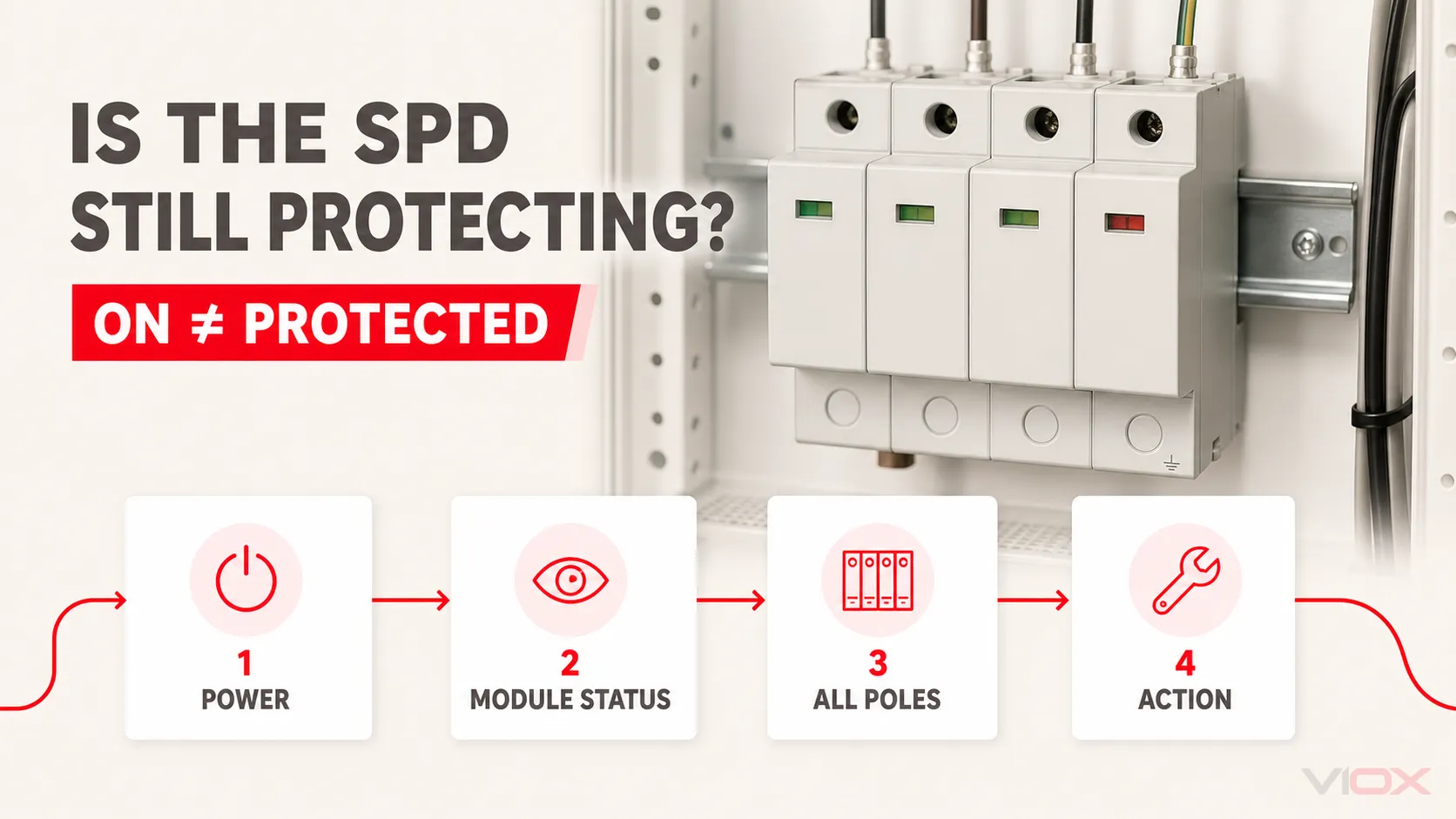
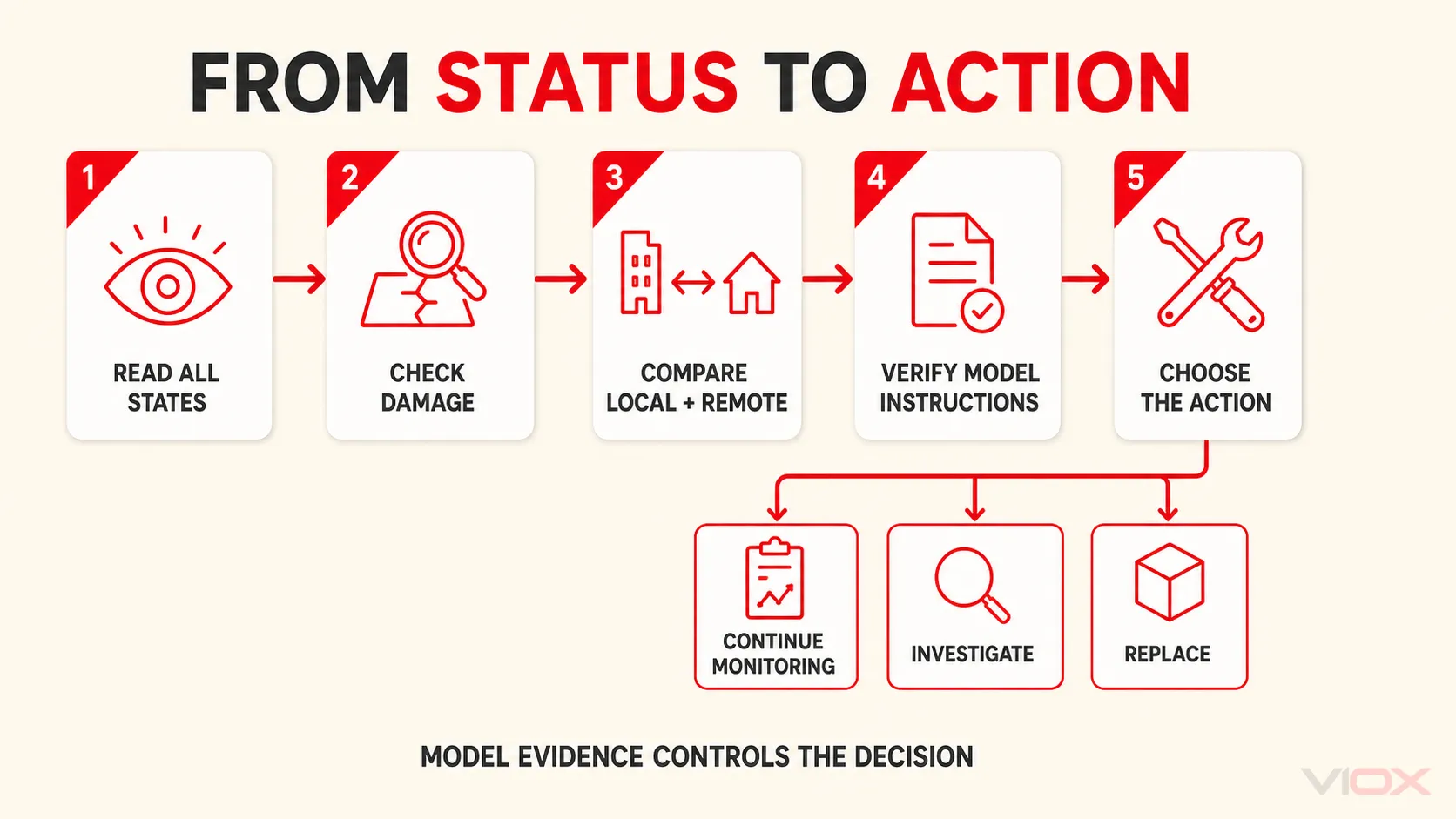
    An industrial surge protective device (SPD) can be connected to an energized panel even after one protection module has disconnected. Load power therefore does not prove that surge protection is available. Read every model-defined status window, light, display, or alarm and compare it with the instructions for the exact device.

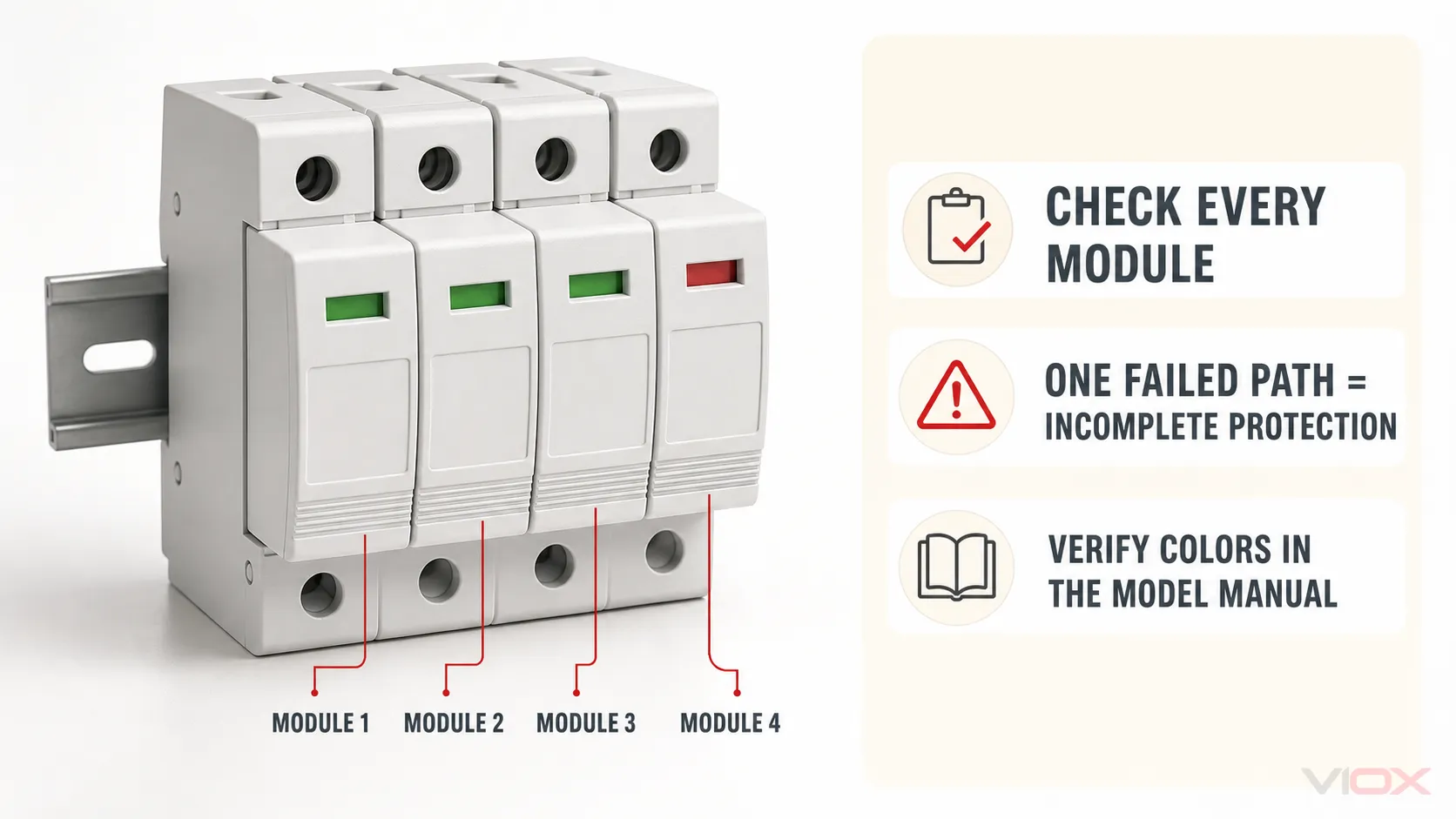
    Green commonly means that a modular SPD remains available, while red commonly means that an internal disconnector has operated and the affected module requires replacement. Those meanings are not a universal color code. Some indicators are mechanical windows rather than lights, some products use different colors or symbols, and some report only an aggregate state. If one pole or protection mode shows failure, complete intended protection is no longer confirmed.

    Key Takeaways

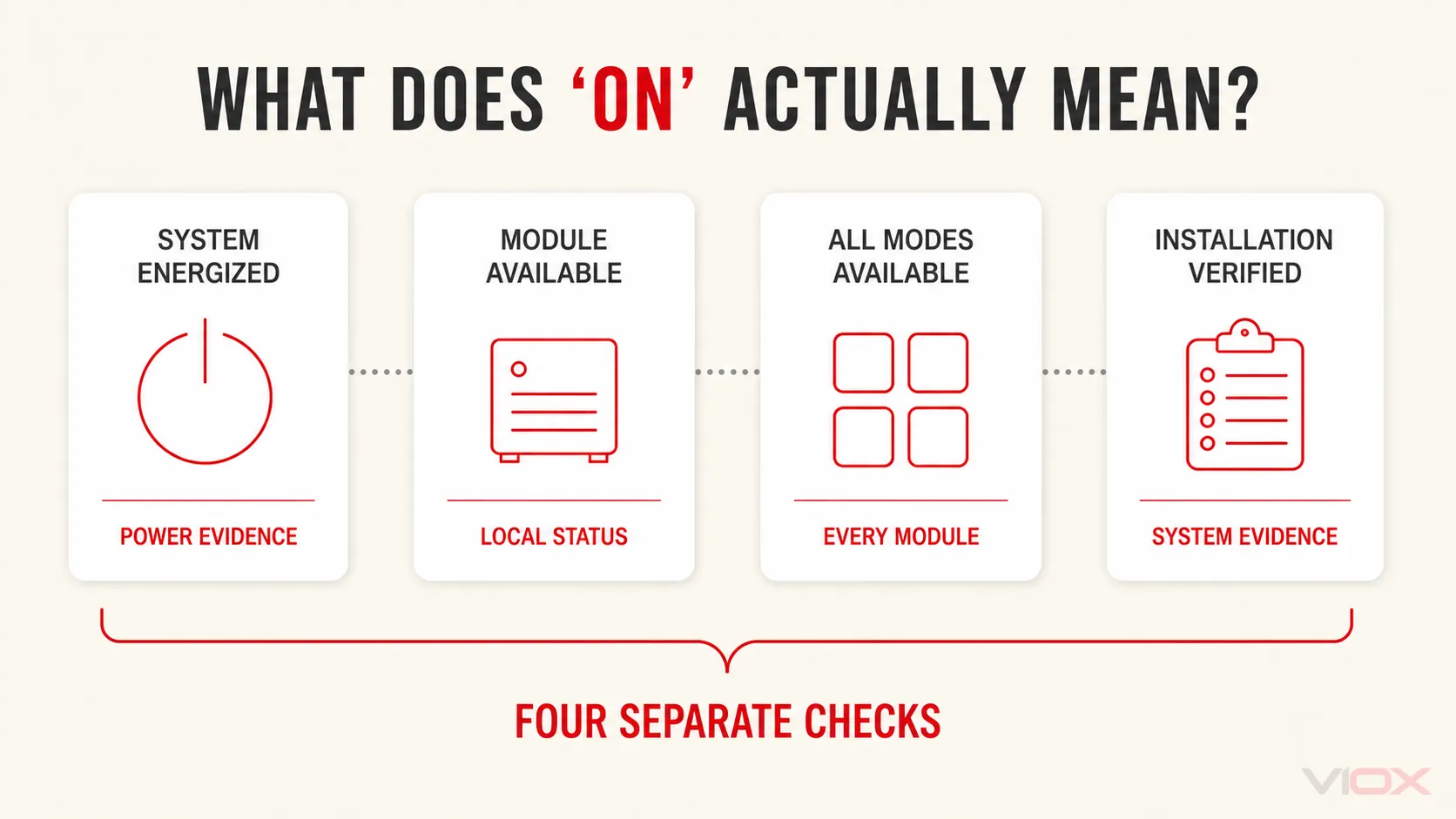
    • “On” is ambiguous. It can mean the panel is energized, the load is operating, an SPD module reports available, or the complete installation has been verified. These are different conditions.
    • Check every module. One normal window does not cancel one failed window in a multi-pole SPD.
    • Use the exact model instructions. Color, contact logic, replaceable scope, and reset behavior vary.
    • A normal indicator has limits. It does not prove correct supply voltage, wiring, earthing, backup protection, conductor routing, or full remaining surge capacity.
    • Do not use an ordinary multimeter as a remaining-life test. It cannot reproduce the impulse tests used to characterize an SPD.
    • Treat damage and abnormal heating as stop conditions. Do not wait for a status window to change before escalating a visibly damaged assembly.

    The Four Statuses Hidden Inside the Word “On”

    The fastest way to avoid a false conclusion is to separate four questions.

    Status question Evidence that answers it What it does not establish
    Is the electrical system energized? Approved voltage-presence procedure performed by qualified personnel, panel instruments, or system status That the SPD is connected correctly or still protective
    Does each SPD module report available? Exact model’s local window, LED, display, or diagnostic output Remaining surge capacity, correct application, or complete system protection
    Are all intended poles or protection modes available? Every required module indication plus the device’s aggregate or remote status where provided Earthing quality, conductor routing, backup protection, or coordination
    Is the installed protection system verified? Design and installation evidence, model instructions, inspection, protective-device checks, and applicable verification process Future performance against every possible event
    Four-state SPD diagnostic model separating an energized system, available modules, complete protection and verified installation
    “On” combines four separate evidence checks; passing one does not prove the next.

    An industrial panel can satisfy the first question while failing the second or third. A green local window can satisfy part of the second question while leaving the fourth unanswered.

    For the broader product boundary, see what a surge protective device does. This page concentrates only on interpreting the current status and deciding the next action.

    Industrial SPD Status: Symptom, Meaning, and Action

    Start with the device label and manual, then use the observed state as a diagnostic input—not as a universal verdict.

    Observed condition Safe check Likely interpretation Next action
    Every required module shows the model-defined normal state Confirm the indicator meaning and identify every required pole or mode The monitoring or disconnector mechanism reports the modules available Continue monitoring if there is no damage, alarm, significant-event instruction, or application concern
    One module shows the model-defined failed or replace state Identify the affected pole or protection mode; compare local and remote status The affected protection path may have been disconnected or declared unavailable Treat complete protection as unavailable; follow the replacement and investigation instructions
    Several modules change state together Record which modules changed and whether a common event, breaker operation, or supply abnormality occurred A common surge, temporary overvoltage (TOV), wiring problem, or other shared stress may be involved Inspect the complete SPD assembly and system before restoring confidence; do not replace cartridges blindly
    Local indication and remote contact disagree Confirm the contact’s normal/alarm truth table, control power, terminal continuity where permitted, and local state The signaling circuit, contact interpretation, module seating, or monitoring path may be faulty Escalate the discrepancy; do not let an unverified BMS “normal” override a local failed state
    No local status feature is present Identify the exact model and documented diagnostic method Condition cannot be inferred from enclosure appearance or load operation Use the manufacturer-approved method or adopt a conservative replacement decision for a critical application
    Indicator appears normal after a known severe event Review the manual’s post-event instructions, event records, physical condition, and system alarms A binary indicator may show only that its monitored disconnector has not operated Keep, verify, or replace according to documented post-event criteria and asset criticality
    Burn marks, odor, cracked housing, contamination, loose plug, or abnormal heat is present Make the panel safe under the site procedure and inspect the assembly and adjacent equipment Physical, thermal, mechanical, or environmental damage may exist beyond the monitored element Remove the affected equipment from service and investigate the initiating condition
    A replacement module soon reports failure again Check system voltage, Uc or MCOV selection, TOV exposure, protection mode, earthing arrangement, backup protection, and installation Repeated misapplication or abnormal system stress is more likely than ordinary calendar aging Stop repeated like-for-like replacement until the root cause is identified

    This matrix deliberately separates a reported state from a complete engineering diagnosis. A status mechanism is valuable because it makes a hidden failure observable; it does not identify every possible root cause.

    Why the Protected Equipment May Keep Running After SPD Failure

    Most panel-mounted power SPDs are connected in parallel with the supply rather than placed in series with the load. During normal operation, the SPD does not carry the load current. It responds to transient overvoltage according to its design and protection modes.

    If an internal disconnector removes a failed protection element from the circuit, the branch or bus supplying the protected equipment may remain energized. The machinery, PLC, drive, server, or other load can therefore operate normally while one surge-protection path is unavailable.

    That creates the central diagnostic rule:

    Load operating = power is available to the load. It does not equal SPD protection available.

    The opposite also needs care. A de-energized load does not prove that an SPD failed. The cause could be an upstream protective device, control action, supply loss, wiring fault, or another system condition. Interpret SPD status separately from load status.

    How to Read a Modular SPD Status Window

    1. Identify whether it is a window, LED, display, or symbol

    A colored rectangle on a plug-in cartridge may be a mechanically actuated status window, not an illuminated lamp. Other models use LEDs, alphanumeric displays, audible alarms, or a remote changeover contact. Call it a status indicator until the documentation identifies the technology.

    This wording matters because “the light is off” has no meaning when the device uses a mechanical flag. It also prevents an installer from assuming that an unlit feature proves the panel is de-energized.

    2. Confirm the model-defined normal and failed states

    Green/red indication is common in modular power SPDs. Phoenix Contact, for example, publishes products with replaceable surge-protection plugs, local green/red indication, thermal monitoring, and optional remote signaling. That is evidence for those product families, not a universal rule for every SPD.

    Use the exact product label, datasheet, and installation instructions to confirm:

    • which color, symbol, or position means available;
    • whether the indication belongs to one cartridge or the whole assembly;
    • whether an intermediate warning state exists;
    • whether the device is resettable or requires replacement;
    • whether the cartridge, base, or complete assembly is the replaceable scope;
    • how the remote contact behaves in normal, alarm, de-energized, and removed-module states.

    3. Read every required pole or protection mode

    A three-phase SPD may have several local windows. Record each state individually. If three windows show normal and one shows failed, do not describe the SPD as “mostly working.” The intended protection arrangement is incomplete until the affected path is restored and the retained assembly is accepted under the manufacturer’s instructions.

    The labels on the device and its topology documentation determine which phase, neutral, or protection mode corresponds to each module. Similar enclosure geometry is not enough to infer the circuit.

    Multi-module industrial SPD with one failed status window showing why every module must be checked
    One failed module means complete intended protection is no longer confirmed; verify each color in the exact model manual.

    4. Compare local and remote status

    An optional floating changeover contact can send an aggregate state to a programmable logic controller (PLC), building management system (BMS), or supervisory control and data acquisition (SCADA) system. It can shorten the time between a declared failure and maintenance response.

    The contact does not automatically reveal the failed pole, surge magnitude, cause, remaining capacity, or installation correctness. Contact logic is also model-specific. Use the exact terminal diagram and truth table; the dedicated guide to SPD remote signaling covers that separate monitoring task.

    What a Green Indicator Can—and Cannot—Tell You

    When the exact product documentation defines green as normal or OK, the strongest safe statement is:

    The monitored module remains in the model-defined available state.

    Do not expand that into “the complete surge-protection system is perfect.” A normal local indication generally cannot prove all of the following:

    • that supply voltage is present at the SPD terminals;
    • that the selected Uc or maximum continuous operating voltage is correct for the system;
    • that line, neutral, and protective-earth conductors are connected correctly;
    • that the earthing and bonding paths are effective;
    • that the required backup fuse or circuit breaker is correct and available;
    • that connection conductors are short and routed as required;
    • that upstream and downstream SPDs are coordinated;
    • that every conductive power, signal, data, or antenna path is protected;
    • that the MOV or other nonlinear element retains its original surge capability;
    • that the installation will withstand every future transient event.

    Industrial status windows are usually condition declarations with a defined monitoring boundary, not laboratory instruments. The exact SPD datasheet and installation record remain necessary.

    What a Red Indicator Usually Requires

    When the exact manual defines red as failed, replace, or end of life, treat the affected protection path as unavailable. The common action sequence is:

    1. Record the evidence. Photograph every status window, note remote alarms, identify the model and cartridge, and record any recent surge, utility, generator, switching, or TOV event.
    2. Apply the approved safety procedure. Opening a distribution panel or removing a cartridge can expose workers to energized conductors and arc-flash hazards. Qualified personnel must follow site isolation, lockout/tagout, verification, personal-protective-equipment, and local electrical-safety requirements.
    3. Inspect the replacement scope. Check the base, plug contacts, terminals, enclosure, remote contact, backup protection, and adjacent equipment as the manufacturer requires.
    4. Identify the cause when failure is premature, repeated, multi-pole, or physically abnormal. Verify application voltage, Uc or MCOV, TOV behavior, topology, earthing system, protection mode, backup protection, and installation.
    5. Install only an approved compatible replacement. Matching shape or color is not proof of electrical, mechanical, or signaling compatibility.
    6. Verify restoration. Confirm every local state, the remote alarm truth table, module seating, protective-device status, and maintenance record after safe re-energization.

    A plug-in cartridge must not be assumed to be hot-swappable simply because it can be removed without disconnecting conductors from the base.

    Industrial SPD status diagnostic path from reading all indicators to continue monitoring, investigate or replace
    Model evidence controls whether the correct action is continued monitoring, investigation or replacement.

    Replace One Cartridge or the Complete SPD?

    Condition A cartridge-only replacement may be acceptable when… Replace or escalate beyond one cartridge when…
    One module reports end of life The manufacturer permits individual replacement, the exact approved cartridge is available, and the base passes inspection The SPD is non-modular, compatibility is uncertain, or the base and contacts show damage
    Several modules fail after one event Every retained part passes the documented inspection and the manufacturer permits selective replacement A common event may have affected the base, insulation, remote contact, several modes, or coordinated protection system
    Remote contact disagrees with local indication The signaling fault is separately identified and corrected without uncertainty about protection status The monitoring architecture cannot establish a trustworthy normal state
    A replacement fails again The first failure cause was identified and corrected and the retained assembly remains acceptable Voltage selection, TOV, wiring, environment, or coordination remains unresolved
    Product is obsolete A documented manufacturer-approved replacement plug exists No exact compatibility evidence is available or the current base is no longer supportable

    Detailed MOV degradation and condition-based service-life decisions belong in the industrial SPD lifespan guide. This page uses the current status only to decide the immediate action.

    Can You Test an SPD With a Multimeter?

    An ordinary multimeter cannot prove the remaining impulse performance of an installed SPD. A simple resistance, continuity, or AC-voltage reading does not reproduce the standardized surge waveforms, currents, protection levels, thermal behavior, disconnector operation, or multi-mode interactions used to characterize the device.

    A meter may support a manufacturer-authorized check of an isolated auxiliary contact, continuity path, or other specifically documented function. That is not the same as proving that the complete SPD still meets its original surge-performance declarations.

    Do not probe an energized distribution panel merely to answer a generic internet test. Test points, isolation, instrument category, personal protective equipment, and procedure must all match the installation and be handled by qualified personnel. For the narrower boundary of pre-installation checks, see what a multimeter can and cannot verify on a DC SPD.

    Plug-In Surge Protector Lights: A Short Consumer Branch

    The same “on versus protected” distinction applies to consumer plug-in surge protectors, but their indicators and load path differ from panel SPDs.

    Plug-in indication What it may mean Correct interpretation rule
    Power or switch light The strip’s outlets may be energized Does not prove the surge-protection circuit remains available
    Protected or Protection light Model-defined status of the surge-protection function Follow the exact label and manual; replace when the documentation says protection is lost
    Grounded, Earthed, or Wiring Fault light A model-defined supply-wiring condition Not the same as an SPD end-of-life indication; have the wiring condition assessed as instructed
    No separate protection indicator No user-visible confirmation of protection status Load operation alone cannot close the uncertainty

    Do not apply an industrial green/red cartridge rule to every consumer strip. If the first question is whether a strip contains surge protection at all, use the power strip vs surge protector guide. For replacement timing and physical warning signs, use the dedicated consumer surge-protector lifespan guide.

    Frequently Asked Questions

    Does a green SPD indicator prove the SPD is working?

    It proves only the state defined by the exact product documentation. On many modular products, green means the monitored module remains available. It does not prove correct voltage selection, wiring, earthing, backup protection, coordination, or full remaining surge capacity.

    What does one red module on a three-phase SPD mean?

    If the manual defines red as failed or replace, the affected pole or protection mode is unavailable and complete intended protection is no longer confirmed. Record every module state and follow the manufacturer’s replacement and inspection instructions.

    Can protected equipment keep running when an SPD has failed?

    Yes. A panel SPD is commonly connected in parallel with the load. An internal disconnector can remove a failed protection element while the distribution circuit and protected equipment remain energized.

    Can a red SPD cartridge be reset?

    Usually a model-defined end-of-life state associated with an operated internal disconnector requires replacement, not reset. Confirm the exact product instructions and never bypass a sealed protective module or its disconnector.

    Should all SPD cartridges be replaced when one turns red?

    Not automatically. Selective replacement depends on the assembly design, event, base condition, protection modes, exact cartridge compatibility, and manufacturer instructions. Multi-pole failure, physical damage, repeated failure, or uncertainty can require replacing a wider scope.

    Can an ordinary multimeter confirm that an SPD is still good?

    No. It cannot reproduce standardized impulse performance or quantify the remaining capability of the complete SPD. Use the model’s documented status and diagnostics, and escalate uncertain or critical conditions.

    What if the indicator remains green after a major surge?

    Check the manufacturer’s post-event instructions, physical condition, event records, remote alarms, and asset criticality. A green binary state may show only that the monitored disconnector has not operated; it does not measure how much surge capability remains.

    Final Decision Rule

    Do not call an industrial SPD “on” merely because the panel or load has power. Determine four states separately:

    1. Is the system energized under an approved verification method?
    2. Does every required SPD module report the model-defined available state?
    3. Are all intended poles or protection modes available, with local and remote states consistent?
    4. Does the installation evidence support correct application, wiring, earthing, backup protection, and condition?

    Choose continue monitoring only when the documented state is normal and no damage, significant-event instruction, or application concern requires action. Choose verify or investigate when status is ambiguous, local and remote signals conflict, or failure repeats. Choose replace the indicated module only when the manufacturer permits it and the base is acceptable. Choose replace or escalate the complete assembly when damage, multi-component uncertainty, incompatibility, or unresolved system stress exists.

    For model-level evaluation, review the VIOX SPD product family and request the exact status definition, remote-contact diagram, approved replacement mapping, backup-protection instructions, and certification evidence for the intended system and market.

    Technical Sources Reviewed

    This article explains status interpretation and diagnostic boundaries. Follow the instructions for the exact SPD and the electrical-safety rules applicable to the installation. Work inside distribution equipment should be performed only by qualified personnel under an approved safe-work procedure.

  • MCB ON and OFF Positions: How to Identify ON, OFF, and Tripped

    MCB ON and OFF Positions: How to Identify ON, OFF, and Tripped

    To identify an MCB’s ON and OFF positions, read the markings on the device first. I or ON identifies the closed command position; O or OFF identifies the open command position. In many vertically mounted toggle MCBs, the handle is up for ON and down for OFF, but direction alone is not a universal rule.

    A tripped handle may sit between ON and OFF, move toward OFF, or be identified by a separate trip flag, depending on the product. Most importantly, the handle position or a colored window does not by itself prove that every relevant conductor is de-energized and safe to touch.

    MCB ON, OFF, and Tripped Positions at a Glance

    Visible state What it normally indicates What it does not prove
    I or ON The breaker has been placed in its closed command position; the protected circuit may be energized That voltage is present at every load, that the circuit is healthy, or that the internal contacts are serviceable
    O or OFF The breaker has been manually placed in its open command position That the line terminals, every conductor, or equipment supplied from another source is de-energized
    TRIP, an intermediate handle, or a product-specific trip flag The breaker or an accessory has operated automatically The cause of the trip, or that every breaker model uses the same handle position or indicator color
    Unclear, damaged, or contradictory indication The state cannot be established reliably by appearance That comparing it with an adjacent breaker or forcing the handle is a safe solution

    The visual state is useful for operation and first-level identification. It is not a substitute for the safe-isolation and voltage-verification procedure required before electrical work.

    MCB ON, OFF, and tripped states identified by markings and model-specific indicators

    What Do I and O Mean on an MCB?

    IEC 60417 identifies symbol 5007 as ON (power) and symbol 5008 as OFF (power). On equipment, these are commonly presented as a vertical line and a circle and are often read as I and O or as 1 and 0.

    • I / ON: the operating control is in the closed position.
    • O / OFF: the operating control is in the open position.

    These symbols identify the intended switching state; they are not arrows showing which way current “flows.” In particular, the O symbol does not mean current flows downward to neutral or earth. That memory aid is electrically incorrect.

    For a broader explanation of the device and its protection function, see What Is a Miniature Circuit Breaker?.

    Is an MCB ON When the Handle Is Up or Down?

    For the common upright DIN-rail arrangement, the handle is usually up for ON and down for OFF. In the North American context, NEC requirements summarized by Schneider Electric state that when a breaker handle is operated vertically, the up position is the ON position.

    That rule should not be turned into a global visual shortcut. Breakers can be mounted or operated horizontally, and some products use rotary, pushbutton, or motor operators rather than a simple vertical toggle. A user may also be looking at the panel from an unusual orientation.

    Use this order of evidence:

    1. Read I/O or ON/OFF on the exact device.
    2. Check the handle or operator against those markings.
    3. Read any manufacturer-declared contact or trip indicator according to the exact product documentation.
    4. If the marking is hidden, damaged, or inconsistent with the operator, treat the status as uncertain and obtain qualified help.

    Do not decide the state only by copying the position of adjacent breakers. Adjacent devices may control different circuits, use different mechanisms, or themselves be in an unknown state.

    Handle Position, Contact Indicator, and Trip Indicator Are Different

    An MCB can present more than one layer of status information.

    Information layer What it tells you Important boundary
    Handle or toggle The operating mechanism’s selected or tripped position The exact trip position varies by model
    Contact-position indicator The position reported by a manufacturer-declared mechanism associated with the main contacts Do not assume every colored window is contact-linked; verify the datasheet
    Trip indicator That an automatic trip event occurred It may not identify the fault type, and not every MCB has a separate trip flag
    Electrical verification Whether voltage is absent at the required points under a defined safe-work procedure Requires the correct method, equipment, competence, and control of all possible sources

    ABB, for example, documents MCB families with a real contact-position indication associated with the moving contact and a separate trip indicator. That feature is useful evidence for those named products; it is not permission to apply ABB’s colors or indicator logic to another breaker.

    The safest universal rule is therefore: read the exact marking and exact datasheet; never assign a state from color alone.

    Difference between MCB handle indication, contact-position indication, and verified absence of voltage

    How to Check Whether an MCB Is ON, OFF, or Tripped

    Use this visual check only when the panel is intact, accessible, dry, and free from burning smell, smoke, arcing, unusual heat, or water ingress.

    1. Identify the correct circuit. Read the panel schedule and circuit label, but remember that labels can be wrong or outdated.
    2. Read the device face. Find I/ON and O/OFF rather than relying on direction from memory.
    3. Observe the handle. A handle aligned with I/ON indicates ON; one aligned with O/OFF indicates manually OFF.
    4. Check declared indicators. Use a contact-position or trip window only as described in the exact manufacturer instructions.
    5. Treat an intermediate or unclear state as possibly tripped. Do not force the handle or assume that every trip is visually identical.
    6. Stop if the breaker is damaged or repeatedly trips. Do not hold it in ON, increase its rating, or keep resetting it.

    If your purpose is to restore power after a trip, follow the dedicated circuit-breaker reset procedure. If it trips again, use the separate MCB tripping diagnostic guide rather than repeating the reset.

    Does the OFF Position Mean the Circuit Is Safe?

    No. An MCB in O/OFF normally indicates that its main current path has been opened, but visual OFF is not proof that the entire work area is de-energized.

    Possible remaining hazards include:

    • live conductors and terminals on the supply side of the breaker;
    • another supply, generator, photovoltaic source, uninterruptible power supply, or backfeed path;
    • incorrect circuit identification or an outdated panel schedule;
    • coupled control or auxiliary supplies;
    • a damaged device or an installation that does not provide the required isolation function.

    For electrical work, a qualified person must identify all relevant sources, use the appropriate disconnecting and lockout procedure, and verify absence of voltage with a suitable instrument and method required by the applicable rules. A non-contact voltage detector can be a useful preliminary screening tool, but it should not be presented as the sole method for proving a circuit dead.

    If the enclosure is damaged, wet, smoking, arcing, or unusually hot, do not approach or operate it. Keep clear and obtain emergency or qualified electrical assistance appropriate to the situation.

    What Does a Tripped MCB Look Like?

    Many toggle breakers move to an intermediate position after a trip. UL guidance recognizes this arrangement and requires appropriate trip and reset marking when the handle uses an intermediate position. Schneider Electric documents an approximately middle trip position for its QO branch breakers.

    However, other breaker designs can move the actuator toward OFF or use a separate visual flag. A breaker may also show that the contacts are open without showing whether the opening was manual or caused by a trip. Therefore, “middle always means tripped” is too broad for a global MCB guide.

    For models that use a resettable intermediate trip position, the usual sequence is to move the handle fully to O/OFF before returning it to I/ON. Apply that sequence only after the downstream condition has been considered and the exact instructions permit a user reset. A trip is an event to understand, not just a handle position to clear.

    Frequently Asked Questions

    Which direction is ON for an MCB?

    For many upright toggle MCBs, ON is up. Confirm it from the I or ON marking on the exact breaker rather than relying on direction alone.

    Which direction is OFF for an MCB?

    For many upright toggle MCBs, OFF is down and aligned with O or OFF. Horizontal, rotary, motor-operated, and differently mounted devices must be read from their own markings.

    Is a breaker in the middle position tripped?

    Often, but not universally. Some breaker families use an intermediate trip position, while others move toward OFF or provide a separate trip indicator. Check the exact product instructions.

    What do red and green MCB indicators mean?

    There is no safe universal color rule. A window may indicate contact position, trip status, or another product-specific state. Use the manufacturer’s legend and datasheet for that exact model.

    Can I use the handle or indicator to prove the circuit is dead?

    No. Handle and indicator information help identify device state, but electrical work requires control of every relevant source and an appropriate verification procedure.

    Bottom Line

    Use I/ON and O/OFF as the primary MCB position references. Treat up-for-ON and down-for-OFF as a common vertically mounted arrangement, not a universal law. Recognize that tripped handles and colored indicators vary by product, and never treat visual OFF as proof that a circuit is safe for electrical work.

    For an exact VIOX model, consult the corresponding product documentation in the VIOX MCB range before relying on an indicator, accessory, or operating sequence.

    Sources

  • SPDT vs DPDT Relay: Meaning, Wiring, Symbols, and Time Relay Applications

    SPDT vs DPDT Relay: Meaning, Wiring, Symbols, and Time Relay Applications

    SPDT vs DPDT Relay: Direct Answer

    SPDT and DPDT describe relay contact configuration, not the timing function. An SPDT relay has one common terminal that switches between normally open and normally closed contacts. A DPDT relay has two SPDT contact sets operated together, allowing two separate circuits to switch at the same time.

    Use SPDT when one circuit needs a changeover contact. Use DPDT when two circuits must switch together, when two isolated outputs are needed, or when the circuit requires polarity reversal or dual control.

    In a time relay, SPDT or DPDT describes the output contact arrangement. The timing function decides when the contacts change state; SPDT or DPDT decides how many circuits are switched.

    For product evaluation, see VIOX time relay products.


    SPDT and DPDT Meaning

    Term Full Form What It Means
    SPST Single Pole Single Throw One circuit, simple ON/OFF contact
    SPDT Single Pole Double Throw One common terminal switches between NO and NC contacts
    DPST Double Pole Single Throw Two circuits switched ON/OFF together
    DPDT Double Pole Double Throw Two SPDT contact sets operated together

    The letters describe the contact structure:

    • Pole means the number of independent circuits controlled.
    • Throw means the number of output positions each pole can connect to.
    • Single Pole controls one circuit.
    • Double Pole controls two circuits.
    • Double Throw means each pole can switch between two outputs.

    So an SPDT relay controls one circuit with two possible outputs. A DPDT relay controls two circuits, and each circuit has two possible outputs.


    SPDT vs DPDT Comparison Table

    Feature SPDT Relay DPDT Relay
    Full form Single Pole Double Throw Double Pole Double Throw
    Contact sets One changeover contact Two changeover contacts
    Typical terminals COM, NO, NC COM1, NO1, NC1, COM2, NO2, NC2
    Circuits controlled One circuit Two independent circuits
    Contact action One common switches between NO and NC Two commons switch between two NO/NC sets together
    Electrical isolation One switched circuit Two isolated circuits if wired separately
    Typical use NO/NC selection, alarm contact, fan delay, signal switching Polarity reversal, dual circuit control, interlock, isolated outputs
    Time relay use One timed output contact Two timed output contact sets
    SPDT and DPDT relay contact arrangement showing COM NO NC terminals
    SPDT and DPDT relay contact arrangement, showing COM, NO, and NC terminals for single-pole and double-pole changeover contact sets.

    For a simple timing output, SPDT is often enough. For two controlled circuits, signal isolation, or polarity reversal, DPDT is usually the better fit.


    What Is an SPDT Relay?

    An SPDT relay has one pole and two throws. It has three output contact terminals:

    • COM: common terminal
    • NO: normally open contact
    • NC: normally closed contact

    When the relay is not energized, COM is connected to NC. When the relay energizes, COM changes over and connects to NO.

    That is why SPDT is also called a changeover contact or Form C contact in many relay datasheets.

    SPDT Contact Logic

    De-energized: COM -> NC
    Energized:    COM -> NO

    An SPDT time relay uses the same contact logic, but the contact changes state after a time delay, interval, repeat cycle, or other timing function.


    What Is a DPDT Relay?

    A DPDT relay is like two SPDT relays operated by one coil or timing mechanism. It normally has six output contact terminals:

    • COM1, NO1, NC1 for pole 1
    • COM2, NO2, NC2 for pole 2

    Both poles switch at the same time, but the two circuits can remain electrically separate.

    DPDT Contact Logic

    Pole 1 de-energized: COM1 -> NC1
    Pole 1 energized:    COM1 -> NO1
    
    Pole 2 de-energized: COM2 -> NC2
    Pole 2 energized:    COM2 -> NO2

    This makes DPDT useful when two signals, two voltage levels, or two circuit paths must change together.


    SPDT vs DPDT Schematic Symbols

    For engineers searching DPDT relay schematic symbol or SPDT relay symbol, the symbol should show the number of poles and throws clearly.

    Symbol Feature SPDT DPDT
    Number of moving contacts One Two
    Number of commons One COM Two commons
    Number of output throws NO and NC NO1/NC1 and NO2/NC2
    Drawing appearance One changeover contact Two mechanically linked changeover contacts
    Common label COM, NO, NC COM1, NO1, NC1, COM2, NO2, NC2
    SPDT relay and DPDT relay schematic symbols comparison
    SPDT relay and DPDT relay schematic symbols comparison, showing one versus two mechanically linked changeover contact sets.

    In schematic drawings, a DPDT symbol should show two mechanically linked SPDT contact sets. Do not draw DPDT as two unrelated relays unless the two poles are actually operated independently.


    SPDT vs DPDT Wiring Concept

    Do not start wiring from the relay name alone. Start from the contact function.

    SPDT Wiring Concept

    Use SPDT when one input needs to choose between two outputs.

    Typical examples:

    • one alarm signal changes from normal to fault
    • one fan output turns on after a delay
    • one control signal switches between automatic and manual logic
    • one light, buzzer, or auxiliary signal changes state

    DPDT Wiring Concept

    Use DPDT when two contact sets must change together.

    Typical examples:

    • switching two independent control signals
    • reversing DC polarity in a low-power control circuit
    • separating two voltage systems while using one timing signal
    • providing one contact for load control and another for feedback
    • switching both line and neutral where the device rating and local rules allow it
    SPDT vs DPDT relay wiring concept for one circuit and two independent circuits
    SPDT vs DPDT relay wiring concept: SPDT switches one circuit while DPDT switches two independent circuits together.

    Always check the relay datasheet before wiring different voltages on separate poles. The contact spacing, insulation rating, terminal layout, and approval conditions determine what is allowed.


    SPDT vs DPDT Time Relay Applications

    SPDT and DPDT are especially common in time relays because timing functions often need relay output contacts.

    SPDT Time Relay Applications

    SPDT output is often enough for:

    • on-delay fan control
    • pump start delay
    • alarm delay output
    • lighting delay
    • simple motor auxiliary control
    • HVAC fan run-on logic

    DPDT Time Relay Applications

    DPDT output is useful when one timing event must control two outputs at the same time.

    Examples include:

    • one timed contact for load control and one for status feedback
    • two isolated control circuits triggered by one delay
    • forward/reverse interlock logic in low-power control circuits
    • backup alarm and control output at the same time
    • separating PLC input feedback from a field control circuit
    SPDT and DPDT time relay applications for delayed output load control and feedback signal
    SPDT and DPDT time relay applications, showing delayed output for load control and a separate feedback signal contact.

    For timer relay selection, see How to Choose the Right Timer Relay.


    SPST vs SPDT vs DPDT

    Many users searching SPDT and DPDT also need the surrounding contact types.

    Contact Type Full Form Terminal Count Function
    SPST Single Pole Single Throw 2 One circuit, simple ON/OFF
    SPDT Single Pole Double Throw 3 One circuit switches between NO and NC
    DPST Double Pole Single Throw 4 Two circuits switch ON/OFF together
    DPDT Double Pole Double Throw 6 Two SPDT contact sets switch together

    If you only need ON/OFF, SPST may be enough. If you need a changeover contact, use SPDT. If two changeover contacts must operate together, use DPDT.


    How to Choose SPDT or DPDT

    Situation Better Choice Reason
    One circuit needs NO/NC switching SPDT Simple changeover contact
    Two independent circuits must switch together DPDT Two contact sets operate together
    One timing signal controls one load SPDT Fewer terminals and simpler wiring
    One timing signal controls load and feedback DPDT One pole can control the load, the other can signal status
    Polarity reversal is required in a low-power control circuit DPDT Two poles can reverse connection paths
    Panel space and cost are critical SPDT Usually smaller and simpler
    Future expansion may need a second contact set DPDT Extra pole may be useful if supported by the design

    Do not select DPDT only because it looks more flexible. More contacts also mean more terminals, more wiring, more space, and more ways to miswire the circuit.


    Common Mistakes

    Mistake 1: Thinking SPDT and DPDT Describe Timing

    SPDT and DPDT describe contact arrangement. They do not tell you whether the relay is on-delay, off-delay, interval, star-delta, or repeat cycle.

    Mistake 2: Treating Contact Rating as Universal

    A relay contact rated for a resistive load may need derating for inductive loads such as contactor coils, solenoids, and small motors. Check AC-1, AC-15, DC-13, or other contact rating categories where provided.

    Mistake 3: Using One DPDT Relay as Two Unrelated Relays

    The two poles of a DPDT relay operate together. They are not independently timed unless the device has separate mechanisms or separate outputs.

    Mistake 4: Ignoring Isolation Limits

    Two DPDT poles can control separate circuits, but the voltage difference, insulation rating, terminal spacing, and safety rules must still be checked.

    Mistake 5: Confusing Relay Contact Terminals With Coil Terminals

    COM, NO, and NC are output contact terminals. Coil terminals such as A1/A2 or input terminals power or trigger the relay. Mixing them up is a common wiring error.

    Mistake 6: Assuming DPDT Is Always Better Than SPDT

    DPDT is better only when you need two switched contact sets. For a single timed output, SPDT is simpler and easier to troubleshoot.


    FAQ

    What does SPDT mean on a relay?

    SPDT means Single Pole Double Throw. It has one common terminal that switches between normally open and normally closed contacts.

    What does DPDT mean on a relay?

    DPDT means Double Pole Double Throw. It has two SPDT contact sets operated together, usually with six contact terminals.

    What is the difference between SPDT and DPDT relay?

    An SPDT relay switches one circuit between two outputs. A DPDT relay switches two independent circuits between two output positions at the same time.

    Is DPDT just two SPDT relays?

    Functionally, a DPDT relay behaves like two SPDT contact sets operated together by one coil or mechanism. The two poles are not independently controlled unless the device is specifically designed that way.

    Can I use a DPDT relay instead of SPDT?

    Yes, if the contact ratings, coil voltage, insulation rating, and terminal layout fit the application. You can use one pole of a DPDT relay and leave the other unused, but it may cost more and take more space.

    What is a DPDT relay schematic symbol?

    A DPDT relay symbol shows two changeover contact sets mechanically linked together. Each pole has a common, normally open, and normally closed contact.

    What is the difference between SPST, SPDT, and DPDT?

    SPST is simple ON/OFF for one circuit. SPDT is one circuit switching between two outputs. DPDT is two SPDT contact sets operated together.

    Is SPDT the same as a changeover contact?

    Yes, SPDT is commonly called a changeover contact because the common terminal changes from NC to NO when the relay operates.

    What does 12V SPDT relay mean?

    It usually means the relay coil is rated for 12V, while the contact arrangement is SPDT. The coil voltage and contact rating are separate specifications and both must be checked.


    Final Advice

    SPDT and DPDT are not timing functions. They are contact arrangements.

    Use SPDT when one circuit needs a changeover contact. Use DPDT when two contact sets must switch together, when isolated outputs are needed, or when a control circuit requires polarity reversal or dual switching.

    For time relays, first choose the timing function, then choose the output contact arrangement. A correct timer relay selection needs both: the right timing mode and the right contact configuration.

  • Circuit Breaker Symbols: IEC and ANSI Reference Guide

    Circuit Breaker Symbols: IEC and ANSI Reference Guide

    A circuit breaker symbol identifies a protective switching function on an electrical drawing. There is no single symbol that is correct for every drawing: the representation depends on the symbol system, the type of diagram, and the project legend.

    The graphic alone may not identify whether a breaker is an MCB, MCCB, ACB, VCB, or SF6 circuit breaker. Engineers often use a base circuit breaker symbol together with a device tag, pole count, voltage class, protection function, or equipment label. Always read the symbol and its annotations as one unit.

    Circuit Breaker Symbols Reference Chart

    The chart below groups 16 commonly encountered breaker representations and related drawing elements. It is an interpretation aid, not a substitute for the symbol library and legend specified for a project. Exact geometry can vary with the drawing system, diagram type, CAD library, utility convention, and manufacturer documentation.

    Circuit breaker symbols reference chart covering IEC and ANSI representations, Device 52, MCB qualifiers, pole configurations, drawout and operated breakers, auxiliary contacts, coils, disconnectors, and fuses
    Figure 1. Circuit breaker symbol reference chart. Use each graphic together with its device tag, ratings, cross-references, and the approved drawing legend.

    How the chart is organized

    • Standards-oriented representations and identifiers (1–4): an IEC-oriented breaker function, the horizontal ANSI/IEEE breaker representation, device number 52, and an MCB shown with thermal and magnetic trip qualifiers.
    • Pole configurations (5–8): 1P, 2P, 3P, and 4P arrangements. Dashed lines indicate mechanical linkage between poles; they do not represent electrical conductors.
    • Construction and operating functions (9–12): drawout, electrically operated, disconnecting, and breaker-plus-auxiliary-contact representations. These features may be shown beside the main symbol or on another drawing sheet through a cross-reference.
    • Control and adjacent devices (13–16): trip coil, closing coil, disconnector, and fuse. The last two are included because they are commonly confused with circuit breakers, not because they are breaker types.

    Quick identification table

    Drawing item What the drawing normally communicates What to verify
    General circuit breaker A switching device capable of interrupting current automatically under defined conditions Symbol standard, device tag, rating and protection notes
    Single-pole breaker One protected pole or one pole represented on the diagram Whether the drawing is single-line or multi-line
    Multi-pole breaker Mechanically linked poles, often shown as repeated contacts or identified by a pole label 2P, 3P, 4P, 1P+N or 3P+N configuration
    MCB Usually a breaker symbol with an MCB or QF-style device reference Rated current, trip curve, breaking capacity and product standard
    MCCB Usually a breaker symbol identified by MCCB, frame information or trip-unit data Frame size, trip unit and interrupting rating
    ACB Often identified by an ACB label, drawout notation or switchgear reference Fixed or drawout construction and control circuit references
    VCB Commonly identified by VCB text or a medium-voltage equipment tag Voltage class, truck position and project legend
    SF6 circuit breaker Commonly identified by an SF6 or high-voltage equipment label Equipment technology and substation drawing convention
    GFCI or AFCI breaker A breaker symbol with a project-specific text label or qualifier Do not assume one universal graphic; check the legend
    RCCB or RCBO Breaker or switching-device representation combined with residual-current identification Device function, overcurrent protection and regional terminology
    Motor-operated breaker Breaker symbol linked to an operating mechanism or motor-control notation Control power, close coil, trip coil and interlocks
    Auxiliary or alarm contact A separate contact associated with the breaker through a tag or cross-reference Normal state, terminal numbering and manufacturer diagram

    The most reliable identification comes from four elements used together: graphic symbol, device tag, adjacent ratings, and drawing legend.

    IEC vs ANSI Circuit Breaker Symbols

    IEC graphical symbols

    IEC 60617 is the official IEC database for graphical symbols used in electrotechnical diagrams. It is a maintained database rather than a set of current standalone paper parts. The database includes symbol titles, graphical representations, reference numbers, application notes, and relationships between symbols.

    An IEC-based drawing may construct a breaker representation from a switching contact and one or more qualifying symbols. The exact form can change with the function being communicated and the type of diagram. For that reason, a simplified symbol copied from one drawing should not automatically be treated as the only IEC circuit breaker symbol.

    ANSI and North American drawings

    North American drawings may use symbols and device designations inherited from IEEE/ANSI practice, company drafting standards, utility conventions, or CAD libraries. IEEE/ANSI 315-1975 is now classified by IEEE as inactive-reserved, although its symbols still appear in legacy documentation and established drawing systems.

    Power-system drawings may also use device numbers. For example, 52 is commonly used to identify an AC circuit breaker in protection and control documentation. A device number is an identifier, not a replacement for the drawing legend or the breaker specifications.

    IEC-style and ANSI-style circuit breaker representations with device tags and legend examples
    Figure 2. IEC-style and North American representations may differ. The project legend controls the interpretation of the actual drawing.
    Comparison point IEC-oriented drawing ANSI/North American drawing
    Primary reference IEC 60617 database Project or utility convention; legacy IEEE/ANSI 315 symbols may appear
    Device identification Symbol plus class/reference designation and project tag Symbol plus equipment tag or device number
    Common source of variation Function qualifiers and diagram type Utility, manufacturer and legacy drafting conventions
    Correct reading method Check the IEC symbol reference used by the project and the legend Check the drawing legend, device list and project drafting standard

    How to Read a Circuit Breaker Symbol

    1. Identify the drawing type

    A single-line diagram represents a multi-conductor power system in a simplified form. A multi-line schematic may show individual poles, operating coils, auxiliary contacts, and interlocks separately. Architectural plans can use a different notation again.

    Do not expect the same amount of information from every drawing type.

    2. Find the protective switching function

    First distinguish the circuit breaker from a plain switch, disconnector, or fuse. A circuit breaker combines switching with automatic interruption under specified conditions. A disconnector primarily provides isolation, while a fuse interrupts by melting its element and must be replaced after operation.

    A symbol can show a function without revealing the full construction of the product. Ratings and protection characteristics normally appear as adjacent text, a device tag, a schedule entry, or a separate specification.

    3. Read the device tag and annotations

    Look for labels such as CB, MCB, MCCB, ACB, VCB, QF, or a project-specific equipment number. Then check the associated information, which may include:

    • rated current;
    • system voltage;
    • number of poles;
    • interrupting or breaking capacity;
    • trip-unit type or protection functions;
    • fixed, plug-in, or drawout construction;
    • normally open, normally closed, or normal service position.

    The abbreviation is useful only within the drawing’s documented convention. For example, a QF-style tag is common in some IEC-oriented projects but should not be assumed to be universal.

    4. Determine the number of poles

    On a detailed schematic, linked contacts may show that the poles operate together. On a single-line diagram, one line can represent a complete three-phase circuit, so the number of drawn lines is not always the physical pole count.

    Confirm the arrangement from labels such as 1P, 2P, 3P, 4P, 1P+N, or 3P+N. A switched neutral is not automatically an overcurrent-protected pole; the product documentation and schematic must make the function clear.

    Circuit breaker pole configuration symbols for 1P, 2P, 3P, 4P, 1P plus neutral, and 3P plus neutral
    Figure 3. Typical circuit breaker pole-configuration notation. Protected poles, switched neutral poles, terminals, and mechanical linkages must be confirmed against the product diagram.

    Use these reading rules:

    • An × qualifier identifies a protected pole in this illustration.
    • A dashed line indicates mechanical linkage between contacts, not an electrical connection.
    • In a typical 1P+N arrangement, one phase pole is protected and the neutral pole is switched with it. In a typical 3P+N arrangement, the three phase poles are protected and the neutral is switched with them.
    • 2P is not automatically equivalent to 1P+N, and 4P is not automatically equivalent to 3P+N. Verify which poles contain overcurrent releases from the breaker markings and manufacturer diagram.

    5. Follow the cross-references

    Trip coils, closing coils, undervoltage releases, shunt releases, alarm contacts, and position contacts may be drawn away from the main breaker symbol. Matching device tags and grid references connect these elements to the same physical breaker.

    Annotated circuit breaker drawing showing the main symbol, tag, pole information, trip coil and auxiliary-contact cross-references
    Figure 4. Read the breaker symbol together with its tag, annotations, cross-references, and drawing legend.

    Symbols for MCB, MCCB, ACB, VCB and SF6 Breakers

    The product name does not always produce a unique universal graphical symbol.

    MCB and MCCB symbols

    A miniature circuit breaker (MCB) and a molded case circuit breaker (MCCB) may use the same base breaker function on a single-line diagram. The distinction is often carried by the device tag, frame or current data, trip-unit information, and equipment schedule.

    Do not infer the trip curve, breaking capacity, or applicable product standard from the graphic alone.

    ACB, VCB and SF6 circuit breaker symbols

    Air, vacuum, and SF6 describe the breaker technology or interrupting medium. Some drawing libraries provide specialized graphics, but many projects use a general circuit breaker symbol followed by an ACB, VCB, or SF6 label.

    For a vacuum circuit breaker, the surrounding context is often more informative than the basic symbol: medium-voltage switchgear references, truck positions, earthing switches, protection relays, and control-circuit cross-references help confirm the device.

    GFCI, AFCI, RCCB and RCBO notation

    GFCI and AFCI protection requirements do not create one universally accepted breaker graphic for every electrical plan. Designers commonly add a text label, abbreviation, qualifier, or panel-schedule note. The project legend remains decisive.

    The same rule applies to residual-current devices in IEC-oriented markets. An RCCB provides residual-current protection without integral overcurrent protection, while an RCBO combines residual-current and overcurrent protection. A drawing should make that functional difference clear instead of relying on a vague “RCD” label alone.

    Circuit Breaker, Fuse, Switch and Disconnector Symbols

    Device Main function communicated Common interpretation risk
    Circuit breaker Switching plus automatic fault interruption Mistaking it for a manually operated switch
    Fuse Overcurrent interruption by a replaceable element Assuming it can be reset like a breaker
    Switch Making and breaking current under its specified duty Assuming it provides automatic overcurrent protection
    Disconnector or isolator Isolation and a defined disconnection function Assuming it can interrupt fault current
    Switch-disconnector Switching and isolation within its declared ratings Treating it as a circuit breaker without overcurrent protection

    The equipment specification—not the visual similarity of two symbols—determines the device’s ratings and permitted duties.

    Auxiliary Contact and Trip Contact Symbols

    Auxiliary contacts report breaker status or participate in control logic. Alarm or trip-indication contacts may change state only after a protective trip. Position contacts can indicate open, closed, connected, test, or disconnected conditions on drawout equipment.

    Terminal numbering must be verified against the manufacturer diagram. As one common example, Schneider Electric documentation identifies 95–96 as a normally closed fault-signalling contact and 97–98 as a normally open fault-signalling contact for specified devices. This numbering should not be generalized to every breaker accessory or manufacturer.

    When reading auxiliary contacts:

    1. Match the contact tag to the parent breaker.
    2. Determine whether the drawing shows the normal, de-energized, or service state.
    3. Identify whether the contact reports breaker position, mechanism state, or protective trip.
    4. Verify terminal numbers in the product wiring diagram.

    Common Circuit Breaker Symbol Mistakes

    Assuming one symbol is universal

    IEC, North American, utility, manufacturer, and project-specific conventions can differ. Use the legend before assigning a meaning.

    Identifying breaker technology from shape alone

    A VCB, ACB, or SF6 breaker may use a general circuit breaker symbol with a text identifier. The symbol shape alone may not reveal the interrupting medium.

    Reading ratings into the graphic

    Current rating, voltage, breaking capacity, trip curve, and trip settings normally come from annotations, schedules, or device data—not from the basic breaker symbol.

    Confusing code requirements with symbol standards

    Installation codes define where particular protection may be required. They do not necessarily prescribe one universal CAD symbol for every project. Keep protection requirements and drawing conventions separate.

    Ignoring the normal-state convention

    Contacts are often shown in a defined normal condition, but that condition must be stated or understood from the drawing rules. Incorrectly assuming the operating state can reverse the interpretation of an interlock or alarm circuit.

    Frequently Asked Questions

    What is the standard symbol for a circuit breaker?

    There is no single graphic that applies to every drawing worldwide. IEC-oriented projects reference the IEC 60617 database, while North American and legacy drawings may use different conventions. Always confirm the project legend and drawing standard.

    What is the IEC circuit breaker symbol?

    IEC 60617 contains graphical symbols and qualifying elements for electrotechnical diagrams. The exact breaker representation depends on the function and diagram context. Use the official IEC 60617 database or a licensed, project-approved symbol library for the exact geometry and reference number.

    Is the MCB symbol different from the MCCB symbol?

    Not necessarily. A single-line diagram may use the same basic breaker symbol and distinguish the products with MCB or MCCB tags, ratings, frame information, and trip-unit data.

    What is the symbol for a vacuum circuit breaker?

    Some symbol libraries provide a specialized representation, but many drawings use a general breaker symbol labeled VCB. Verify the equipment tag, voltage class, switchgear context, and legend rather than relying on shape alone.

    How is a GFCI breaker shown on a drawing?

    The notation varies. It may be identified by GFCI, GF, a project-defined qualifier, or a panel-schedule note. Do not assume that a wavy line, ground mark, or other graphic has the same meaning on every drawing.

    What does 52 mean next to a circuit breaker?

    In power-system protection and control documentation, device number 52 commonly identifies an AC circuit breaker. The complete tag may include additional letters or numbers that identify location, voltage level, or equipment sequence.

    How do I distinguish a circuit breaker from a disconnector?

    A circuit breaker has an automatic fault-interruption function. A disconnector provides isolation and is not automatically equivalent to a breaker. Check the symbol qualifiers, device tag, equipment specification, and project legend.

    Final Reading Rule

    Treat a circuit breaker symbol as the starting point, not the complete specification. A reliable interpretation combines the symbol with the drawing type, equipment tag, ratings, cross-references, and project legend. When these sources conflict, stop and verify the approved drawing standard or equipment documentation before using the diagram for design, operation, or maintenance.

    References

  • Are Square D Breakers Obsolete?

    Are Square D Breakers Obsolete?

    No, Square D circuit breakers are not obsolete. Square D continues as an active flagship brand of Schneider Electric, producing current lines of circuit breakers for domestic, commercial, and industrial applications. While some older Square D models have been discontinued, the brand itself remains one of the most widely available and trusted circuit breaker manufacturers in North America.

    Quick Answer: Square D Current Status

    Square D circuit breakers remain fully current and widely available through major retailers, electrical distributors, and online suppliers. Schneider Electric continues to support the Square D brand with current products, services, tools, and technical support, making it far from obsolete in 2025.

    Square D circuit breakers

    Understanding Square D vs. Obsolete Circuit Breaker Brands

    Current Active Brands vs. True Obsolete Brands

    Status Brand Examples Availability Safety Recommendation
    Current/Active Square D (Schneider), Siemens, Eaton, GE Widely available new Continue using with proper maintenance
    Obsolete/Discontinued Federal Pacific (FPE), Zinsco, Challenger (some lines) Aftermarket only Panel replacement recommended
    Legacy Square D QwikLine I, QwikLine II, vintage QO Refurbished/used Replacement parts available

    Expert Tip: Don’t confuse specific discontinued Square D product lines with the entire Square D brand being obsolete.

    Current Square D Product Lines (2025)

    Active Square D Circuit Breaker Series

    Square D currently manufactures several active product lines including QO, QOB (Bolt-On), QOU (Unit Mount), HOM miniature circuit breakers, and PowerPact molded case circuit breakers rated from 15 to 3000A.

    Current Square D Lines:

    • QO Series: Most popular residential/light commercial line
    • HOM Series: Cost-effective residential option
    • PowerPact Series: Commercial and industrial applications
    • MasterPact Series: High-capacity industrial breakers
    • Arc Fault and GFCI Lines: Latest safety technology integration

    Where to Buy Current Square D Breakers

    Square D circuit breakers are available at major retailers including Home Depot, through electrical distributors like Graybar, and from specialized electrical suppliers. You can find them:

    • Major Home Centers: Home Depot, Lowe’s
    • Electrical Distributors: Graybar, Rexel, WESCO
    • Online Retailers: Amazon, SimplyBreakers, SuperBreakers
    • Local Electrical Supply Houses: Check your area for Square D authorized distributors

    Discontinued Square D Lines: What You Need to Know

    Common Obsolete Square D Models

    While Square D as a brand isn’t obsolete, specific older lines have been discontinued, including the original QwikLine series and QwikLine II, which were common in UK installations with part numbers starting with QO.

    Discontinued Lines Include:

    • QwikLine (Original)
    • QwikLine II
    • Certain piggyback/tandem models
    • Some vintage QO configurations
    • EH, EHB, FA, KA, QB, LA, MA, NA, DG, DJ, DL, LC, LE, LI, LX, LXI series

    Replacement Options for Obsolete Square D Breakers

    Three Primary Options:

    1. Refurbished Original Parts: Many companies stock obsolete and refurbished Square D circuit breakers, with inventory broken down, cleaned, parts replaced, and re-assembled, then tested to ensure original specifications.
    2. Compatible Replacements: Some manufacturers like Eaton make UL-classified replacements for Square D panels (such as Eaton’s CHQ series for QO panels), though genuine Square D breakers are the safest choice.
    3. Panel Upgrade: For heavily obsolete systems, complete panel replacement may be the most cost-effective long-term solution.

    Safety Warning: Always use breakers specifically listed or UL-classified for your panel type. Square D does not approve other brands’ breakers in their panels without proper certification.

    Why Square D Became Associated with “Obsolete”

    Historical Context and Market Changes

    Square D was founded in 1902 and was acquired by Schneider Electric in 1991, after being listed on the New York Stock Exchange for 55 years without reporting financial loss in any calendar quarter. The confusion about obsolescence often stems from:

    • Product Line Evolution: Natural discontinuation of older models as technology advances.
    • Regional Availability: Some international markets saw different product availability.
    • Confusion with Truly Obsolete Brands: Mixing up Square D with brands like FPE or Zinsco that were discontinued for safety reasons.

    Square D vs. Problematic Obsolete Brands

    Key Difference: Unlike Federal Pacific Electric (FPE) and Zinsco panels that were discontinued for safety reasons due to design flaws, Square D breakers don’t have systemic safety issues.

    Identifying Your Square D Breaker Age and Compatibility

    How to Determine if Your Square D Breakers Need Replacement

    Step-by-Step Identification Process:

    1. Check the Panel Label: Look for Square D brand marking and model number.
    2. Examine Breaker Markings: Note part numbers (QO, HOM, etc.).
    3. Assess Age: Breakers from after Schneider’s 1991 acquisition typically have better availability.
    4. Test Functionality: Ensure breakers trip properly during testing.
    5. Consult an Electrician: Professional assessment for older installations.

    Compatibility Guidelines

    Panel Series Compatible Breakers Interchangeability Notes
    QO Panels QO, QOB, QOU breakers Not interchangeable with HOM Most common residential
    HOM Panels HOM series only Not interchangeable with QO Budget residential option
    Older Square D Later Schneider versions fit older boards despite appearance changes Limited compatibility Professional evaluation recommended

    Expert Tip: Use HOM breakers in HOM panels and QO breakers in QO panels – these two series are not interchangeable with each other or with any other brand.

    Cost Considerations: New vs. Refurbished vs. Panel Replacement

    Economic Analysis of Options

    Cost Comparison Table:

    Solution Typical Cost Range Best For Long-term Value
    New Square D Breaker $15-100 per breaker Current panels Excellent
    Refurbished Obsolete Up to 70% savings vs. new Matching existing obsolete Good short-term
    UL-Listed Replacement $20-80 per breaker When original unavailable Good with proper certification
    Panel Replacement $1,500-4,000+ Multiple obsolete breakers Best long-term investment

    When Panel Replacement Makes Sense

    Consider Full Panel Upgrade When:

    • Multiple breakers need replacement
    • Panel is from problematic manufacturers (FPE, Zinsco)
    • Electrical needs have expanded significantly
    • Current panel is packed to capacity with obsolete piggyback breakers
    • Insurance or local codes require updates

    Safety and Code Compliance Considerations

    Current Electrical Code Requirements

    Important Safety Standards:

    • All circuit breakers must be UL-listed for specific panel types
    • AFCI (Arc Fault) protection required in many residential circuits
    • GFCI protection mandatory in specific locations
    • Advanced ground fault and combination arc fault protection available in modern Square D breakers

    Professional Installation Requirements

    Safety Warning: Always turn off main power before working on electrical panels. Circuit breaker work requires:

    • Proper electrical knowledge and training
    • Understanding of local electrical codes
    • Appropriate safety equipment and procedures
    • Professional inspection for complex installations

    When to Call a Professional:

    • Any panel work beyond simple breaker replacement
    • Uncertainty about breaker compatibility
    • Suspected panel or wiring problems
    • Insurance or permit requirements

    Making the Right Choice: Decision Framework

    Selection Criteria for Square D Breaker Replacement

    Follow This Decision Tree:

    1. Is your panel brand Square D?
      • Yes: Continue to step 2
      • No: Research your specific panel brand compatibility
    2. Are current Square D breakers available for your panel?
      • Yes: Purchase new genuine Square D breakers
      • No: Consider refurbished or UL-listed alternatives
    3. How many breakers need replacement?
      • 1-2 breakers: Individual replacement often cost-effective
      • 3+ breakers: Evaluate panel replacement economics
    4. What’s your long-term plan?
      • Staying long-term: Invest in new equipment
      • Short-term occupancy: Refurbished may suffice

    Expert Recommendations by Scenario

    For Homeowners:

    • Prioritize genuine Square D breakers when available
    • Consider panel upgrade if multiple issues exist
    • Don’t mix different breaker brands in same panel

    For Commercial Properties:

    • Consult distributors about open-market sourcing and rigorous testing programs for used components
    • Plan for systematic equipment updates
    • Maintain detailed maintenance records

    For Industrial Applications:

    • Work with Schneider Electric directly for large installations
    • Consider predictive maintenance programs
    • Plan equipment lifecycle management

    Frequently Asked Questions

    What makes Square D different from truly obsolete breaker brands?

    Square D continues production under Schneider Electric with modern manufacturing and ongoing technical support, unlike brands such as Federal Pacific Electric that were discontinued due to safety issues.

    Can I replace a Square D breaker with another brand?

    Square D does not approve other brands’ breakers in their panels, though some UL-classified alternatives exist for specific applications. Always verify compatibility and local code requirements.

    How long do Square D breakers typically last?

    With proper maintenance, Square D breakers can operate reliably for 25-40 years. Obsolete Square D breakers function perfectly fine and are merely parts at the end of their product lifecycle, not safety hazards.

    Where can I find parts for discontinued Square D models?

    Specialized dealers stock refurbished and obsolete Square D circuit breakers, with thousands of parts available from warehouse inventory dating back decades.

    Should I upgrade my entire panel if I have obsolete Square D breakers?

    Consider panel replacement when facing multiple breaker failures, increased electrical demands, or when refurbished parts become difficult to source. A professional assessment can help determine the most cost-effective approach.

    Are refurbished Square D breakers safe to use?

    Quality refurbished breakers are broken down, cleaned, have parts replaced, and are reassembled and tested to meet original specifications. Choose reputable dealers with proper testing programs and warranties.

    Conclusion: Square D’s Continued Relevance in 2025

    Square D circuit breakers are definitively not obsolete. As a flagship brand of Schneider Electric, Square D continues producing innovative circuit protection solutions with over 100 years of reputation for quality behind modern product lines.

    While specific older Square D models have reached end-of-life, the brand maintains strong market presence with current QO, HOM, and PowerPact series readily available through multiple distribution channels. For owners of discontinued Square D equipment, refurbished parts and compatible replacements provide viable options, though panel upgrades offer the best long-term value for multiple obsolete breakers.

    Bottom Line: Choose genuine Square D breakers for current panels, consider professional evaluation for older installations, and prioritize safety over cost savings when dealing with electrical protection equipment.

    *Always consult a qualified electrician for circuit breaker work. This information is for educational purposes and should not replace professional electrical assessment.*

    Related

    7 Critical Warning Signs Your Air Circuit Breaker Is Failing