VIOX Electric
Language

Month: July 2025

  • What Is a Circuit Overload? Causes, Breaker Trips, Fire Risk, and Fixes

    What Is a Circuit Overload? Causes, Breaker Trips, Fire Risk, and Fixes

    What Is a Circuit Overload?

    A circuit overload happens when the connected loads draw more current than the circuit wiring or protection device is designed to carry. Unlike a short circuit, overload current usually flows through the normal conductive path, but it lasts long enough to overheat wires, terminals, plugs, outlets, or breakers. A properly selected fuse or circuit breaker should trip before the overload becomes a fire risk.

    The everyday example is simple: too many high-power appliances are plugged into the same circuit and used at the same time. The circuit may work for a short period, but the current can exceed the safe rating of the wiring or breaker. If the overload continues, heat builds up.
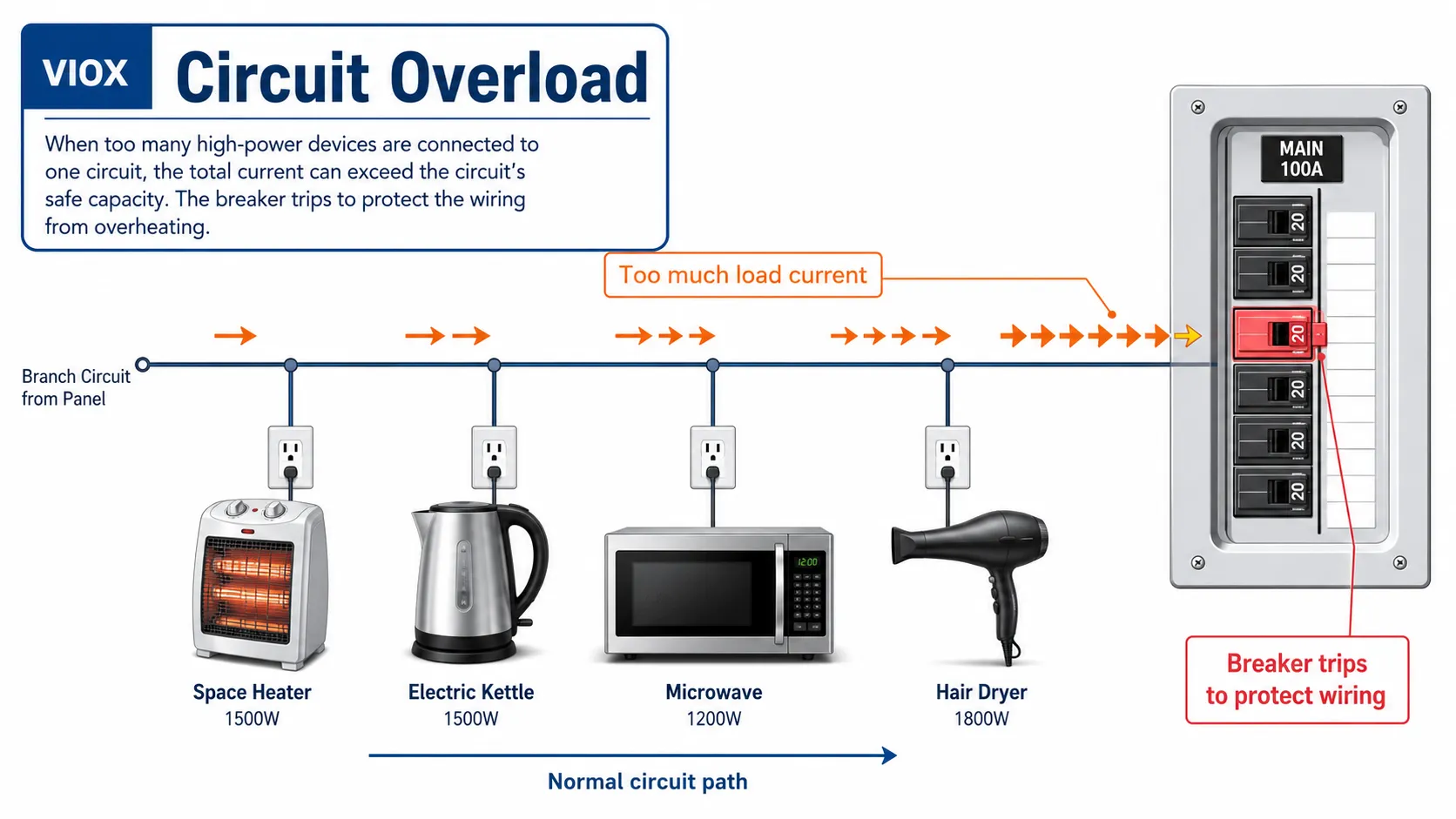
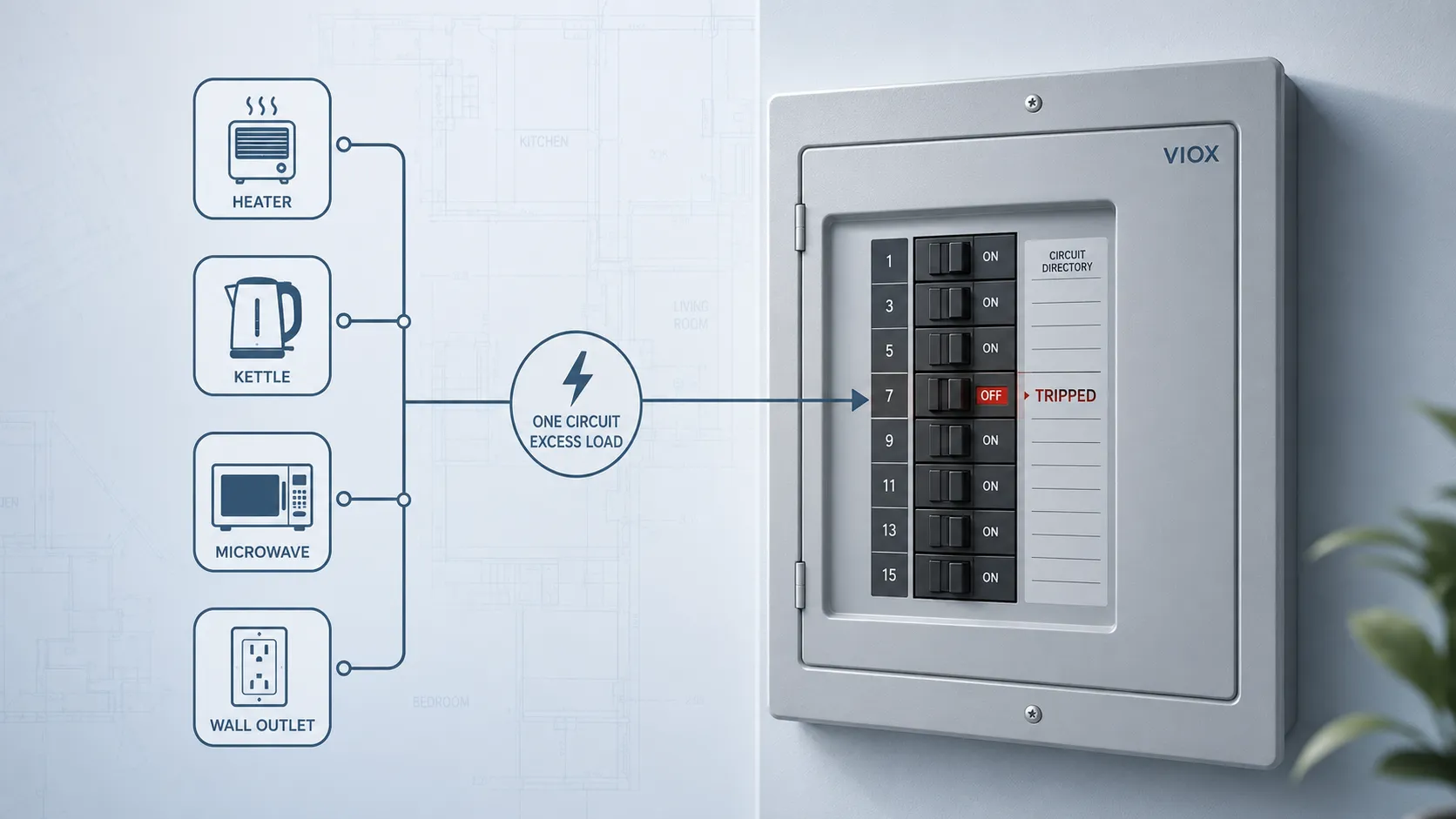
    Circuit overload diagram showing too many appliances drawing excess current through the normal circuit path
    Circuit overload: too many appliances draw excess current through the normal circuit path, causing conductors and terminals to overheat.

    That is why circuit overload is not just an inconvenience. It is a fire-prevention issue.


    Circuit Overload vs Short Circuit vs Ground Fault

    Many people use these terms interchangeably, but they are different fault conditions.

    Problem What It Means Current Path Typical Example Protective Device
    Circuit overload Too much load current for the circuit rating Normal conductive path Too many appliances on one circuit MCB, MCCB, fuse, overload device
    Short circuit Very high fault current through an unintended low-resistance path Abnormal path between conductors Live conductor touches neutral or another phase Breaker or fuse short-circuit protection
    Ground fault Current leaks to earth or exposed conductive parts Leakage path to ground/earth Damaged insulation contacts metal housing RCD, RCCB, RCBO, GFCI depending market
    Arc fault Dangerous arcing caused by damaged conductors or loose connections Intermittent arc path Damaged cord, loose terminal, cracked insulation AFCI / AFDD where required
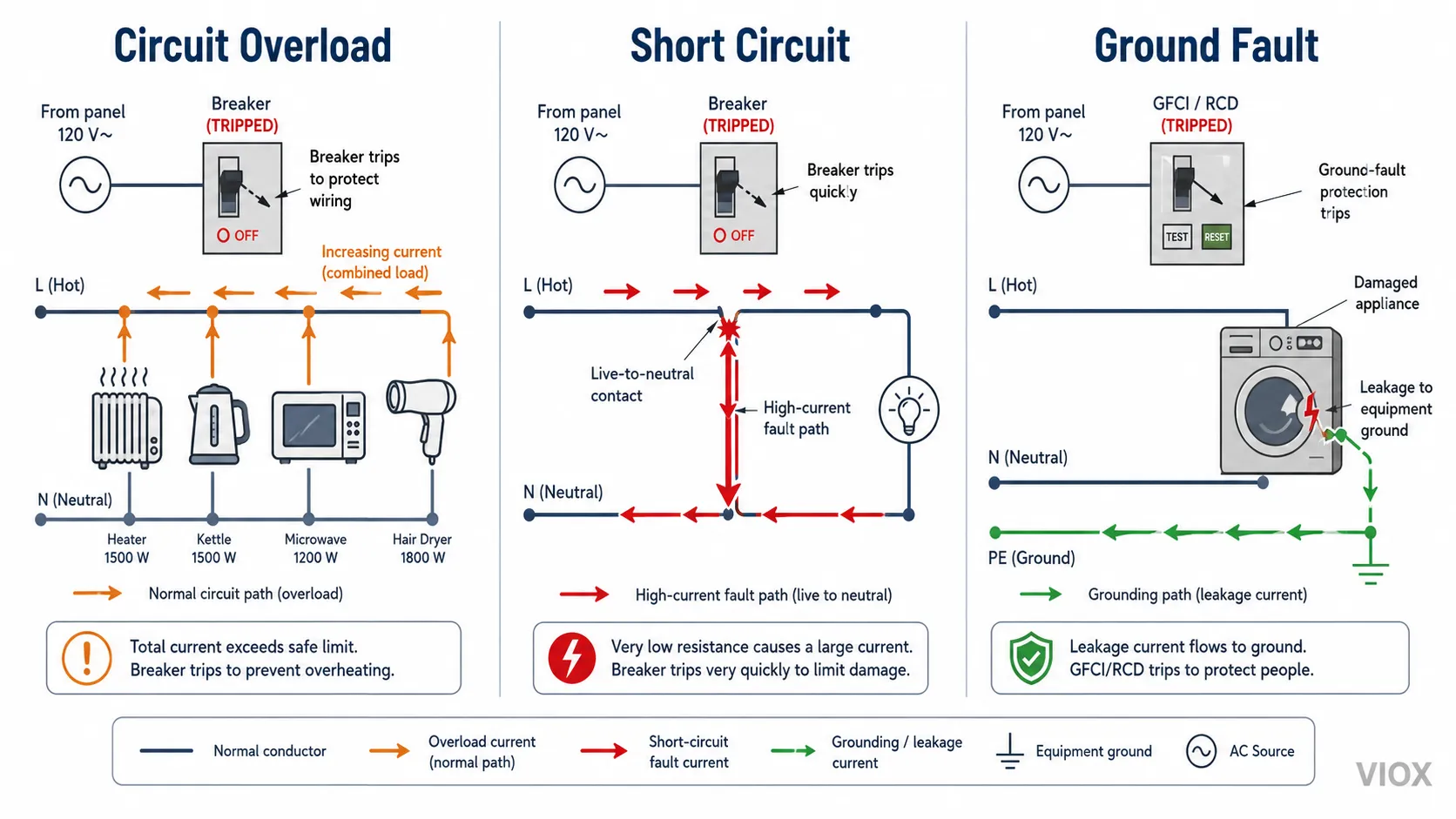
    Comparison diagram showing circuit overload, short circuit, and ground fault current paths
    Comparison of circuit overload, short circuit, and ground fault current paths: overload stays on the normal path while faults take abnormal routes.

    The key point:

    An overload is not the same as a short circuit. Overload current normally flows through the intended circuit path, but the amount of current is higher than the circuit can safely carry for the duration.


    What Causes an Overloaded Circuit?

    Circuit overload is usually caused by excessive load, poor circuit planning, or equipment changes after installation.

    Common causes include:

    • too many devices plugged into one circuit
    • high-wattage appliances used together
    • extension cords or power strips used as permanent wiring
    • space heaters, kettles, hair dryers, microwaves, or portable AC units on the same circuit
    • undersized wiring for the connected load
    • old circuits used for modern higher-power equipment
    • loose terminals increasing local heating
    • motor starting current or repeated equipment startup
    • added loads after a panel or circuit was originally designed

    In homes, overloads often happen when several appliances operate at once. In industrial or control-panel applications, overloads may appear when equipment is upgraded, motors are replaced, heaters are added, or branch circuits are expanded without checking current capacity.


    Warning Signs of Circuit Overload

    An overloaded circuit may show visible or operational symptoms before a serious failure occurs.

    Warning Sign What It May Indicate
    Breaker trips repeatedly Load current may exceed circuit rating
    Fuse blows after several appliances operate Circuit may be overloaded
    Outlet or plug feels warm High current or poor contact may be causing heating
    Burning smell near outlet or panel Stop using the circuit and call a qualified electrician
    Lights dim when appliances start Voltage drop or high inrush current may be present
    Buzzing or crackling sound Loose connection, arcing, or failing device may be present
    Discolored outlet, plug, or terminal Heat damage may already have occurred
    Power strip feels hot Connected load may exceed safe use

    Do not ignore repeated breaker trips. A breaker that trips under overload is doing its job. The problem is usually the load, wiring, connection, or circuit design, not the fact that the breaker operated.


    Why Breakers Trip During Overload

    A circuit breaker is designed to open the circuit when current exceeds a safe level for too long. In a typical thermal-magnetic breaker, overload protection is handled by the thermal element, while short-circuit protection is handled by the magnetic element.

    In simple terms:

    • Overload: current is too high for too long, so the breaker trips after a delay.
    • Short circuit: current rises extremely fast, so the breaker trips much more quickly.
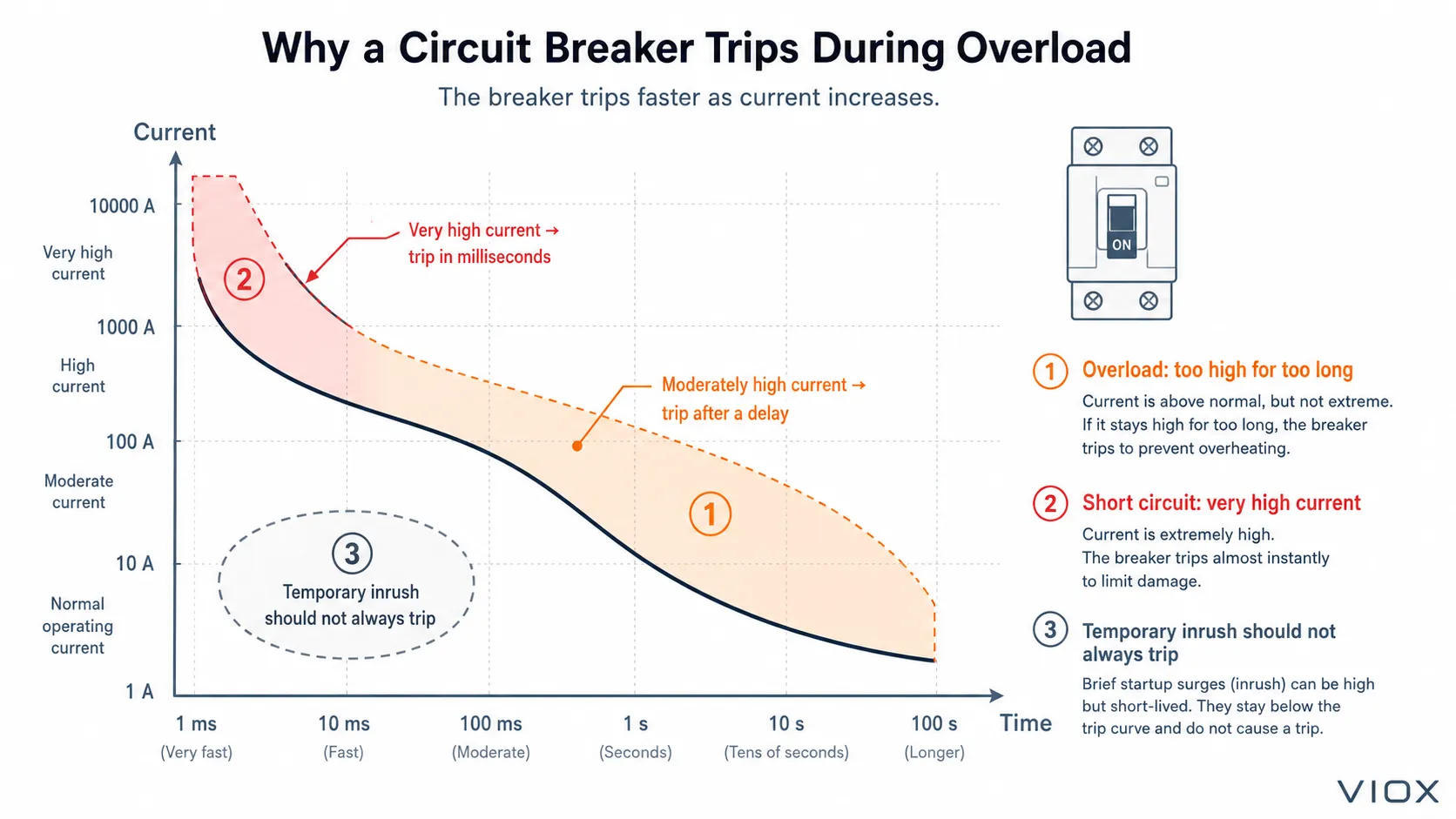
    Breaker trip behavior chart showing delayed overload trip and fast short circuit trip
    Breaker trip behavior: overload trips after a time delay while short-circuit trips operate almost instantly.

    This time-delay behavior is intentional. Some loads draw temporary inrush current when starting. A breaker should not trip instantly for every brief current spike. But if current remains above the safe level long enough to overheat conductors, the breaker must disconnect the circuit.

    For more on how breakers work, see VIOX’s guide to miniature circuit breakers.


    How to Fix a Circuit Overload Safely

    If you suspect a circuit overload, do not simply reset the breaker and keep using the same loads. Reduce the load first.

    Step 1: Turn off or unplug high-power devices

    Unplug or turn off devices such as heaters, kettles, microwaves, portable air conditioners, power tools, or other high-wattage equipment connected to the same circuit.

    Step 2: Reset the breaker once after reducing load

    After reducing the load, reset the breaker once. If it holds, the circuit was likely overloaded. If it trips again immediately or repeatedly, stop using the circuit and call a qualified electrician.

    Step 3: Spread loads across different circuits

    Move some appliances or equipment to a different branch circuit. Do not put multiple high-power devices on the same circuit if the circuit is not designed for that total load.

    Step 4: Do not replace the breaker with a larger one casually

    Never solve nuisance tripping by installing a higher-rated breaker unless the wiring, outlet rating, installation method, panel design, and local code allow it.

    Oversizing the breaker can allow the wire to overheat before the breaker trips.

    Step 5: Add a dedicated circuit if needed

    High-load equipment may require a dedicated circuit. This is common for ovens, HVAC equipment, water heaters, large motors, EV chargers, industrial heaters, and similar loads.

    Step 6: Inspect for heat damage

    If an outlet, plug, cable, terminal, or breaker shows discoloration, melting, odor, or heat damage, it should be inspected before reuse. The overload may have weakened the connection or insulation.


    What Not to Do During an Overload

    Avoid these common mistakes:

    Mistake Why It Is Dangerous
    Repeatedly resetting the breaker Heat may continue building in the circuit
    Replacing the breaker with a larger one Wiring may not be protected correctly
    Using extension cords permanently Cord and plug ratings may be exceeded
    Ignoring warm outlets or plugs Heat indicates a possible overload or poor contact
    Taping a breaker handle on Prevents the protection device from working
    Assuming every trip is a bad breaker The breaker may be correctly responding to unsafe current
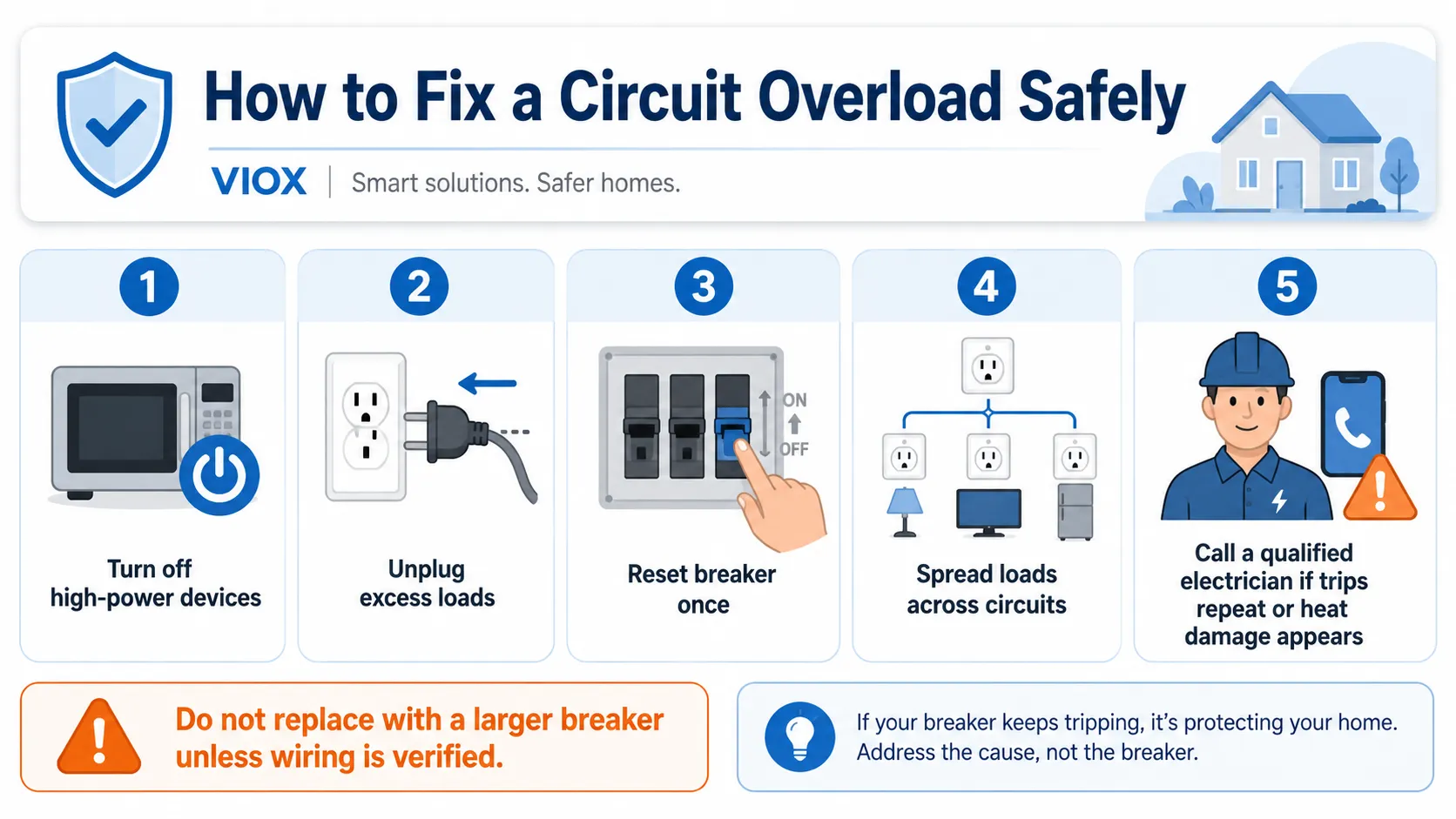
    Circuit overload fix checklist showing unplug loads, reset breaker once, and call electrician if trips repeat
    Circuit overload fix checklist: unplug high-power loads, reset the breaker once, and call a qualified electrician if trips repeat.

    If a breaker trips repeatedly, the safest assumption is that the circuit needs diagnosis, not that the breaker should be defeated.


    How to Prevent Circuit Overload

    Prevention is mostly about load planning and protection coordination.

    Practical prevention steps:

    • know which outlets are on the same circuit
    • avoid running several high-wattage appliances together
    • use dedicated circuits for large fixed loads
    • check equipment nameplates before adding load
    • avoid permanent use of extension cords and power strips
    • keep panel schedules accurate
    • inspect warm outlets, terminals, and plugs
    • size breakers according to wire capacity and application
    • upgrade old circuits when adding modern loads
    • use appropriate protection devices for the circuit type

    For panel design and load calculation basics, see VIOX’s guide to low-voltage electrical formulas.


    Circuit Overload Protection Devices

    Different protection devices respond to different conditions.

    Device Main Protection Role Notes
    MCB Overload and short-circuit protection for smaller circuits Common in distribution boards
    MCCB Overload and short-circuit protection for higher-current circuits Often used in commercial and industrial panels
    Fuse Overcurrent protection Must match voltage, current, and breaking capacity requirements
    RCBO Residual-current protection plus overcurrent protection Combines leakage and overcurrent protection in one device
    RCCB Residual-current protection only Does not provide overload protection by itself
    Overload relay Motor overload protection Usually coordinated with contactor and short-circuit protection

    This distinction matters. For example, an RCCB can protect against residual current or earth leakage, but it does not replace the overload protection of an MCB, MCCB, fuse, or RCBO. For a broader device comparison, see RCBO vs RCCB + MCB.


    Overload Current: The Correct Concept

    Several electrical training questions focus on the definition of overload current. The concept is:

    Overload current is excessive current flowing in the normal conductive path of the circuit.

    That means:

    • overload is not the same as short circuit
    • overload is usually caused by too much connected load
    • overload current follows the intended circuit path
    • protective devices must interrupt dangerous overloads before conductors overheat
    • overload can damage insulation, outlets, terminals, and equipment if not cleared

    This is why a statement such as “too many appliances on one circuit can cause more current than the wiring is designed to carry” describes a circuit overload.


    When to Call an Electrician

    Call a qualified electrician if:

    • the breaker trips repeatedly after loads are reduced
    • an outlet, plug, cable, or panel area feels hot
    • there is a burning smell
    • an outlet or breaker is discolored
    • lights dim severely when equipment starts
    • you need to add a high-power appliance
    • old wiring is being used with modern loads
    • you are unsure which circuits supply which outlets
    • the panel has buzzing, crackling, or visible damage

    Electrical overload can be a fire hazard. If there is heat, smoke, burning odor, or visible damage, stop using the circuit and arrange inspection before restoring normal use.


    Quick Reference

    Question Short Answer
    What is a circuit overload? Too much current for the circuit rating
    Is overload the same as short circuit? No
    Does overload current follow the normal path? Yes, usually
    Why does the breaker trip? To stop overheating and reduce fire risk
    Can I install a larger breaker? Not unless the wiring and code allow it
    How do I fix overload? Reduce load, redistribute circuits, add dedicated circuits if needed
    What prevents overload fires? Correct wiring, correct breaker/fuse, and proper load planning

    FAQ

    What is circuit overload?

    Circuit overload is a condition where the connected loads draw more current than the circuit wiring or protective device is designed to carry safely.

    What causes an overloaded circuit?

    An overloaded circuit is commonly caused by too many appliances or devices operating on the same circuit at the same time, especially high-wattage loads such as heaters, microwaves, kettles, or portable air conditioners.

    How do you fix a circuit overload?

    Reduce the connected load, reset the breaker once after reducing load, move equipment to other circuits, and add a dedicated circuit if needed. If the breaker trips again or any component is warm, damaged, or discolored, call a qualified electrician.

    Is overload the same as short circuit?

    No. An overload is excessive current through the normal circuit path. A short circuit is a fault current through an unintended low-resistance path.

    Can an overloaded circuit cause a fire?

    Yes. If overload current continues without proper protection, conductors, outlets, terminals, or plugs can overheat and create a fire risk.

    What device prevents overload from causing fires?

    A properly selected fuse, MCB, MCCB, RCBO, or other overcurrent protective device can interrupt overload current before the circuit overheats. The device must match the wiring and application.

    Why does my breaker trip when I use several appliances?

    The combined current of the appliances may exceed the circuit rating. The breaker trips to protect the wiring from overheating.

    Should I replace a tripping breaker with a larger breaker?

    No, not without proper verification. A larger breaker may fail to protect the existing wire. The circuit wiring, outlet rating, panel design, and applicable code must be checked first.


    Conclusion

    A circuit overload occurs when too much current flows through the normal conductive path of a circuit. It is different from a short circuit, but it can still overheat wiring and create a fire risk if not interrupted.

    The right response is not to defeat the breaker. Reduce the load, identify what is connected to the circuit, inspect for heat damage, and upgrade the circuit when the load demand requires it. A correctly selected breaker or fuse is not just a switch. It is part of the fire-prevention system that keeps the circuit within safe current limits.

  • What Is the Most Common Breaker Size in a Residential Electrical Panel

    What Is the Most Common Breaker Size in a Residential Electrical Panel

    Quick Answer: The most common breaker size in residential electrical panels is 15 amp, followed closely by 20 amp breakers. These two sizes typically account for 60-70% of all breakers in a standard home electrical panel, with 15 amp breakers protecting general lighting circuits and 20 amp breakers serving kitchen outlets, bathrooms, and other high-demand areas.

    Understanding Residential Circuit Breaker Basics

    BH-P 30A breaker

    Circuit breakers serve as the critical safety mechanism in your home’s electrical system, automatically shutting off power when circuits become overloaded. Understanding breaker sizes helps homeowners make informed decisions about electrical upgrades, troubleshooting, and safety compliance.

    Why Breaker Size Matters for Home Safety

    The amperage rating on a circuit breaker determines how much electrical current can safely flow through that circuit before the breaker trips. Using incorrectly sized breakers can lead to:

    • Fire hazards from overloaded circuits
    • Equipment damage from insufficient power supply
    • Code violations during home inspections
    • Insurance claim denials after electrical incidents

    Complete Breakdown of Standard Residential Breaker Sizes

    15 Amp Breakers: The Most Common Choice

    Usage Percentage: 35-40% of residential breakers

    Primary Applications:

    • General lighting circuits throughout the home
    • Bedroom outlets (non-AFCI areas)
    • Living room standard outlets
    • Hallway and closet lighting

    Wire Gauge Required: 14 AWG copper wire

    Maximum Safe Load: 12 amps (80% of rated capacity)

    Expert Tip: While 15 amp breakers can handle 15 amps, the National Electrical Code (NEC) recommends continuous loads should not exceed 80% of the breaker rating, or 12 amps for 15 amp circuits.

    20 Amp Breakers: The Versatile Workhorse

    Usage Percentage: 25-30% of residential breakers

    Primary Applications:

    • Kitchen counter outlets (GFCI protected)
    • Bathroom outlets and lighting
    • Laundry room circuits
    • Garage outlets
    • Outdoor outlets (GFCI protected)

    Wire Gauge Required: 12 AWG copper wire

    Maximum Safe Load: 16 amps (80% of rated capacity)

    Higher Amperage Breakers: Specialized Applications

    Breaker Size Percentage of Panel Common Applications Wire Gauge
    30 Amp 10-15% Electric dryers, water heaters 10 AWG
    40 Amp 5-8% Electric ranges, large AC units 8 AWG
    50 Amp 3-5% Electric ranges, RV outlets 6 AWG
    60+ Amp 2-3% Hot tubs, electric vehicle chargers 4 AWG or larger

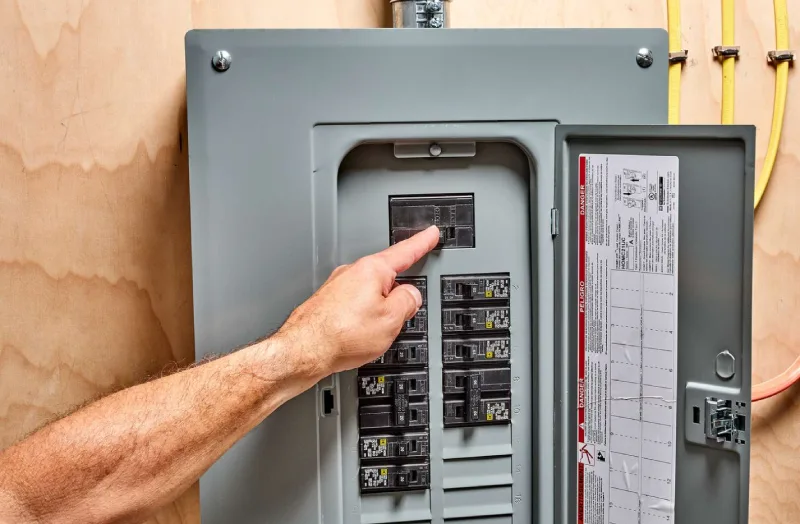
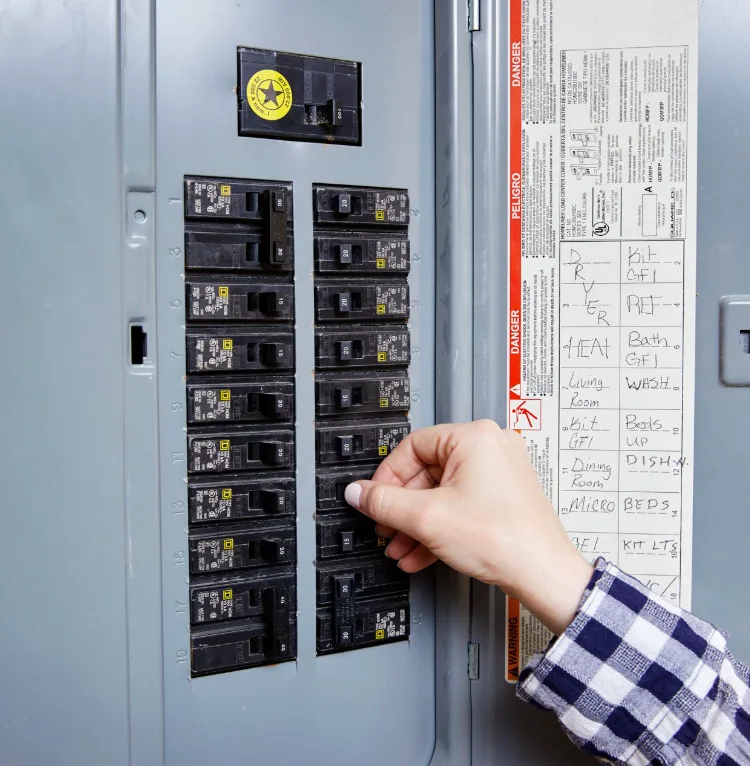
    A hand operating a residential electrical circuit breaker panel showing multiple miniature circuit breakers (MCBs) used to protect circuits from overloads and short circuits

    Regional Variations in Breaker Size Distribution

    Modern Construction Trends (2020-2025)

    Recent building codes and lifestyle changes have shifted breaker size preferences:

    • Increased 20 amp circuits: Modern homes typically have more 20 amp circuits for increased device loads
    • AFCI requirements: Arc-fault circuit interrupters are now mandatory for most 15 and 20 amp bedroom circuits
    • EV preparation: New construction often includes provisions for 40-50 amp EV charging circuits

    Older Home Considerations (Pre-1990)

    Homes built before 1990 may have different distributions:

    • Higher percentage of 15 amp circuits: Older homes relied more heavily on 15 amp circuits
    • Fewer kitchen circuits: Older kitchens may have insufficient 20 amp circuits for modern appliances
    • Panel upgrade needs: Many older panels require updates to meet current electrical demands

    How to Determine Your Panel’s Breaker Sizes

    Step-by-Step Identification Process

    1. Locate your electrical panel (usually in basement, garage, or utility room)
    2. Open the panel cover carefully (turn off main breaker if unsure)
    3. Read breaker labels – amperage is printed on each breaker handle
    4. Create an inventory listing each breaker size and its protected circuit
    5. Verify circuit purposes using the panel schedule (if available)

    Safety Precautions When Inspecting Your Panel

    • Never touch exposed wires or metal components inside the panel
    • Use a flashlight rather than overhead lighting when inspecting
    • Keep the area dry – never inspect panels with wet hands or in damp conditions
    • Call a professional if you notice burning smells, corrosion, or damaged components

    MCB without logo IN BOX

    When to Upgrade Your Electrical Panel Breakers

    Signs You Need Professional Assessment

    Immediate Red Flags:

    • Breakers trip frequently without obvious cause
    • Burning smells from the electrical panel
    • Lights dimming when large appliances turn on
    • Warm or hot breaker handles
    • Visible corrosion or damage to breakers

    Capacity Upgrade Indicators:

    • Adding new high-demand appliances (AC units, electric vehicles)
    • Kitchen or bathroom renovations requiring additional circuits
    • Home additions requiring expanded electrical service
    • Converting from gas to electric appliances

    Professional vs. DIY Considerations

    Always Hire a Licensed Electrician For:

    • Installing new breakers or circuits
    • Upgrading panel capacity
    • Any work involving the main breaker
    • Troubleshooting electrical problems

    Homeowner-Friendly Tasks:

    • Identifying and labeling existing circuits
    • Resetting tripped breakers
    • Basic electrical load calculations
    • Planning electrical upgrades before contractor consultation

    30A AMP Breaker

    Cost Considerations for Breaker Replacement and Upgrades

    Typical Replacement Costs (2025 Pricing)

    Service Type Cost Range Factors Affecting Price
    Single breaker replacement $150-$300 Breaker type, accessibility, local rates
    Multiple breaker upgrade $500-$1,200 Number of circuits, wire replacement needs
    Panel capacity upgrade $1,500-$4,000 Current panel condition, electrical service size
    Complete panel replacement $2,000-$6,000 Home size, complexity, local permitting costs

    Factors That Increase Project Costs

    • Older home wiring: May require extensive rewiring with new circuits
    • Code compliance updates: Bringing older installations up to current NEC standards
    • Permit requirements: Municipal permits and inspections add time and cost
    • Access challenges: Difficult-to-reach panels increase labor costs

    Frequently Asked Questions About Residential Breaker Sizes

    Can I replace a 15 amp breaker with a 20 amp breaker?

    No, this is dangerous and code-violating. The breaker size must match the wire gauge in the circuit. Installing a larger breaker on undersized wire creates a fire hazard because the wire can overheat before the breaker trips.

    Why do some circuits use 15 amp breakers instead of 20 amp?

    Cost and necessity. 15 amp circuits with 14 AWG wire cost less to install than 20 amp circuits requiring 12 AWG wire. For lighting and low-demand outlet circuits, 15 amps provides adequate capacity while reducing installation costs.

    How many outlets can be on a 15 amp circuit?

    Generally 8-10 outlets, but the actual limit depends on the expected electrical load rather than the number of outlets. Bedrooms might safely have 10 outlets on a 15 amp circuit, while a home office might max out at 6 outlets due to computer equipment.

    Do newer homes have different breaker size distributions?

    Yes, significantly. Homes built after 2010 typically have more 20 amp circuits due to increased electrical demands from modern devices, appliances, and code requirements for kitchen and bathroom circuits.

    What’s the difference between single-pole and double-pole breakers?

    Voltage and applications. Single-pole breakers (15, 20, 30 amp) serve 120V circuits, while double-pole breakers (typically 30+ amp) serve 240V circuits for large appliances like dryers, ranges, and air conditioners.

    Planning Your Electrical Future: Smart Breaker Strategies

    Preparing for Modern Electrical Demands

    Today’s homes require more electrical capacity than ever before. Consider these trends when planning electrical upgrades:

    • Smart Home Integration:
      • Additional 20 amp circuits for device charging stations
      • Dedicated circuits for smart home hubs and network equipment
      • Upgraded lighting circuits for smart switches and dimmers
    • Electric Vehicle Preparation:
      • 40-50 amp circuits for Level 2 EV charging
      • Upgraded main panel capacity to handle additional load
      • Future-proofing for multiple EV charging stations
    • Energy Efficiency Upgrades:
      • Heat pump systems requiring 30-60 amp circuits
      • Solar panel inverter circuits (typically 30-50 amp)
      • Battery backup systems requiring dedicated high-amperage circuits

    Conclusion: Making Informed Electrical Panel Decisions

    Understanding that 15 amp and 20 amp breakers comprise the majority of residential electrical panels helps homeowners make informed decisions about their electrical systems. While 15 amp breakers remain the most common for general lighting and outlet circuits, the trend toward 20 amp circuits reflects increasing electrical demands in modern homes.

    Related

    GFCI vs AFCI: The Complete Guide to Electrical Safety Circuit Breakers

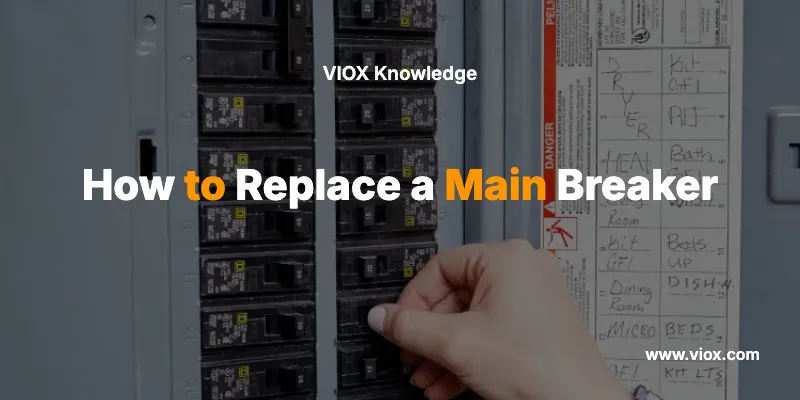
    How to Replace a Main Breaker

    IEC 60898-1 vs IEC 60947-2: Complete Guide to Electrical Circuit Breaker Standards

  • Voltage Protector vs Surge Protector: What Is the Difference?

    Voltage Protector vs Surge Protector: What Is the Difference?

    A voltage protector disconnects a load when the measured supply remains above or below configured voltage limits. A surge protector, more precisely a surge protective device (SPD), limits short transient overvoltage by conducting surge current through a defined protection path.
    They solve different problems:

    • Choose a voltage protector for sustained or recurring overvoltage and undervoltage.
    • Choose an SPD for short transients associated with lightning effects, switching, or similar surge events.
    • Use both when the installation is exposed to both disturbance types.
    • Choose a regulator, UPS, or another solution if the load must continue operating through voltage variation or an outage.

    Neither device is universally “better.” The correct choice depends on what the voltage is doing, how long the condition persists, and whether the required response is to disconnect the load or limit a transient.

    Scope note: In this article, “voltage protector” means an automatic over and under voltage protector or voltage-monitoring relay that initiates disconnection. Some sellers use the same phrase for voltage regulators, surge strips, or multifunction devices, so the actual datasheet function must always be checked.

    Voltage Protector vs Surge Protector: Decision Table

    Decision point Voltage protector Surge protector / SPD
    Primary disturbance Supply remains outside an allowed overvoltage or undervoltage window Short transient overvoltage
    Protective action Opens an internal switching device or commands a contactor to disconnect the load Changes impedance and conducts surge current, limiting the voltage across protected conductors
    Load during operation Power is interrupted Power is normally not intentionally interrupted by the surge-limiting action
    Low-voltage protection Yes, when undervoltage monitoring is provided and configured No
    Sustained high-voltage protection Yes, within the device’s declared monitoring and switching capability Not the SPD’s intended function
    Lightning- or switching-induced transient protection Not a substitute for an SPD Core function when the SPD is correctly selected and installed
    Typical connection role In the load path or in a control circuit that operates a switching device Usually connected in parallel across defined conductors or protection modes
    Key limitation Disconnects rather than corrects the supply and is not intended to limit surge energy Does not regulate voltage, boost low voltage, provide backup power, or replace sustained-voltage protection

    The shortest reliable rule is:

    Out-of-range voltage that persists → disconnect it. Short transient voltage → limit it. Exposure to both → coordinate both functions.

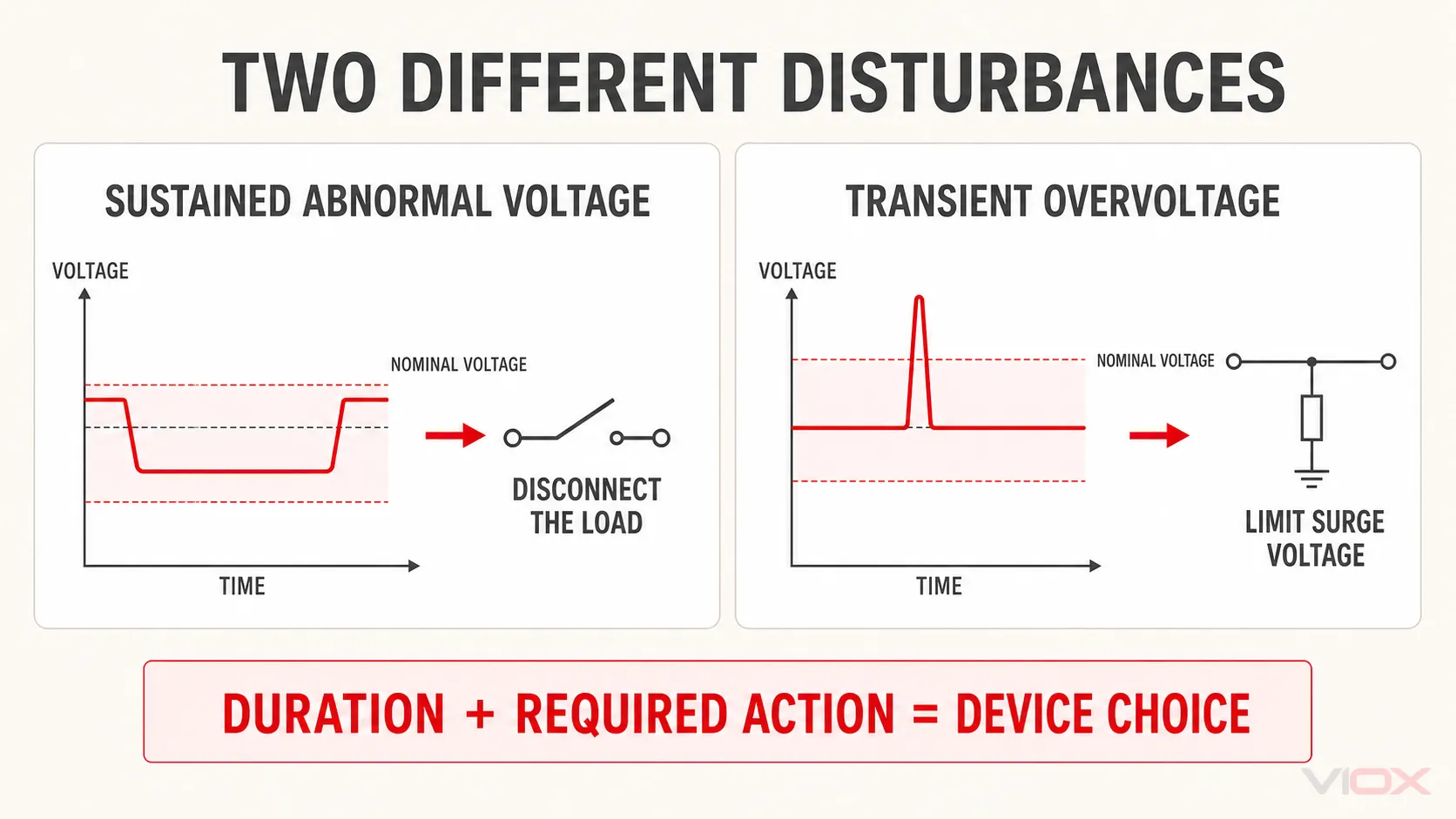
    The Key Distinction Is Disturbance Duration and Protective Action

    “Overvoltage” is a broad description, not one single electrical event. Two conditions can both rise above nominal voltage yet require different protection.

    A sustained abnormal supply voltage remains present long enough for a monitoring device to determine that the supply has left its permitted window. Where load disconnection is an appropriate protective response, reconnection follows the device’s configured recovery logic.

    A temporary overvoltage (TOV) requires a more specific system assessment and should not be treated as merely another name for ordinary long-term supply deviation. Whether a voltage protector is an appropriate part of the response depends on the TOV magnitude and duration, the earthing system, equipment withstand capability, the installed SPD’s declared TOV behavior, and applicable local installation rules. A general voltage protector should therefore not be assumed to resolve every TOV scenario by itself.

    A transient overvoltage is a short event caused by effects such as lightning or switching. The required action is to limit the voltage stress while providing a path for surge current. IEC 61643-11 describes AC low-voltage SPDs as devices containing at least one nonlinear component and intended to limit surge voltages and divert surge currents.

    This distinction also explains why a low-looking voltage number alone cannot identify the right device. A power-quality measurement, event log, equipment alarm, or investigation of the source may be needed to determine whether the problem is a persistent supply condition, a transient, an interruption, or a different disturbance entirely.

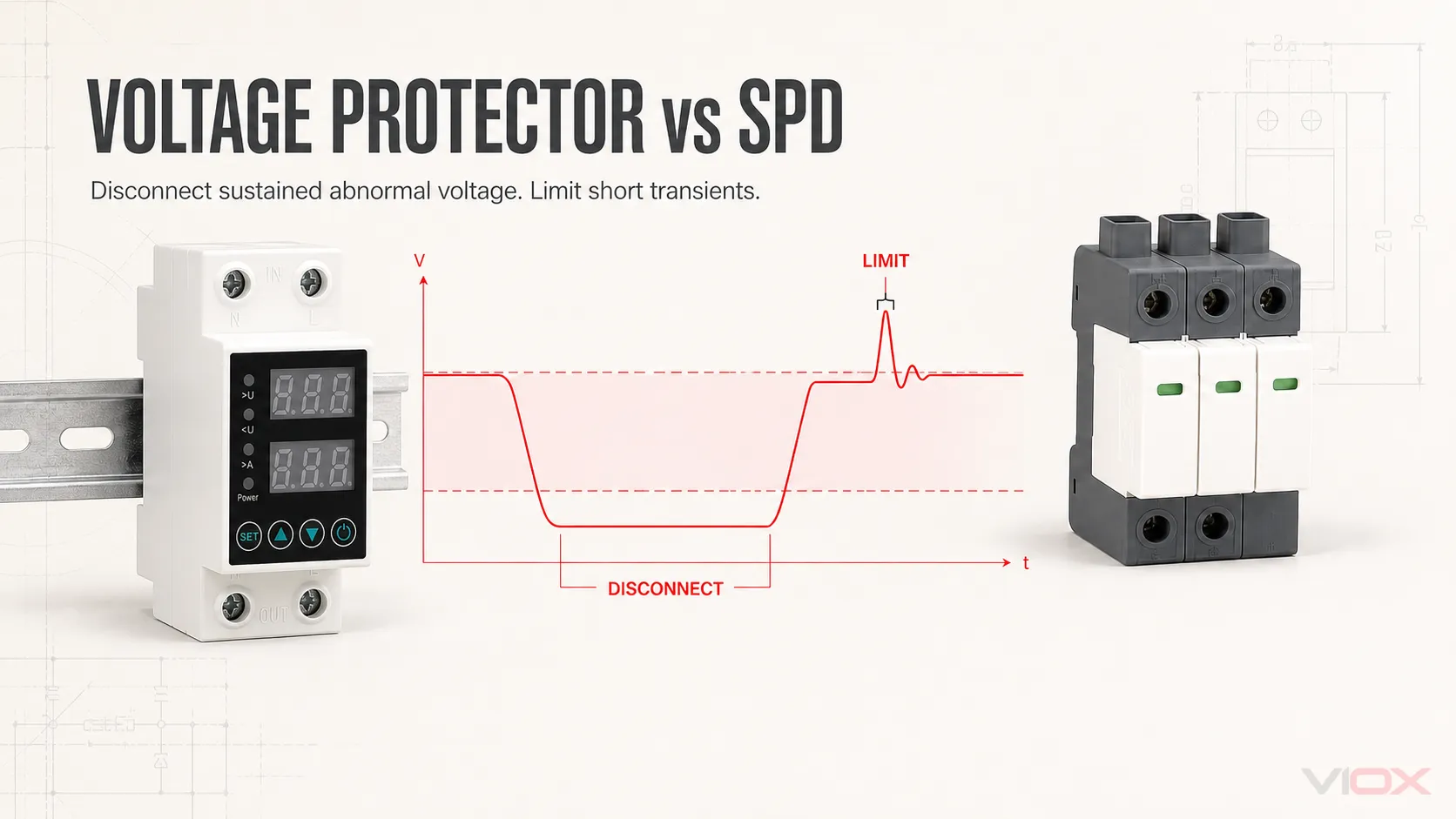
    Comparison of sustained abnormal voltage and transient overvoltage by duration and required protective action

    How Does a Voltage Protector Respond?

    A voltage protector typically follows a monitoring-and-disconnection sequence:

    1. It measures the relevant supply voltage.
    2. It compares the measurement with configured overvoltage and undervoltage thresholds.
    3. When the trip condition is satisfied, its output changes state.
    4. The load is disconnected directly or through a contactor, depending on the device design.
    5. Reconnection occurs according to the product’s recovery threshold, hysteresis, and delay logic.

    The exact thresholds, delay behavior, contact rating, and reset method are product-specific. A three-phase monitoring relay may also supervise phase loss, phase sequence, or asymmetry, but those features should not be assumed for every voltage protector.

    The essential point is that the device removes an unsafe supply from the load. It does not normally hold the output at a constant voltage.

    How Does a Surge Protective Device Respond?

    A surge protective device normally remains in a high-impedance standby state at acceptable system voltage. When a transient causes the voltage across a protected mode to rise, a nonlinear component changes state and provides a lower-impedance path for surge current. This limits the transient voltage reaching downstream equipment.

    The current does not always travel simply “to ground.” Depending on the system and SPD topology, the protected modes may include line-to-neutral, line-to-protective-earth, neutral-to-protective-earth, line-to-line, or DC conductor combinations. Earthing, bonding, conductor routing, protection mode, and installation position all influence the result.

    An SPD is therefore a transient-limiting device—not a voltage stabilizer and not a general high-voltage cutoff. Schneider Electric also states that surge protectors are not intended to safeguard against temporary overvoltages below their maximum continuous operating voltage.

    Can a Surge Protector Replace a Voltage Protector?

    No. A standard SPD does not provide the core functions required for sustained over/under-voltage protection:

    • It does not boost low voltage.
    • It does not normally open the load circuit because supply voltage remains below a configured limit.
    • It is not intended to continuously absorb or divert the energy of a sustained abnormal supply condition.
    • Its Uc or MCOV rating is a continuous operating limit used in SPD selection, not a user-adjustable overvoltage trip threshold for load disconnection.

    This directly answers the common question, “Do surge protectors protect against low voltage?” They do not. If undervoltage must cause shutdown, the system needs undervoltage monitoring and an appropriate means of disconnection. If operation must continue, regulation or stored-energy support may be required instead.

    Can a Voltage Protector Replace an SPD?

    No. A voltage protector is designed to evaluate the supply against monitoring thresholds and then disconnect the load. That is not the same operation as limiting a short transient at the equipment terminals.

    Even if a voltage protector includes an overvoltage trip function, that label does not prove it has been tested as an SPD. Surge protection requires declared transient-performance ratings and an applicable test framework. For AC low-voltage SPDs, relevant label and datasheet items may include SPD Type, Uc or MCOV, Up, In, Imax or Iimp, protection modes, and short-circuit coordination.

    Therefore, overvoltage protection is not automatically the same as surge protection. Surge protection is one specialized response to transient overvoltage; a voltage protector addresses a different part of the voltage-disturbance spectrum.

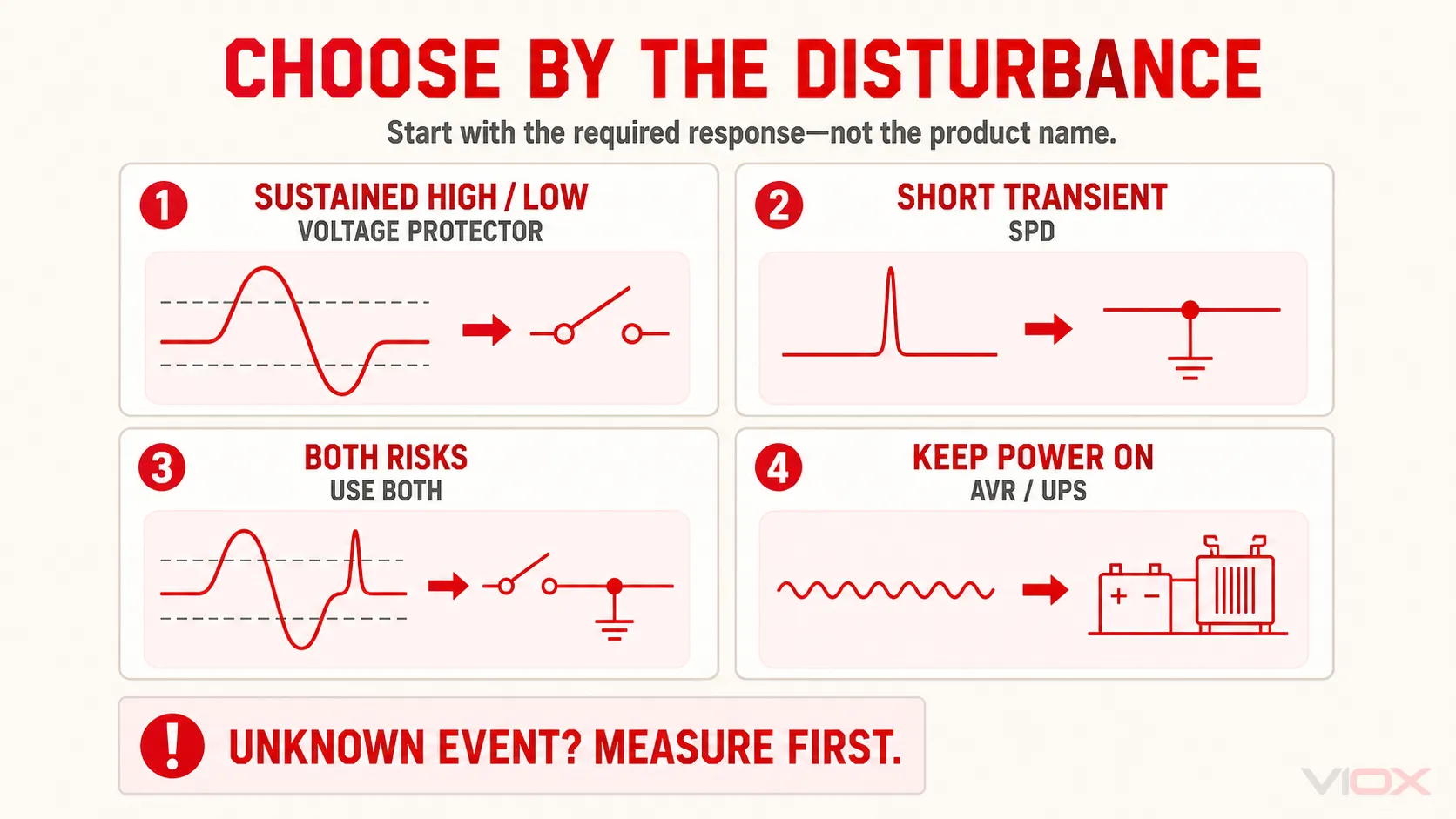
    Which Device Do You Need?

    Use the observed problem—not the product name—as the selection starting point.

    Observed requirement Appropriate direction Why
    Voltage remains too high or too low and the equipment should shut down Voltage protector Threshold monitoring and disconnection match the required response
    Exposure to lightning-induced or switching transients SPD The requirement is transient-voltage limitation and surge-current handling
    Unstable supply plus credible transient exposure Both Each device covers a different disturbance class
    Equipment must remain energized through moderate voltage variation Voltage regulator / AVR Regulation, not disconnection, is required
    Equipment must continue operating during interruption UPS or another backup-power system Neither a voltage protector nor an SPD supplies backup energy
    Overload, short circuit, or electric-shock protection is the main concern Appropriate overcurrent or residual-current protection The problem is not primarily voltage magnitude or transient limitation
    Disturbance type is unknown Measure or diagnose first Product selection without identifying the event can leave the real failure mode unprotected
    Four-way selection matrix for choosing a voltage protector, SPD, both devices, or an AVR or UPS

    Choose a Voltage Protector When

    Choose a voltage protector when all three statements are true:

    1. The important variable is the measured supply voltage.
    2. The unacceptable condition persists long enough to satisfy the device’s trip logic.
    3. Disconnecting the load is the desired safe response.

    Then verify nominal voltage, single- or three-phase configuration, over/under thresholds, hysteresis, delay and reset logic, contact or controlled-contactor capacity, and any required phase-monitoring functions.

    Choose an SPD When

    Choose an SPD when the design must limit transient overvoltage on an AC, DC, PV, power, or signal circuit. Selection depends on the applicable standard and installation context, not on one headline kA value.

    For an AC power SPD, verify system voltage and earthing arrangement, installation point, SPD Type, Uc or MCOV, voltage protection level, declared discharge-current ratings, protection modes, backup protection, and available short-circuit conditions. The VIOX guide to reading an SPD datasheet explains these parameters in detail.

    When Should a Voltage Protector and SPD Be Used Together?

    Use both when the risk assessment identifies both unstable supply voltage and transient exposure. A facility may, for example, experience recurring voltage excursions while also having outdoor feeders, lightning exposure, inductive switching, or sensitive electronic controls.

    In that arrangement, the devices remain functionally separate:

    • The SPD limits transient voltage between its connected conductors.
    • The voltage protector monitors supply voltage and initiates load disconnection when its settings require it.
    • The breaker or fuse provides the required overcurrent and short-circuit function.
    • Earthing and bonding provide the system reference and current paths required by the design.

    “Use both” does not create a universal wiring order. Device topology, earthing system, upstream protection, conductor routing, contactor arrangement, local rules, and manufacturer instructions determine the final design. A qualified electrical professional should coordinate these elements for the actual installation.

    Voltage Protector vs Voltage Regulator: Do Not Confuse Disconnection With Correction

    Some search results use “voltage protector,” “voltage regulator,” and “stabilizer” interchangeably. They are not necessarily the same product.

    • A voltage protector decides whether the measured voltage is acceptable and disconnects when its protection logic is met.
    • A voltage regulator or AVR changes the input-to-output relationship to keep output voltage within its regulating capability.
    • A UPS provides stored energy during an interruption and may also include regulation or surge-related functions.
    • An SPD limits transient overvoltage.

    A multifunction product may combine more than one function, but each function must be verified from its ratings, test standard, wiring diagram, and declared operating behavior. The word “protection” on the enclosure is not evidence that all four functions are present.

    Final Selection Rule

    The voltage protector vs surge protector decision becomes straightforward when the disturbance is defined first:

    • Sustained high or low supply voltage + shutdown required: voltage protector.
    • Short transient overvoltage + voltage limitation required: SPD.
    • Both disturbance classes are credible: coordinate both.
    • Continuous correction or backup power is required: select a regulator, UPS, or engineered power-quality solution instead.

    After identifying SPD as the required product category, compare the VIOX surge protective device range by system voltage, application, SPD Type, protection mode, and declared ratings.

    Sources Reviewed

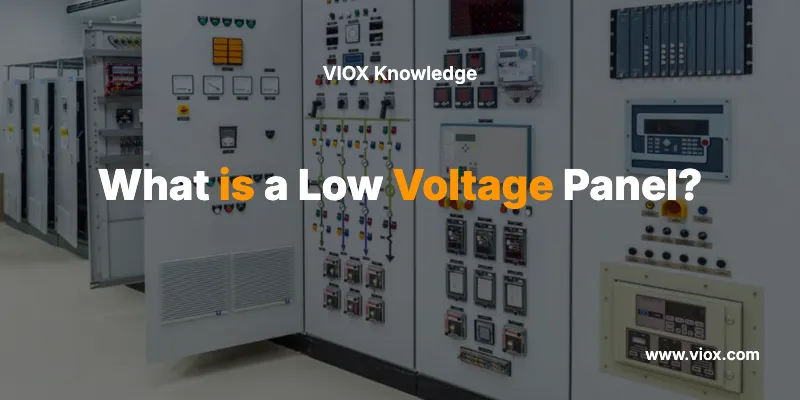
  • What is a Low Voltage Panel?

    What is a Low Voltage Panel?

    A low voltage panel is an electrical distribution board that manages and distributes electrical power at voltages typically below 1,000 volts AC or 1,500 volts DC. These panels serve as central control points that safely distribute electricity from main power sources to various circuits, loads, and equipment throughout residential, commercial, and industrial facilities.

    Low voltage panels are essential safety components that protect electrical systems through circuit breakers, fuses, and monitoring devices while providing organized power distribution to lighting, outlets, HVAC systems, and other electrical equipment.

    What Makes Low Voltage Panels Different from High Voltage Panels?

    Low Voltage Panels

    Understanding the distinction between low voltage and high voltage panels is crucial for electrical safety and proper system design.

    Low Voltage vs High Voltage Panel Comparison

    Feature Low Voltage Panels High Voltage Panels
    Voltage Range Below 1,000V AC / 1,500V DC Above 1,000V AC / 1,500V DC
    Typical Applications Residential, small commercial, control systems Industrial plants, utility substations
    Safety Requirements Standard electrical safety practices Specialized high-voltage safety protocols
    Installation Complexity Moderate – qualified electricians High – specialized technicians required
    Cost Lower initial and maintenance costs Higher initial and maintenance costs
    Space Requirements Compact, wall-mounted or floor-standing Larger footprint, specialized rooms
    Arc Flash Risk Lower energy levels Higher energy levels, specialized PPE required

    Key Components of Low Voltage Panels

    Low voltage panels contain several critical components that work together to ensure safe and reliable power distribution:

    Essential Panel Components

    1. Main Breaker or Main Disconnect
    – Controls power to the entire panel
    – Provides emergency shutoff capability
    – Sized according to panel’s total amperage rating

    2. Branch Circuit Breakers
    – Protect individual circuits from overcurrent
    – Available in various amperage ratings (15A, 20A, 30A, etc.)
    – Trip automatically when circuit overload occurs

    3. Bus Bars
    – Copper or aluminum conductors that distribute power
    – Main bus carries power from service entrance
    – Branch buses distribute power to individual circuits

    4. Neutral and Ground Bars
    – Provide return path for electrical current
    – Essential for safety and proper circuit operation
    – Must be properly bonded per NEC requirements

    5. Panel Enclosure
    – Protects internal components from environmental factors
    – Provides safety barrier against electrical contact
    – Available in various NEMA ratings for different environments

    ? Expert Tip: Always verify that your low voltage panel meets the appropriate NEMA rating for its installation environment. Indoor panels typically use NEMA 1, while outdoor installations require NEMA 3R or higher ratings.

    Types and Classifications of Low Voltage Panels

    Low voltage panels come in various configurations designed for specific applications and installation requirements.

    Panel Types by Application

    Panel Type Voltage Range Typical Use Key Features
    Residential Load Centers 120/240V single-phase Homes, small apartments 20-40 circuits, plug-in breakers
    Commercial Panelboards 120/208V or 277/480V three-phase Office buildings, retail 30-84 circuits, bolt-on breakers
    Industrial Control Panels 24V-600V DC/AC Manufacturing, automation Custom configurations, monitoring systems
    Motor Control Centers (MCC) 208V-600V three-phase Industrial motors Variable frequency drives, starters
    Distribution Panels 120V-600V Large facilities High amperage ratings, multiple feeders

    Panel Classifications by Construction

    Surface-Mounted Panels
    – Installed on wall surfaces
    – Easier access for maintenance
    – Common in commercial applications

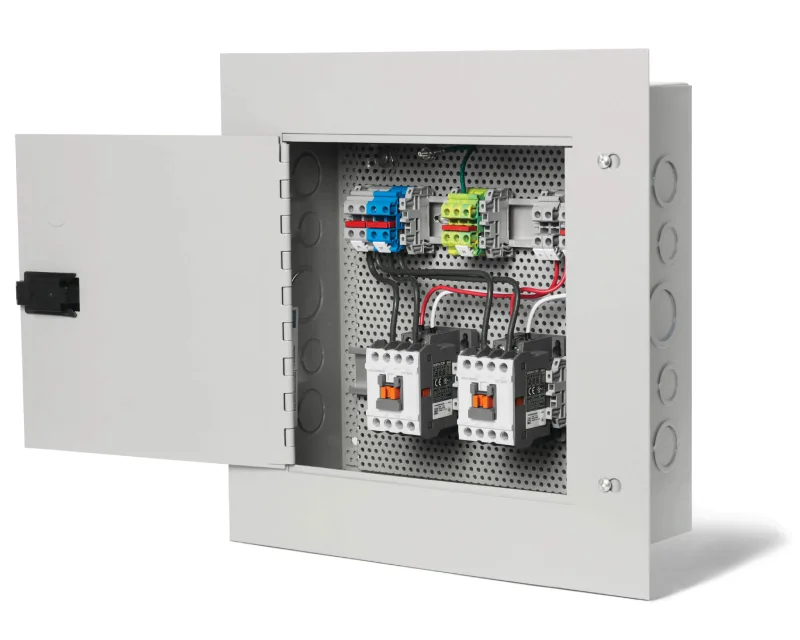
    Flush-Mounted (Recessed) Panels

    Flush-Mounted (Recessed) Panels
    – Installed within wall cavities
    – Cleaner appearance, space-saving
    – Popular in residential installations

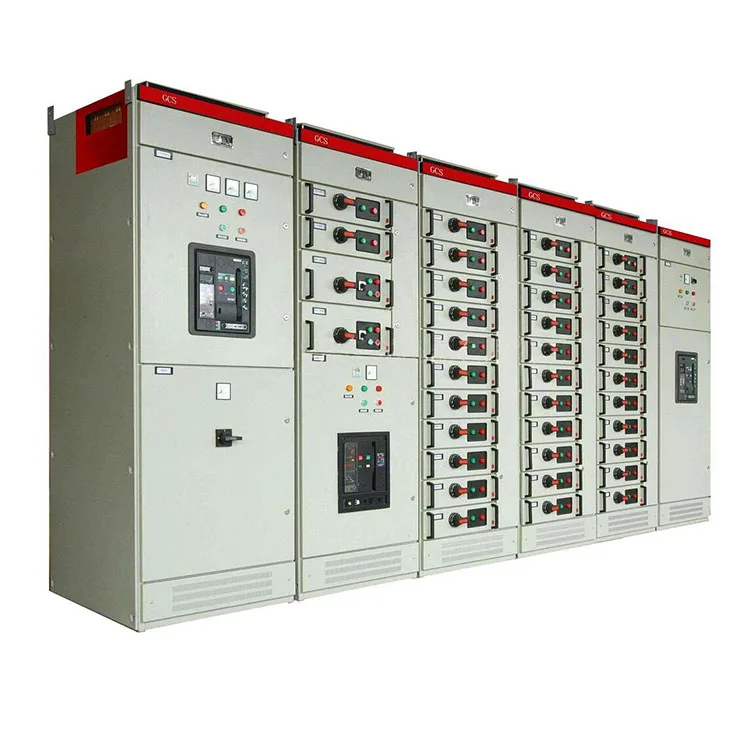
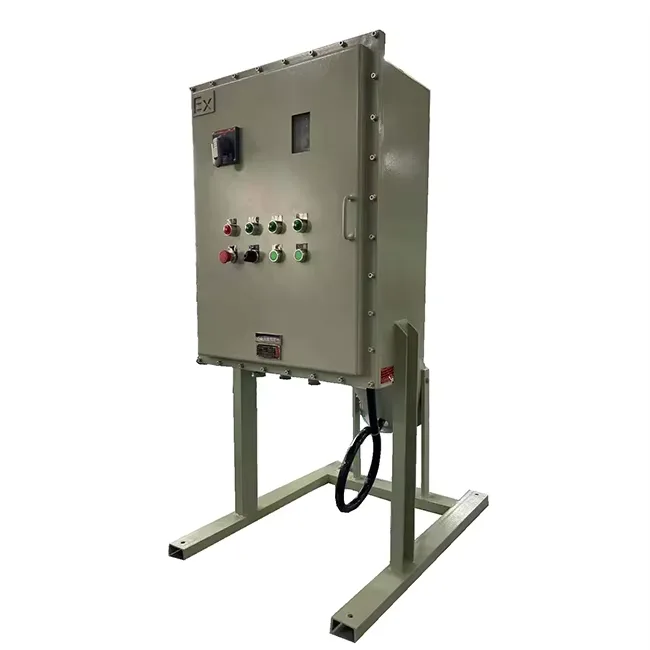
    Free-Standing Panels

    Free-Standing electric Panels
    – Floor-mounted units
    – Higher capacity applications
    – Industrial and large commercial use

    Applications and Use Cases for Low Voltage Panels

    Low voltage panels serve diverse applications across residential, commercial, and industrial sectors.

    Residential Applications

    Primary Functions:
    – Distribute power from utility service to home circuits
    – Protect lighting and outlet circuits
    – Control major appliances (water heaters, HVAC, etc.)
    – Provide GFCI and AFCI protection as required by code

    Common Residential Panel Sizes:
    – 100-amp service: Smaller homes, basic electrical needs
    – 200-amp service: Standard modern homes
    – 400-amp service: Large homes with extensive electrical systems

    Commercial Applications

    Office Buildings:
    – Power distribution to floors and tenant spaces
    – Lighting control systems
    – HVAC equipment power
    – Emergency lighting circuits

    Retail Facilities:
    – Store lighting and display power
    – Point-of-sale system circuits
    – Security system power
    – Refrigeration equipment circuits

    Industrial Applications

    Manufacturing Facilities:
    – Motor control and power distribution
    – Process control system power
    – Safety system circuits
    – Instrumentation and monitoring equipment

    Data Centers:
    – Server rack power distribution
    – UPS system integration
    – Environmental control power
    – Network equipment circuits

    ⚠️ Safety Warning: All low voltage panel installations must comply with National Electrical Code (NEC) Article 408 and local electrical codes. Only qualified, licensed electricians should perform panel installations or modifications.

    How to Select the Right Low Voltage Panel

    Choosing the appropriate low voltage panel requires careful consideration of several critical factors.

    Selection Criteria Checklist

    1. Electrical Load Requirements
    – Calculate total connected load in amperes
    – Consider future expansion needs (add 25-30% capacity)
    – Determine voltage and phase requirements
    – Assess short-circuit current ratings

    2. Environmental Conditions
    – Indoor vs. outdoor installation
    – Temperature and humidity considerations
    – Corrosive atmosphere requirements
    – Seismic and vibration factors

    3. Code Compliance Requirements
    – NEC Article 408 (Switchboards and Panelboards)
    – Local electrical code modifications
    – UL 67 (Panelboards) certification
    – NEMA standards compliance

    4. Physical Space Constraints
    – Available installation space
    – Required working clearances (NEC 110.26)
    – Mounting configuration preferences
    – Future accessibility needs

    Panel Sizing Guide

    Application Recommended Amperage Typical Circuit Count
    Small Residence 100-150A 20-30 circuits
    Standard Home 200A 30-40 circuits
    Large Home 300-400A 40-60 circuits
    Small Commercial 225-400A 30-50 circuits
    Large Commercial 600-1200A 50-84 circuits

    ? Expert Tip: Always size panels for 80% of their rated capacity to allow for proper heat dissipation and code compliance. A 200-amp panel should not exceed 160 amps of connected load.

    Installation and Safety Considerations

    Proper installation of low voltage panels is critical for safety, code compliance, and reliable operation.

    Pre-Installation Requirements

    1. Design and Permits
    – Obtain necessary electrical permits
    – Complete load calculations and panel schedules
    – Verify utility service requirements
    – Plan for required working clearances

    2. Site Preparation
    – Ensure adequate structural support
    – Verify environmental conditions
    – Plan cable routing and access
    – Coordinate with other building systems

    Installation Safety Requirements

    Working Clearance Requirements (NEC 110.26):
    – Front: Minimum 3 feet clear working space
    – Width: Panel width or 30 inches minimum, whichever is greater
    – Height: 6.5 feet from floor or platform
    – Dedicated Space: Area above panel to structural ceiling

    Grounding and Bonding Requirements:
    – Main bonding jumper installation
    – Equipment grounding conductor connections
    – Neutral and ground separation (for subpanels)
    – Grounding electrode conductor sizing

    ⚠️ Critical Safety Warning: Never attempt to install, modify, or service low voltage panels without proper electrical training and licensing. Electrical work poses serious risks of shock, electrocution, fire, and death.

    Maintenance and Troubleshooting

    Regular maintenance ensures safe and reliable low voltage panel operation while extending equipment life.

    Routine Maintenance Schedule

    Monthly Inspections:
    – Visual inspection for signs of overheating
    – Check for loose connections or damaged components
    – Verify panel door closure and lock operation
    – Document any unusual conditions

    Annual Professional Maintenance:
    – Thermographic inspection of connections
    – Torque verification of all connections
    – Insulation resistance testing
    – Arc flash hazard assessment update

    Common Problems and Solutions

    Problem Possible Causes Professional Solutions
    Frequent Circuit Breaker Trips Overloaded circuits, faulty equipment Load analysis, circuit reconfiguration
    Panel Overheating Loose connections, overloading Connection tightening, load redistribution
    Voltage Fluctuations Utility issues, poor connections Utility coordination, connection repair
    Corrosion/Oxidation Environmental exposure Component replacement, enclosure upgrade

    ? Expert Tip: Schedule annual thermographic inspections to identify hot spots before they become safety hazards. Loose connections can create dangerous arc flash conditions.

    Code Compliance and Standards

    Low voltage panels must comply with numerous codes and standards to ensure safety and proper operation.

    Key Code Requirements

    National Electrical Code (NEC) Articles:
    – Article 408: Switchboards and Panelboards
    – Article 110: Requirements for Electrical Installations
    – Article 240: Overcurrent Protection
    – Article 250: Grounding and Bonding

    Industry Standards:
    – UL 67: Panelboards Standard
    – UL 891: Switchboards Standard
    – NEMA PB 1: Panelboards Standards
    – IEEE Standards: Installation and testing requirements

    Certification Requirements

    Panel Certifications:
    – UL Listed components and assemblies
    – CSA certification for Canadian installations
    – NRTL (Nationally Recognized Testing Laboratory) approval
    – Local authority having jurisdiction (AHJ) approval

    Frequently Asked Questions

    What is the difference between a panelboard and a switchboard?
    Panelboards are typically rated for 1,200 amps or less and use plug-in or bolt-on circuit breakers. Switchboards are rated above 1,200 amps and use individually mounted, stationary switches and circuit breakers in a custom assembly.

    How often should low voltage panels be inspected?
    Visual inspections should occur monthly, with comprehensive professional inspections annually. High-use industrial panels may require more frequent maintenance every 6 months.

    Can I add circuits to an existing low voltage panel?
    Yes, if the panel has available space and capacity. However, this work must be performed by a licensed electrician and typically requires an electrical permit and inspection.

    What causes a low voltage panel to fail?
    Common causes include loose connections creating heat buildup, overcurrent conditions, environmental factors like moisture or corrosion, and age-related component degradation.

    How do I know if my low voltage panel needs replacement?
    Signs include frequent breaker trips, visible corrosion or damage, panels over 25-30 years old, insufficient capacity for current loads, or panels that don’t meet current safety codes.

    What is the typical lifespan of a low voltage panel?
    Well-maintained panels typically last 25-40 years. However, panels in harsh environments or with heavy use may require replacement sooner.

    Do low voltage panels require special tools for maintenance?
    Yes, proper maintenance requires infrared thermometers, torque wrenches, insulation testers, and appropriate personal protective equipment (PPE) for electrical work.

    Can weather affect low voltage panel performance?
    Yes, temperature extremes, humidity, and moisture can affect panel performance. Outdoor panels require appropriate NEMA ratings and may need additional environmental protection.

    Quick Reference Guide

    Panel Selection Checklist

    • Calculate total electrical load requirements
    • Determine voltage and phase needs
    • Verify available installation space
    • Check environmental conditions
    • Confirm code compliance requirements
    • Plan for future expansion needs
    • Obtain necessary permits and approvals

    Safety Reminders

    • Always turn off power before panel work
    • Use appropriate PPE for electrical work
    • Maintain required working clearances
    • Test circuits before beginning work
    • Follow lockout/tagout procedures
    • Only allow qualified electricians to perform work

    Emergency Procedures

    1. Electrical Emergency: Turn off main breaker immediately
    2. Fire: Use Class C fire extinguisher only
    3. Electrical Shock: Call 911, do not touch victim until power is off
    4. Arc Flash: Evacuate area, call emergency services

    Related

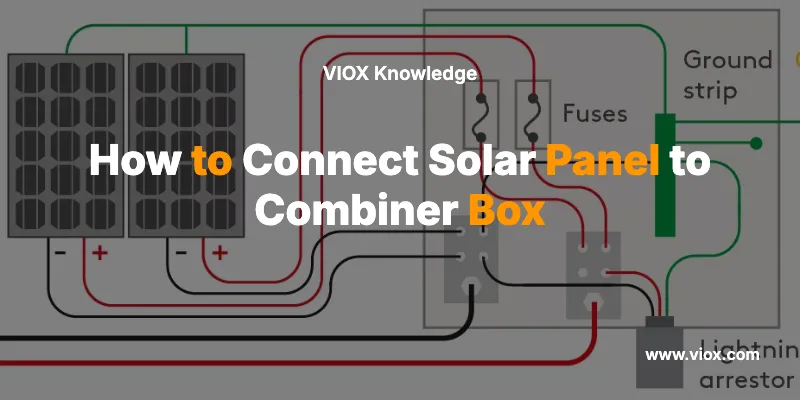
    What Causes Solar Panels to Catch Fire? A Complete Safety Guide

    Electrical Control Panels

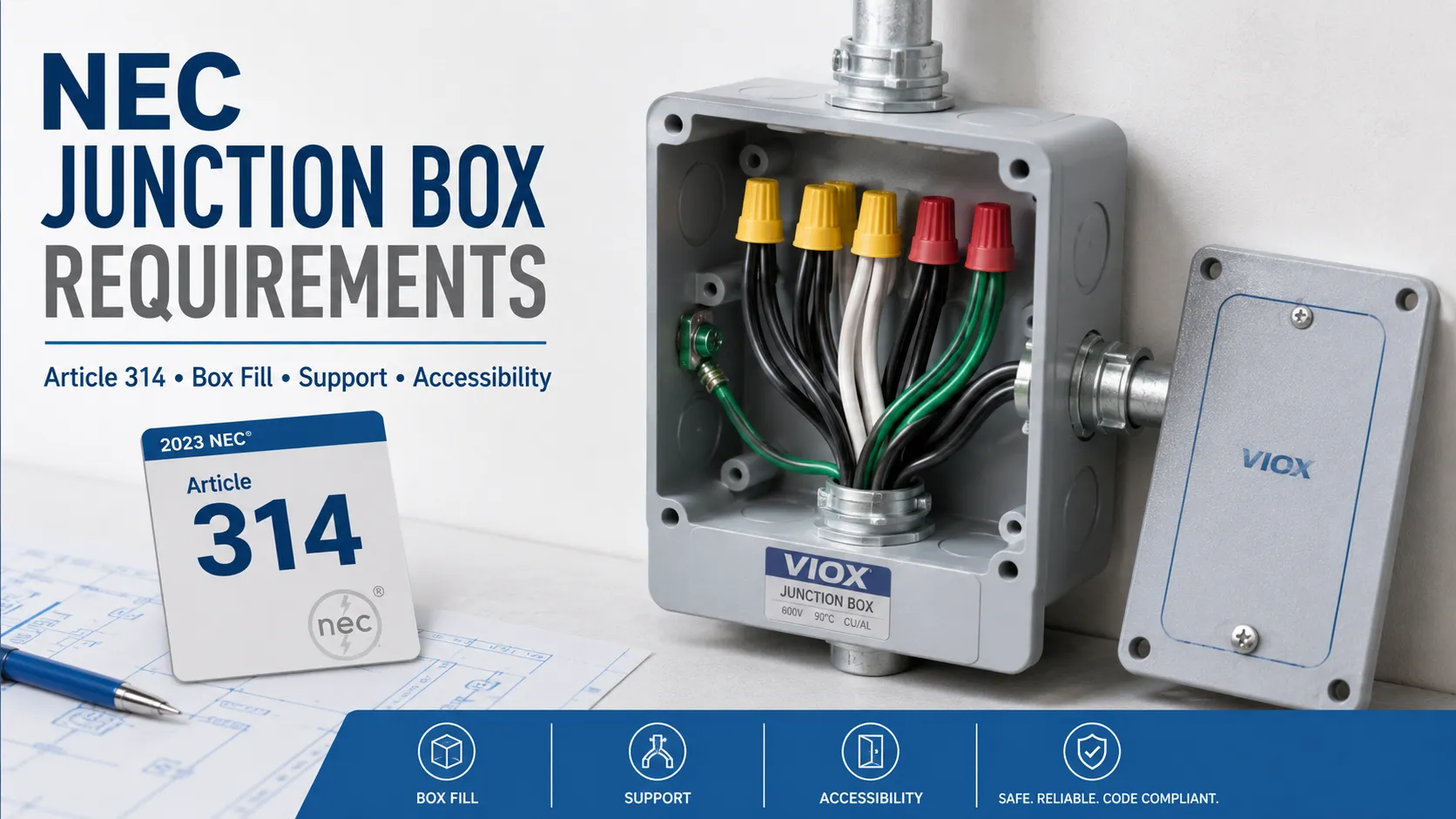
    NEC Code for Junction Boxes

    Where Is the Distribution Box Located and How to Find It

  • IEC 60898-1 vs IEC 60947-2: Complete Guide to Electrical Circuit Breaker Standards

    IEC 60898-1 vs IEC 60947-2: Complete Guide to Electrical Circuit Breaker Standards

    Quick Answer: IEC 60898-1 vs IEC 60947-2

    IEC 60898-1 and IEC 60947-2 are not simply "MCB vs MCCB" standards. IEC 60898-1 applies to AC circuit breakers for household and similar installations, typically operated by ordinary persons. IEC 60947-2 applies to low-voltage circuit breakers used in switchgear and controlgear, typically selected, installed, and maintained by instructed or skilled persons.

    For MCB selection, the key question is not only current rating or breaking capacity. The real question is whether the breaker is being used in a household or similar final circuit, or in an industrial panel, OEM machine, control cabinet, distribution board, or low-voltage switchgear assembly where IEC 60947-2 performance data such as Icu, Ics, selectivity, pollution degree, and suitability for isolation may be required.

    If you are selecting an MCB for a residential or light commercial final circuit, IEC 60898-1 is often the relevant standard. If you are specifying breakers for industrial panels, machine control, factory distribution, or harsh environments, IEC 60947-2 or dual-standard certification is usually the safer specification route.

    For broader device background, start with What Is a Miniature Circuit Breaker?. If your main task is sizing and curve selection, use the MCB Selection Guide after reading this standards comparison.

    Core Difference in One Table

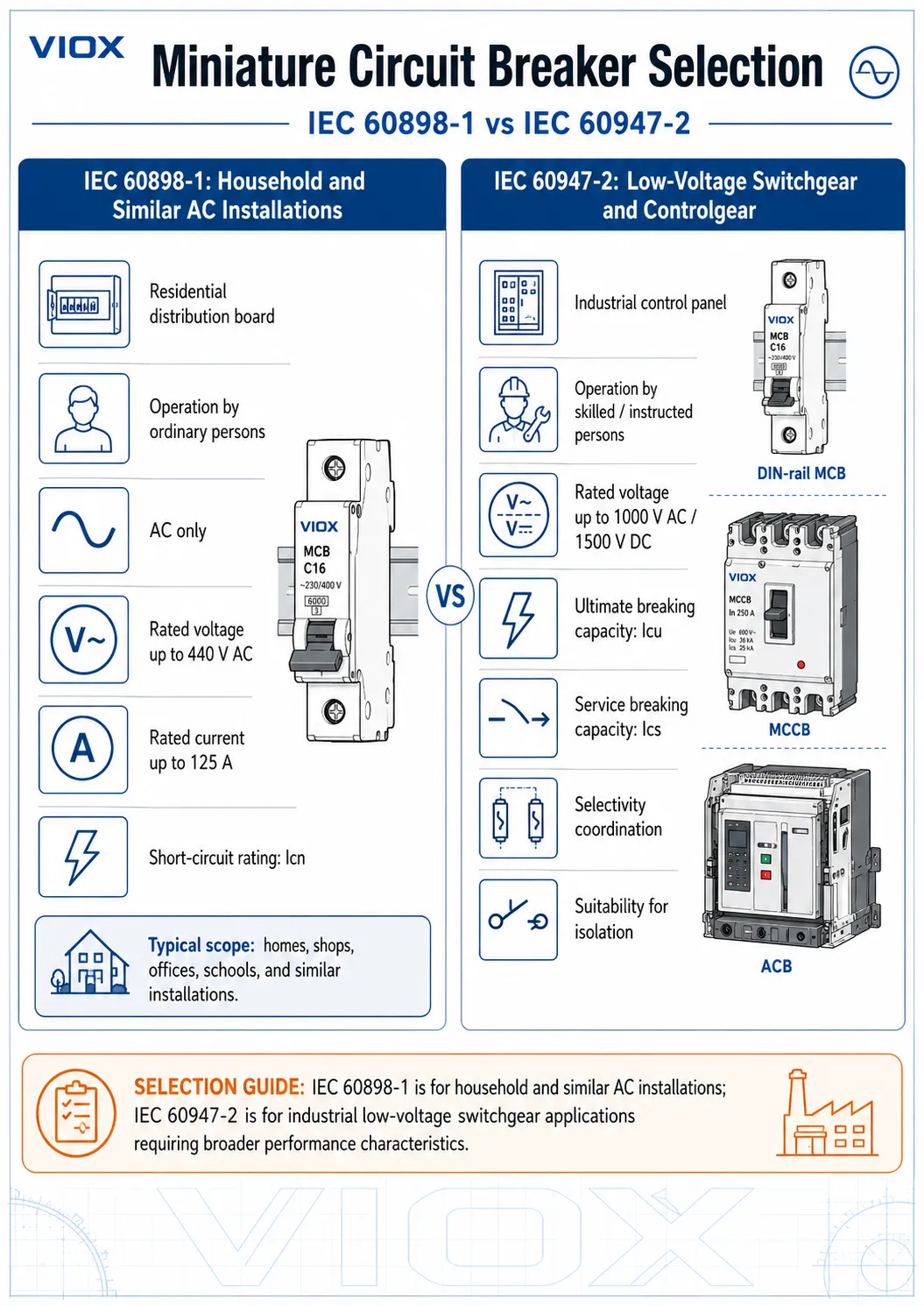
    IEC 60898-1 vs IEC 60947-2 comparison showing household AC MCB scope versus industrial low-voltage circuit breaker scope
    IEC 60898-1 vs IEC 60947-2 MCB standard comparison, showing where household AC final-circuit breakers differ from industrial low-voltage circuit breaker applications.
    Selection point IEC 60898-1 IEC 60947-2
    Primary application Household and similar AC installations Low-voltage switchgear, controlgear, industrial panels, distribution systems
    Typical user assumption Ordinary persons may operate the device Instructed or skilled persons select, install, maintain, and operate the device
    Voltage scope AC operation up to 440 V between phases Up to 1000 V AC or 1500 V DC, depending on product rating and application
    Current scope Up to 125 A Broad low-voltage circuit-breaker scope; exact current range depends on product type
    Breaking capacity term Icn, rated short-circuit capacity Icu and Ics, ultimate and service short-circuit breaking capacities
    Typical curve marking B, C, D curves are common B, C, D may appear on DIN-rail MCBs; industrial ranges may also include K, Z, MA or manufacturer-specific trip data
    Environment expectation Normal household or similar installation conditions Industrial environments may require stronger attention to pollution degree, vibration, humidity, temperature, and coordination
    Maintenance expectation Replacement after significant fault interruption is often the practical approach Service continuity and post-fault performance matter more; Ics becomes important
    Typical products Residential and similar DIN-rail MCBs Industrial DIN-rail MCBs, MCCBs, ACBs, and other low-voltage circuit breakers

    The practical point is simple: IEC 60947-2 is not only for MCCBs. A DIN-rail miniature circuit breaker can be tested and marked to IEC 60947-2 if the manufacturer designs and certifies it that way.

    IEC 60898-1 Scope: Household and Similar AC Circuit Breakers

    IEC 60898-1 covers circuit breakers for overcurrent protection in household and similar installations. The scope is intentionally narrower than IEC 60947-2 because the expected users, environment, and maintenance conditions are different.

    Under IEC 60898-1, the standard scope is:

    IEC 60898-1 item Scope meaning
    Current type AC air-break circuit breakers
    Frequency 50 Hz, 60 Hz, or 50/60 Hz
    Rated voltage Not exceeding 440 V between phases
    Rated current Not exceeding 125 A
    Rated short-circuit capacity Not exceeding 25,000 A
    Typical users Ordinary persons in household and similar installations
    Typical markings Curve + current, such as B16, C20, D32; breaking capacity often shown as 4500, 6000, or 10000 A

    This makes IEC 60898-1 highly suitable for residential distribution boards, small commercial final circuits, offices, schools, shops, and similar installations where the breaker may be operated by non-specialists.

    It does not make IEC 60898-1 a universal answer for every DIN-rail breaker application. A breaker that is perfectly suitable for a residential final circuit may not provide the industrial performance data required for a machine panel, OEM cabinet, photovoltaic combiner, data center distribution board, or harsh industrial environment.

    If the breaker marking is your main question, see How to Read the Nameplate of a Miniature Circuit Breaker.

    IEC 60947-2 Scope: Industrial Low-Voltage Circuit Breakers

    IEC 60947-2 covers low-voltage circuit breakers used in switchgear and controlgear. Its scope includes circuit breakers connected to circuits with rated voltage not exceeding 1000 V AC or 1500 V DC, and it is written for equipment installed and operated by instructed or skilled persons.

    That broader scope matters because industrial installations ask different questions:

    • Can the breaker safely interrupt the available fault current at this point in the system?
    • What is the difference between ultimate breaking capacity and service breaking capacity?
    • Can the breaker remain serviceable after a short-circuit interruption under defined test conditions?
    • Is the breaker suitable for isolation?
    • How does the breaker coordinate with upstream and downstream protective devices?
    • What environmental assumptions apply, including pollution degree, humidity, vibration, enclosure temperature, and installation altitude where relevant?
    • Does the application require AC or DC ratings?

    IEC 60947-2 can apply to several circuit-breaker families, including:

    • DIN-rail MCBs designed for industrial panel use
    • MCCBs used in distribution boards, machinery, feeders, and panel mains
    • ACBs used in larger low-voltage switchboards and main distribution systems
    • Specialized low-voltage circuit breakers where manufacturer data defines the application limits

    This is why the common shortcut "IEC 60898-1 equals MCB and IEC 60947-2 equals MCCB" is wrong. The product category and the standard are related, but they are not the same thing.

    For product-category comparison, keep that discussion separate: MCCB vs MCB explains the device differences, while this page explains the standards boundary.

    Can an MCB Be Certified to Both IEC 60898-1 and IEC 60947-2?

    Yes. Many industrial-grade DIN-rail MCBs are tested and marked to both IEC 60898-1 and IEC 60947-2. This is common where one product family is intended to serve both building distribution and industrial panel markets.

    However, dual certification must be verified from the product marking, datasheet, or certificate. It should never be assumed from the physical appearance of the breaker.

    A dual-certified MCB may show two different breaking capacity values because each standard uses different test assumptions and performance terms. For example, a product may be marked with an IEC 60898-1 value such as 6000 A or 10000 A, while the datasheet also lists IEC 60947-2 values such as Icu and Ics at specific voltages.

    That does not mean the manufacturer is contradicting itself. It means the breaker has been evaluated under different standard frameworks.

    What to Check on a Dual-Standard MCB

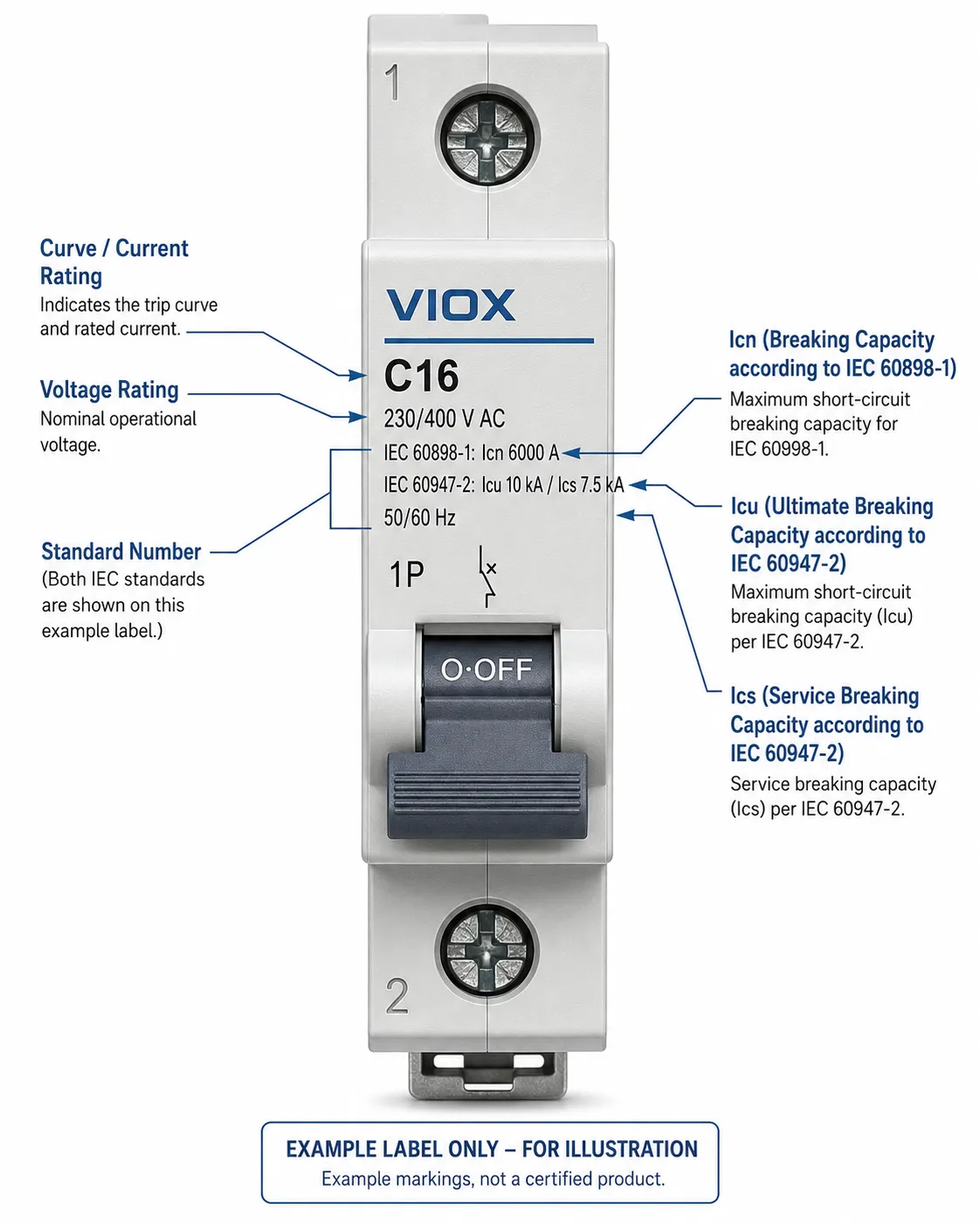
    Annotated dual-certified MCB nameplate showing IEC 60898-1 Icn and IEC 60947-2 Icu and Ics markings
    Annotated dual-certified MCB nameplate showing how IEC 60898-1 Icn and IEC 60947-2 Icu/Ics ratings may appear on the same breaker label.
    Check item Why it matters
    Both standard numbers are shown Confirms the device is not merely styled like an industrial MCB
    Voltage associated with each rating Breaking capacity can change at different operating voltages
    Icn under IEC 60898-1 Relevant for household and similar final-circuit use
    Icu and Ics under IEC 60947-2 Relevant for industrial panel and switchgear applications
    Trip curve and magnetic threshold B/C/D curves may not be enough for all industrial loads
    AC/DC rating IEC 60898-1 is AC; DC applications need explicit DC suitability
    Temperature and installation conditions Enclosure heat and grouping can affect practical selection

    If you are building panels for export, dual-standard marking can be useful, but it still does not replace local approval requirements such as UL, CSA, UKCA, or other regional conformity routes where applicable.

    Icn vs Icu vs Ics: The Breaking Capacity Terms That Decide the Specification

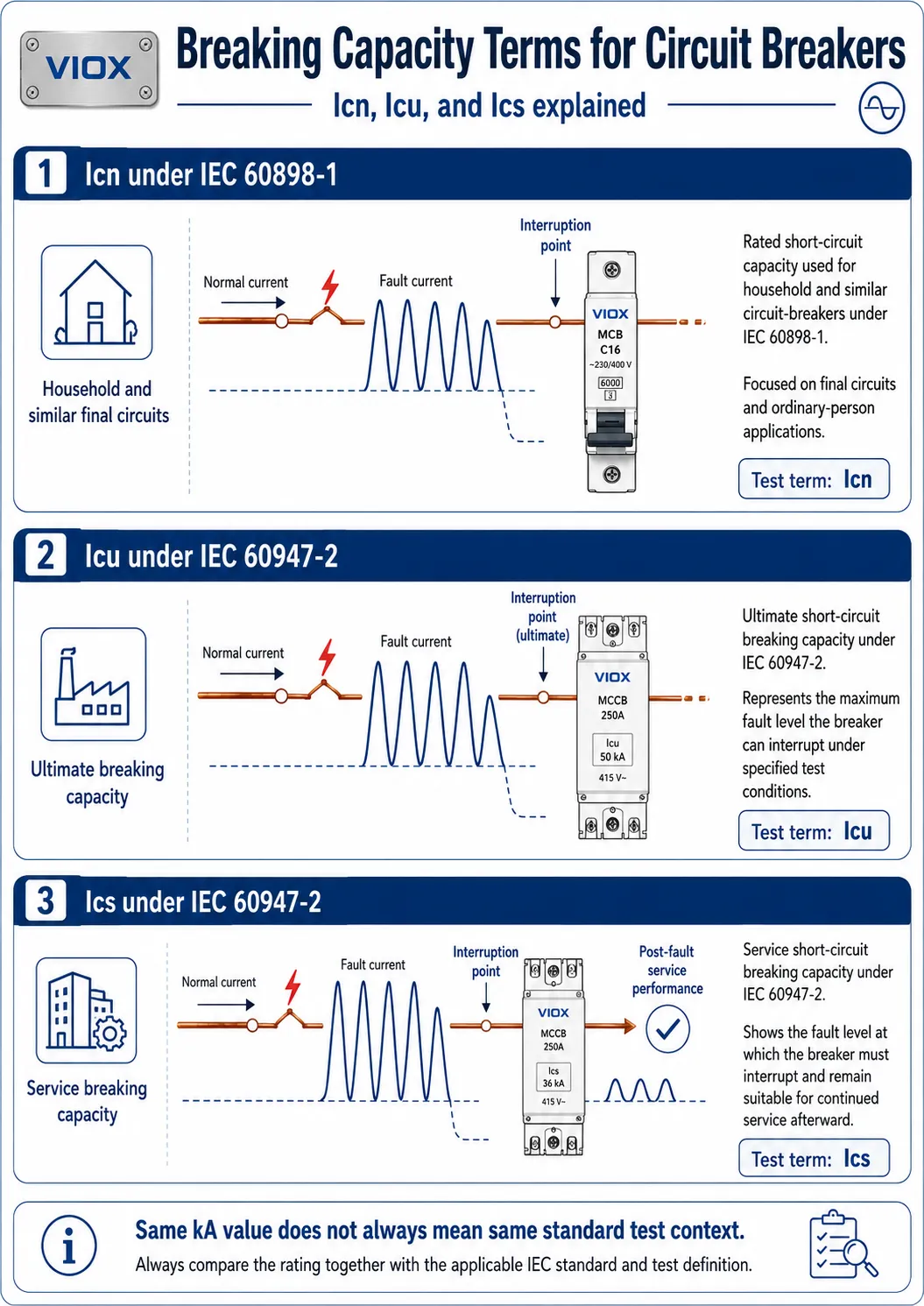
    Diagram explaining Icn Icu and Ics ratings for MCBs under IEC 60898-1 and IEC 60947-2 standards
    Icn, Icu, and Ics breaking-capacity terms explained for comparing IEC 60898-1 household MCB ratings with IEC 60947-2 industrial circuit breaker ratings.

    One of the most important differences between IEC 60898-1 and IEC 60947-2 is how short-circuit performance is expressed.

    IEC 60898-1 typically uses Icn, the rated short-circuit capacity. IEC 60947-2 uses Icu and Ics, which tell you more about ultimate interruption and service continuity.

    Term Standard context Meaning Practical interpretation
    Icn IEC 60898-1 Rated short-circuit capacity The short-circuit current the breaker is rated to interrupt under IEC 60898-1 test conditions
    Icu IEC 60947-2 Rated ultimate short-circuit breaking capacity The maximum short-circuit current the breaker can interrupt under IEC 60947-2 ultimate test conditions
    Ics IEC 60947-2 Rated service short-circuit breaking capacity The short-circuit current level at which the breaker is tested for service performance after interruption

    Why Icn Is Not the Same as Icu

    Icn belongs to the IEC 60898-1 framework. It is highly useful for household and similar final circuits, where the breaker is expected to protect wiring and provide simple, safe operation.

    Icu belongs to the IEC 60947-2 framework. It tells you the maximum fault current the breaker can interrupt under ultimate breaking-capacity test conditions. For industrial design, this value must be compared with the prospective short-circuit current at the installation point.

    The mistake is treating a 6 kA marking under one standard as directly equivalent to a 6 kA value under another standard. The number matters, but the test framework behind the number also matters.

    If short-circuit capacity is the main selection issue, see MCB Breaking Capacity: 6kA vs 10kA Selection Guide.

    Why Ics Matters in Industrial Panels

    Ics is often more important than buyers realize. It indicates the service short-circuit breaking capacity under IEC 60947-2. In many datasheets, Ics is expressed as a percentage of Icu, such as 50%, 75%, or 100%.

    For a low-risk residential final circuit, the practical response after a major short circuit is often inspection and breaker replacement if needed. In an industrial process, data center, OEM machine, or critical facility, the question is not only "Can the breaker interrupt the fault?" but also "What service performance is expected after that interruption?"

    That is why industrial specifications often ask for Icu and Ics together rather than only a headline kA number.

    When to Specify IEC 60898-1, IEC 60947-2, or Both

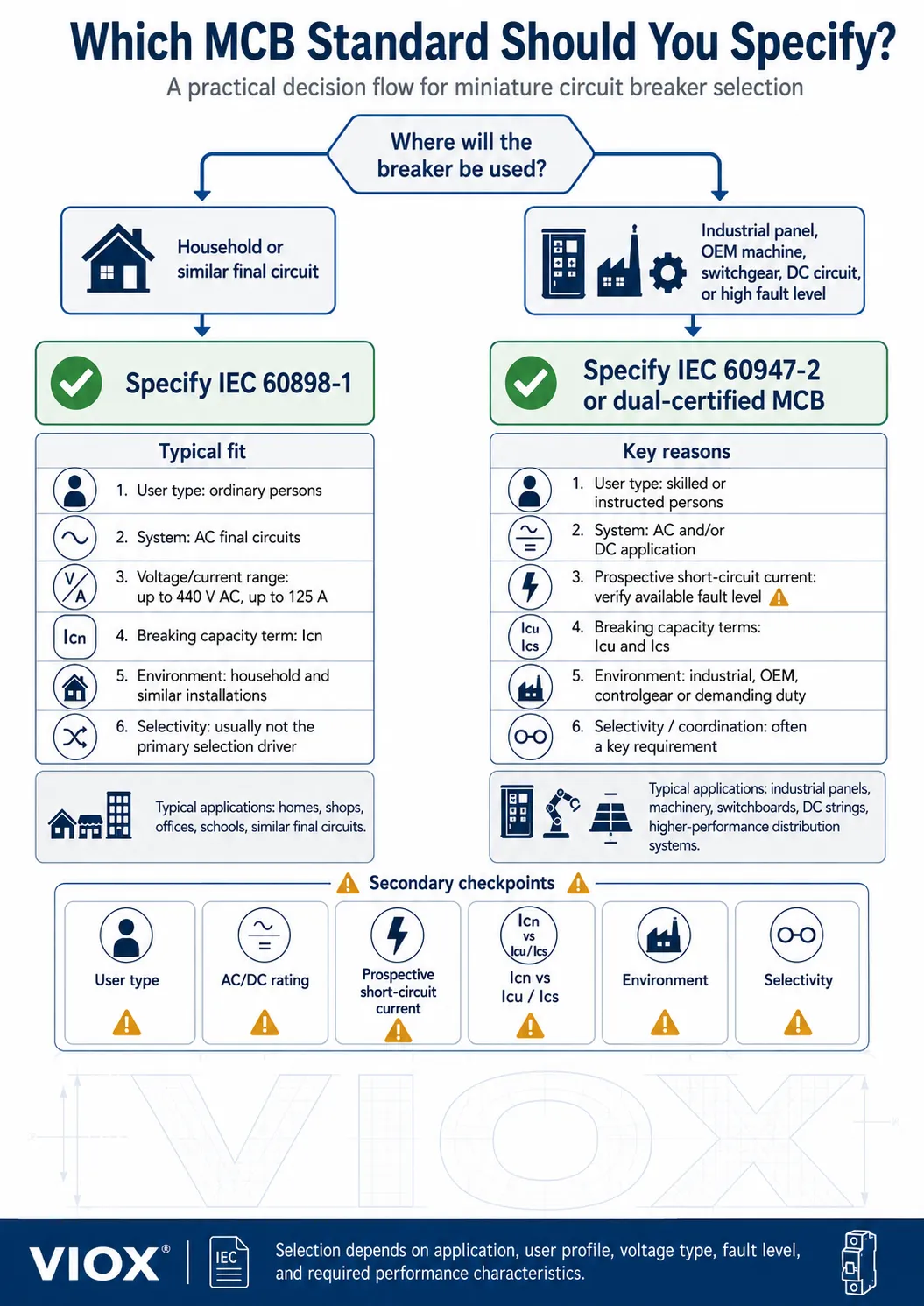
    MCB standard selection flowchart for choosing IEC 60898-1 IEC 60947-2 or dual-certified breakers based on application
    MCB standard selection flowchart for choosing IEC 60898-1, IEC 60947-2, or dual-certified breakers based on application, user type, fault level, and environment.
    Application Better specification route Engineering reason
    Residential distribution board IEC 60898-1 Household/similar final-circuit use with ordinary-person operation
    Small office or shop final circuits IEC 60898-1, or dual-certified if specified Similar installation environment, usually final-circuit protection
    Commercial distribution board with higher fault level Dual-certified or IEC 60947-2 Short-circuit capacity and service data may need closer review
    Machine control cabinet IEC 60947-2 or dual-certified industrial MCB Skilled-person environment, coordination and panel conditions matter
    OEM equipment panel IEC 60947-2 or dual-certified, plus local market approvals Export projects need clear standard basis and documentation
    Factory distribution panel IEC 60947-2 Industrial fault levels, environmental conditions, and selectivity matter
    Motor control center IEC 60947-2 Coordination with contactors, overload relays, MPCBs, or upstream breakers must be engineered
    Data center or critical infrastructure IEC 60947-2 or dual-certified with reviewed Icu/Ics/selectivity Service continuity and coordination are central
    PV or DC circuit Explicit DC-rated breaker under the appropriate standard and application data IEC 60898-1 is for AC operation; DC breaking behavior requires DC-specific rating
    Harsh environment panel IEC 60947-2 Damp heat, vibration, salt mist, dust, altitude, and enclosure temperature may affect selection

    This table is not a substitute for local code review. It is a specification filter: it helps you avoid using a household final-circuit standard as the default answer for industrial switchgear.

    For curve and inrush selection after the standard is chosen, see Understanding Trip Curves.

    Standard Selection Workflow for Panel Builders

    Use this sequence before choosing the part number:

    1. Define the installation type. Is the breaker for a household/similar final circuit, or for an industrial panel, OEM machine, distribution board, or control cabinet?
    2. Identify who will operate and maintain it. Ordinary-person operation points toward IEC 60898-1. Skilled-person installation and maintenance often points toward IEC 60947-2.
    3. Calculate the prospective short-circuit current. Compare it with the correct breaking-capacity term for the selected standard: Icn for IEC 60898-1, Icu/Ics for IEC 60947-2.
    4. Confirm voltage and current ratings. Do not assume one marking applies at every system voltage.
    5. Check the trip curve against the load. B, C, and D curves are common, but industrial applications may require a closer look at motor starting, transformer inrush, power supplies, or high-inrush LED loads.
    6. Review environmental conditions. Enclosure temperature, grouping, pollution degree, humidity, vibration, and altitude can affect the right device choice.
    7. Verify the product marking and datasheet. If the specification requires IEC 60947-2, the breaker must show IEC 60947-2 data. Physical size or DIN-rail mounting is not proof.
    8. Check coordination requirements. Cascading, backup protection, and selectivity must come from manufacturer documentation for the actual breaker combination, not from generic assumptions.

    For a complete current-rating and cable-coordination process, use the MCB Selection Guide.

    Common Specification Mistakes

    Mistake 1: Treating IEC 60898-1 as a Universal Industrial Breaker Standard

    IEC 60898-1 breakers can appear in some tertiary or industrial environments when no special industrial conditions are present. But that does not mean IEC 60898-1 is automatically enough for machine panels, factory distribution, high-fault-level boards, or harsh environments.

    Risk: the breaker may be accepted based on current and kA marking, while the project actually needs IEC 60947-2 data such as Icu, Ics, selectivity, or environmental suitability.

    Mistake 2: Looking Only at the kA Number

    A buyer sees 6 kA, 10 kA, or 15 kA and assumes the highest number is the best breaker. That is too shallow.

    Risk: the breaker may have the right-looking short-circuit number under the wrong standard, at the wrong voltage, or without the required Ics value for industrial service continuity.

    Mistake 3: Equating IEC 60947-2 with MCCB Only

    IEC 60947-2 covers low-voltage circuit breakers. MCCBs are part of that world, but they are not the whole story. Industrial DIN-rail MCBs can also be certified to IEC 60947-2.

    Risk: specifiers may reject a valid industrial MCB because they wrongly believe IEC 60947-2 automatically means MCCB.

    Mistake 4: Ignoring Ics

    Icu answers the ultimate breaking question. Ics adds the service-performance question. In industrial panels, that difference matters.

    Risk: a breaker is selected because its Icu looks acceptable, but the application actually needs stronger service continuity after a fault event.

    Mistake 5: Ignoring Pollution Degree and Environment

    Industrial enclosures can expose breakers to heat, dust, humidity, vibration, salt mist, and condensation. Those are not cosmetic details; they affect insulation, creepage, corrosion, and mechanical reliability.

    Risk: a breaker suitable for a clean distribution board is placed into an enclosure where the environmental assumptions no longer hold.

    Mistake 6: Assuming Dual Certification Without Checking the Datasheet

    Some MCBs carry both IEC 60898-1 and IEC 60947-2 data. Others do not.

    Risk: the quotation says "industrial MCB," but the installed device only carries the household/similar standard needed for a different environment.

    Mistake 7: Using IEC 60898-1 Logic for DC or PV Circuits

    IEC 60898-1 is for AC operation. DC circuits have different arc behavior and require explicitly DC-rated devices.

    Risk: an AC-only breaker is applied to a DC circuit where it may not safely interrupt fault current.

    Mistake 8: Confusing Circuit-Breaker Standards with Motor-Starter Coordination

    Type 1 and Type 2 coordination are commonly discussed in the context of contactors and motor starters. They should not be used as the headline difference between IEC 60898-1 and IEC 60947-2 for MCB selection.

    Risk: the article, specification, or procurement document sounds technical but mixes standard families in a way that experienced engineers will immediately challenge.

    Practical Examples

    Example 1: Residential Distribution Board

    A 230/400 V residential distribution board uses DIN-rail MCBs for socket and lighting final circuits. The expected operator is a homeowner or ordinary building occupant. The prospective short-circuit current is within the device’s marked IEC 60898-1 capacity.
    Likely standard route: IEC 60898-1.

    The key checks are rated current, curve, pole configuration, breaking capacity, and compatibility with the local wiring rules.

    Example 2: OEM Machine Control Cabinet

    An OEM builds a packaging machine panel for export. The MCBs protect control transformers, power supplies, auxiliary circuits, and small motor-related circuits. The panel is installed and maintained by trained technicians, and the customer requires industrial documentation.
    Likely standard route: IEC 60947-2 or dual-certified MCBs.
    The buyer should request Icu/Ics data, voltage-specific breaking capacity, trip curve information, terminal capacity, and coordination documentation where upstream protection is involved.
    Example 3: Factory Distribution Panel with Higher Fault Level

    A factory sub-distribution panel is installed near a transformer. The prospective short-circuit current is higher than in a typical residential final circuit, and the panel feeds several production machines.

    Likely standard route: IEC 60947-2, or dual-certified breakers verified for the exact fault level.

    The selection should not stop at "10 kA." It should review the standard behind the value, Icu, Ics, installation voltage, selectivity expectations, and enclosure conditions.

    Example 4: DC Auxiliary Circuit

    A control panel includes a DC auxiliary circuit or battery-backed DC supply. The breaker looks like an AC MCB, but the circuit is not AC.

    Likely standard route: use a breaker with explicit DC voltage and breaking ratings, under the applicable standard and manufacturer data.

    IEC 60898-1 alone is not the right basis for this decision because it applies to AC operation.

    How VIOX Supports MCB Specification

    For panel builders, OEMs, distributors, and electrical contractors, the safest MCB specification starts with the application, not the catalog number. VIOX supplies miniature circuit breakers and related low-voltage protection products for distribution boxes, control panels, and OEM electrical assemblies.

    When evaluating a VIOX MCB or any alternative product, request the exact datasheet and confirm:

    • applicable standard markings
    • rated current and trip curve
    • voltage rating
    • breaking capacity under the relevant standard
    • pole configuration
    • terminal capacity
    • operating temperature and derating guidance
    • AC or DC suitability
    • coordination data where required

    Need help selecting MCBs for IEC panels, distribution boxes, or OEM projects? Review the VIOX MCB product page or contact the VIOX technical team for model selection support.

    FAQ

    Is IEC 60947-2 better than IEC 60898-1?

    Not universally. IEC 60947-2 is broader and more appropriate for industrial low-voltage switchgear and controlgear applications, but IEC 60898-1 is the correct standard for many household and similar AC final-circuit applications. The right standard depends on the installation, user type, environment, and required performance data.

    Can IEC 60898-1 breakers be used in industrial panels?

    Sometimes, but only where the application conditions are similar and no specific industrial requirements apply. If the panel requires Icu/Ics data, selectivity studies, harsh-environment suitability, DC ratings, or skilled-person switchgear documentation, IEC 60947-2 or dual-standard certification is usually more appropriate.

    What is the difference between Icn and Icu?

    Icn is the rated short-circuit capacity used under IEC 60898-1. Icu is the rated ultimate short-circuit breaking capacity used under IEC 60947-2. They are not simply two names for the same value because they belong to different standard frameworks and test assumptions.

    What is the difference between Icu and Ics?

    Icu is the maximum short-circuit current the breaker can interrupt under ultimate breaking-capacity test conditions. Ics is the service short-circuit breaking capacity and is often expressed as a percentage of Icu. In industrial applications, Ics helps indicate service-performance expectations after fault interruption.

    Is IEC 60947-2 only for MCCBs?

    No. IEC 60947-2 applies to low-voltage circuit breakers, including ACBs, MCCBs, and DIN-rail MCBs when the product is designed and certified under that standard. Do not treat IEC 60947-2 as a synonym for MCCB.

    Can an MCB comply with both IEC 60898-1 and IEC 60947-2?

    Yes. Many industrial-grade DIN-rail MCBs are dual-certified. The product marking and datasheet must show both standards and the associated ratings. Do not assume dual certification from appearance, brand, or physical size.

    Which standard should I specify for OEM panels?

    For OEM control panels, IEC 60947-2 or dual-certified MCBs are usually the safer specification route because the application is normally installed and maintained by skilled persons and may require Icu/Ics data, coordination information, and industrial environmental assumptions.

    Does IEC 60898-1 apply to DC breakers?

    IEC 60898-1 applies to AC operation. DC circuits require explicitly DC-rated circuit breakers with suitable voltage, current, polarity, and breaking-capacity data. Do not use an AC-only IEC 60898-1 marking as proof of DC suitability.

    Why do some MCB datasheets show both 6000 A and 10 kA or 15 kA values?

    The values may be listed under different standards, voltages, or test conditions. For example, a breaker may show an IEC 60898-1 short-circuit capacity in amperes and IEC 60947-2 Icu/Ics values in kA. Always read the line item together with the standard and voltage.

    Is a 10 kA IEC 60898-1 MCB the same as a 10 kA IEC 60947-2 MCB?

    Not automatically. The kA number must be interpreted with the standard, voltage, test condition, and service-performance requirement. Two breakers with the same headline kA value may not be equivalent for an industrial panel.

    Sources Reviewed

    • IEC 60898-1:2015+A1:2019, Electrical accessories – Circuit-breakers for overcurrent protection for household and similar installations – Part 1: Circuit-breakers for AC operation.
    • IEC 60947-2:2024, Low-voltage switchgear and controlgear – Part 2: Circuit-breakers.
  • Relay vs Timer: The Complete Guide to Understanding Key Differences and Applications

    Relay vs Timer: The Complete Guide to Understanding Key Differences and Applications

    A relay is an electrically operated switch that controls one circuit by opening or closing contacts in another circuit, while a timer is a device that controls electrical circuits based on preset time intervals. Both devices are essential components in electrical control systems, but they serve distinctly different functions that determine when and how you should use each one.

    Understanding the difference between relays and timers is crucial for anyone working with electrical control systems, automation equipment, or industrial applications. This comprehensive guide will help you make the right choice for your specific application while ensuring safety and code compliance.

    What is a Relay?

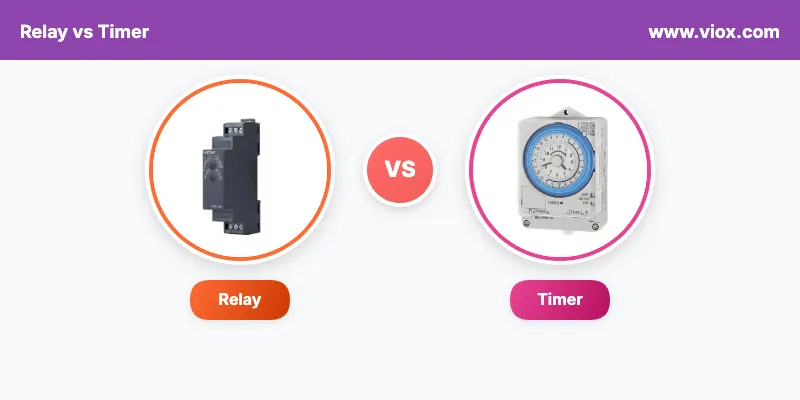
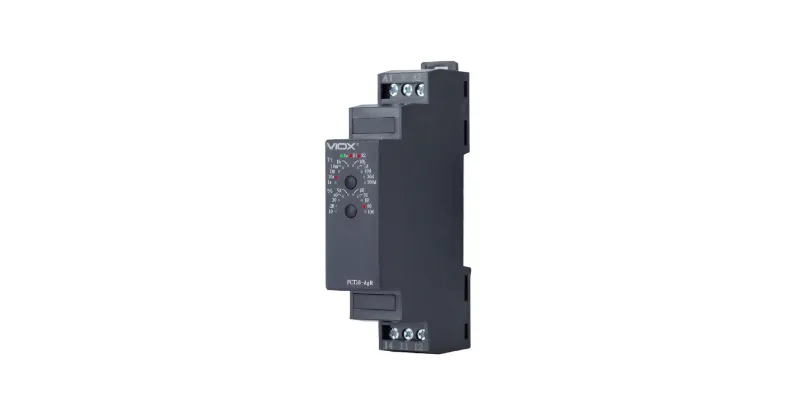
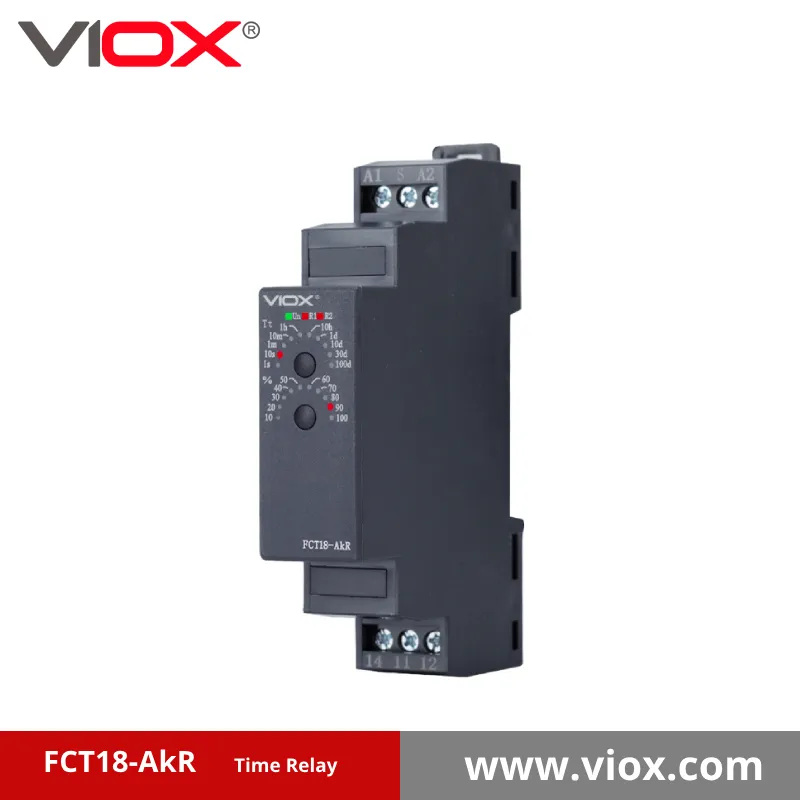
    time relay 800_400

    VIOX Relay

    A relay is an electromagnetic switch that uses a small electrical current to control a much larger current in a separate circuit. When the relay coil receives power, it creates a magnetic field that physically moves metal contacts to either open or close electrical connections.

    Key Relay Characteristics:

    • Instant operation when power is applied or removed
    • Electrical isolation between control and switched circuits
    • Multiple contact configurations (normally open, normally closed, changeover)
    • Current amplification capability (small control current switches large load current)
    • No timing function built into basic relays

    What is a Timer?

    Mechanical Timer Switch TB388N VIOX

    A timer is a time-delay device that controls when electrical circuits turn on or off based on preset time intervals. Timers can delay the activation of equipment, control how long devices operate, or create specific timing sequences in automated systems.

    Key Timer Characteristics:

    • Time-based control with adjustable delay periods
    • Various timing functions (on-delay, off-delay, interval, repeat cycle)
    • Digital or analog time setting mechanisms
    • Built-in timing circuits using electronic or mechanical methods
    • Programmable timing sequences in advanced models

    Relay vs Timer: Comprehensive Comparison

    Feature Relay Timer
    Primary Function Electrical switching Time-based control
    Operation Speed Instant (milliseconds) Delayed (seconds to hours)
    Control Method Voltage presence/absence Preset time intervals
    Circuit Isolation Yes, complete isolation Varies by design
    Timing Capability None (basic relays) Core functionality
    Power Consumption Low when activated Continuous during timing
    Complexity Simple electromagnetic device Complex timing circuits
    Cost Range $5-50 (basic models) $25-500+ (depending on features)
    Typical Applications Motor control, lighting switching Delay circuits, automation sequences
    Installation Complexity Simple wiring May require programming

    Applications and Use Cases

    When to Use Relays

    Relays are ideal for applications requiring:

    1. Motor Starting and Stopping
      • Controlling large motors with small control switches
      • Protecting control circuits from high motor currents
      • Enabling remote motor operation
    2. Lighting Control Systems
      • Switching high-wattage lighting from low-voltage controls
      • Creating lighting zones in commercial buildings
      • Interfacing with building automation systems
    3. Safety Interlocks
      • Emergency stop circuits
      • Door interlock systems
      • Machine safety controls
    4. Signal Amplification
      • Converting low-current sensor signals to switch high-power loads
      • Interfacing between different voltage systems
      • Creating multiple outputs from single input

    When to Use Timers

    Timers are essential for applications requiring:

    1. Delayed Equipment Starting
      • HVAC system staging to prevent simultaneous startup
      • Pump control in water systems
      • Lighting delay circuits
    2. Automatic Equipment Shutdown
      • Fan run-on timers after heating systems turn off
      • Pump run-out timers for remaining fluid
      • Safety equipment timeout functions
    3. Process Control Sequences
      • Manufacturing equipment timing
      • Chemical mixing processes
      • Automated assembly line control
    4. Energy Management
      • Scheduled equipment operation
      • Peak demand reduction
      • Automatic lighting control

    Types of Relays and Timers

    Relay Categories

    Type Description Typical Applications
    General Purpose Basic SPDT/DPDT contacts Lighting, small motors
    Power Relays High current capacity Large motors, heaters
    Safety Relays Force-guided contacts Emergency stop systems
    Solid State No moving parts Frequent switching applications
    Latching Maintains position without power Energy-saving applications

    Timer Categories

    Type Description Timing Range
    On-Delay Delays turn-on after trigger 0.1 sec – 24 hours
    Off-Delay Delays turn-off after trigger removed 0.1 sec – 24 hours
    Interval Turns on for set period then off 0.1 sec – 999 hours
    Repeat Cycle Continuous on/off cycling Variable cycles
    Multi-Function Programmable timing modes Highly variable

    Selection Criteria and Expert Tips

    Choosing the Right Relay

    Key factors to consider:

    1. Contact Configuration
      • Determine how many circuits you need to control
      • Consider normally open vs. normally closed requirements
      • Account for future expansion needs
    2. Current and Voltage Ratings
      • Size contacts for actual load current plus 25% safety margin
      • Verify coil voltage matches control circuit
      • Consider inrush current for motor loads
    3. Environmental Requirements
      • Choose appropriate enclosure rating (NEMA 1, 4, 7, etc.)
      • Consider temperature and humidity extremes
      • Account for vibration in industrial applications

    ? Expert Tip: Always use contactors rather than general-purpose relays for motors over 1 HP to ensure proper arc suppression and contact life.

    Choosing the Right Timer

    Critical selection parameters:

    1. Timing Function Needed
      • Identify whether you need on-delay, off-delay, or interval timing
      • Consider multi-function timers for complex sequences
      • Evaluate need for manual override capabilities
    2. Time Range Requirements
      • Select timer with appropriate minimum and maximum time settings
      • Allow for potential future timing adjustments
      • Consider whether digital or analog adjustment is preferred
    3. Power Supply Compatibility
      • Verify timer operates on available control voltage
      • Consider power consumption during timing periods
      • Account for backup power requirements if applicable

    ? Expert Tip: Use electronic timers rather than mechanical ones in applications requiring frequent timing adjustments or high precision.

    Safety Considerations and Code Compliance

    Electrical Safety Requirements

    ⚠️ Critical Safety Warning: Always follow NEC (National Electrical Code) requirements when installing relays and timers. Improper installation can result in equipment damage, fire, or personal injury.

    Essential safety practices:

    • Use properly rated overcurrent protection for all circuits
    • Ensure adequate wire sizing for connected loads
    • Provide appropriate grounding per NEC Article 250
    • Install arc-fault protection where required by local codes

    Professional Installation Requirements

    When to use certified electricians:

    • Any installation involving voltages over 50V
    • Commercial or industrial applications
    • Integration with fire safety or security systems
    • Modification of existing electrical panels

    Troubleshooting Common Issues

    Relay Problems and Solutions

    Problem Possible Cause Solution
    Relay won’t energize No coil voltage Check control circuit wiring
    Contacts weld shut Excessive inrush current Install current limiting or use contactor
    Coil burns out Overvoltage condition Verify supply voltage ratings
    Erratic operation Poor connections Clean and tighten all terminals

    Timer Problems and Solutions

    Problem Possible Cause Solution
    Timing inaccurate Temperature effects Use temperature-compensated timer
    Timer won’t start Input signal too brief Check minimum pulse width requirements
    Timing drifts over time Component aging Calibrate or replace timer
    Display not working Power supply issues Verify correct supply voltage

    Cost Analysis and ROI Considerations

    Initial Investment Comparison

    Basic relay systems:

    • Simple relay: $10-25
    • Installation labor: $50-100
    • Total project cost: $60-125

    Basic timer systems:

    • Electronic timer: $50-150
    • Installation and programming: $100-200
    • Total project cost: $150-350

    Long-term Value Assessment

    Relay advantages:

    • Lower initial cost
    • Minimal maintenance requirements
    • Long service life (10+ years typical)
    • Simple replacement procedures

    Timer advantages:

    • Energy savings through optimized control
    • Reduced manual operation requirements
    • Improved process consistency
    • Enhanced system automation capabilities

    Installation Best Practices

    Relay Installation Guidelines

    1. Mounting Orientation
      • Install relays vertically when possible for optimal contact performance
      • Avoid mounting upside-down to prevent contact welding
      • Ensure adequate ventilation around relay enclosure
    2. Wiring Practices
      • Use proper wire gauge for connected loads
      • Implement surge suppression for inductive loads
      • Label all wires for future maintenance
    3. Testing Procedures
      • Verify coil resistance before installation
      • Test contact operation with multimeter
      • Check for proper contact opening and closing

    Timer Installation Guidelines

    1. Power Supply Requirements
      • Verify correct voltage and frequency
      • Ensure stable power source for accurate timing
      • Consider UPS backup for critical applications
    2. Programming and Setup
      • Document all timing settings for future reference
      • Test timing accuracy with stopwatch during commissioning
      • Provide written operating instructions for users
    3. Environmental Protection
      • Use appropriate NEMA-rated enclosures
      • Protect against electromagnetic interference
      • Ensure adequate temperature control in enclosures

    Frequently Asked Questions

    Q: Can a relay perform timing functions?
    A: Basic relays cannot provide timing functions. However, time-delay relays combine relay contacts with built-in timing circuits, offering both switching and timing capabilities in one device.

    Q: What’s the difference between mechanical and electronic timers?
    A: Mechanical timers use clockwork mechanisms and are less accurate but more resistant to electrical interference. Electronic timers offer higher precision, more features, and programmable functions but may be affected by power quality issues.

    Q: How do I know if I need a relay or a timer for my application?
    A: If you need immediate switching based on an input signal, use a relay. If you need to control when something happens based on time intervals, use a timer. For both functions, consider a time-delay relay or programmable control module.

    Q: What safety certifications should I look for?
    A: Look for UL (Underwriters Laboratories) listing for North America, CE marking for Europe, and CSA (Canadian Standards Association) approval where applicable. Industrial applications may require additional certifications like explosion-proof ratings.

    Q: Can timers and relays be used together in the same system?
    A: Yes, timers and relays are commonly used together in complex control systems. Timers provide the timing logic while relays handle the actual switching of loads, creating sophisticated automation sequences.

    Q: What maintenance do relays and timers require?
    A: Relays typically need periodic contact cleaning and replacement after extended use. Electronic timers require minimal maintenance but should have timing accuracy verified annually. Both should be inspected for secure connections and proper mounting.

    Q: How do I size a relay for motor starting applications?
    A: For motor starting, select relay contacts rated for at least 6 times the motor full-load current to handle starting inrush. Better yet, use a motor starter contactor specifically designed for this application with proper overload protection.

    Q: What’s the typical lifespan of relays versus timers?
    A: Quality relays can operate for 10-15 years with proper installation and appropriate load sizing. Electronic timers typically last 15-20 years, while mechanical timers may require replacement every 8-12 years depending on usage frequency.

    Making the Right Choice: Decision Framework

    Use a Relay When:

    • You need immediate switching response
    • Control and load circuits require isolation
    • Simple on/off control is sufficient
    • Cost is a primary concern
    • High current switching capability is needed

    Use a Timer When:

    • Time-based control is required
    • Automated sequences are needed
    • Energy management is important
    • Process optimization is a goal
    • Equipment protection requires time delays

    Consider Combined Solutions When:

    • Complex control sequences are required
    • Both immediate and time-delayed responses are needed
    • Future system expansion is anticipated
    • Integration with building automation systems is planned

    Expert Recommendations and Next Steps

    For optimal results:

    1. Consult with qualified electricians for installations involving high voltages or complex systems
    2. Review local electrical codes before beginning any installation
    3. Document all settings and configurations for future maintenance
    4. Plan for future expansion by selecting devices with additional capacity
    5. Implement proper labeling for all control devices and circuits

    Professional consultation is recommended for:

    • Industrial automation systems
    • Life safety applications
    • Integration with existing building management systems
    • High-voltage or high-current applications
    • Applications requiring specific industry certifications

    Understanding the fundamental differences between relays and timers enables you to design more effective control systems while ensuring safety and code compliance. Whether you’re controlling simple lighting circuits or complex industrial processes, choosing the right device for each application is essential for reliable, efficient operation.

    For complex applications requiring both immediate switching and time-based control, consider consulting with automation professionals who can design integrated solutions using programmable logic controllers (PLCs) or other advanced control systems that combine the benefits of both relays and timers in sophisticated control architectures.

    Related

    Understanding Timer Switch Types, Functions & Applications

    How to Choose the Right Timer Relay

  • Centralized vs Distributed Photovoltaic Systems

    Centralized vs Distributed Photovoltaic Systems

    Direct Answer: Centralized photovoltaic systems are large-scale solar installations that generate electricity for wide distribution through the electrical grid, while distributed/household photovoltaic systems are smaller installations located at or near the point of energy consumption. The key difference lies in scale, ownership, grid integration, and energy distribution methods.

    Understanding these two solar energy approaches is crucial for making informed decisions about renewable energy investments, whether you’re a homeowner, business owner, or policy maker evaluating solar energy options.

    What Are Photovoltaic Systems? Key Definitions

    Centralized Photovoltaic Systems

    Centralized PV System

    Centralized photovoltaic systems are large-scale solar power plants, typically ranging from 1 MW to over 1000 MW in capacity. These utility-scale installations are designed to generate electricity for transmission through high-voltage power lines to multiple end users across wide geographic areas.

    Distributed/Household Photovoltaic Systems

    Distributed PV System

    Distributed photovoltaic systems, including household installations, are smaller-scale solar energy systems installed at or near the location where electricity is consumed. These systems typically range from 3 kW to 50 kW for residential applications and up to several hundred kW for commercial distributed systems.

    ? Expert Tip: The distinction between centralized and distributed solar isn’t just about size—it’s about energy flow direction, ownership models, and grid integration strategies.

    Comprehensive System Comparison

    Here is a table that shows the key differences between centralized and distributed photovoltaic systems:

    Feature Centralized PV Systems Distributed/Household PV Systems
    System Size 1 MW – 1000+ MW 3 kW – 500 kW
    Installation Location Remote utility-scale sites Rooftops, near consumption points
    Ownership Model Utilities, IPPs, large investors Individual homeowners, businesses
    Grid Connection High-voltage transmission lines Local distribution grid
    Energy Distribution Wide geographic area Local consumption first
    Installation Cost $0.80-$1.20 per watt $2.50-$4.00 per watt
    Permitting Complexity High (environmental, zoning) Moderate (local building permits)
    Construction Timeline 2-4 years 1-6 months
    Economies of Scale Maximum efficiency Limited by site constraints
    Grid Stability Impact Centralized generation risk Enhanced grid resilience
    Energy Storage Large-scale battery systems Individual battery systems

    Detailed Technical Specifications Comparison

    Power Generation and Efficiency

    Centralized Systems:

    • Power output: 1 MW to 2,245 MW (world’s largest)
    • System efficiency: 18-22% (utility-grade panels)
    • Capacity factor: 15-35% depending on location
    • Land requirement: 5-10 acres per MW

    Distributed Systems:

    • Power output: 3 kW to 500 kW typical
    • System efficiency: 15-20% (residential panels)
    • Capacity factor: 12-25% depending on roof orientation
    • Space requirement: 70-100 sq ft per kW

    ⚠️ Safety Note: Both system types must comply with IEEE 1547 interconnection standards and local electrical codes for safe grid integration.

    Real-World Applications and Use Cases

    When Centralized PV Systems Work Best

    1. Utility-Scale Energy Generation
      • Large power companies serving hundreds of thousands of customers
      • States with renewable portfolio standards requiring bulk clean energy
      • Areas with abundant land and high solar irradiance
    2. Industrial Power Purchase Agreements
      • Large manufacturers requiring consistent, cost-effective power
      • Data centers with massive energy demands
      • Mining operations in remote locations
    3. Grid-Scale Energy Storage Integration
      • Utility companies balancing renewable intermittency
      • Regional grid stabilization projects
      • Large-scale backup power systems

    When Distributed/Household PV Systems Excel

    1. Residential Energy Independence
      • Homeowners seeking to reduce utility bills
      • Areas with high electricity rates and net metering
      • Properties with optimal roof orientation and minimal shading
    2. Commercial Self-Consumption
      • Businesses with daytime energy usage patterns
      • Retail establishments with suitable roof space
      • Manufacturing facilities seeking cost control
    3. Microgrid and Resilience Applications
      • Critical facilities requiring backup power
      • Remote locations without reliable grid access
      • Communities prioritizing energy security

    ? Expert Tip: The best choice depends on your specific energy needs, available space, budget, and local utility policies.

    Step-by-Step Selection Guide

    How to Choose Between Centralized and Distributed Solar

    Step 1: Assess Your Energy Needs

    • Calculate annual electricity consumption
    • Identify peak usage patterns
    • Determine backup power requirements

    Step 2: Evaluate Available Space and Resources

    • Measure available installation area
    • Assess solar resource potential (sun hours)
    • Consider zoning and permitting restrictions

    Step 3: Analyze Financial Options

    • Compare upfront investment requirements
    • Research available incentives and financing
    • Calculate long-term return on investment

    Step 4: Consider Grid Integration Requirements

    • Review local interconnection policies
    • Understand net metering availability
    • Assess grid stability and reliability needs

    Step 5: Plan for Future Expansion

    • Consider scalability requirements
    • Plan for battery storage integration
    • Evaluate maintenance and monitoring needs

    Benefits and Advantages Analysis

    Centralized PV System Benefits

    Economic Advantages:

    • Lowest cost per watt due to economies of scale
    • Professional procurement and installation
    • Bulk purchasing power for components

    Technical Benefits:

    • Maximum system efficiency and performance
    • Professional monitoring and maintenance
    • Grid-scale energy storage integration

    Grid Integration:

    • Simplified utility planning and dispatch
    • Reduced transmission losses in optimal locations
    • Enhanced grid stability through centralized control

    Distributed/Household PV Benefits

    Economic Advantages:

    • Direct ownership and energy bill reduction
    • Net metering credits and energy independence
    • Property value enhancement

    Technical Benefits:

    • Reduced transmission losses
    • Enhanced grid resilience and reliability
    • Customizable system sizing

    Environmental Impact:

    • Utilizes existing building structures
    • Minimal additional land use requirements
    • Supports local energy production

    ⚠️ Safety Consideration: All distributed systems must include rapid shutdown capabilities per NEC 690.12 for firefighter safety.

    Installation and Implementation Guidelines

    Centralized System Development Process

    1. Site Selection and Land Acquisition (6-12 months)
      • Environmental impact assessments
      • Transmission interconnection studies
      • Zoning and permitting applications
    2. System Design and Engineering (3-6 months)
      • Detailed electrical and structural design
      • Grid interconnection agreements
      • Equipment procurement planning
    3. Construction and Commissioning (12-24 months)
      • Site preparation and infrastructure
      • Panel installation and electrical work
      • Testing and grid interconnection

    Distributed System Installation Process

    1. Site Assessment and Design (2-4 weeks)
      • Roof structural evaluation
      • Electrical system assessment
      • System sizing and layout design
    2. Permitting and Approvals (2-8 weeks)
      • Building permit applications
      • Utility interconnection agreements
      • Homeowner association approvals (if applicable)
    3. Installation and Commissioning (1-3 days)
      • Equipment delivery and installation
      • Electrical connections and safety testing
      • Utility meter installation and activation

    Common Challenges and Troubleshooting

    Centralized System Challenges

    Development Obstacles:

    • Complex environmental permitting processes
    • Transmission line upgrade requirements
    • Community opposition and NIMBY concerns

    Solutions:

    • Early stakeholder engagement and communication
    • Comprehensive environmental mitigation planning
    • Strategic site selection near existing infrastructure

    Distributed System Challenges

    Installation Issues:

    • Roof structural limitations
    • Shading from trees or buildings
    • Electrical panel upgrade requirements

    Solutions:

    • Professional structural engineering assessment
    • Strategic panel placement and micro-inverter use
    • Electrical system upgrades before installation

    ? Expert Tip: Always work with certified installers who maintain proper licensing and insurance for your system type.

    Cost Analysis and Financial Considerations

    Total Cost of Ownership Comparison

    Centralized Systems:

    • Capital cost: $0.80-$1.20 per watt installed
    • Operations and maintenance: $15-$25 per kW per year
    • Financing: Power purchase agreements or utility ownership
    • Payback period: 7-12 years for utility investors

    Distributed Systems:

    • Capital cost: $2.50-$4.00 per watt installed
    • Operations and maintenance: $150-$300 per year
    • Financing: Cash purchase, loans, or leasing options
    • Payback period: 6-10 years for homeowners

    Return on Investment Factors

    1. Local Electricity Rates
    2. Available Incentives and Tax Credits
    3. Net Metering Policies
    4. System Performance and Degradation
    5. Financing Terms and Interest Rates

    Safety and Compliance Requirements

    National Electrical Code (NEC) Compliance

    Both centralized and distributed systems must comply with:

    • NEC Article 690: Solar Photovoltaic Systems
    • NEC 690.12: Rapid Shutdown Requirements
    • NEC 690.35: Grounding Requirements
    • Local amendments and modifications

    IEEE Standards

    • IEEE 1547: Interconnection and Interoperability Standards
    • IEEE 1547.1: Conformance Test Procedures
    • UL 1741: Inverter Safety and Performance Standards

    ⚠️ Critical Safety Warning: Only qualified, licensed electricians should perform electrical connections and system commissioning. Improper installation can result in fire, electrocution, or equipment damage.

    Future Trends and Technology Evolution

    Emerging Technologies

    Grid Integration Advances:

    • Smart inverter technologies
    • Advanced energy storage systems
    • Vehicle-to-grid integration capabilities

    System Performance Improvements:

    • Bifacial solar panel technologies
    • Artificial intelligence optimization
    • Predictive maintenance systems

    Market Developments

    • Community solar programs bridging centralized and distributed benefits
    • Virtual power plant aggregation technologies
    • Peer-to-peer energy trading platforms

    Frequently Asked Questions

    What makes centralized PV systems more cost-effective than distributed systems?

    Centralized systems achieve lower costs through economies of scale, bulk equipment purchasing, professional installation, and optimized site selection. Large-scale installations can negotiate better pricing for panels, inverters, and installation services.

    Can I combine distributed solar with centralized utility solar programs?

    Yes, many utilities offer community solar programs that allow customers with distributed systems to also participate in larger centralized projects. This provides additional clean energy access without requiring individual system expansion.

    What happens to distributed systems during power outages?

    Most distributed systems automatically shut down during grid outages for safety reasons. Systems with battery storage and proper disconnection equipment can continue operating in island mode to power critical loads.

    How do net metering policies affect the choice between systems?

    Net metering policies that provide full retail credit for excess distributed generation make household systems more financially attractive. Changes to net metering can shift economics toward centralized utility-scale development.

    What size distributed system do I need for my home?

    System size depends on your annual electricity usage, available roof space, and energy goals. A typical home uses 10,000-12,000 kWh annually, requiring a 7-10 kW system in most locations.

    Are there financing options for both system types?

    Yes, centralized systems use utility financing, power purchase agreements, and institutional investment. Distributed systems offer cash purchase, solar loans, leasing, and power purchase agreements for homeowners.

    How do weather and location affect system performance?

    Both systems perform better in areas with high solar irradiance and minimal weather interference. Distributed systems are more affected by local shading and orientation, while centralized systems can optimize site selection for maximum performance.

    What maintenance is required for each system type?

    Centralized systems require professional monitoring and maintenance teams. Distributed systems need minimal maintenance but benefit from annual inspections and periodic cleaning, especially in dusty environments.

    Expert Selection Criteria and Decision Framework

    Choose Centralized PV When:

    • You represent a utility or large energy buyer
    • Massive scale energy generation is required
    • Professional operation and maintenance is preferred
    • Long-term power purchase agreements are acceptable
    • Environmental and regulatory approvals are manageable

    Choose Distributed/Household PV When:

    • You own suitable property with good solar exposure
    • Energy independence and bill reduction are priorities
    • Net metering policies provide fair compensation
    • Upfront investment capital is available
    • Local permitting processes are streamlined

    ? Final Expert Recommendation: The future of solar energy likely involves both centralized and distributed systems working together. Centralized systems provide bulk clean energy generation, while distributed systems enhance grid resilience and provide individual energy independence.

    Professional Next Steps

    For Centralized Solar Development:

    • Consult with utility-scale solar developers
    • Engage environmental and permitting consultants
    • Review power purchase agreement opportunities

    For Distributed Solar Installation:

    • Request quotes from certified solar installers
    • Evaluate financing options and available incentives
    • Schedule professional site assessments

    Remember: Both system types require professional expertise for optimal design, installation, and operation. Work with qualified professionals who understand local codes, utility requirements, and safety standards to ensure successful solar energy implementation.

    *This comprehensive guide provides authoritative information for solar energy decision-making. For specific project requirements, consult with qualified solar professionals and local authorities having jurisdiction.*

  • How to Replace a Main Breaker

    How to Replace a Main Breaker

    ⚠️ CRITICAL SAFETY WARNING: Main breaker replacement involves working with live electrical panels that can cause electrocution, fire, or death. This work typically requires permits and licensed electricians in most jurisdictions. Always consult local codes and consider professional installation for safety and compliance.

    Replacing a main breaker is a critical electrical upgrade that protects your entire home’s electrical system. You need to understand when replacement is necessary, safety requirements, and proper installation procedures to ensure your family’s safety and code compliance.

    What Is a Main Breaker and When Does It Need Replacement?

    main breaker

    A main breaker is the primary electrical disconnect switch that controls power flow to your entire electrical panel. Located at the top of most residential panels, it acts as the first line of protection against electrical overloads and provides a means to shut off all power to your home.

    Signs your main breaker needs replacement:

    • Frequent tripping without obvious overloads
    • Burning smell or visible burn marks around the breaker
    • Breaker feels hot to the touch
    • Breaker won’t stay in the “ON” position
    • Age exceeding 25-30 years (especially in Federal Pacific or Zinsco panels)
    • Crackling or sparking sounds when switching

    Where is the Main Breaker Located? Complete Location Guide for Homeowners

    Main Breaker Types Comparison

    Breaker Type Amperage Range Best For Safety Features Cost Range
    Standard Thermal-Magnetic 100A-200A Most residential homes Overcurrent protection $75-$150
    GFCI Main Breaker 100A-200A Wet locations, pools Ground fault protection $200-$400
    Arc Fault Main Breaker 100A-200A Modern code compliance Arc fault detection $300-$500
    High-Amperage (225A+) 225A-400A Large homes, heavy loads Enhanced capacity $400-$800

    Safety Requirements and Code Compliance

    ? PERMIT REQUIREMENTS: Most jurisdictions require electrical permits for main breaker replacement. Contact your local building department before beginning work.

    National Electrical Code (NEC) Requirements:

    • Work must comply with NEC Article 230 (Services)
    • Proper grounding and bonding required
    • GFCI protection may be required in certain installations
    • Professional inspection typically required

    Personal Protective Equipment (PPE) Required:

    • Safety glasses with side shields
    • Insulated electrical gloves (Class 0 minimum)
    • Non-conductive footwear
    • Flame-resistant clothing
    • Insulated tools rated for electrical work

    Main Breaker

    When to Call a Professional vs. DIY Considerations

    Call a Licensed Electrician If:

    • Your area requires professional installation by code
    • You’re uncomfortable working with electrical systems
    • The panel is Federal Pacific, Zinsco, or other recalled brands
    • Meter disconnect is required
    • Grounding system needs updating
    • You lack proper tools or experience

    DIY May Be Possible If:

    • Local codes permit homeowner electrical work
    • You have electrical experience and proper tools
    • The existing panel is in good condition
    • No meter disconnect is required
    • You can obtain proper permits

    Step-by-Step Main Breaker Replacement Process

    ⚠️ WARNING: This process involves deadly voltages. Consider this educational information only. Professional installation is recommended.

    Phase 1: Preparation and Safety

    1. Contact utility company to discuss power disconnection if meter disconnect is required
    2. Obtain electrical permit from your local building department
    3. Gather proper tools:
      • Insulated screwdrivers
      • Wire strippers
      • Voltage tester (non-contact and multimeter)
      • Torque wrench
      • Wire nuts or connectors
    4. Turn off all individual breakers in the panel
    5. Verify power is off using a voltage tester

    Phase 2: Main Breaker Removal

    1. Photograph existing connections for reference
    2. Test for voltage at main breaker terminals (should read 240V if live)
    3. Remove panel cover carefully to avoid contact with live parts
    4. Disconnect neutral and ground wires from main breaker if connected
    5. Remove hot wire connections from main breaker terminals
    6. Unclip old main breaker from panel bus bars

    Phase 3: New Breaker Installation

    1. Verify new breaker compatibility with your panel manufacturer
    2. Align new breaker with bus bars and press firmly until fully seated
    3. Reconnect hot wires to new breaker terminals using proper torque specifications
    4. Reconnect neutral and ground wires if applicable
    5. Verify all connections are tight and properly seated

    Phase 4: Testing and Inspection

    1. Replace panel cover ensuring no wires are pinched
    2. Turn on main breaker slowly and listen for unusual sounds
    3. Test individual breakers one at a time
    4. Verify proper operation with voltage tester
    5. Schedule electrical inspection as required by local code

    Expert Tips for Safe Installation

    ? PROFESSIONAL TIP: Always use a breaker specifically designed for your panel brand. Cross-compatibility can create safety hazards and code violations.

    ? PROFESSIONAL TIP: Torque connections to manufacturer specifications. Under-tightened connections cause arcing and overheating; over-tightened connections can damage equipment.

    ? PROFESSIONAL TIP: Take photos before disconnecting anything. Proper wire identification prevents dangerous mistakes during reconnection.

    Main Breaker Selection Guide

    Choosing the Right Amperage:

    • 100A: Small homes, minimal electrical loads
    • 150A: Average homes with standard appliances
    • 200A: Modern homes with electric heat, A/C, multiple appliances
    • 225A+: Large homes or heavy electrical loads

    Panel Compatibility Requirements:

    • Breaker must match exact panel manufacturer (Square D, GE, Siemens, etc.)
    • Verify bus bar configuration and mounting style
    • Check available space and clearance requirements
    • Ensure proper voltage rating (120/240V for residential)

    Common Problems and Troubleshooting

    Problem Possible Cause Solution
    Breaker won’t stay on Internal damage, overload Replace breaker, check for overloads
    Burning smell Loose connections, overload Shut off immediately, call electrician
    No power after installation Incorrect wiring, defective breaker Verify connections, test breaker
    Breaker trips immediately Short circuit, ground fault Check wiring, use GFCI breaker if required

    Cost Analysis and Professional Considerations

    DIY Cost Breakdown:

    • Main breaker: $75-$500 (depending on type and amperage)
    • Permits: $50-$200
    • Tools (if needed): $100-$300
    • Total DIY Cost: $225-$1,000

    Professional Installation Cost:

    • Labor: $200-$500
    • Materials: $75-$500
    • Permits: $50-$200
    • Total Professional Cost: $325-$1,200

    ? EXPERT RECOMMENDATION: The cost difference between DIY and professional installation is often minimal when factoring in permit requirements, tool costs, and safety risks. Professional installation ensures code compliance and warranty coverage.

    Frequently Asked Questions

    How long does main breaker replacement take?

    Professional installation typically takes 2-4 hours, including testing and cleanup. DIY projects may take longer due to permit requirements and inspection scheduling.

    Can I replace a main breaker without shutting off power at the meter?

    In most cases, no. Main breaker replacement usually requires complete power disconnection, which often involves utility company coordination for meter disconnect.

    Will my homeowner’s insurance cover damage from DIY electrical work?

    Many insurance policies exclude coverage for unpermitted electrical work or DIY installations that don’t meet code requirements. Check your policy before proceeding.

    What’s the difference between a main breaker and a main disconnect?

    A main breaker provides both disconnection and overcurrent protection, while a main disconnect (switch) only provides disconnection without overcurrent protection.

    How often should main breakers be replaced?

    Quality main breakers can last 25-40 years with proper maintenance. However, panels from certain manufacturers (Federal Pacific, Zinsco) should be replaced regardless of age due to safety concerns.

    Can I upgrade from 100A to 200A service with just a breaker replacement?

    No. Service upgrades require new meter base, panel, and often utility line upgrades. This is always professional work requiring permits and utility coordination.

    What happens if I use the wrong type of breaker for my panel?

    Using incompatible breakers creates serious safety hazards including fire risk, electrocution danger, and code violations. Always use manufacturer-approved breakers.

    Do I need special tools for main breaker replacement?

    Yes. Essential tools include insulated electrical tools, voltage testers, and often torque wrenches for proper connection tightening. Standard tools are insufficient and dangerous.

    Safety Checklist and Final Recommendations

    Before Starting Any Work:

    • ✅ Verify local permit requirements
    • ✅ Confirm your skill level matches project complexity
    • ✅ Gather all required PPE and tools
    • ✅ Plan for professional inspection
    • ✅ Consider professional installation for safety and warranty

    ? REMEMBER: Main breaker replacement involves potentially lethal voltages. When in doubt, hire a licensed electrician. Your safety and your family’s safety are worth more than potential savings.

    Professional installation ensures:

    • Code compliance and permit handling
    • Proper safety procedures
    • Warranty coverage
    • Insurance protection
    • Expert troubleshooting if problems arise

    For complex electrical work like main breaker replacement, investing in professional installation provides peace of mind and long-term safety that DIY approaches cannot match.

    Related

    Complete Guide to Circuit Breaker Symbols

    Where Is the Distribution Box Located and How to Find It

    What Is a Miniature Circuit Breaker (MCB): Complete Guide for Safety and Selection

    How to Reset a Circuit Breaker

  • How to Connect Solar Panel to Combiner Box

    How to Connect Solar Panel to Combiner Box

    Connecting solar panels to a combiner box involves running DC wiring from each panel’s output to dedicated input terminals in the combiner box, where multiple panel circuits are safely combined before feeding to the charge controller or inverter. This critical connection requires proper wire sizing, fuse protection, and adherence to National Electrical Code (NEC) requirements to ensure safe, efficient solar system operation.

    Understanding how to properly connect solar panels to combiner boxes is essential for maximizing energy production, ensuring system safety, and maintaining code compliance in your solar installation.

    What is a Solar Panel Combiner Box?

    Standard DC Combiner Box

    A solar combiner box is an electrical enclosure that safely combines multiple DC circuits from individual solar panels or panel strings into a single output circuit. This consolidated connection simplifies wiring management and provides essential overcurrent protection through integrated fuses or circuit breakers.

    Key Functions:

    • Combines multiple DC inputs into fewer outputs
    • Provides overcurrent protection via fuses or breakers
    • Offers disconnect capability for maintenance
    • Houses surge protection devices (SPDs)
    • Simplifies monitoring and troubleshooting

    Solar Panel to Combiner Box Connection Overview

    Connection Component Purpose NEC Requirement
    DC Wiring Carries current from panels 12 AWG minimum (690.31)
    MC4 Connectors Weather-resistant connections Listed connectors required
    Fuse Protection Overcurrent protection 125% of panel Isc rating
    Grounding Equipment safety Equipment grounding required
    Labeling Safety identification Warning labels mandatory

    Key Differences: Combiner Box vs. Other Connection Methods

    Feature Combiner Box Direct Connection Junction Box
    Overcurrent Protection Built-in fuses/breakers External protection needed No protection
    Monitoring Capability Individual string monitoring Limited monitoring No monitoring
    Code Compliance NEC 690.9 compliant Requires external devices Often non-compliant
    Expansion Flexibility Easy to add panels Difficult modifications Limited expansion
    Cost $150-$400 $50-$100 $20-$50
    Installation Complexity Moderate Simple Simple

    Step-by-Step Connection Process

    Phase 1: Pre-Installation Safety and Planning

    ⚠️ SAFETY WARNING: Solar electrical work involves high DC voltages that can cause serious injury or death. Always work with covered panels or during low-light conditions, and consider hiring a licensed electrician for complex installations.

    1. Calculate System Requirements
      • Determine total panel wattage
      • Calculate maximum current (Isc x 1.25 safety factor)
      • Size combiner box for future expansion
    2. Select Appropriate Combiner Box
      • Choose NEMA 3R or 4 rating for outdoor installation
      • Ensure adequate input terminals for all panels
      • Verify voltage and current ratings exceed system requirements

    Phase 2: Wiring Preparation and Installation

    1. Install Combiner Box Location
      • Mount within 6 feet of solar array (NEC 690.31)
      • Ensure accessible for maintenance
      • Provide adequate clearance (36″ in front minimum)
    2. Prepare DC Wiring
      • Use THWN-2 or USE-2 wire rated for outdoor use
      • Size conductors for 125% of maximum current
      • Include equipment grounding conductor

    Wire Sizing Chart:

    System Current Minimum Wire Size Fuse Rating
    0-20 Amps 12 AWG 15-20A
    21-30 Amps 10 AWG 25-30A
    31-40 Amps 8 AWG 35-40A
    41-55 Amps 6 AWG 45-60A

    Phase 3: Physical Connections

    1. Connect Solar Panel Outputs
      • Strip wire ends 3/4 inch
      • Insert positive lead into designated positive terminal
      • Insert negative lead into designated negative terminal
      • Torque connections to manufacturer specifications (typically 15-20 ft-lbs)
    2. Install Overcurrent Protection
      • Insert properly rated fuses or reset circuit breakers
      • Verify fuse rating matches calculated requirements
      • Ensure fuse holders are properly seated

    ? EXPERT TIP: Always use fuses rated at 125% of the panel’s short-circuit current (Isc) rating. For a 10-amp Isc panel, use a 12.5-amp fuse (round up to available 15-amp fuse).

    Connection Requirements by System Type

    String Inverter Systems

    • Connect panel strings to individual combiner inputs
    • Size combiner output for inverter input requirements
    • Include DC disconnect between combiner and inverter

    Charge Controller Systems (Off-Grid)

    • Match combiner output voltage to controller input range
    • Size for maximum power point tracking (MPPT) requirements
    • Include battery disconnect and monitoring

    Microinverter Systems

    • Combiner box typically not required
    • Individual panel AC connections to AC combiner panel
    • Follow AC electrical code requirements

    Essential Safety Considerations

    ⚠️ CRITICAL SAFETY REQUIREMENTS:

    Safety Element Requirement NEC Reference
    Arc Fault Protection Required on most residential systems 690.11
    Rapid Shutdown Must shut down within 30 seconds 690.12
    Grounding Equipment and system grounding required 690.41-690.47
    Labeling Warning labels at all disconnect points 690.54

    Emergency Procedures:

    1. Panel Coverage: Cover panels with opaque material to stop current flow
    2. Disconnect Sequence: Turn off AC disconnect, then DC disconnect
    3. Voltage Testing: Always verify zero voltage before touching conductors
    4. Professional Help: Contact licensed electrician for complex issues

    Troubleshooting Common Connection Issues

    Problem: Low Power Output

    Symptoms: System producing less power than expected

    Solutions:

    • Check for loose connections at combiner terminals
    • Verify fuse integrity and proper ratings
    • Inspect for corrosion or water intrusion
    • Test individual panel voltages

    Problem: Ground Fault Indicators

    Symptoms: Inverter shows ground fault errors

    Solutions:

    • Inspect all wiring for damage or moisture
    • Check equipment grounding connections
    • Verify proper conductor insulation
    • Test system grounding resistance

    Problem: Arc Fault Detection

    Symptoms: System shuts down with arc fault indicators

    Solutions:

    • Inspect all DC connections for tightness
    • Check for damaged conductors or connectors
    • Verify proper MC4 connector engagement
    • Replace any corroded or damaged components

    Professional Installation vs. DIY Considerations

    Factor DIY Installation Professional Installation
    Cost $50-200 materials only $500-1,500 including labor
    Code Compliance Requires permit/inspection Included in service
    Warranty Protection May void panel warranty Maintains all warranties
    Liability Homeowner assumes risk Contractor liability coverage
    Complexity Simple systems only All system types

    When to Hire a Professional:

    • Systems over 5kW capacity
    • Complex roof configurations
    • Local code requirements mandate licensed electrician
    • Utility interconnection applications
    • Insurance or warranty requirements

    Selection Criteria for Combiner Boxes

    Essential Features to Look For:

    1. Current Rating: Must exceed 125% of total system current
    2. Voltage Rating: Minimum 600V DC for residential systems
    3. NEMA Rating: NEMA 3R minimum for outdoor installations
    4. Fuse Type: Quick-blow DC fuses rated for solar applications
    5. Monitoring: String-level monitoring capability preferred

    Top-Rated Combiner Box Brands:

    Brand Price Range Key Features
    MidNite Solar $200-500 Surge protection, monitoring ready
    Schneider Electric $150-400 UL listed, multiple configurations
    SolarBOS $300-600 Rapid shutdown integration
    VIOX ELECTRIC $100-250 Compact designs, charge controller integration

    Code Compliance and Inspection Requirements

    National Electrical Code (NEC) Key Requirements:

    • 690.9: Overcurrent protection required for all circuits
    • 690.31: Wiring methods and conductor requirements
    • 690.35: Ungrounded photovoltaic power systems
    • 690.47: Grounding and bonding requirements

    Local Jurisdiction Requirements:

    • Building permit typically required
    • Electrical inspection mandatory
    • Utility interconnection agreement
    • Fire department access requirements

    ? EXPERT TIP: Schedule electrical inspection before final system commissioning. Inspectors often require access to all connections and may request modifications for code compliance.

    Frequently Asked Questions

    Q: How many solar panels can I connect to one combiner box?

    A: This depends on the combiner box capacity and panel specifications. Most residential combiner boxes handle 2-8 panel strings, with each string carrying 8-15 amps. Calculate total current and ensure it doesn’t exceed 80% of combiner box rating.

    Q: Do I need a combiner box for every solar installation?

    A: Not always. Systems with microinverters or power optimizers typically don’t require DC combiner boxes. String inverter systems over 2-3 panels usually benefit from combiner boxes for overcurrent protection and code compliance.

    Q: What size fuse should I use in my combiner box?

    A: Use fuses rated at 125% of the panel’s short-circuit current (Isc). For panels with 10-amp Isc, use 15-amp fuses. Never exceed the combiner box or conductor ampacity ratings.

    Q: Can I add more panels to an existing combiner box?

    A: Yes, if you have unused input terminals and the total current doesn’t exceed the combiner box rating. You may need to upsize the output wiring and protection devices.

    Q: How do I know if my combiner box connections are working properly?

    A: Check for proper voltage output (should equal sum of panel voltages in series), verify current flow matches expected levels, and ensure no ground fault or arc fault indicators on your inverter.

    Q: What maintenance does a combiner box require?

    A: Annual inspection of connections, fuse integrity checks, cleaning of terminals, and verification of proper grounding. Replace any corroded components immediately.

    Expert Recommendations and Best Practices

    ? PROFESSIONAL TIPS:

    1. Wire Management: Use wire management accessories to prevent cable stress and maintain neat installations
    2. Future Expansion: Size combiner boxes 25% larger than current needs for easy system expansion
    3. Documentation: Photograph all connections before closing combiner box for future reference
    4. Quality Components: Invest in marine-grade terminals and tinned copper conductors for corrosion resistance

    Cost-Saving Strategies:

    • Buy combiner boxes with built-in monitoring to avoid separate monitoring equipment
    • Choose models with integrated surge protection devices
    • Select units with tool-free fuse replacement for easier maintenance

    Conclusion

    Properly connecting solar panels to combiner boxes requires careful attention to safety, code compliance, and technical specifications. Following NEC requirements, using appropriate overcurrent protection, and ensuring proper grounding creates a safe, efficient solar installation that maximizes energy production and system reliability.

    Remember: When in doubt, consult with a licensed electrician or certified solar installer. The investment in professional guidance ensures code compliance, maintains equipment warranties, and protects your investment in clean, renewable energy.

    For complex installations or systems exceeding basic residential requirements, professional installation provides the expertise needed for optimal performance and long-term reliability.

    Related

    Difference Between a Combiner Box and a Junction Box

    What Does a Solar Combiner Box Do?

    Solar Combiner Box Wiring Diagram

    The Ultimate Guide to Solar Combiner Boxes: From Basics to Advanced Technologies

  • NEC Junction Box Requirements: Article 314.16, 314.23, 314.29 Accessibility and Box Fill

    NEC Junction Box Requirements: Article 314.16, 314.23, 314.29 Accessibility and Box Fill

    Quick Answer: NEC Junction Box Requirements

    The main NEC requirements for junction boxes are found in NEC Article 314, which covers outlet boxes, device boxes, pull boxes, junction boxes, conduit bodies, and handhole enclosures. For most junction box installations, the most important rules are:

    • NEC 314.16: the box must have enough internal volume for the number and size of conductors, devices, clamps, and grounding conductors.
    • NEC 314.23: the box must be securely supported by the building structure or by an approved support method.
    • NEC 314.29: the box must remain accessible after installation and cannot be buried behind permanent building finish.
    • NEC 314.17: conductors and cables must enter the box through approved openings, fittings, bushings, or clamps.
    • NEC 314.40: metal boxes must be properly grounded and bonded.

    A compliant junction box must be large enough, securely mounted, covered, accessible, and wired with approved connectors and cable entries. Local amendments and the authority having jurisdiction (AHJ) can add requirements, so always verify the NEC edition adopted in your project location.


    NEC Edition Note: 2017 vs 2020/2023 Rules Can Differ

    NEC requirements evolve. A calculation or installation habit learned from an older code cycle may not match the NEC edition currently adopted by your AHJ. This is especially important for box fill calculations under NEC 314.16, where the treatment of equipment grounding conductors changed in the 2020 NEC and remains important in 2023 NEC-based work.

    Use this article as a practical guide to the major NEC concepts, not as a substitute for the adopted code book, project specifications, or local inspection requirements.


    NEC Article 314 Quick Reference Table

    NEC Section Main Topic What It Means in the Field
    Article 314 Boxes and enclosures Main NEC article for junction boxes, pull boxes, outlet boxes, device boxes, conduit bodies, and handhole enclosures
    314.16 Box fill The box must provide enough cubic-inch volume for conductors, devices, grounding conductors, and internal fittings
    314.17 Conductors entering boxes Cables and raceways must enter through suitable openings, fittings, clamps, or bushings
    314.23 Support The box must be securely supported by framing, structure, or an approved support system
    314.25 Covers and canopies Boxes generally need covers, faceplates, or fixtures to enclose wiring and splices
    314.28 Pull and junction boxes for larger conductors Larger conductors and raceway pulls require minimum dimensions based on pull type
    314.29 Accessibility Boxes must remain accessible and cannot be concealed behind permanent finish
    314.40 Metal boxes Metal boxes must be grounded and bonded as part of the equipment grounding path

    This table is a practical guide, not a replacement for the NEC text. For code inspection, design, and permitting, use the currently adopted NEC edition and any local amendments.


    NEC 314.29: Junction Box Accessibility Requirements

    A common inspection question around junction boxes is simple: do junction boxes need to be accessible?

    NEC 314.29 junction box accessibility diagram showing an accessible junction box versus one hidden behind drywall.
    NEC 314.29 accessibility diagram showing the difference between an accessible junction box and a noncompliant box hidden behind drywall.

    Yes. Under NEC 314.29, junction boxes, pull boxes, and similar enclosures must be installed so the wiring inside can be accessed after installation. The key point is that a splice or termination cannot be permanently hidden where an electrician or inspector cannot reach it later.

    What “Accessible” Means for Junction Boxes

    For a junction box, accessible generally means the box can be reached without damaging or removing permanent building finish. The cover can be removed for inspection and service, but the box should not be buried behind drywall, plaster, tile, fixed paneling, or other permanent surfaces.

    Compliant examples often include:

    • visible surface-mounted boxes
    • boxes above a removable suspended ceiling
    • boxes in an attic or crawlspace with practical access
    • boxes behind an access panel
    • boxes inside accessible equipment or cabinet spaces where allowed by the installation

    Noncompliant or high-risk examples include:

    • a box hidden behind drywall
    • a box plastered into a wall cavity with no access cover
    • a splice abandoned inside a finished ceiling
    • a junction box covered by fixed cabinets with no removable access
    • a box buried under flooring or behind permanent wall finish

    For a deeper discussion of this exact issue, see VIOX’s guide on whether junction boxes can be behind drywall.

    Accessible Is Not Always the Same as Readily Accessible

    One common mistake is treating accessible and readily accessible as the same rule. They are related, but not identical.

    In practical terms:

    Term Practical Meaning
    Accessible Can be reached for inspection, maintenance, or wiring access without removing permanent building finish
    Readily accessible Can be reached quickly without needing tools, ladders, obstacles removal, or special access procedures

    Junction box rules often focus on accessibility, not necessarily everyday user access. A junction box above a removable ceiling tile may be accessible, while a box buried behind drywall is not. The exact judgment can depend on installation details and the AHJ.


    Can Junction Boxes Be Behind Drywall, Cabinets, or Ceiling Panels?

    Many failed inspections start with this exact issue.

    Location Usually Acceptable? Reason
    Behind drywall with no access panel No The box is concealed behind building finish
    Above removable ceiling tiles Often yes The ceiling tile can usually be displaced for access
    Behind a removable access panel Often yes The box remains serviceable
    Inside a fixed cabinet with no access path Usually no Access may be blocked by permanent installation
    Inside an accessible attic Often yes The box can be reached for inspection and service
    Buried underground without a listed handhole or enclosure method No Wiring access and environmental protection are not adequate

    If the box contains a splice, it is not a place to hide and forget. The purpose of the box cover is not only insulation; it also preserves future serviceability.


    NEC 314.16: Box Fill Calculation Requirements

    NEC 314.16 box fill calculation visual for conductors, grounding wires, clamps, and device volume.
    NEC 314.16 box fill visual showing how conductors, grounding wires, internal clamps, and device volume allowances affect required box size.

    NEC 314.16 is the key section for box fill. It prevents installers from stuffing too many conductors, devices, clamps, or splices into a small enclosure.

    An overcrowded junction box creates several problems:

    • conductor insulation can be damaged during folding
    • wire connectors may loosen
    • heat dissipation becomes worse
    • troubleshooting becomes difficult
    • the installation may fail inspection

    What Counts in Box Fill?

    For typical box fill calculations, the following items must be considered:

    Item General Box Fill Treatment
    Current-carrying conductors entering the box Counted based on conductor size and quantity
    Conductors spliced or terminated in the box Counted according to NEC box fill rules
    Equipment grounding conductors Edition-sensitive. Under 2020/2023 NEC-style rules, up to four equipment grounding conductors or bonding jumpers are generally counted as one volume allowance based on the largest conductor, with additional grounding conductors adding partial volume allowance
    Internal cable clamps Counted if they are inside the box
    Device yokes such as switches or receptacles Counted based on the largest conductor connected to the device
    Pigtails that do not leave the box Often not counted the same as conductors entering from outside, but verify the exact NEC rule
    Wire connectors alone Usually not counted as separate volume items, but the conductors they join are counted

    The old habit of saying “this box is fine because the wires fit” is not a code calculation. Box fill must be calculated from conductor size, count, and box volume.

    Equipment Grounding Conductors: Check the NEC Edition

    Grounding conductor volume is one place where old rules and current rules can be confused. In older NEC editions, installers often treated the equipment grounding conductors together as one volume allowance based on the largest equipment grounding conductor in the box.

    Under the 2020 and 2023 NEC approach, the rule is more detailed: up to four equipment grounding conductors or equipment bonding jumpers are generally counted as one volume allowance based on the largest grounding conductor, and each additional grounding conductor or bonding jumper adds one-quarter of that largest conductor volume allowance.

    That detail matters in crowded junction boxes. A box with many branch-circuit grounding conductors can require more volume than an older quick estimate would suggest. When in doubt, calculate from the NEC edition adopted by the AHJ rather than relying on memory.

    Common Conductor Volume Allowances

    The NEC provides conductor volume allowances by conductor size. Common values used in many residential and light-commercial calculations include:

    Conductor Size Volume Allowance per Conductor
    18 AWG 1.50 cubic inches
    16 AWG 1.75 cubic inches
    14 AWG 2.00 cubic inches
    12 AWG 2.25 cubic inches
    10 AWG 2.50 cubic inches
    8 AWG 3.00 cubic inches
    6 AWG 5.00 cubic inches

    These values are useful for common branch-circuit boxes. Always verify the applicable table in the NEC edition adopted by your jurisdiction.

    Simple Box Fill Example

    Suppose a junction box contains:

    • two 12 AWG conductors entering
    • two 12 AWG conductors leaving
    • up to four equipment grounding conductors or bonding jumpers, depending on the adopted NEC edition
    • internal clamps

    A simplified 2020/2023-style calculation may count the current-carrying conductors, the applicable grounding conductor volume allowance, and one volume allowance for internal clamps if they are inside the box. Because 12 AWG conductors use 2.25 cubic inches per counted conductor volume, the final required box volume can quickly exceed what a shallow box provides. If more than four equipment grounding conductors or bonding jumpers are present, do not use the older one-volume shortcut.

    The safest design habit is to choose the box after the conductor count is known, not before. If future splices are likely, select a larger enclosure.

    For more detail on physical selection and sizing, route readers to a dedicated junction box sizing guide.


    NEC 314.23: Junction Box Support and Mounting Rules

    NEC 314.23 junction box support methods for framing, surface mount, and industrial enclosure installations.
    NEC 314.23 support methods for junction boxes including framing attachment, surface mounting, and secure mounting inside industrial enclosures.

    NEC 314.23 covers box support. The basic rule is that boxes must be securely supported by the building structure or by an approved support method. A junction box should not depend on loose cable tension, drywall alone, or unsupported conduit movement.

    Common Support Methods

    Installation Type Typical Support Method Field Note
    New-work box on framing Fastened directly to stud, joist, or framing member Common in residential walls and ceilings
    Old-work box Secured with listed clamps or wings for the wall material Must match the wall type and box rating
    Surface-mounted box Fastened to wall, structure, strut, or backplate Common in industrial and utility spaces
    Ceiling box Supported for the expected load Fan or fixture loads may require special box ratings
    Raceway-supported box Allowed only under specific conditions Do not assume conduit support is acceptable in every case
    Panel or enclosure interior Mounted to backplate, DIN rail, bracket, or listed support Common in control cabinets and industrial assemblies

    The mistake to avoid is using the wiring method as the support system without verifying the rule. A cable, flexible conduit, or raceway connection is not automatically a structural support.

    Why Support Matters

    Poor support can lead to:

    • loosened cable entries
    • damaged insulation
    • stressed splices
    • broken grounding continuity
    • cover misalignment
    • failed inspection

    In industrial and outdoor installations, vibration and thermal cycling make mechanical support even more important. The box should remain stable after repeated cable movement, maintenance, and environmental exposure.


    Industrial Junction Boxes and Control Panels

    Many NEC junction box questions come from residential and commercial construction, but VIOX’s B2B customers often deal with machinery, control cabinets, terminal junction boxes, and industrial enclosures. The compliance logic is similar, but the design priorities change.

    Industrial junction box with DIN rail terminal blocks for organized control panel wiring.
    Industrial junction box with DIN rail terminal blocks for organized control-panel wiring, labeling, and easier maintenance access.

    In an industrial enclosure, the problem is often not drywall access. It is serviceability, wire identification, vibration resistance, heat, gland sealing, and future maintenance. A box filled with loose splices may pass a basic wiring check but still be difficult for a panel builder or maintenance technician to troubleshoot.

    For control panels and machinery wiring, engineers often prefer:

    • DIN rail terminal blocks instead of loose splices
    • labeled conductors and terminal markers
    • larger enclosures with wiring duct space
    • cable glands or strain relief fittings matched to the cable
    • separate power and control wiring zones
    • grounding terminals bonded to the enclosure or mounting system

    At that point, a simple junction box becomes an engineered wiring enclosure. If the wiring must be inspected, labeled, expanded, or serviced repeatedly, terminal blocks and a larger industrial enclosure are usually better than trying to fit more wire connectors into a small box. VIOX terminal blocks and junction box products can be selected together for organized industrial wiring layouts.


    NEC 314.17: Conductors Entering Junction Boxes

    Conductors must enter a junction box through suitable openings and fittings. Sharp edges, missing bushings, loose clamps, and unsealed unused openings can all create safety and inspection problems.

    Important checks include:

    • cable clamps are suitable for the cable type
    • raceway fittings are tight and listed for the box
    • nonmetallic cable is secured as required
    • conductor insulation is protected from abrasion
    • unused knockouts are closed with suitable plugs
    • wet-location entries use fittings rated for the environment

    For outdoor or wet-location installations, the enclosure, cover, gasket, cable gland, and drainage strategy matter together. A weatherproof box can still fail if the cable entries are wrong.


    NEC 314.25: Junction Box Covers

    A junction box containing splices or terminations generally needs a cover, faceplate, fixture canopy, or equipment cover suitable for the box. The cover protects the wiring, keeps fingers and objects away from live parts, and keeps the box accessible for future service.

    Common cover mistakes include:

    • leaving an open junction box above a ceiling
    • using a damaged or missing cover screw
    • installing the wrong cover size
    • using an indoor cover outdoors
    • covering a box with drywall instead of a removable cover

    For product-level cover differences, see VIOX’s guide to junction box cover types.


    NEC 314.40: Grounding and Bonding for Metal Junction Boxes

    Metal junction boxes must be grounded and bonded correctly. If a live conductor contacts the box, the equipment grounding path must help clear the fault through the overcurrent protective device.

    Common grounding methods include:

    • grounding screw
    • listed grounding clip
    • bonding jumper
    • metal raceway path where permitted
    • equipment grounding conductor connected to the box

    Plastic boxes do not need the box body grounded, but the equipment grounding conductors in the circuit still need to be connected correctly. Do not confuse “plastic box” with “no grounding required.”


    Pull Boxes vs Junction Boxes Under NEC Article 314

    A junction box is usually used for splices, taps, or wire connections. A pull box is often used to make conductor pulling easier through a raceway system. One enclosure can sometimes serve both functions, but NEC sizing rules can differ depending on conductor size, raceway arrangement, and whether the box is used for straight pulls, angle pulls, or U-pulls.

    For larger conductors and raceway systems, NEC 314.28 becomes especially important. The dimensions of the box may be governed by the raceway size and pull direction, not just conductor count.

    Box Type Main Purpose Key NEC Concern
    Junction box Splices, taps, branch connections Box fill, accessibility, cover, support
    Pull box Pulling conductors through raceway Pull length, raceway size, bending space
    Device box Switches, receptacles, controls Box fill, device yoke volume, accessibility
    Conduit body Raceway access and pulling point Fill limits, cover access, conductor bending

    For a deeper comparison, see pull box vs junction box.


    Metallic vs Nonmetallic Junction Boxes

    Both metallic and nonmetallic boxes can be code-compliant when used correctly. The selection depends on wiring method, grounding strategy, environment, mechanical exposure, and product rating.

    Box Type Common Strength Common Limitation
    Metal junction box Strong, suitable for many raceway systems, supports grounding continuity Requires proper bonding and corrosion consideration
    Plastic or nonmetallic box Lightweight, corrosion-resistant, common with NM cable Not suitable for every raceway, heat, or mechanical exposure condition
    Weatherproof box Outdoor and damp/wet applications when properly rated Must be paired with correct cover and fittings
    Industrial enclosure Better for machinery, panels, and terminal wiring Requires correct IP/NEMA rating, glands, terminals, and mounting

    For more comparison detail, see VIOX’s guide on metal vs plastic junction boxes.


    NEC Rules for Pull and Junction Boxes: Metallic and Nonmetallic Examples

    Many training and exam-style questions ask for NEC regulations governing pull and junction boxes and examples of metallic and nonmetallic boxes. The practical answer is:

    NEC Article 314 governs the installation of boxes and similar enclosures. Pull and junction boxes must be properly sized, accessible, supported, covered, and suitable for the wiring method and environment. Metallic boxes are common with metal raceways, commercial wiring, and locations requiring durable mechanical protection. Nonmetallic boxes are common in residential cable wiring, corrosion-prone environments, and low-voltage or light-duty installations where the box is listed for the use.

    Examples:

    • Metal square junction box: branch-circuit splices in EMT conduit systems.
    • Plastic old-work box: retrofit residential switch or receptacle location with NM cable.
    • Weatherproof outdoor box: exterior lighting or receptacle junction with wet-location cover and fittings.
    • Large pull box: raceway conductor pulling point for long conduit runs.
    • Industrial terminal junction box: machinery or control wiring where terminal blocks improve labeling and service access.

    For industrial wiring where splices need organization, labeling, and repeatable maintenance, a terminal block inside a suitable enclosure may be better than loose splices.


    Common Junction Box Code Violations

    1. Hidden Box Behind Drywall

    The box may be electrically functional, but it fails the serviceability requirement. If a splice exists, the box must remain accessible.

    2. Overfilled Box

    If conductors are forced into the box, box fill may be too small. Overfilled boxes are especially common when adding smart switches, dimmers, pigtails, or extra branch-circuit splices to older boxes.

    3. Missing Cover

    An open box exposes wiring and creates a service hazard. Every junction box should have the correct cover or enclosure closure.

    4. Unsupported Box

    A box hanging from cable, flexible conduit, or loose drywall is not a reliable installation. The support method must match the box type and wiring method.

    5. Wrong Box for Wet Locations

    Indoor boxes, covers, and connectors can fail outdoors. Wet and damp locations require the correct enclosure rating, cover, gaskets, fittings, and cable entry method.

    6. Poor Cable Entry

    Missing clamps, sharp knockouts, or loose fittings can damage conductor insulation. Cable entry is part of the safety system, not a cosmetic detail.

    7. Improper Grounding of Metal Boxes

    Metal boxes need a reliable equipment grounding path. A loose or missing bonding connection can make the box dangerous during a fault.


    Field Inspection Checklist

    Use this checklist before closing a wall, ceiling, cabinet, or enclosure:

    Check Item Pass Condition
    Accessibility Box cover can be reached without removing permanent finish
    Box fill Internal volume matches conductor count and device volume
    Support Box is secured to framing, structure, or approved support
    Cover Correct cover, plate, canopy, or enclosure closure installed
    Cable entry Clamps, fittings, bushings, and knockout closures are suitable
    Grounding Metal box bonded; grounding conductors connected correctly
    Environment Box and fittings rated for dry, damp, wet, corrosive, or hazardous location as applicable
    Wiring method Box type matches cable, raceway, or enclosure system
    Future service Splices can be inspected and repaired without demolition

    When to Use a Larger Junction Box

    Use a larger box when:

    • conductor count is close to the box fill limit
    • multiple cable assemblies enter the same box
    • devices or dimmers add volume
    • large wire connectors make folding difficult
    • future expansion is likely
    • wiring must be labeled or serviced frequently
    • the installation is industrial or high-vibration

    In field work, a box that is technically just large enough can still be unpleasant to wire and difficult to service. For clean installations, leave working room.


    FAQ

    Do junction boxes need to be accessible?

    Yes. Junction boxes containing wiring splices or terminations must remain accessible for inspection, maintenance, and repair. They should not be buried behind drywall, plaster, tile, fixed paneling, or other permanent finish.

    What does NEC 314.29 require?

    NEC 314.29 covers accessibility for boxes, conduit bodies, and handhole enclosures. In practice, it means the box must be installed so the wiring inside can be accessed without removing permanent building finish.

    Can a junction box be hidden behind drywall?

    No. A junction box with splices should not be hidden behind drywall. If the box must be in that area, use a suitable access panel or relocate the splice to an accessible location.

    Can a junction box be above a drop ceiling?

    Often yes, if the ceiling panels are removable and the box remains accessible. However, the installation must still meet support, cover, box fill, and local code requirements.

    Does a junction box need a cover?

    Yes, a junction box containing splices or terminations generally needs a suitable cover, faceplate, canopy, or enclosure closure. The box should not be left open.

    What does NEC 314.23 require?

    NEC 314.23 covers support. A junction box must be securely supported by the building structure or an approved support method. It should not hang loosely from cables or depend on unsupported wiring.

    What does NEC 314.16 require?

    NEC 314.16 covers box fill. The box must have enough internal volume for the conductors, grounding conductors, internal clamps, device yokes, and fittings that count under the box fill rules.

    Where in the NEC are pull and junction boxes covered?

    Pull boxes and junction boxes are mainly covered in NEC Article 314. Larger pull boxes and raceway pull calculations may also involve NEC 314.28.

    What is the difference between a pull box and a junction box?

    A junction box is mainly used for splices, taps, or wire connections. A pull box is mainly used to provide access for pulling conductors through raceway. Some boxes can serve both functions if sized and installed correctly.

    Can I use wire nuts in a junction box?

    Yes, if the wire connectors are listed, correctly sized for the conductor combination, and installed inside a box with enough fill volume. For industrial panels, terminal blocks may provide better organization and serviceability.

    Do plastic junction boxes need to be grounded?

    The plastic box body itself does not need bonding like a metal box. However, equipment grounding conductors in the circuit still must be connected correctly.

    Can a junction box be inside a cabinet?

    It depends on access. If the cabinet or panel allows the box cover to be reached and removed without damaging permanent finish, it may be acceptable. If the box is blocked or permanently enclosed, it can become a code problem.


    Conclusion

    The NEC rules for junction boxes are not only about choosing a box and making a splice. A compliant junction box must be accessible, properly sized, securely supported, covered, grounded when metallic, and suitable for the wiring method and environment.

    For field clarity, remember the three most important code points:

    • NEC 314.29: keep junction boxes accessible.
    • NEC 314.16: calculate box fill correctly.
    • NEC 314.23: support boxes securely.

    If those three rules are handled correctly, most junction box installations are already on a stronger path toward inspection approval. For product selection, VIOX offers junction box and electrical connection solutions for residential, commercial, industrial, and enclosure applications. See the VIOX junction box product range for enclosure options.