

On this page
A time switch, also called a timer switch, is an electrical control device that automatically turns a circuit on or off according to a preset time schedule. It can control lights, signboards, fans, pumps, irrigation systems, ventilation circuits, and auxiliary control circuits inside an electrical panel.
The right time switch is not selected by schedule alone. You must check the load type, contact rating, voltage, mounting method, wiring requirement, power reserve, enclosure environment, and whether the timer should switch the load directly or control a contactor.
For VIOX buyers, this page works as the main time switch selection hub. Use it to decide which timer type fits your application, then compare the dedicated VIOX Digital Timer Switch and Mechanical Timer Switch product ranges.
Quick Answer: How Do You Choose the Right Time Switch?
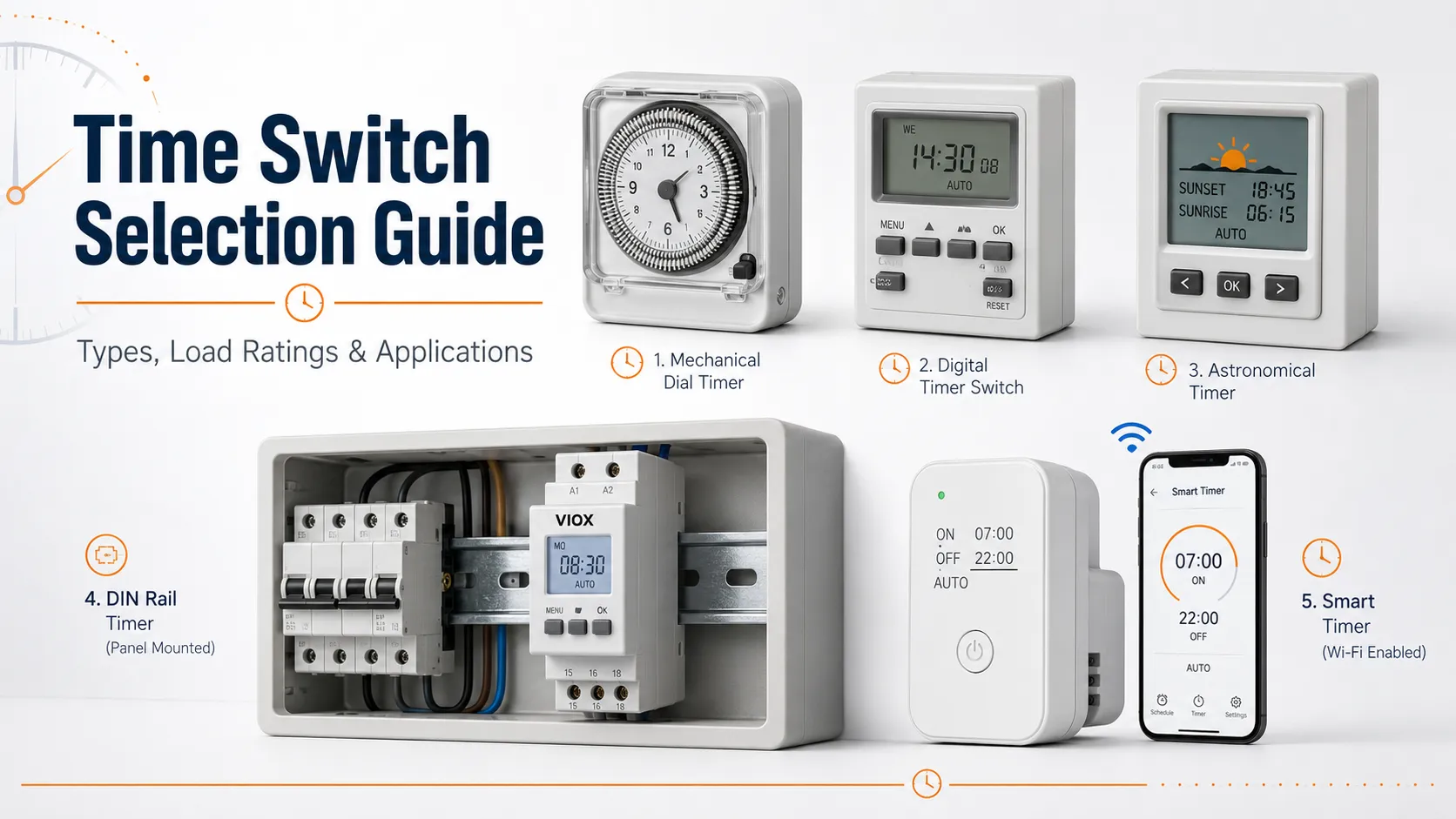
Choose a mechanical time switch for simple daily on/off schedules where the user wants a visible dial and easy operation. Choose a digital time switch for weekly programming, multiple schedules, backup memory, and more precise switching. Choose an astronomical time switch when outdoor lighting should follow sunrise and sunset. Choose a DIN rail timer switch or time relay for control panels, OEM equipment, and industrial automation.
If the time switch controls a pump, fan, motor, compressor, large LED lighting group, or other inductive/inrush load, do not choose by amp rating alone. Use the time switch to drive a contactor coil when the load is too demanding for the timer contact.
Time Switch vs Timer Switch: Are They the Same?
In most electrical product catalogs, time switch and timer switch refer to the same product category: a switch that operates according to time. Some markets use “time switch” more often for DIN rail and panel-mounted devices, while “timer switch” is common in consumer, lighting, and outlet-control contexts.
The function is the same: the device changes contact state based on time.
Related terms include:
- Electric timer switch: a broad term for electrical time-controlled switching.
- Mechanical timer switch: dial or segment-based timer.
- Digital timer switch: electronic timer with display and programmable schedule.
- DIN rail timer switch: timer designed for modular distribution boards or control panels.
- Time relay: control-circuit timing device for delay, interval, cyclic, flashing, or sequence logic.
Main Types of Time Switches
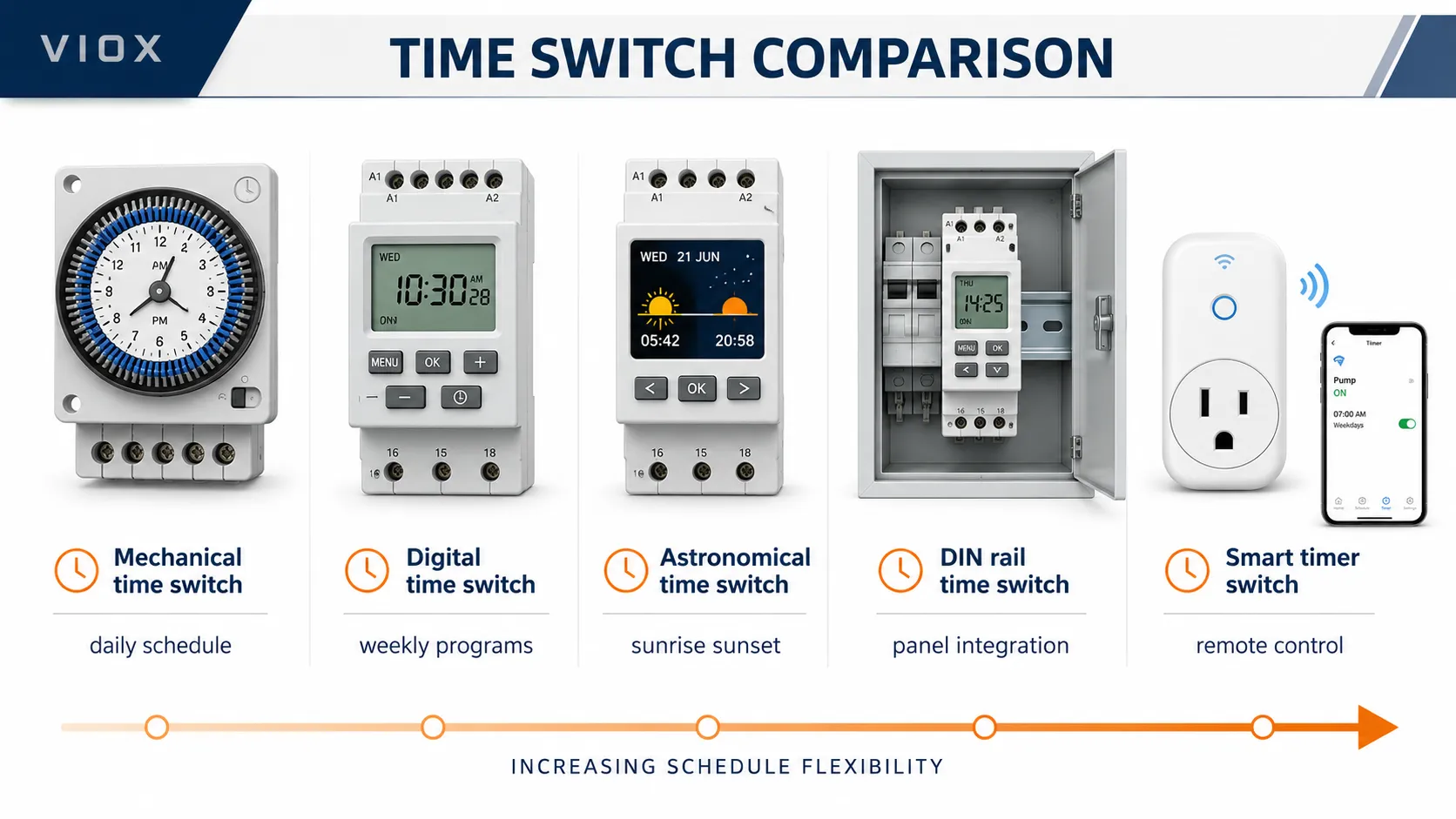
| Type | Best For | Main Advantage | Main Limitation |
|---|---|---|---|
| Mechanical time switch | Simple daily lighting, signboards, basic outlet timing | Easy dial setting and low complexity | Limited program flexibility |
| Digital time switch | Weekly schedules, commercial lighting, pumps, fans | Multiple programs and better precision | Requires programming |
| Astronomical time switch | Outdoor lighting by sunrise/sunset | Seasonal adjustment without frequent reprogramming | Needs correct location or time-zone setting |
| Smart timer switch | Remote control and app-based schedules | Network control and automation features | Depends on app, network, and cybersecurity quality |
| DIN rail timer switch | Electrical panels and modular distribution boxes | Clean panel integration | Needs proper panel wiring |
| Time relay | Control circuits and automation logic | Delay, cyclic, pulse, interval, and sequence functions | Not a clock-based schedule timer in many cases |
Time Switch Comparison at a Glance
| Selection Point | Mechanical | Digital | Astronomical | DIN Rail | Smart |
|---|---|---|---|---|---|
| Main role | Simple daily schedule | Programmable schedule | Sunrise/sunset schedule | Panel integration | App or remote control |
| Typical precision | Segment or dial based | Minute-level on many models | Minute-level on many models | Depends on timer technology | App-defined schedule |
| Schedule flexibility | Low | Medium to high | High for daylight-based control | Medium to high | High, if network is reliable |
| Power outage behavior | Model dependent | Often memory or battery backed | Often memory or battery backed | Model dependent | Local schedule depends on model |
| Best installation | Plug-in, wall, simple panel | Wall, DIN rail, panel | Outdoor lighting panels | Distribution boards and control cabinets | Smart homes or small commercial spaces |
| Main risk | Limited flexibility | Programming errors | Wrong location/time-zone setting | Wrong contact/load architecture | WiFi, cloud, and neutral-wire dependency |
| VIOX fit | Mechanical timer products | Digital timer products | Digital/lighting control selection | Panel and OEM projects | Only where remote control is truly needed |
Mechanical Time Switch
A mechanical time switch uses a rotating dial, motor-driven mechanism, pins, or segments to switch contacts at preset times. It is usually chosen for simple 24-hour schedules.
Use a mechanical time switch when:
- The schedule repeats every day.
- The user wants visible settings without a menu.
- The application is simple lighting, signboard, or basic outlet control.
- Low complexity matters more than advanced programming.
Check before selecting:
- Contact rating for the real load.
- Minimum switching interval.
- Supply voltage.
- Indoor or outdoor installation environment.
- Whether the timer keeps time during power loss.
For product review, see VIOX Mechanical Timer Switch.
Digital Time Switch
A digital time switch uses electronic timing circuitry, a display, buttons, and one or more relay outputs. It is better when the schedule changes by weekday, weekend, holiday, or operating mode.
Use a digital time switch when:
- You need weekly programming.
- You need several on/off cycles per day.
- You need manual override.
- The schedule must survive short power interruptions.
- The timer is installed in a control panel or commercial lighting board.
Check before selecting:
- Number of programs.
- Number of channels.
- Power reserve or battery backup.
- Contact rating.
- LED/inrush load compatibility.
- Display readability and programming method.
- DIN rail width and panel space.
For product review, see VIOX Digital Timer Switch.
Astronomical Time Switch
An astronomical time switch calculates sunrise and sunset times based on location. It is useful for outdoor lighting, signboards, street lighting, landscape lighting, and security lighting where fixed clock time is not ideal across seasons.
Use an astronomical timer when:
- Lights should turn on at sunset and off at sunrise.
- Seasonal time adjustment is a maintenance problem.
- The lighting schedule should follow daylight, not a fixed hour.
- The installation is commercial, municipal, or outdoor security lighting.
The key selection point is setup accuracy. The timer must be configured with the correct location, time zone, offset, and daylight-saving rule if applicable.
Smart Timer Switch
Smart timer switches add app control, wireless connectivity, remote scheduling, or integration with building and home automation systems. They can be useful, but they should not be treated as the default choice for every project.
Use a smart timer only when remote control or integration is genuinely required. For industrial or B2B applications, also check device security, long-term app support, network reliability, and whether manual local override is still available.
DIN Rail Time Switches for Electrical Panels
A DIN rail time switch is defined by its mounting style, not by one timing technology. DIN rail timers can be mechanical, digital, or astronomical. The key difference is that they are designed to be installed inside a distribution board or control cabinet on a standard DIN rail, usually near MCBs, contactors, terminal blocks, and other modular devices.
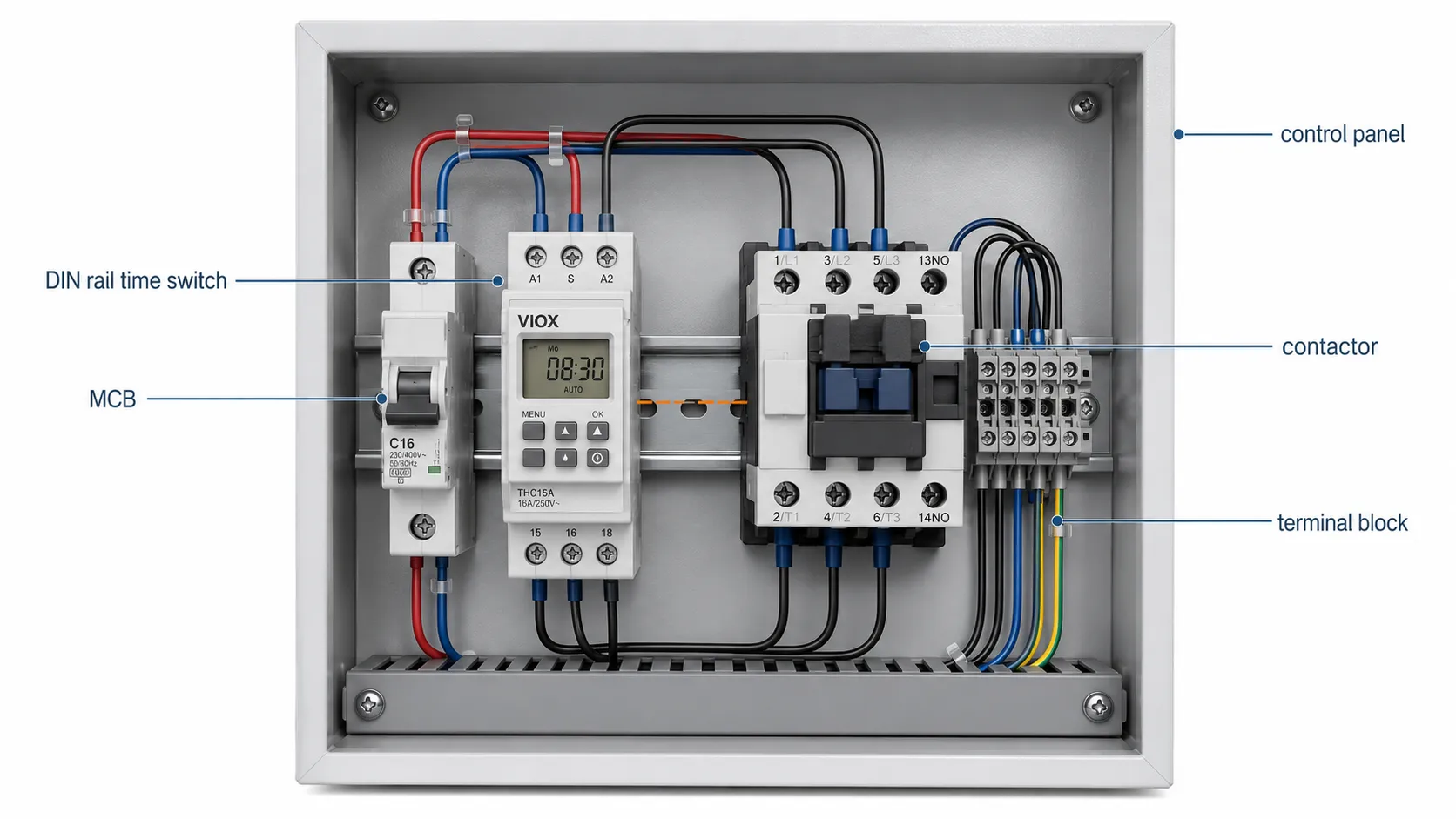
This makes DIN rail timers especially useful for commercial lighting panels, signboard control boxes, pump panels, irrigation cabinets, small automation panels, and OEM equipment.
What to check on a DIN rail time switch
| Specification | What to Check | Why It Matters |
|---|---|---|
| Module width | 1 module, 2 modules, or wider | Determines available panel space |
| Supply voltage | AC or DC control supply | Must match the panel control voltage |
| Output contact | NO/NC, changeover, or multiple channels | Determines how the timer controls the circuit |
| Contact rating | Resistive, inductive, LED, or control load | Prevents relay contact welding or early failure |
| Number of channels | Single-channel or multi-channel | Useful for independent circuit schedules |
| Power reserve | Battery or internal memory, if provided | Keeps schedule after short power interruption |
| Manual override | ON/OFF/AUTO or similar function | Helps maintenance teams test circuits |
| Wiring terminals | Terminal size and tightening method | Affects panel assembly and service reliability |
| Environment | Panel temperature, humidity, vibration | Impacts long-term reliability |
DIN rail format is usually the cleanest choice when the time switch belongs inside a professional electrical enclosure instead of a wall box or plug-in outlet.
Application Selector: Which Time Switch Fits Best?
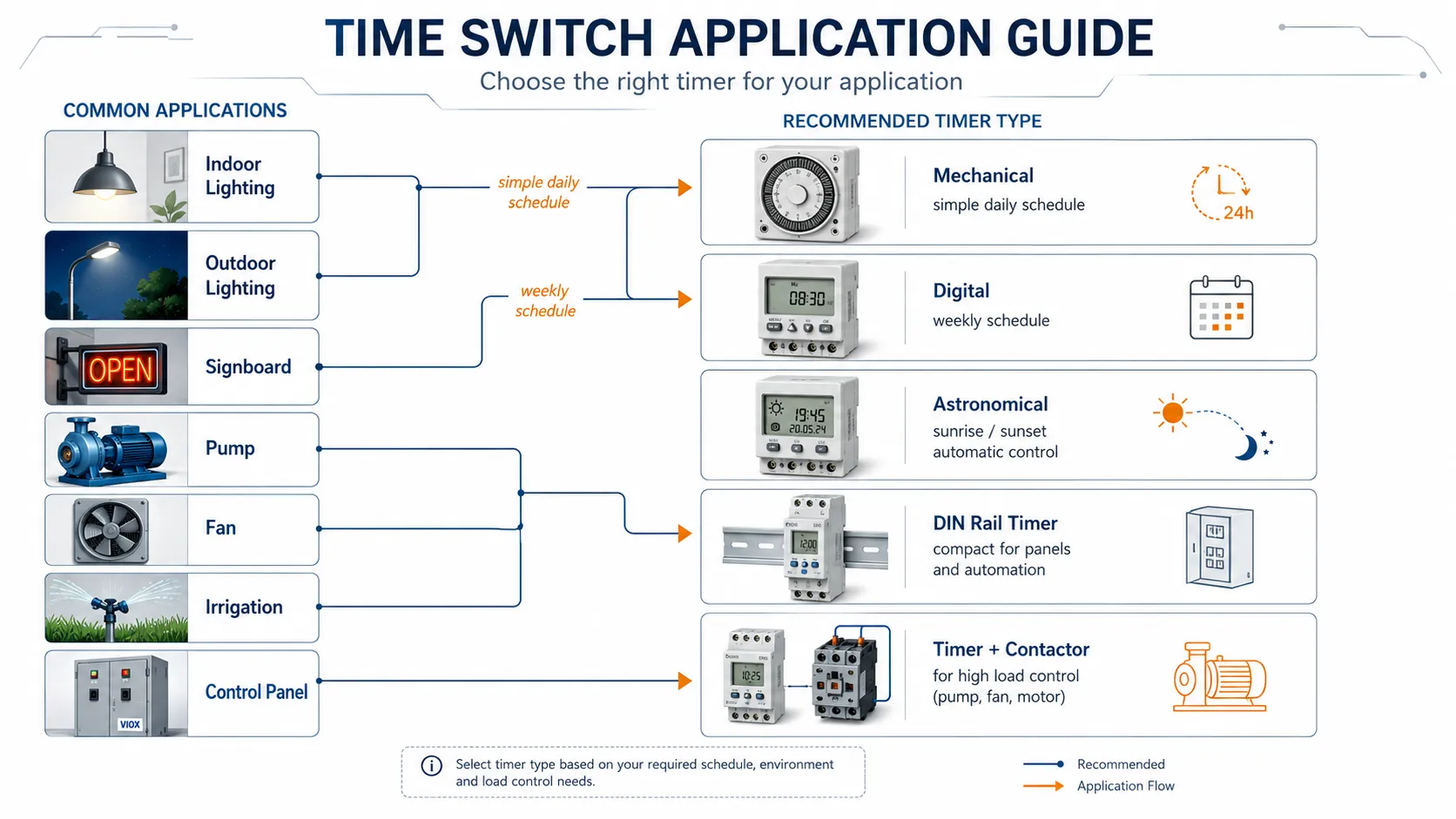
| Application | Better Time Switch Type | Selection Notes |
|---|---|---|
| Indoor lighting | Mechanical or digital | Mechanical for simple daily schedules; digital for weekly schedules |
| Outdoor lighting | Astronomical or digital | Check enclosure, IP rating, and seasonal adjustment needs |
| Signboard lighting | Digital or astronomical | Manual override and weekly schedule are useful |
| Pump or fan schedule | Digital timer plus contactor | Timer controls coil; contactor switches motor load |
| Water heater or geyser timing | Mechanical or digital | Verify local wiring rules and load rating |
| Control panel timing | DIN rail digital timer or time relay | Better wiring, replacement, and panel integration |
| Irrigation schedule | Digital or mechanical | Outdoor protection and multiple cycles may matter |
| Large LED lighting bank | Digital timer plus contactor | LED driver inrush can damage small timer contacts |
| Security occupancy simulation | Digital or smart timer | Random mode or weekly scheduling may help |
Load Rating: The Most Important Technical Check
The biggest time switch selection mistake is reading only the amp rating. A timer marked 16A may refer to a resistive load, not a motor, pump, fan, LED driver, or transformer.
| Load Type | Examples | Risk | Better Selection Method |
|---|---|---|---|
| Resistive load | Heater, simple incandescent lamp | Lower switching stress | Match voltage and current rating |
| Inductive load | Pump, fan, motor, transformer, contactor coil | Inrush and switching arc | Check motor/inductive load rating |
| LED driver load | LED lamps, LED panels, outdoor LED lights | High capacitor inrush | Check LED load rating or use contactor |
| Capacitive load | Power supplies, driver banks | High peak current | Verify inrush capability |
| Control load | Contactor coil, relay coil | Coil inrush and back-EMF | Check coil voltage and contact rating |
IEC Utilization Categories
In IEC-based electrical selection, contact ratings are often interpreted through utilization categories. The exact category on a timer switch datasheet may vary by product, but these categories help explain why the same current value does not mean the same switching duty.
| Category | Typical Meaning | Why It Matters |
|---|---|---|
| AC-1 | Non-inductive or slightly inductive resistive load | Easier switching duty |
| AC-3 | Squirrel-cage motor duty, usually contactor context | Much harder than resistive switching |
| AC-7a | Slightly inductive household and similar loads | Relevant for light commercial or domestic loads |
| AC-7b | Motor loads for household and similar use | More demanding than AC-7a |
The Contactor Question: When a Timer Should Not Switch the Load Directly
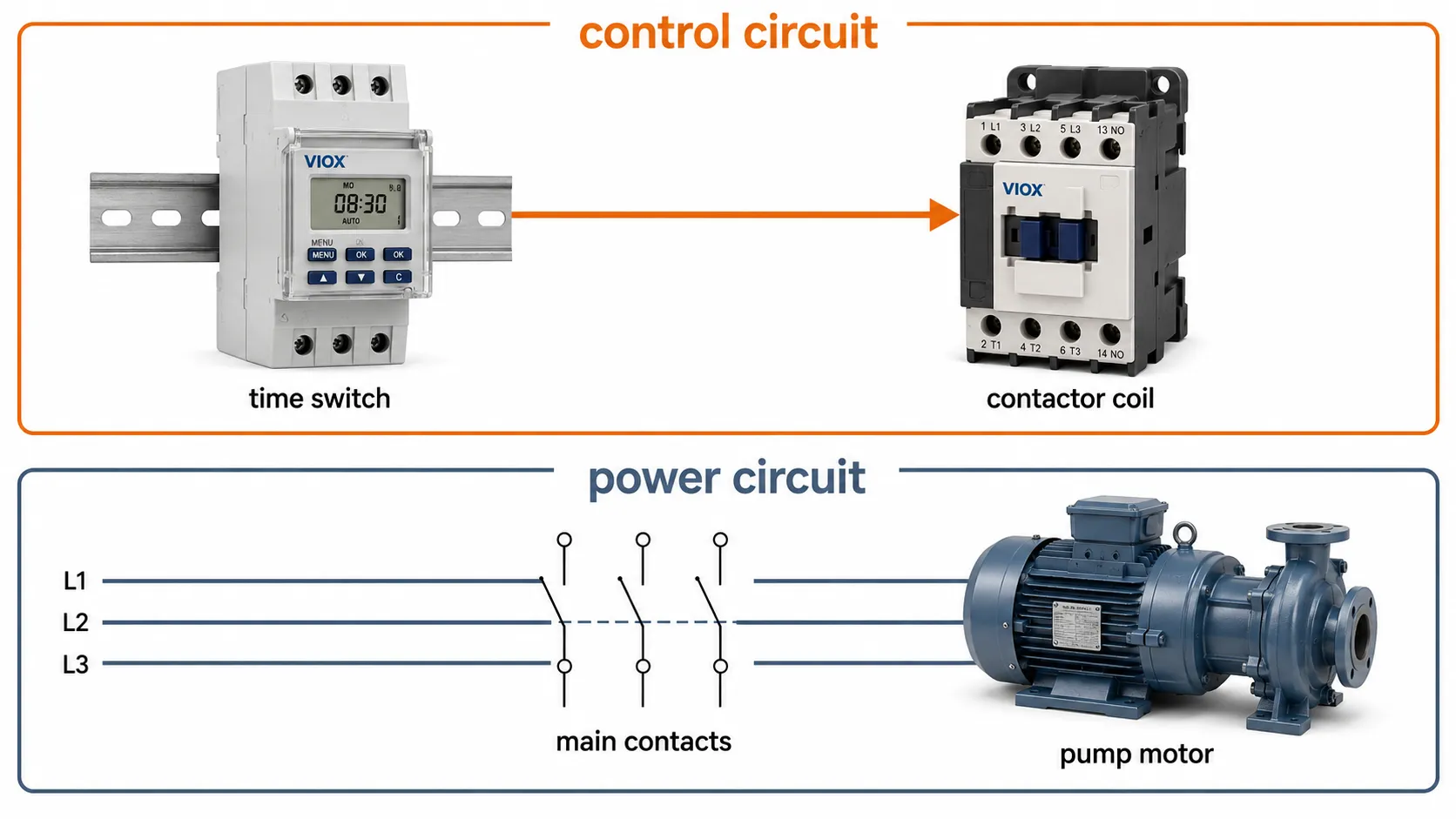
A time switch is often a control device, not the best power-switching device. If the load is a pump, fan, motor, compressor, heater bank, or large LED lighting group, the timer’s internal relay contact may not be the right component to break the load current directly.
A safer design is often:
Time switch output -> AC contactor coil -> contactor main contacts -> load
That way, the timer handles the control signal while the contactor handles the high-current switching. For load switching hardware, see VIOX AC Contactor options.
This architecture also makes maintenance easier. The timer can be replaced or reprogrammed as the control device, while the contactor is selected according to the real load duty. For pumps and motors, that usually means reviewing motor load behavior instead of trusting a resistive timer rating.
LED Lighting and Inrush Current
LED lighting is often misleading. The steady-state wattage may be low, but LED drivers can draw a high inrush current at startup. A timer that works well with a small heater may fail early when it switches many LED drivers at the same time.
For LED applications, check:
- LED load rating in the timer datasheet.
- Maximum number of LED drivers.
- Inrush current limit.
- Whether an external contactor is recommended.
- Contact material and relay type where specified.
Silver nickel (AgNi) contacts are common for general switching. Silver tin oxide (AgSnO2) is often used in switching devices designed for stronger resistance to inrush and arc erosion. Do not assume contact material from the product appearance; verify the datasheet.
Mounting Types
| Mounting Type | Typical Use | What to Check |
|---|---|---|
| Plug-in timer | Lamps, temporary loads, portable appliances | Plug standard, indoor/outdoor use, load rating |
| Wall timer switch | Lighting and fan circuits | Neutral requirement, wall box depth, wiring method |
| DIN rail timer switch | Distribution boards and control panels | Module width, terminal size, voltage, contact rating |
| Panel-mount timer | Equipment front panels | Cutout size, terminal protection, operator access |
| Timer relay | Machine control and automation | Timing function, supply voltage, output contact |
For control panels, DIN rail devices are usually cleaner because they can be installed next to MCBs, contactors, terminals, and other modular devices.
Wiring and Installation Checks
Before installation, confirm the wiring method. Many digital and smart time switches need a neutral conductor for power supply. Some two-wire timer switches are designed for specific lighting loads and may not work correctly with very low LED loads.
Check these items:
- Supply voltage matches the device rating.
- Line, load, neutral, and ground are identified correctly.
- The timer contact is not overloaded.
- The load type matches the timer’s contact rating.
- A contactor is used for motor or high-inrush loads when needed.
- The enclosure suits indoor, outdoor, dusty, or humid conditions.
- Manual override is accessible after installation.
- Local electrical code and qualified installation requirements are followed.
Time Switch vs Time Relay
A time switch usually controls a circuit according to clock time, such as turning lighting on at 18:00 and off at 23:00. A time relay usually controls a delay or timing function inside a control circuit, such as on-delay, off-delay, cyclic, pulse, interval, or star-delta timing.
| Device | Main Purpose | Example |
|---|---|---|
| Time switch | Clock-based automatic on/off schedule | Shop lights on at 8:00, off at 22:00 |
| Time relay | Control-circuit timing logic | Motor fan continues 60 seconds after signal stops |
For DIN rail delay functions and automation timing logic, review VIOX Timer Relay Manufacturer capabilities.
How to Choose a Time Switch: Step-by-Step Framework
Step 1: Define the load
Identify whether the load is lighting, pump, fan, motor, heater, signboard, contactor coil, or control circuit.
Step 2: Define the schedule
Decide whether the circuit needs a fixed daily schedule, weekly schedule, sunrise/sunset schedule, countdown function, cyclic operation, or remote/app control.
Step 3: Confirm voltage, current, and switching duty
Check nominal voltage, operating current, contact rating, and whether the stated current is resistive or inductive. LED drivers, motors, transformers, and contactor coils can create much higher switching stress than their normal running current suggests.
Step 4: Define the installation environment
Check whether the timer will be installed in a wall box, plug-in outlet, distribution board, outdoor enclosure, machine panel, or industrial control cabinet. Environment can eliminate some timer types before cost or features are considered.
Step 5: Decide whether a contactor is required
If the load is high-current, inductive, or high-inrush, use the time switch to control a contactor coil instead of switching the load directly.
Step 6: Choose the timing technology
Use mechanical for simple daily schedules, digital for weekly programs, astronomical for sunset/sunrise control, and time relay for delay logic.
Step 7: Choose mounting type
Select plug-in, wall, DIN rail, or panel mount based on the installation location.
Step 8: Confirm backup and override
For commercial or unattended sites, choose a timer with power reserve, memory retention, and manual override.
Step 9: Check documentation and maintenance
Label the timer function in the panel, record the programmed schedule, and keep the wiring diagram available for the next maintenance technician.
Common Mistakes
Mistake 1: Selecting by “16A” alone
A 16A resistive rating does not mean the timer can safely switch a 16A motor or large LED lighting bank. Check the load category and inrush current.
Mistake 2: Using a timer instead of a contactor
If the load is a pump, fan, motor, compressor, or large lighting circuit, the time switch should often control a contactor coil rather than the load directly.
Mistake 3: Ignoring neutral wire requirements
Many digital and smart timer switches require a neutral conductor. If the wall box or panel wiring does not provide one, the timer may not work correctly.
Mistake 4: Choosing smart features before electrical ratings
App control is useful only after the electrical basics are correct: voltage, load type, contact rating, wiring, and enclosure.
Mistake 5: Installing indoor timers outdoors
Outdoor lighting and irrigation controls need suitable enclosure protection. A timer’s function may be correct while its housing is wrong for the environment.
Time Switch Selection Checklist
| Check Item | Question to Ask |
|---|---|
| Load type | Is it resistive, inductive, LED, motor, pump, fan, or control coil? |
| Voltage | Does the timer support the actual supply voltage? |
| Contact rating | Is the rating valid for the real load type? |
| Inrush current | Will LED drivers, motors, or coils create high startup current? |
| Timing schedule | Daily, weekly, astronomical, countdown, cyclic, or delay? |
| Power reserve | Does the clock retain time after power loss? |
| Manual override | Can the user force on/off safely? |
| Mounting | Plug-in, wall, DIN rail, or panel mount? |
| Environment | Indoor, outdoor, humid, dusty, hot, or vibrating? |
| Installation | Does the wiring match local code and device instructions? |
Related VIOX Time Switch Resources
- Compare product options: Digital Timer Switch
- Compare product options: Mechanical Timer Switch
- Read the comparison guide: Mechanical Timer Switch vs Digital Timer Switch
- Review control-panel timing supply: Timer Relay Manufacturer
- Use contactors for larger loads: AC Contactor
FAQ
What is a time switch?
A time switch is an electrical device that automatically turns a circuit on or off according to a preset schedule. It is used for lights, pumps, fans, signboards, irrigation systems, and control panels.
Is a time switch the same as a timer switch?
Yes. In most electrical product catalogs, time switch and timer switch refer to the same type of device. Both names describe time-based automatic switching.
Which is better, mechanical or digital time switch?
Mechanical time switches are better for simple daily schedules and easy dial operation. Digital time switches are better for weekly schedules, multiple programs, backup memory, and more precise switching.
Can a time switch control a pump?
Yes, but for pumps and motors it is often better for the time switch to control a contactor coil while the contactor switches the pump power circuit. This reduces stress on the timer contact.
Can a timer switch be used for LED lights?
Yes, but check the LED load rating and inrush current. Large LED driver groups can stress timer contacts even when the steady-state wattage looks low.
What is the best time switch for outdoor lighting?
For outdoor lighting, an astronomical or digital time switch is often suitable. The device should be installed in a proper enclosure and selected for the operating environment.
Do digital time switches need a neutral wire?
Many digital and smart time switches require a neutral conductor to power the electronics. Always check the wiring diagram before selecting a model.
What is the difference between a time switch and a time relay?
A time switch follows clock time. A time relay provides timing logic such as on-delay, off-delay, interval, cyclic, or pulse timing inside a control circuit.
Final Recommendation
Use this page as the starting point for time switch selection. First identify the load, voltage, switching duty, schedule, mounting type, and installation environment. Then choose the timer type.
For simple daily control, choose a mechanical time switch. For weekly programs and commercial lighting, choose a digital time switch. For outdoor lighting that follows daylight, choose an astronomical timer. For control panels and automation logic, use a DIN rail timer switch or time relay. For motors, pumps, fans, compressors, and large LED lighting groups, let the time switch control a contactor instead of switching the load directly.