

On this page
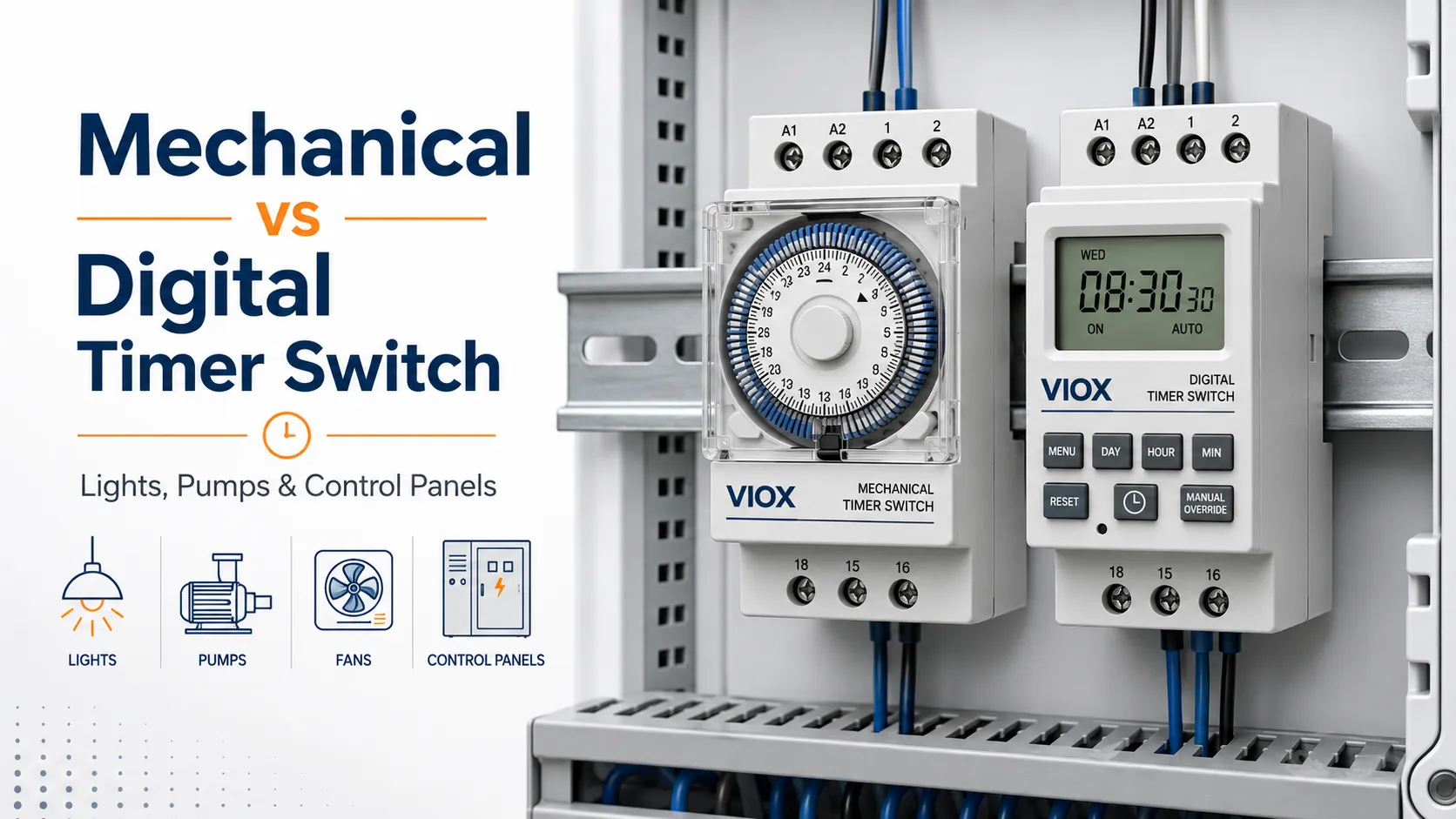
Mechanical timer switches and digital timer switches both turn electrical loads on and off automatically, but they are not chosen for the same reasons. A mechanical timer is usually better for simple daily schedules, low cost, and easy manual operation. A digital timer is usually better when you need weekly programming, higher timing accuracy, multiple switching events, backup memory, or integration into a control panel.
For VIOX buyers, the real question is not “which timer is better?” The better question is: what load are you switching, how precise must the schedule be, and where will the timer be installed?
Quick Answer
Choose a mechanical timer switch for basic lighting, signboards, simple outlet control, and low-cost daily on/off schedules. Choose a digital timer switch for 7-day schedules, multiple programs, DIN rail control panels, pumps, fans, HVAC auxiliary circuits, and applications where backup memory or precise timing matters.
If the load is inductive, such as a motor, pump, fan, contactor coil, or compressor circuit, do not select by amp rating alone. Check the timer’s contact rating for the actual load type, voltage, and switching duty. In IEC-based selection, this usually means looking beyond “16A” and checking the utilization category or the manufacturer’s load table.
Mechanical vs Digital Timer Switch: Key Differences
| Feature | Mechanical Timer Switch | Digital Timer Switch |
|---|---|---|
| Timing method | Motor-driven dial, gears, pins, or segments | Electronic clock, microcontroller, display, relay output |
| Typical schedule | Repeating daily schedule | Daily, weekly, multi-program, holiday or countdown modes |
| Setup | Simple dial or pins | Buttons, LCD screen, menu programming |
| Timing precision | Good for basic schedules, less precise over long periods | More precise and flexible |
| Minimum switching interval | Often 15 or 30 minutes, depending on model | Often 1 minute or shorter, depending on model |
| Power interruption | May lose position if supply is interrupted | Many models include battery or memory backup |
| Ease of use | Very easy for non-technical users | Better features but needs programming |
| Best fit | Basic lights, signs, simple loads | Control panels, weekly schedules, pumps, fans, commercial lighting |
| Main limitation | Limited programs and lower precision | More complex setup and sensitive electronics |
What Is a Mechanical Timer Switch?
A mechanical timer switch uses a rotating dial, gear mechanism, pins, tabs, or time segments to open and close a contact at preset times. Many mechanical timers run from the mains supply and repeat the same schedule every day.
Mechanical timers are popular because the operation is visible. If the dial shows 18:00 and the segment is pressed down, the user can usually understand the switching state without reading a manual.
Common mechanical timer applications
- Indoor lighting schedules
- Storefront signs
- Basic garden or irrigation timing
- Simple plug-in outlet control
- Water heater or geyser time control where permitted by local installation rules
- Low-cost daily on/off automation
Mechanical timers are not automatically “more rugged” in every situation. Their gears and contacts still have load and environmental limits. For industrial use, check enclosure protection, contact rating, operating temperature, and whether the model is designed for panel installation.
What Is a Digital Timer Switch?
A digital timer switch uses electronic timing circuitry and a relay or electronic output to switch a load. It usually has an LCD display, buttons, memory functions, and programmable schedules.
Digital timers are useful when a simple 24-hour cycle is not enough. For example, a commercial lighting system may need one schedule for weekdays, another for weekends, and manual override during maintenance. A digital timer is also better when the user needs more precise switching intervals.
Common digital timer applications
- 7-day lighting control
- Commercial signs and shop lighting
- Pump and fan schedules
- DIN rail control panels
- HVAC auxiliary control
- Street lighting with manual override
- Automation circuits where schedule memory matters
Which Timer Is Better for Your Application?
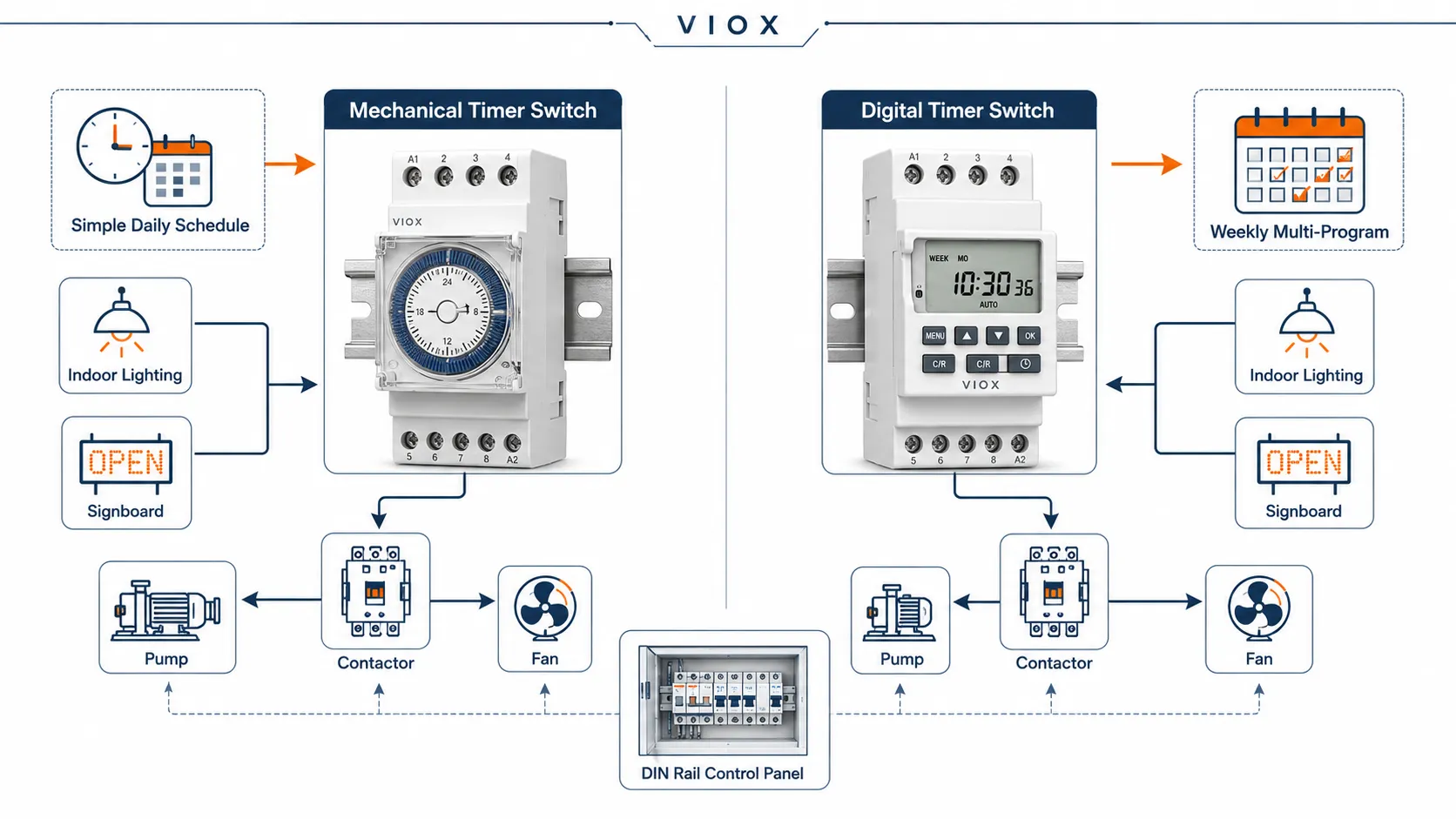
| Application | Better Choice | Reason |
|---|---|---|
| Simple lamp or indoor light schedule | Mechanical or digital | Mechanical is easy; digital gives more schedule flexibility |
| Weekly commercial lighting | Digital timer | 7-day programming and multiple switching periods |
| Outdoor signboard | Digital timer in suitable enclosure | More precise control; check IP rating and contact rating |
| Pump or fan control | Digital timer or rated mechanical timer | Must verify inductive load rating |
| Industrial control panel | Digital DIN rail timer | Better schedule control, display, relay output, and memory |
| Basic plug-in outlet timing | Mechanical timer | Low cost and simple operation |
| Frequent schedule changes | Digital timer | Easier to store multiple programs |
| Harsh dust or moisture environment | Depends on enclosure | The enclosure and IP rating matter more than timer type |
Load Rating: Resistive vs Inductive Loads
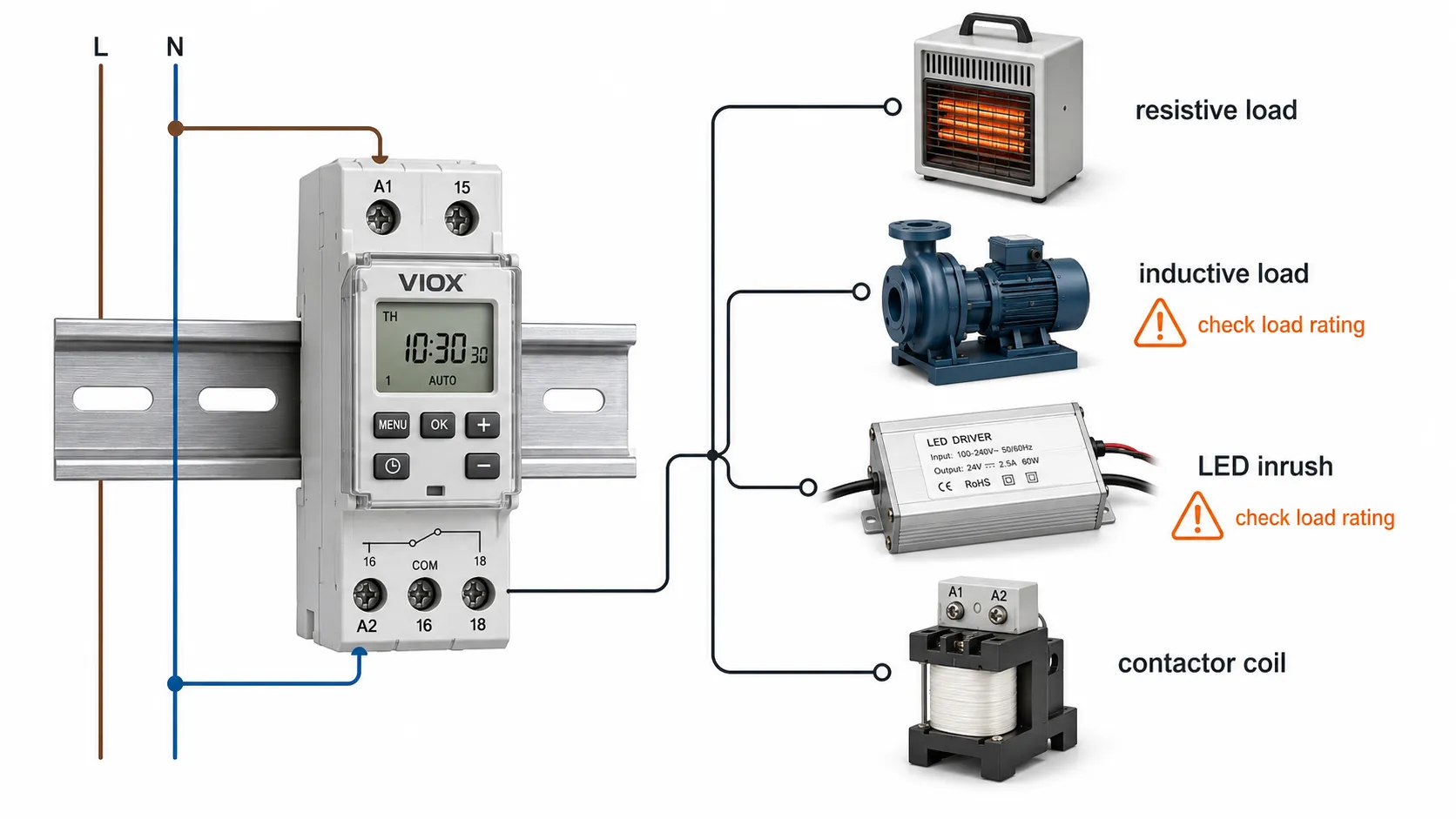
The most common selection mistake is reading only the printed amp rating and ignoring the load type.
A timer rated for 16A resistive load is not necessarily suitable for switching a 16A motor, pump, fan, compressor, or contactor coil. Inductive loads create inrush current and switching arcs that stress the timer contacts more severely than a heater or incandescent lamp.
| Load Type | Examples | Selection Note |
|---|---|---|
| Resistive load | Heater, simple incandescent lighting | Easier to switch; amp rating is more straightforward |
| Inductive load | Pump, fan, motor, contactor coil | Check inductive or motor load rating |
| LED lighting | LED drivers, lamps | Check inrush current and minimum load requirement |
| Capacitive load | Some power supplies and LED drivers | Inrush can be high; confirm switching rating |
IEC Utilization Categories: Why “16A” Is Not Enough
For professional timer switch selection, the contact rating should be read together with the load category. IEC 60947 series standards use utilization categories to describe how contacts are tested and applied under different electrical stresses.
| Category | Typical Meaning | Why It Matters for Timer Switches |
|---|---|---|
| AC-1 | Non-inductive or slightly inductive resistive loads | Suitable reference for heaters and simple resistive loads |
| AC-3 | Squirrel-cage motor switching by contactors | Motor starting current is much harder on contacts than resistive current |
| AC-7a | Slightly inductive household and similar loads | Relevant for some domestic or light commercial timing loads |
| AC-7b | Motor loads for household and similar use | More demanding than AC-7a because of motor starting current |
| DC load categories | DC resistive or inductive switching | DC arcs are harder to extinguish; verify DC rating separately |
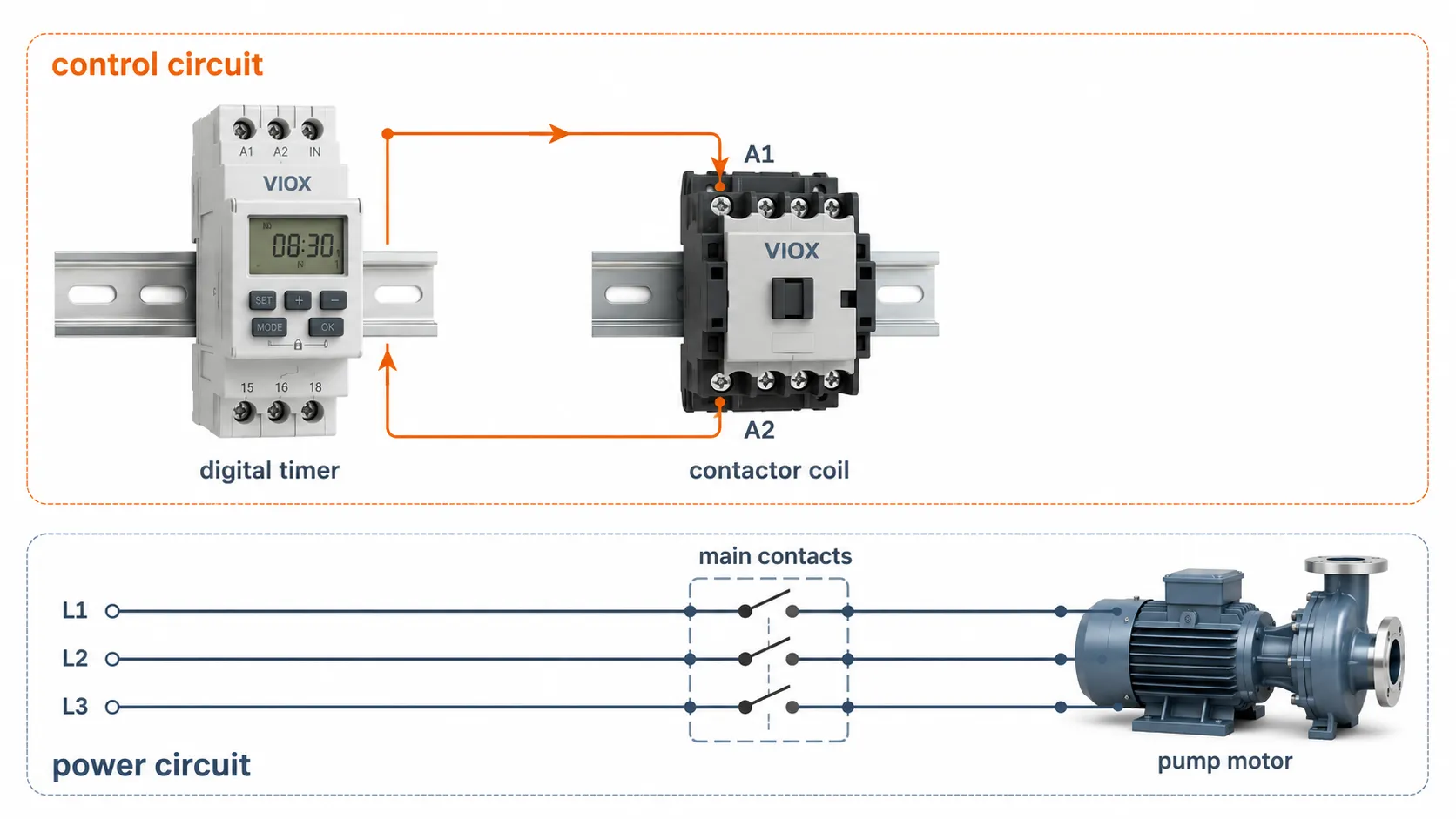
A small timer switch is often used to control a contactor coil rather than switching the motor directly. In that layout, the timer contact handles the control circuit, while the contactor handles the high-current load. This is the safer architecture for pumps, fans, compressors, and larger lighting banks.
LED Driver Inrush and Contact Material
LED lighting looks like a small load on the wattage label, but the driver input capacitors can create a high inrush current when switched on. This can weld or pit small timer contacts if the timer is selected only by steady-state current.
For LED and electronic driver loads, check the timer datasheet for LED load capacity or inrush current limits. Contact material also matters. Silver nickel (AgNi) contacts are common for general switching, while silver tin oxide (AgSnO2) contacts are often preferred in devices designed to resist higher inrush and arc erosion. The exact material and load limit must be confirmed from the product datasheet; do not assume every “digital timer” uses the same relay contact design.
If the timer controls a contactor instead of switching the load directly, size the timer contact for the contactor coil and use the contactor to switch the main load. This is often cleaner for pumps, motors, and larger lighting circuits.
Accuracy and Minimum Switching Interval
Mechanical timers are usually accurate enough for simple daily control, but they are not ideal when exact switching time matters. Many mechanical plug-in or panel timers use segments that limit the minimum switching interval, often to 15 or 30 minutes depending on the model.
Digital timers can often switch in smaller intervals, such as one-minute steps, and some industrial timers can handle seconds-level timing. Always verify the datasheet because “digital” does not automatically mean high precision for every model.
Use a digital timer if the application needs:
- Multiple on/off events per day
- Different weekday and weekend schedules
- Short timing intervals
- Countdown or cyclic timing
- Backup memory after power failure
- Display-based status checking
Power Failure and Program Memory
Mechanical timers that rely on a synchronous motor may stop when power is lost. When power returns, the dial position may no longer match real time unless the model has a backup feature.
Many digital timer switches include battery backup or non-volatile memory to retain the program. This matters in commercial lighting, pump control, and unattended sites. Without backup memory, a power outage can leave the system running on the wrong schedule.
Before choosing a digital timer, check:
- Does it retain the program after power loss?
- Does the clock continue running during outage?
- Is the backup battery replaceable?
- Is there a manual override mode?
- Does the display show relay state clearly?
Mounting Types: Plug-In, Wall, DIN Rail, and Panel Mount
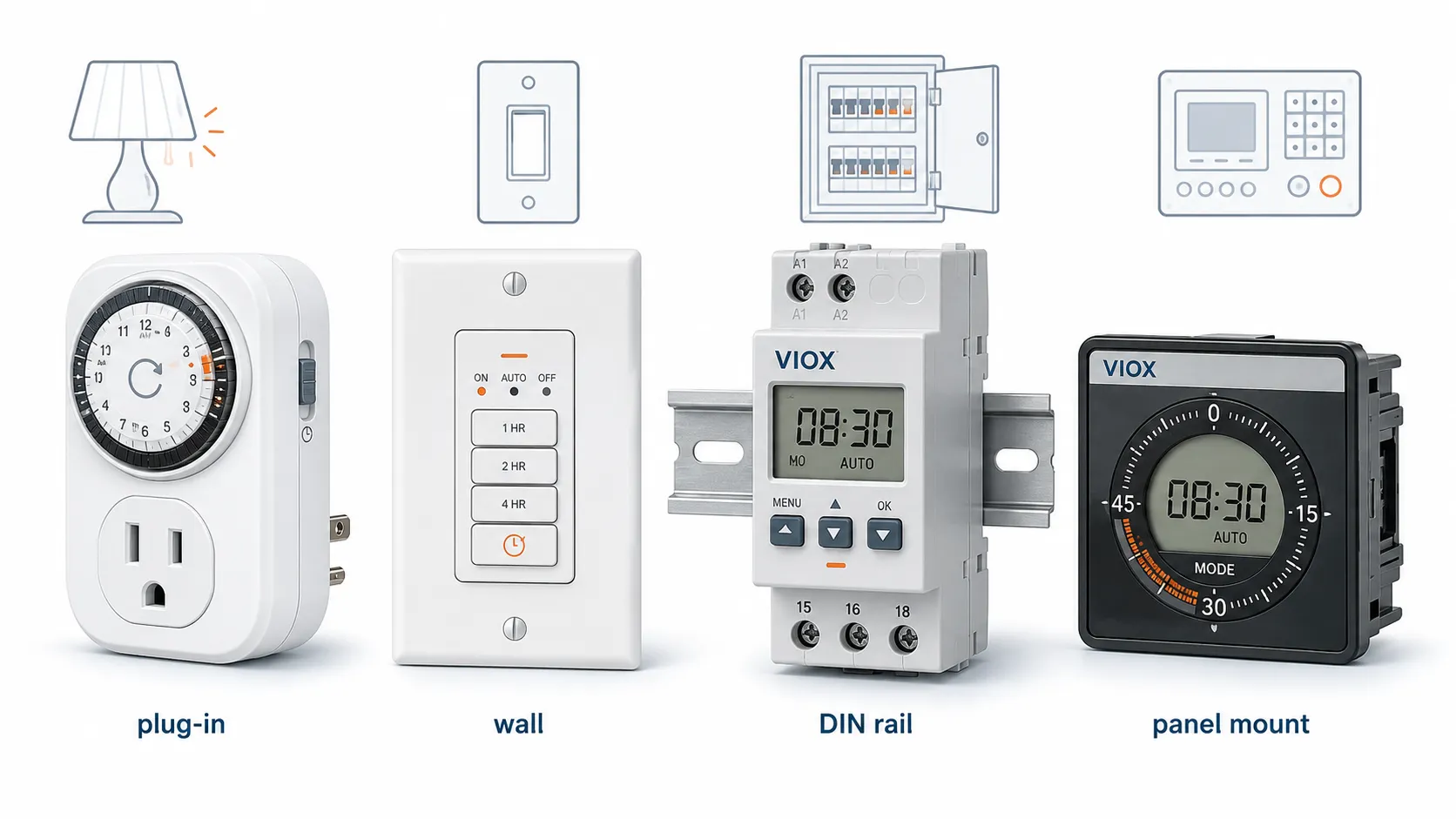
Timer switches are not only divided into mechanical and digital types. The mounting style is just as important.
| Mounting Type | Typical Use | Selection Note |
|---|---|---|
| Plug-in outlet timer | Lamps, small appliances, temporary use | Check plug standard, load rating, and indoor/outdoor use |
| Wall timer switch | Lighting circuits, fans | Must match wall box, voltage, neutral requirement, and wiring rules |
| DIN rail timer switch | Distribution boxes, control panels | Best for professional panel wiring and modular systems |
| Panel-mount timer | Machinery or equipment front panel | Check cutout size and terminal protection |
| Timer relay | Control circuits, automation logic | Better for delay, cyclic, star-delta, or signal control |
For modular electrical panels, DIN rail timers are usually easier to wire, replace, and combine with MCBs, contactors, and terminal blocks.
Mechanical Timer Switch: Advantages and Limitations
Advantages
- Simple to understand and operate
- Lower cost for basic timing
- No complex menu programming
- Easy manual adjustment
- Good fit for simple daily schedules
Limitations
- Limited program flexibility
- Lower precision than electronic timers
- Mechanical wear over time
- Often larger than digital models
- Power interruption can affect time position
- Not ideal for frequent schedule changes
Mechanical timers are best when the user wants “turn this load on and off every day at roughly the same time” without advanced programming.
Digital Timer Switch: Advantages and Limitations
Advantages
- Better timing accuracy
- Multiple programs and weekly schedules
- Display-based setup and status
- Often includes manual override
- Program memory or battery backup on many models
- Better fit for control panels and commercial lighting
Limitations
- More complex setup
- Usually higher cost
- Electronics can be more sensitive to moisture, heat, and surges
- Requires correct programming after installation
- Display or buttons may be harder for some users
Digital timers are best when the schedule is more important than simplicity.
Common Selection Mistakes
Mistake 1: Choosing by amp rating only
A timer’s printed current rating may refer to resistive load. If the actual load is a pump, fan, motor, LED driver, or contactor coil, check the correct load category and inrush current.
Field example: a buyer once specified a 16A timer to switch a 2HP pump directly because the normal running current looked acceptable on paper. The timer contacts welded after repeated starts. The fix was not a “bigger digital timer”; the correct solution was to let the timer drive an AC contactor coil and let the contactor switch the pump circuit.
Mistake 2: Using a plug-in timer for a fixed installation
Plug-in timers are convenient, but they are not a substitute for a properly wired DIN rail timer, wall timer, or control panel timer in permanent installations.
Mistake 3: Ignoring power failure behavior
If the clock loses time after an outage, the load may switch at the wrong hour. This is a common problem for lighting, irrigation, and unattended equipment.
Mistake 4: Forgetting manual override
Maintenance teams often need to force a load on or off without changing the whole schedule. A timer without clear override can become frustrating in the field.
Mistake 5: Installing the timer in the wrong environment
Moisture, dust, heat, and vibration affect timer life. For outdoor or industrial locations, the enclosure and installation method matter as much as the timer type.
Selection Checklist
Before buying a mechanical or digital timer switch, confirm:
- Supply voltage: 110/120V AC, 220/240V AC, 12V, 24V, or another control voltage
- Load type: resistive, inductive, LED driver, contactor coil, pump, fan, motor
- Contact rating for the actual load type
- Number of switching programs required
- Minimum switching interval
- Daily or weekly schedule requirement
- Manual override requirement
- Backup memory or battery requirement
- Mounting type: plug-in, wall, DIN rail, panel mount
- Indoor/outdoor environment and enclosure rating
- Local wiring rules and installation method
FAQ
Which is better, a mechanical or digital timer?
A mechanical timer is better for simple, low-cost daily schedules. A digital timer is better for precise timing, weekly programs, multiple on/off events, and control panel applications.
Are mechanical timers more reliable than digital timers?
Mechanical timers are simple and easy to operate, but they have moving parts that can wear. Digital timers have fewer mechanical parts but include electronics that must be protected from moisture, heat, voltage surges, and incorrect wiring.
Can I use a timer switch for lights?
Yes. Timer switches are commonly used for indoor lights, outdoor lights, signboards, and shop lighting. Check the voltage, load rating, LED driver inrush current, mounting style, and whether the timer is rated for indoor or outdoor installation.
Can a timer switch control a pump or motor?
Yes, but the timer must be rated for the load, or it should control a contactor that switches the pump or motor. Do not assume a resistive amp rating is suitable for motor loads.
What is the difference between a timer switch and a timer relay?
A timer switch usually controls a load based on clock time, such as turning lights on at 18:00 and off at 23:00. A timer relay controls a delay or timing function in a control circuit, such as on-delay, off-delay, cyclic timing, or star-delta control.
Does a digital timer use more power than a mechanical timer?
Power consumption depends on the model. Digital timers need electronics and a display, while mechanical timers may use a small synchronous motor. The difference is usually less important than contact rating, programming needs, and installation environment.
Do digital timers keep their program after power failure?
Many digital timers include memory or battery backup, but not all models do. Check whether the clock and program are retained during power loss.
What timer is best for a control panel?
For control panels, a DIN rail digital timer or industrial timer relay is usually the better choice because it is easier to integrate with MCBs, contactors, terminal blocks, and panel wiring.
Final Recommendation
Use a mechanical timer switch when the schedule is simple, the budget is tight, and the user wants a visible dial that is easy to adjust. Use a digital timer switch when the project needs weekly programming, accurate timing, multiple schedules, backup memory, or integration into a control panel.
For electrical distributors, panel builders, and OEMs, the safest selection method is to start with the load: voltage, current, utilization category, inrush current, mounting style, and required schedule. The timer type comes after that. If the timer will control a motor, pump, compressor, or large LED lighting group, consider using the timer as a control device and a contactor as the power switching device.
Explore VIOX Timer Switch options for lighting, pumps, fans, and electrical control applications.