Introduction
Wiring a solar panel junction box is the critical foundation of any photovoltaic (PV) system’s reliability and safety. Whether you’re installing a small residential array or a larger commercial system, understanding how to properly wire and connect your solar panels directly impacts system efficiency, longevity, and—most importantly—safety. Improperly wired junction boxes are a leading cause of solar-related fires, electrical failures, and warranty voidance.
This comprehensive guide walks you through every step of the process, from preparing UV-rated PV cables to securing MC4 connectors with professional-grade techniques. You’ll learn the same safety standards used by certified installers worldwide, along with industry best practices that meet NEC 690 and IEC 61010 regulations.
What is a Solar Panel Junction Box?
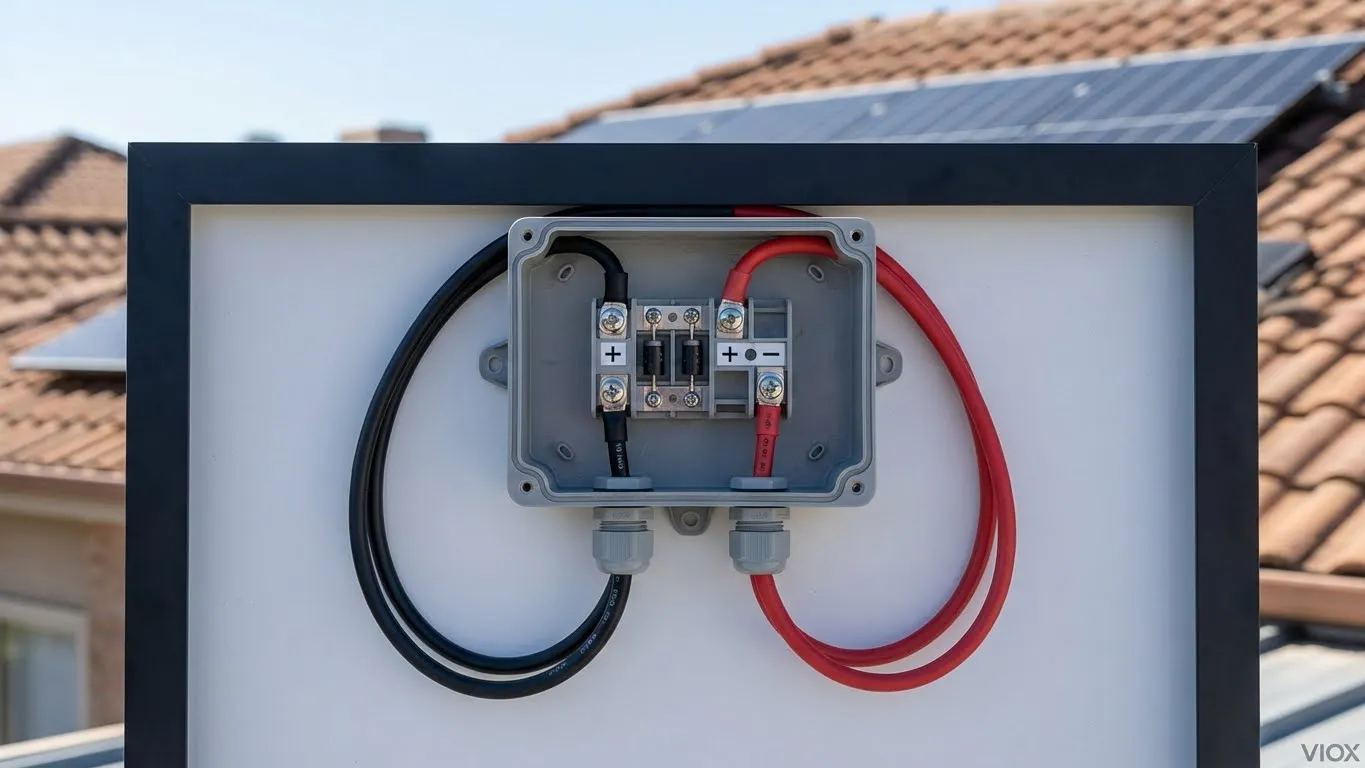
A solar panel junction box is the sealed electrical enclosure mounted on the back of each solar module. It serves three critical functions:
- Connection Hub: The junction box merges internal panel wiring with external PV cables, routing power to your inverter or combiner box.
- Safety Component: It houses bypass diodes that prevent “hot spots” (areas of excessive heat) when one panel is shaded while others are in full sun.
- Weather Protection: A sealed, IP65/IP67-rated enclosure ensures moisture, dust, and insects cannot corrode or damage internal electrical components.
Understanding these functions is essential because mistakes in junction box wiring can result in:
- Arc flash incidents (potentially lethal)
- Moisture-induced corrosion and short circuits
- Reduced system output by 15–30%
- Complete system failure
Tools and Materials You’ll Need
Before beginning any wiring work, gather the following industry-standard tools:
| Tool/Material | Specification | Purpose | Why It Matters |
|---|---|---|---|
| PV Wire | 10 AWG, USE-2 or PV rated, UV-resistant | Main conductor | Standard cable minimizes voltage drop; non-UV wire degrades in sunlight |
| Wire Strippers | Precision model, 1/16″ tolerance | Expose clean copper | Nicking the conductor creates weak points and corrosion zones |
| Flathead Screwdriver | 3/16″ or 1/4″ | Open junction box cover | Wrong size can strip screw heads |
| MC4 Crimper | Ratcheting style, not pliers | Crimp male/female pins | Ratchet crimpers ensure consistent “gas-tight” pressure |
| Heat Shrink Tubing | Adhesive-lined, UV-rated | Waterproof insulation | Creates secondary moisture barrier |
| MC4 Spanners | Staubli original or equivalent | Tighten gland nuts | Prevents over-torquing and connector damage |
| Multimeter | DCV + Resistance modes | Test for polarity & faults | Essential for safety verification |
| Insulated Gloves | 1000V rated | Personal protection | DC cannot be safely touched ungloved |
| Torque Screwdriver | 0.5–2.5 Nm range | Terminal block fastening | Loose connections are the #1 cause of solar fires |
Pro Tip: Many solar professionals use “cold work” gloves (cotton-backed rubber) over insulated gloves for better dexterity while maintaining protection.
Step 1: Safety First – Understanding Hazards
Solar panels are “always on” in daylight. Even on a cloudy day or when partially shaded, they generate dangerous DC voltage.
Critical Safety Measures:
- Cover the Panel: Place an opaque tarp or cardboard over the solar array to halt power generation. Measure voltage before starting; it should read zero.
- Disconnect DC Isolators: If your system includes a DC disconnect switch (between panels and inverter), switch it to “OFF” and verify via multimeter.
- Use Insulated Tools: Standard metal screwdrivers conduct electricity. Use tools rated for 1000V electrical work.
- Wear PPE: Insulated gloves, safety glasses, and rubber-soled shoes are mandatory.
- Never Work Alone: Have a partner present who can call emergency services if needed.
Why This Matters: A single slip while holding a DC-powered wire can cause ventricular fibrillation (VF). Solar panel DC voltage, even from a small 2–3 kW array, is often 300–600V—well above the 50V threshold that is considered lethal.
Step 2: Prepare the PV Conductors
Proper wire preparation is where many installations begin to fail.
Detailed Procedure:
- Measure and Cut: Cut two lengths of 10 AWG PV wire—one for the positive lead, one for negative. Add 6–12 inches of extra length to allow for future maintenance without re-running new wire.
- Strip the Wire: Using a precision wire stripper:
- Set the stripper for 10 AWG.
- Insert the wire end and rotate the stripper 2–3 times.
- Pull the insulation off with gentle pressure.
- Expose 1/4 to 1/2 inch (6–12mm) of bare copper.
- Critical: Do NOT nick or cut any copper strands—each nick reduces current capacity.
- Inspect the Copper: Look at the exposed end under good light. All copper should be shiny and intact. If you see black oxidation, use a soft brass wire brush to clean it.
- Test for Nicks: Gently tug on the insulation; it should not slide. If it does, re-strip and expose a fresh section of conductor.
Step 3: Open and Inspect the Junction Box
The First Look:
- Using a small flathead screwdriver, carefully pry open the junction box cover. Most boxes have 4 screws or a snap-on lid. Set screws aside in a labeled container.
- Inside, you’ll see:
- Two or three terminals (negative, positive, and sometimes a ground terminal).
- Bypass diodes (small rectangular components soldered to internal wires).
- Internal PV cables (thin ribbon-like wires connecting the diodes to the terminals).
Warning: Do NOT disturb internal diodes or ribbon wires. Touching them can break internal connections and destroy the panel.
- Locate Polarity Markings:
- Look for (+) and (–) symbols inside the box.
- Red wires typically connect to (+); black to (–).
- Verify with a multimeter by touching the red probe to the (+) terminal and black to (–); you should see an open circuit voltage (Voc) around 35–45V per panel.
Step 4: Feed Wires Through Cable Glands
Cable glands (also called strain relief connectors) are where water and dust typically breach a junction box.
Professional Installation Technique:
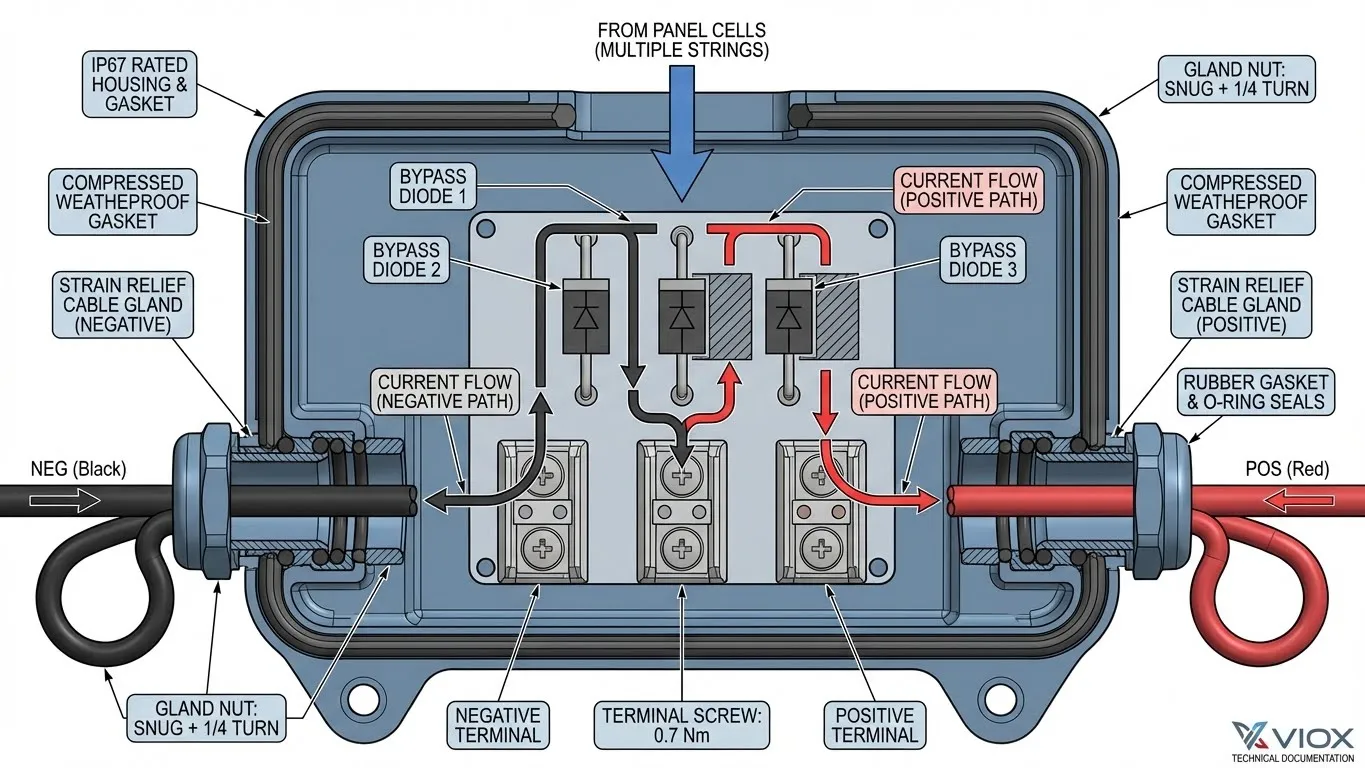
- Identify the Glands: Locate the rubber strain relief connectors on the left (negative) and right (positive) sides of the box.
- Thread the Negative Lead: Slide the black PV cable through the negative side gland. The gland nut should hand-tighten (do not over-tighten yet).
- Thread the Positive Lead: Repeat with the red cable on the positive side.
- Create a “Drip Loop”: Before entering the box, bend each cable into a downward U-shape about 6 inches below the box. This prevents rain from running along the cable into the gland.
Step 5: Secure Connections to Terminals
Terminal tightness is your first line of defense against fires.
Terminal Torquing Procedure (NEC 690.31):
- Position the Wire: Insert the stripped end of the negative cable into the negative terminal. Ensure at least 1/4 inch of bare copper is inside the terminal.
- Tighten with Torque Screwdriver: Using a 0.5–0.7 Nm torque screwdriver (or a manual screwdriver, tightened until “snug plus 1/4 turn”), secure the terminal screw.
- Crimp the Strain Relief: Use a wire crimper to form a tight barrel crimp around the exposed portion of the negative cable, just outside the terminal. This locks the wire in place and prevents pull-out.
- Repeat for Positive: Follow the same steps for the positive (red) lead.
- Verify Tightness: Give each wire a firm tug; it should not budge.
Common Mistakes:
- Twisting stranded wire together and forcing it into the terminal (use a ring or spade connector for better contact).
- Under-tightening (leads to arcing and fire).
- Over-tightening (can break terminal screws).
Step 6: Understanding and Installing MC4 Connectors
MC4 connectors have become the industry standard because they’re weatherproof, keyed to prevent reverse polarity, and compatible across major panel brands.
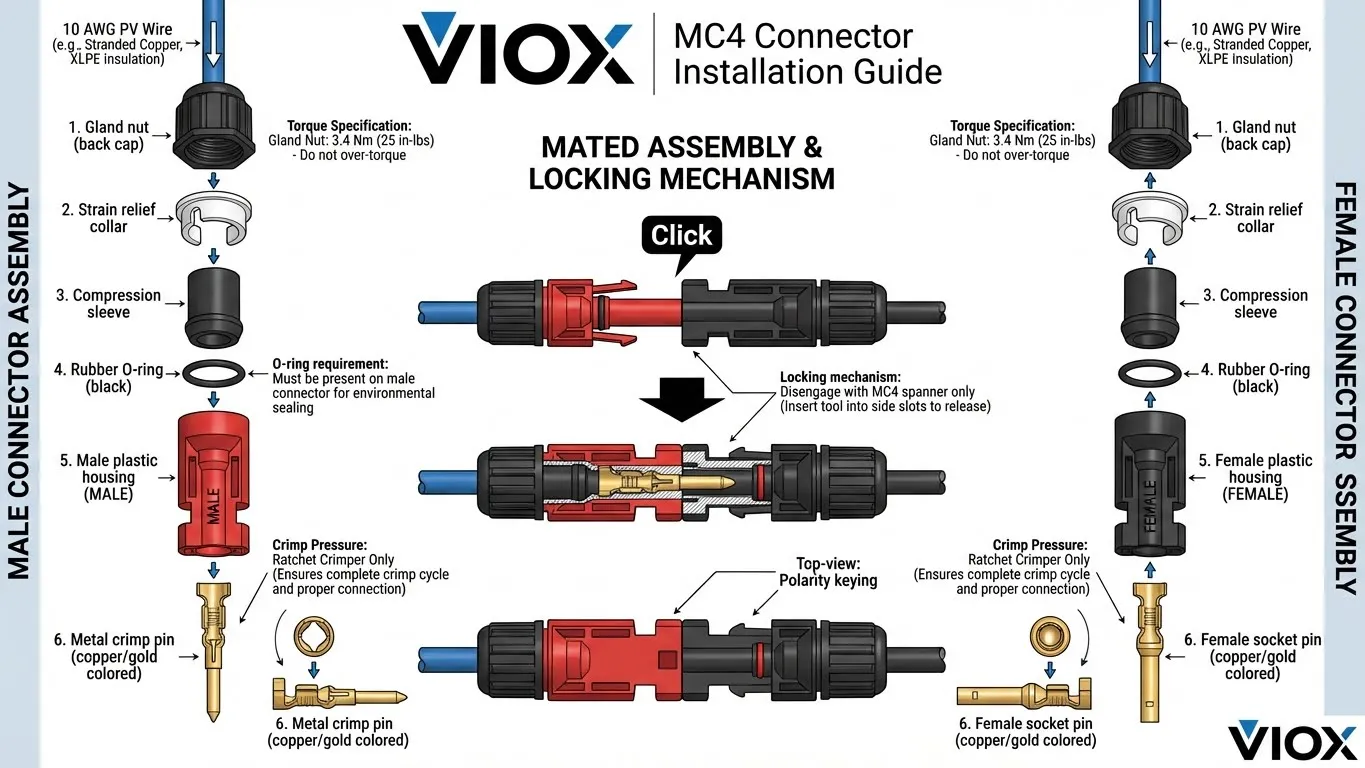
Anatomy of an MC4 Connector:
- Male Connector (used for positive/red wire) – metal pin inside.
- Female Connector (used for negative/black wire) – socket inside.
- Metal Crimp Pin – the critical component carrying current.
- Strain Relief – plastic collar providing mechanical support.
- Gland Nut – back cap that tightens for a waterproof seal.
- Rubber O-Ring – seals out moisture.
- Locking Tabs – ensure connectors stay mated under vibration.
Step 7: Perfect the MC4 Crimp
A bad crimp is the #1 cause of solar installation failures and fires. Here’s the professional method:
Crimping Procedure:
- Prepare the Pin: Take a male copper crimp pin (for the positive/red lead) and examine it under light. It should be shiny, not oxidized.
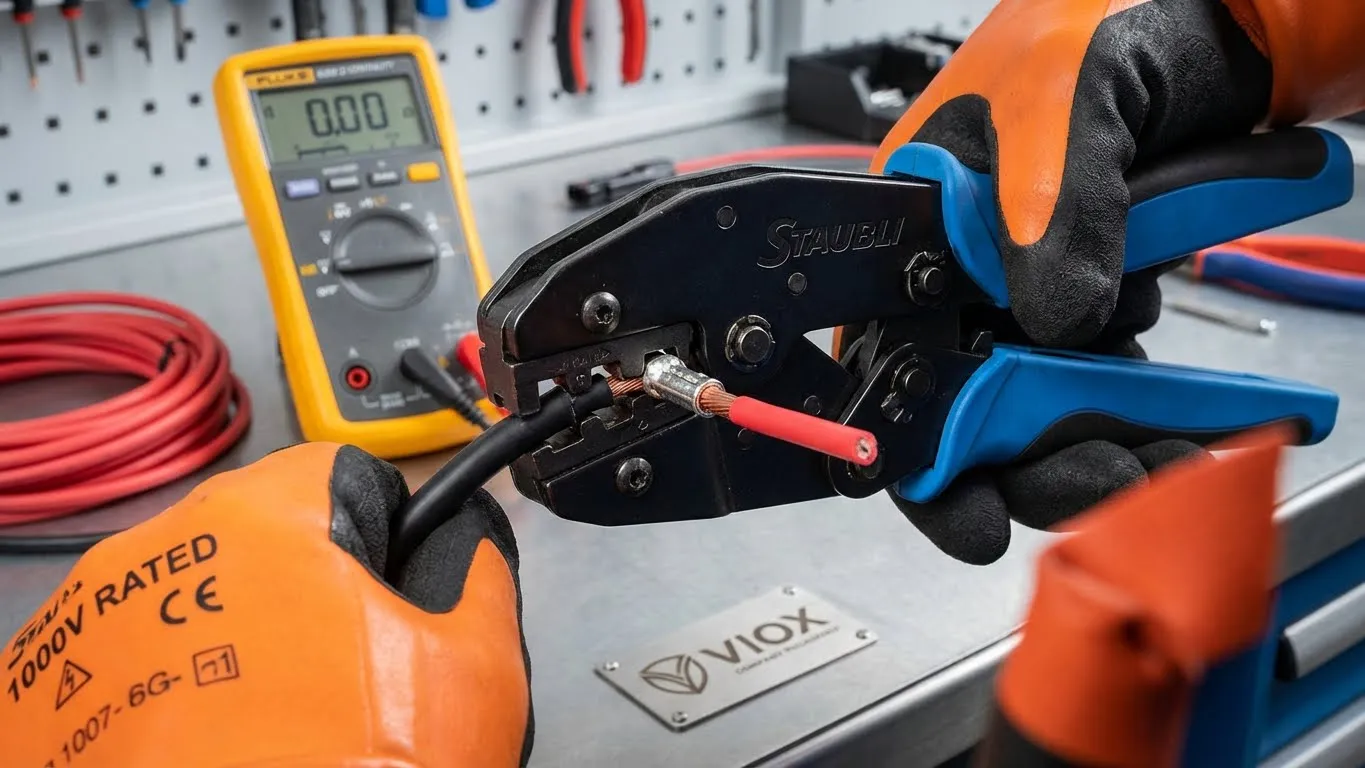
- Set the Crimper: Use a ratcheting MC4 crimper and set it for 10 AWG wire. The ratchet ensures consistent pressure.
- Insert and Crimp: Slide the stripped end of the red wire fully into the crimp pin barrel. Squeeze the crimper handles until it releases (you’ll hear a click).
- Verify the Crimp: Pull gently on the wire—it should not slide. If it does, the crimp failed; discard the pin and try again.
- Slide on Protective Components: Before inserting the pin into the connector housing, slide the following components onto the wire in order:
- Rubber gland nut (the back cap)
- Compression sleeve
- Rubber O-ring seal
- Insert and Lock: Push the crimped pin into the MC4 male housing until you hear a distinct click.
- Tighten the Gland: Use MC4 spanners to tighten the back nut by approximately 3.4 Nm (25 in-lbs). The connection should be hand-tight with no visible gaps.
- Repeat for Negative: Follow the same steps using a female connector for the black/negative wire.
Critical Testing:
- Visual Inspection: No melting, discoloration, or warping of plastic.
- The “Click” Test: Connectors should mate with a definite click.
- Temperature Test: After installation, use a thermal camera to verify the connector is not warmer than the surrounding cable.
Step 8: Extending PV Cables
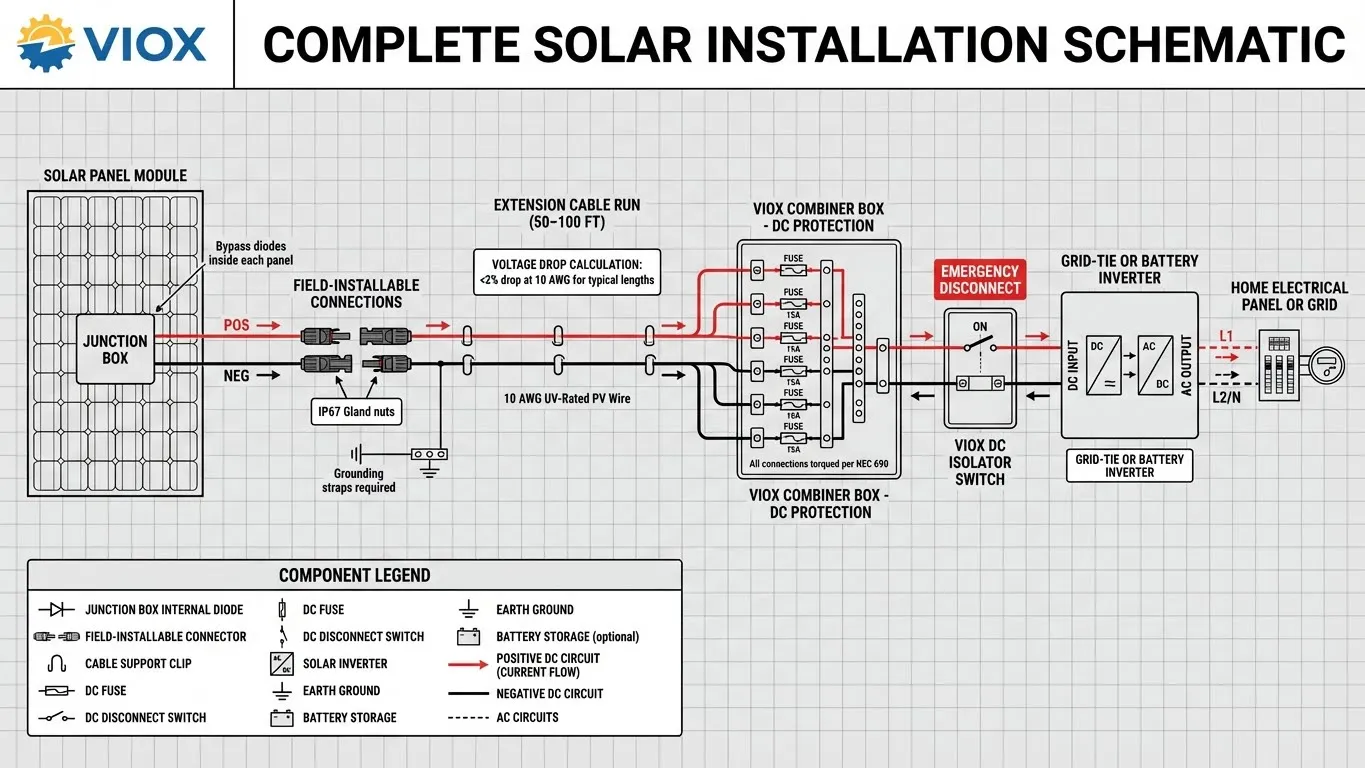
Most installations require cables longer than what exits the junction box. VIOX manufactures PV cables and MC4 connectors for safe field extensions.
Extension Cable Installation:
| Cable Length | Recommended AWG | Voltage Drop | Why This Matters |
|---|---|---|---|
| 0–50 ft | 10 AWG | <2% | Standard residential; no efficiency loss |
| 50–100 ft | 8 AWG | ~2% | Longer runs require larger conductors |
| 100–200 ft | 6 AWG | ~1.5% | Commercial/ground-mount arrays |
| >200 ft | 4 AWG or parallel runs | <1% | Utility-scale; high-voltage systems |
Extension Process:
- Prepare extension cable ends (strip 1/4–1/2 inch) and crimp appropriate MC4 connectors using the same professional technique described in Step 7.
- Critical: Positive connects to positive (male to male through a female coupler), negative to negative.
- Secure cables to roofing or racking using UV-rated cable clips every 3 feet.
- Ensure cables do not hang freely (weight causes internal connection stress).
- Label both cables at the junction box and inverter using color-coded or printed tags.
Step 9: Disconnecting and Troubleshooting MC4 Connectors
Safe disconnection prevents arc flash injuries and equipment damage.
Safe Disconnection Process:
- Turn Off the Inverter: Place the inverter into “standby” or “off” mode.
- Verify Zero Voltage: Use a multimeter to confirm 0V DC between the connectors.
- Use an MC4 Spanner: Align the spanner prongs with the locking tabs on the female connector and gently pull backward to release the mechanical lock.
- Separate Slowly: Once the lock releases, carefully pull the connectors apart. Do NOT yank forcefully.
- Cover Open Connectors: If the array will be de-energized for more than a few hours, cover open positive connector ends with insulating tape or caps.
Troubleshooting High-Resistance Connectors:
| Symptom | Cause | Solution |
|---|---|---|
| Connectors are warm to touch | High-resistance crimp or loose pins | Disconnect, re-crimp with new pins, or replace connector |
| Intermittent power or low voltage | Corrosion on pin or incomplete locking | Use multimeter to test continuity; clean or replace connector |
| Connector pulls apart easily | Locking tabs not engaged | Re-mate firmly until definite click; if still loose, replace housing |
| Moisture inside connector | Gland nut not tightened; O-ring damaged | Disassemble, dry completely, replace O-ring, re-assemble with torque |
Compliance & Safety Standards
Your installation must meet these regulations:
- NEC 690 (National Electrical Code, Solar Photovoltaic Systems) – Terminal torquing, wire sizing, disconnection procedures.
- IEC 61010 (Safety standards for electrical measuring equipment) – Testing and inspection protocols.
- UL 4703 (PV Wire standard) – Ensures UV resistance and temperature ratings.
- IP65/IP67 Rating – Your junction box must be rated for water jets (IP65) or temporary immersion (IP67).
- Bypass Diode Testing – Use multimeter diode mode to verify each diode conducts in one direction only.
Key Takeaways
- Proper preparation prevents problems: Clean copper, correct wire sizing, and precise stripping reduce 95% of installation failures.
- Terminal tightness is critical: Use torque screwdrivers and verify all connections are mechanically secure.
- MC4 crimp quality determines reliability: Use only ratcheting crimpers, genuine Staubli connectors, and verify the “click” on every single pin.
- Safety trumps speed: Cover panels, use PPE, and verify zero voltage before every working step.
- Moisture is the silent killer: Ensure drip loops, tight gland nuts, intact O-rings, and sealed cable entry points.
- Test before energizing: Use multimeter to verify polarity, continuity, and insulation resistance before connecting to the inverter or combiner box.
Frequently Asked Questions (FAQ)
Q1: Can I use standard electrical wire instead of UV-rated PV wire?
A: No. Standard wire insulation degrades in direct sunlight within 6–12 months. PV wire (USE-2 rated) is specifically formulated to withstand UV rays for 25+ years.
Q2: What wire gauge should I use if my panels are 100+ feet from the inverter?
A: Use 8 AWG for runs of 50–100 feet, or 6 AWG for longer distances. Each doubling of distance requires moving up one gauge size to keep voltage drop below 2%.
Q3: Why does my MC4 connector feel warm?
A: Warmth indicates high contact resistance, typically from an incomplete crimp, corrosion, or undersized wire. Disconnect immediately and check continuity.
Q4: Can I mix Staubli and “compatible” MC4 connectors?
A: This is a major cause of solar fires. Never mix brands. Stick with one brand (preferably the original Staubli) for the entire installation.
Q5: How often should I inspect my junction box wiring?
A: Inspect annually or after severe weather. Use thermal imaging to detect hot spots.
Q6: Is grounding required for my junction box?
A: Yes, under NEC 690.43. All non-current-carrying metal parts must be bonded to ground using UL 2703-listed grounding clips.
Related VIOX Resources
For additional guidance on integrating your solar junction box into the larger system, explore these VIOX articles:
- How to Connect Solar Panel to Combiner Box – Step-by-step wiring guide for combining multiple panel strings.
- How to Wire Solar Panels to Combiner Box Safely – Professional installation procedures and safety protocols.
- DC Isolator Switches: Essential Safety Components – Understand DC disconnect placement and operation.
- The Complete Guide to Solar Panel Connectors – Guide to MC4 standards and troubleshooting.
- How to Select the Right MC4 Solar Connector – Technical specifications and quality indicators.
- Cable Size, Types (mm² vs AWG) Guide – Determine correct wire gauge for your cable runs.
Conclusion
Wiring a solar panel junction box correctly is the foundation of a safe, efficient, and long-lasting PV system. By following this guide—using proper tools, adhering to torque specifications, and implementing professional safety practices—you ensure that your solar investment performs optimally for 25+ years.