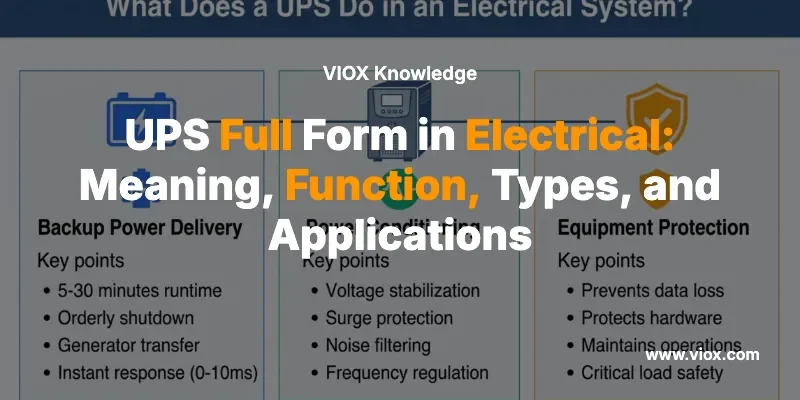
Τι σημαίνει η συντομογραφία UPS;
UPS: Uninterruptible Power Supply (Αδιάλειπτη Παροχή Ενέργειας)
Ένα UPS (Uninterruptible Power Supply - Αδιάλειπτη Παροχή Ενέργειας) είναι ένα ηλεκτρικό σύστημα εφεδρικής τροφοδοσίας που παρέχει άμεση ισχύ στον συνδεδεμένο εξοπλισμό όταν η κύρια πηγή ενέργειας αποτυγχάνει, μειώνεται ή γίνεται ασταθής. Σε αντίθεση με τις γεννήτριες που χρειάζονται χρόνο εκκίνησης, ένα UPS ανταποκρίνεται άμεσα - συνήθως εντός 0-10 χιλιοστών του δευτερολέπτου - καθιστώντας το απαραίτητο για την προστασία ευαίσθητου εξοπλισμού ακόμη και από σύντομες διακοπές ρεύματος.
Πίνακας Γρήγορου Ορισμού
| Όρος | Πλήρης μορφή | Κύρια λειτουργία |
|---|---|---|
| UPS | Αδιάλειπτη Παροχή Ενέργειας | Άμεση εφεδρική ισχύς + ρύθμιση ισχύος |
| Χρόνος απόκρισης | Άμεση (0-10ms) | Προστατεύει από απώλεια δεδομένων και ζημιές στον εξοπλισμό |
| Βασική Διαφορά | Έναντι Γεννήτριας: Χωρίς καθυστέρηση εκκίνησης | Έναντι Inverter: Ενσωματωμένη λογική συνέχειας |
| Τυπική Διάρκεια Λειτουργίας | 5-30 λεπτά | Αρκετή για ασφαλή τερματισμό ή μεταφορά πηγής |
Εάν κάποιος ρωτήσει “Τι σημαίνει η συντομογραφία UPS;” ή “Τι σημαίνει UPS στα ηλεκτρικά συστήματα;” - η απάντηση είναι απλή: Αδιάλειπτη Παροχή Ενέργειας. Αλλά η κατανόηση του τι κρύβεται πίσω από αυτό το ακρωνύμιο είναι αυτό που διαχωρίζει έναν βασικό ορισμό από την πρακτική γνώση που σας βοηθά να επιλέξετε, να καθορίσετε και να αναπτύξετε σωστά τα συστήματα UPS.
Τι σημαίνει η συντομογραφία UPS στην Ηλεκτρολογία;
Στην ηλεκτρολογία και τα συστήματα ηλεκτρικής ενέργειας, UPS στα Ηλεκτρικά σημαίνει Αδιάλειπτη Παροχή Ενέργειας—ένα κρίσιμο στοιχείο υποδομής που έχει σχεδιαστεί για να γεφυρώσει το χάσμα μεταξύ της κανονικής ισχύος και των εφεδρικών πηγών, ή να παρέχει αρκετό χρόνο λειτουργίας για ελεγχόμενο τερματισμό του εξοπλισμού.
Ο όρος “αδιάλειπτη” είναι το κλειδί: σημαίνει ότι η παροχή ρεύματος στο φορτίο συνεχίζεται χωρίς διακοπή, ακόμη και όταν η πηγή εισόδου αντιμετωπίζει προβλήματα. Αυτό διακρίνει ένα UPS από άλλα εφεδρικά συστήματα που ενδέχεται να έχουν καθυστερήσεις μεταφοράς ή να απαιτούν χειροκίνητη παρέμβαση.
Γιατί το ακρωνύμιο UPS έχει σημασία στα ηλεκτρικά συστήματα
Η ηλεκτρική βιομηχανία χρησιμοποιεί πολλά ακρωνύμια τριών γραμμάτων, αλλά το UPS είναι ιδιαίτερα σημαντικό επειδή αντιπροσωπεύει μια κατηγορία εξοπλισμού που:
- Προστατεύει κρίσιμα φορτία από προβλήματα ποιότητας ισχύος
- Αποτρέπει την απώλεια δεδομένων σε συστήματα πληροφορικής και τηλεπικοινωνιών
- Διατηρεί τη συνέχεια της διαδικασίας σε εφαρμογές βιομηχανικού ελέγχου
- Υποστηρίζει συστήματα ασφάλειας ζωής σε υπηρεσίες υγειονομικής περίθαλψης και έκτακτης ανάγκης
Κατανόηση της Η συντομογραφία UPS είναι το σημείο εκκίνησης, αλλά το να γνωρίζετε πώς λειτουργούν τα συστήματα UPS, πού χρησιμοποιούνται και πώς να επιλέξετε τον σωστό τύπο είναι αυτό που κάνει τη διαφορά στις πραγματικές εφαρμογές.
Τι κάνει ένα UPS σε ένα ηλεκτρικό σύστημα;
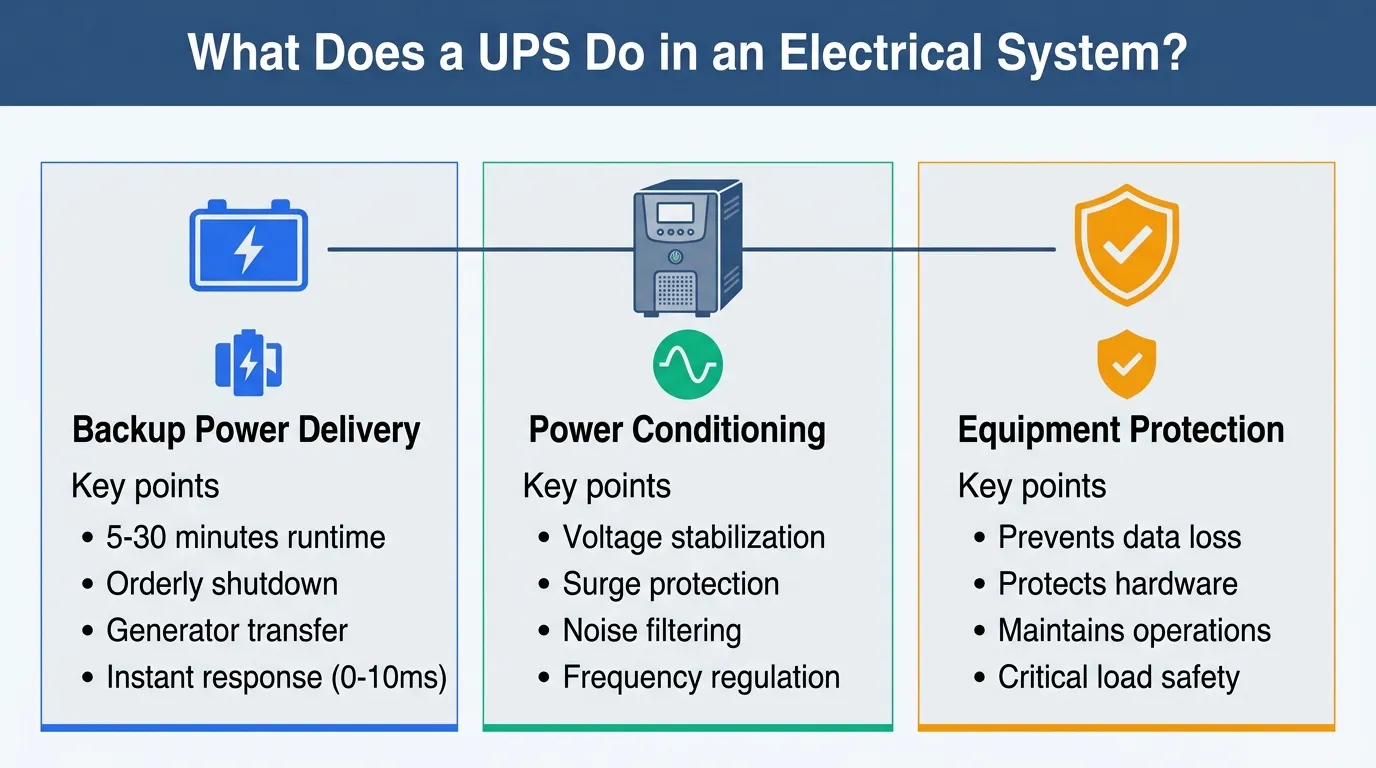
Ένα UPS κάνει περισσότερα από το να λειτουργεί ως κουτί μπαταριών. Στις ηλεκτρικές εφαρμογές, συνήθως εκτελεί τρεις βασικές λειτουργίες ταυτόχρονα:
1. Παροχή Εφεδρικής Ισχύος
Το UPS διατηρεί το φορτίο ενεργοποιημένο για αρκετό χρόνο ώστε:
- Να γίνει ένας εύρυθμος τερματισμός του εξοπλισμού
- Να γίνει μεταφορά σε άλλη πηγή ενέργειας (όπως μια γεννήτρια)
- Να συνεχιστεί η λειτουργία κατά τη διάρκεια σύντομων διακοπών (συνήθως 5-30 λεπτά ανάλογα με τη χωρητικότητα της μπαταρίας και το φορτίο)
2. Ρύθμιση Ισχύος
Πολλά συστήματα UPS σταθεροποιούν ενεργά την τάση και τη συχνότητα τροφοδοσίας που βλέπει το φορτίο, μειώνοντας τον αντίκτυπο των:
- Υποτάσεων (brownouts)
- Υπερτάσεων και αιχμών τάσης
- Ηλεκτρικού θορύβου και αρμονικής παραμόρφωσης
- Διακυμάνσεων συχνότητας
Αυτή η λειτουργία ρύθμισης είναι συχνά τόσο πολύτιμη όσο και η ίδια η δυνατότητα εφεδρικής λειτουργίας, ειδικά σε περιοχές με ασταθή ηλεκτρική ενέργεια.
3. Προστασία Εξοπλισμού
Ένα UPS βοηθά στην προστασία συσκευών που δεν μπορούν να ανεχθούν ξαφνική απώλεια ισχύος ή κακή ποιότητα ισχύος, συμπεριλαμβανομένων:
- Διακομιστών και συστημάτων αποθήκευσης δεδομένων
- Πινάκων ελέγχου PLC και SCADA
- Τηλεπικοινωνιακού εξοπλισμού και υποδομής δικτύου
- Ιατρικού διαγνωστικού και εξοπλισμού παρακολούθησης
- Οργάνων ελέγχου διεργασιών
Αυτή η προστασία τριών επιπέδων είναι ο λόγος για τον οποίο Η συντομογραφία UPS αναζητείται συχνά από μηχανικούς και διαχειριστές εγκαταστάσεων που πρέπει να κατανοήσουν όχι μόνο τι σημαίνει το ακρωνύμιο, αλλά και τι αξία προσφέρει ένα UPS στη συγκεκριμένη εφαρμογή τους.
Πώς λειτουργεί ένα UPS; Κατανόηση της Ροής Ισχύος
Για να κατανοήσετε πραγματικά τι σημαίνει UPS στα συστήματα ηλεκτρικής ενέργειας, βοηθά να κατανοήσετε τη βασική αρχιτεκτονική λειτουργίας.
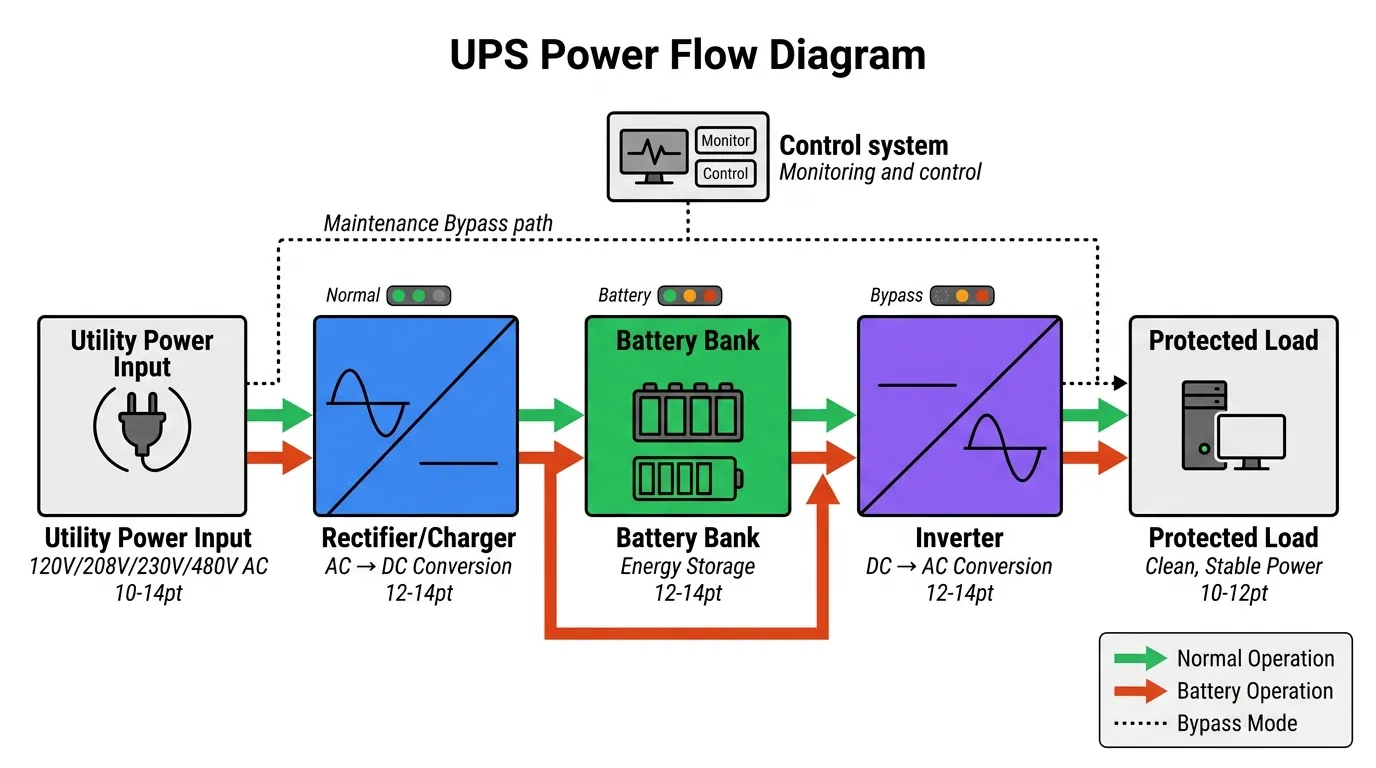
Τα περισσότερα συστήματα UPS περιλαμβάνουν αυτές τις βασικές ενότητες:
Βασικά Στοιχεία UPS
| Στοιχείο UPS | Λειτουργία | Γιατί έχει σημασία |
|---|---|---|
| Ανόρθωση/Φορτιστής | Μετατρέπει το εισερχόμενο AC σε DC και διατηρεί τη φόρτιση της μπαταρίας | Διατηρεί την αποθήκευση ενέργειας έτοιμη για άμεση ανάπτυξη |
| Συστοιχία Μπαταριών | Αποθηκεύει ενέργεια για εφεδρική λειτουργία | Καθορίζει τη χωρητικότητα χρόνου λειτουργίας κατά τη διάρκεια διακοπών ρεύματος |
| Μετατροπέας (Inverter) | Μετατρέπει την αποθηκευμένη ενέργεια DC σε καθαρή έξοδο AC | Παρέχει ρυθμιζόμενη ισχύ στο φορτίο |
| Στατική/Συντήρηση Παράκαμψη (Bypass) | Επιτρέπει την άμεση τροφοδοσία από το δίκτυο όταν χρειάζεται | Επιτρέπει τη συντήρηση χωρίς διακοπή του φορτίου |
| Σύστημα Ελέγχου & Παρακολούθησης | Παρακολουθεί την ποιότητα εισόδου, την υγεία της μπαταρίας, τους συναγερμούς, τη λογική μεταγωγής | Εξασφαλίζει αξιόπιστη αυτόματη λειτουργία |
Κανονική Λειτουργία
Κατά τη διάρκεια της κανονικής λειτουργίας:
- Το UPS παρακολουθεί συνεχώς την ποιότητα της εισερχόμενης ισχύος
- Ο φορτιστής διατηρεί τη συστοιχία μπαταριών σε πλήρη φόρτιση
- Ανάλογα με τον τύπο του UPS (δείτε παρακάτω), το φορτίο μπορεί να τροφοδοτείται μέσω του μετατροπέα ή απευθείας από το δίκτυο με ρύθμιση
- Το σύστημα ελέγχου είναι έτοιμο να μεταβεί σε εφεδρική μπαταρία άμεσα, εάν χρειαστεί
Εφεδρική Λειτουργία
Όταν η ισχύς εισόδου αποτύχει ή πέσει εκτός αποδεκτών ορίων:
- Το UPS εντοπίζει το πρόβλημα μέσα σε χιλιοστά του δευτερολέπτου
- Ο μετατροπέας αντλεί ενέργεια από τη συστοιχία μπαταριών
- Το φορτίο συνεχίζει να λαμβάνει καθαρή, σταθερή ισχύ
- Το UPS συνήθως στέλνει ειδοποιήσεις σε συνδεδεμένα συστήματα παρακολούθησης
- Όταν η ισχύς του δικτύου επιστρέψει και σταθεροποιηθεί, το UPS μεταφέρεται πίσω και επαναφορτίζει τις μπαταρίες
Για περισσότερες πληροφορίες σχετικά με την τεχνολογία των μετατροπέων—ένα κρίσιμο στοιχείο στα συστήματα UPS—το άρθρο VIOX σχετικά με μετατροπείς υψηλής συχνότητας έναντι χαμηλής συχνότητας παρέχει χρήσιμο τεχνικό πλαίσιο.
Κύριοι Τύποι UPS: Κατανόηση των Αρχιτεκτονικών
Ένας λόγος για τον οποίο η λέξη-κλειδί Η συντομογραφία UPS έχει βάθος είναι ότι δεν λειτουργούν όλα τα UPS με τον ίδιο τρόπο. Το ακρωνύμιο είναι καθολικό, αλλά οι εσωτερικές αρχιτεκτονικές διαφέρουν σημαντικά—και η επιλογή του λάθος τύπου μπορεί να σημαίνει ανεπαρκή προστασία ή περιττό κόστος.
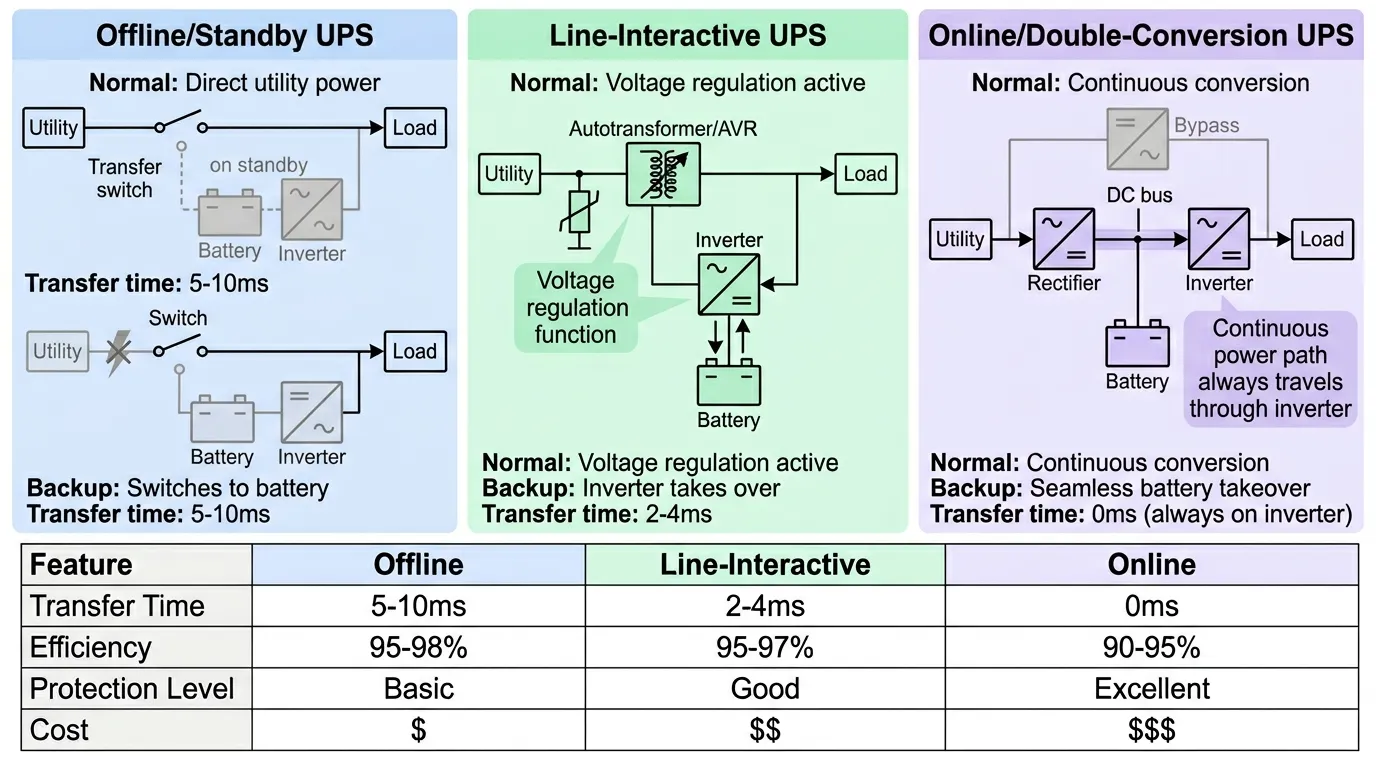
Οι τρεις κύριες τοπολογίες UPS ταξινομούνται ανάλογα με τον τρόπο με τον οποίο χειρίζονται τη ροή ισχύος κατά την κανονική λειτουργία και τον τρόπο με τον οποίο μεταβαίνουν σε εφεδρική λειτουργία.
1. Offline UPS (Standby UPS)
Πώς λειτουργεί: Κατά την κανονική λειτουργία, το φορτίο λαμβάνει ισχύ απευθείας από την παροχή του δικτύου μέσω βασικού φιλτραρίσματος. Το UPS παρακολουθεί την είσοδο και είναι έτοιμο. Όταν η είσοδος αποτύχει ή πέσει εκτός αποδεκτών ορίων, το UPS μεταβαίνει σε έξοδο μετατροπέα με υποστήριξη μπαταρίας.
Χρόνος μεταγωγής: Συνήθως 5-10 χιλιοστά του δευτερολέπτου
Τυπικές εφαρμογές:
- Επιτραπέζιοι υπολογιστές και εξοπλισμός οικιακού γραφείου
- Μικρές συσκευές γραφείου
- Φορτία χαμηλής κρισιμότητας που μπορούν να ανεχθούν σύντομο χρόνο μεταγωγής
- Καταναλωτικά ηλεκτρονικά
Κύρια πλεονεκτήματα:
- Απλούστερος σχεδιασμός και πιο οικονομικός
- Υψηλή απόδοση κατά την κανονική λειτουργία (95-98%)
- Συμπαγές μέγεθος και χαμηλότερη παραγωγή θερμότητας
Κύριοι περιορισμοί:
- Περιορισμένη ρύθμιση ισχύος κατά την κανονική λειτουργία
- Ο χρόνος μεταγωγής μπορεί να είναι αισθητός σε ευαίσθητο εξοπλισμό
- Λιγότερο κατάλληλο για ασταθή περιβάλλοντα ισχύος
2. Line-Interactive UPS
Πώς λειτουργεί: Ένα line-interactive UPS προσθέτει έναν αυτόματο μετασχηματιστή ή κύκλωμα buck-boost που ρυθμίζει ενεργά την τάση χωρίς να μεταβαίνει σε μπαταρία. Ο μετατροπέας λειτουργεί παράλληλα με την παροχή εισόδου, παρέχοντας ταχύτερη απόκριση και καλύτερη ρύθμιση από το offline UPS. Όταν η ισχύς εισόδου αποτύχει εντελώς, το UPS μεταβαίνει σε πλήρη λειτουργία μπαταρίας-μετατροπέα.
Χρόνος μεταγωγής: Συνήθως 2-4 χιλιοστά του δευτερολέπτου
Τυπικές εφαρμογές:
- Εξοπλισμός δικτύου και διακόπτες
- Μικροί έως μεσαίοι χώροι διακομιστών
- Συστήματα πληροφορικής γραφείου και σταθμοί εργασίας
- Τηλεπικοινωνιακά ερμάρια και edge computing
- Συστήματα σημείου πώλησης
Κύρια πλεονεκτήματα:
- Βελτιωμένη ρύθμιση τάσης σε σύγκριση με τα συστήματα αναμονής
- Μπορεί να χειριστεί βυθίσεις τάσης και υπερτάσεις χωρίς να μεταβεί σε μπαταρία
- Καλή ισορροπία προστασίας και κόστους
- Κατάλληλο για περιοχές με ασταθή τάση αλλά γενικά αξιόπιστη ισχύ
Κύριοι περιορισμοί:
- Εξακολουθεί να έχει χρόνο μεταγωγής κατά τη διάρκεια πλήρων διακοπών ρεύματος
- Όχι το ίδιο επίπεδο απομόνωσης με το online double-conversion UPS
- Ενδέχεται να μην φιλτράρει όλα τα προβλήματα ποιότητας ισχύος
3. Online UPS (Double-Conversion UPS)
Πώς λειτουργεί: Σε ένα online UPS, η εισερχόμενη ισχύς μετατρέπεται συνεχώς από AC σε DC (ανορθωτής) και, στη συνέχεια, ξανά από DC σε AC (μετατροπέας). Το φορτίο λαμβάνει πάντα ισχύ μέσω του μετατροπέα, ο οποίος τροφοδοτείται τόσο από τον ανορθωτή όσο και από τη συστοιχία μπαταριών. Δεν υπάρχει χρόνος μεταγωγής επειδή το φορτίο είναι πάντα σε ισχύ μετατροπέα—η μπαταρία απλώς αναλαμβάνει τον δίαυλο DC όταν η είσοδος αποτύχει.
Χρόνος μεταγωγής: Μηδέν (το φορτίο είναι πάντα στον μετατροπέα)
Τυπικές εφαρμογές:
- Κέντρα δεδομένων και συμπλέγματα διακομιστών
- Συστήματα βιομηχανικού ελέγχου και αυτοματισμού
- Ιατρικός διαγνωστικός εξοπλισμός και εξοπλισμός υποστήριξης ζωής
- Κρίσιμη υποδομή επικοινωνιών
- Συστήματα χρηματοοικονομικών συναλλαγών
- Έλεγχος διεργασιών στη μεταποίηση
Κύρια πλεονεκτήματα:
- Πλήρης απομόνωση από προβλήματα ποιότητας εισερχόμενης ισχύος
- Μηδενικός χρόνος μεταγωγής σε λειτουργία μπαταρίας
- Ισχυρότερη ρύθμιση ισχύος και σταθερότητα εξόδου
- Μπορεί να χειριστεί σοβαρές διαταραχές εισόδου χωρίς να επηρεάζεται το φορτίο
- Ακριβής ρύθμιση τάσης και συχνότητας
Κύριοι περιορισμοί:
- Πιο σύνθετη σχεδίαση και συνήθως υψηλότερο κόστος
- Χαμηλότερη απόδοση (90-95%) λόγω συνεχούς διπλής μετατροπής
- Παράγει περισσότερη θερμότητα, απαιτώντας καλύτερη ψύξη
- Υψηλότερες απαιτήσεις συντήρησης
Πίνακας Σύγκρισης Τύπων UPS
| Τύπος UPS | Τυπική Περίπτωση Χρήσης | Ρύθμιση Ισχύος | Χρόνος μεταφοράς | Αποδοτικότητα | Σχετικό κόστος |
|---|---|---|---|---|---|
| Offline / Standby | Βασικά φορτία γραφείου ή σπιτιού | Ελάχιστο | 5-10ms | 95-98% | $ |
| Line-Interactive | Φορτία δικτύου και μικρών επιχειρήσεων | Καλή ρύθμιση τάσης | 2-4ms | 95-97% | $$ |
| Online / Double-Conversion | Κρίσιμα ηλεκτρικά φορτία και φορτία πληροφορικής | Εξαιρετική απομόνωση & ρύθμιση | 0ms | 90-95% | $$$ |
UPS έναντι Inverter έναντι Γεννήτριας: Ξεκαθαρίζοντας τη Σύγχυση
Πολλοί αναγνώστες που αναζητούν Η συντομογραφία UPS προσπαθούν στην πραγματικότητα να διακρίνουν ένα UPS από άλλα προϊόντα εφεδρικής ισχύος. Αυτή η σύγκριση είναι απαραίτητη επειδή αυτοί οι όροι συχνά συγχέονται, ωστόσο εξυπηρετούν διαφορετικούς σκοπούς στις στρατηγικές προστασίας ισχύος.
UPS έναντι Inverter: Ποια είναι η Διαφορά;
UPS (Αδιάλειπτη Παροχή Ισχύος):
- Ειδικά κατασκευασμένο για συνέχεια και άμεση μεταγωγή
- Περιλαμβάνει ενσωματωμένη παρακολούθηση, αυτόματη λογική μεταγωγής και προστασία φορτίου
- Σχεδιασμένο για μηδενική ή σχεδόν μηδενική διακοπή (0-10ms)
- Συνήθως παρέχει 5-30 λεπτά αυτονομίας για ασφαλή τερματισμό λειτουργίας ή μεταφορά πηγής
- Περιλαμβάνει ρύθμιση ισχύος και προστασία από υπερτάσεις
- Βελτιστοποιημένο για φορτία πληροφορικής, τηλεπικοινωνιών και συστημάτων ελέγχου
Σύστημα Inverter:
- Μετατρέπει τη DC ισχύ σε AC ισχύ—αυτή είναι η βασική του λειτουργία
- Μπορεί να είναι μέρος ενός εφεδρικού συστήματος, ηλιακής εγκατάστασης ή εγκατάστασης αποθήκευσης ενέργειας
- Ο χρόνος μεταγωγής και τα χαρακτηριστικά συνέχειας εξαρτώνται από τη σχεδίαση του συστήματος
- Μπορεί να παρέχει μεγαλύτερη αυτονομία με μεγαλύτερες συστοιχίες μπαταριών
- Μπορεί να περιλαμβάνει ή να μην περιλαμβάνει αυτόματη μεταγωγή και παρακολούθηση
- Ευρύτερο φάσμα εφαρμογών πέρα από την απλή εφεδρική ισχύ
Βασική διάκριση: Όλα τα συστήματα UPS περιέχουν έναν inverter, αλλά δεν είναι όλα τα συστήματα inverter συστήματα UPS. Ένα UPS είναι μια ολοκληρωμένη λύση συνέχειας. ένας inverter είναι ένα στοιχείο μετατροπής ισχύος που μπορεί να χρησιμοποιηθεί σε διάφορες εφαρμογές.
UPS έναντι Γεννήτριας: Συμπληρωματικά, Όχι Ανταγωνιστικά
UPS:
- Χρόνος απόκρισης: Άμεση (0-10ms)
- Αυτονομία: Σύντομη (5-30 λεπτά τυπικά)
- Καύσιμο: Μπαταρία (χωρίς καύση)
- Συντήρηση: Αντικατάσταση μπαταρίας κάθε 3-5 χρόνια
- Ιδανικό για: Γεφύρωση σύντομων διακοπών, παρέχοντας χρόνο για ασφαλή τερματισμό λειτουργίας, προστασία από σύντομες διαταραχές
- Εγκατάσταση: Εσωτερικός χώρος, κοντά στο φορτίο
Γεννήτρια:
- Χρόνος απόκρισης: 10-30 δευτερόλεπτα τυπικά (απαιτεί εκκίνηση και σταθεροποίηση)
- Αυτονομία: Εκτεταμένη (ώρες έως ημέρες, περιορίζεται μόνο από την παροχή καυσίμου)
- Καύσιμο: Πετρέλαιο, φυσικό αέριο ή προπάνιο
- Συντήρηση: Τακτικές δοκιμαστικές λειτουργίες, αλλαγές λαδιών, συντήρηση συστήματος καυσίμου
- Ιδανικό για: Υποστήριξη εκτεταμένης διακοπής ρεύματος, εφεδρική λειτουργία σε ολόκληρη την εγκατάσταση
- Εγκατάσταση: Εξωτερικός χώρος ή ειδικό δωμάτιο γεννήτριας
Γιατί συνεργάζονται: Σε κρίσιμες εγκαταστάσεις, τα συστήματα UPS και γεννήτριας αναπτύσσονται συχνά μαζί. Το UPS παρέχει άμεση προστασία και γεφυρώνει το κενό των 10-30 δευτερολέπτων ενώ ξεκινά η γεννήτρια. Μόλις η γεννήτρια λειτουργήσει και σταθεροποιηθεί, το UPS μπορεί να επαναφορτίσει τις μπαταρίες του ενώ συνεχίζει να ρυθμίζει την έξοδο της γεννήτριας για ευαίσθητα φορτία.
UPS έναντι Σταθεροποιητή Τάσης (AVR)
Σταθεροποιητής Τάσης/AVR (Αυτόματος Ρυθμιστής Τάσης):
- Ρυθμίζει τις διακυμάνσεις της τάσης (βυθίσεις και υπερτάσεις)
- ΔΕΝ παρέχει εφεδρική ισχύ κατά τη διάρκεια διακοπών
- Κατάλληλο για περιοχές με αστάθεια τάσης αλλά αξιόπιστη συνέχεια
- Χρησιμοποιείται συνήθως για κινητήρες, συσκευές και εξοπλισμό ευαίσθητο στις διακυμάνσεις της τάσης
UPS:
- Παρέχει τόσο ρύθμιση τάσης ΟΣΟ και εφεδρική ισχύ
- Προστατεύει από πλήρη απώλεια ισχύος, όχι μόνο από διακυμάνσεις τάσης
- Πιο ολοκληρωμένη προστασία για κρίσιμα φορτία
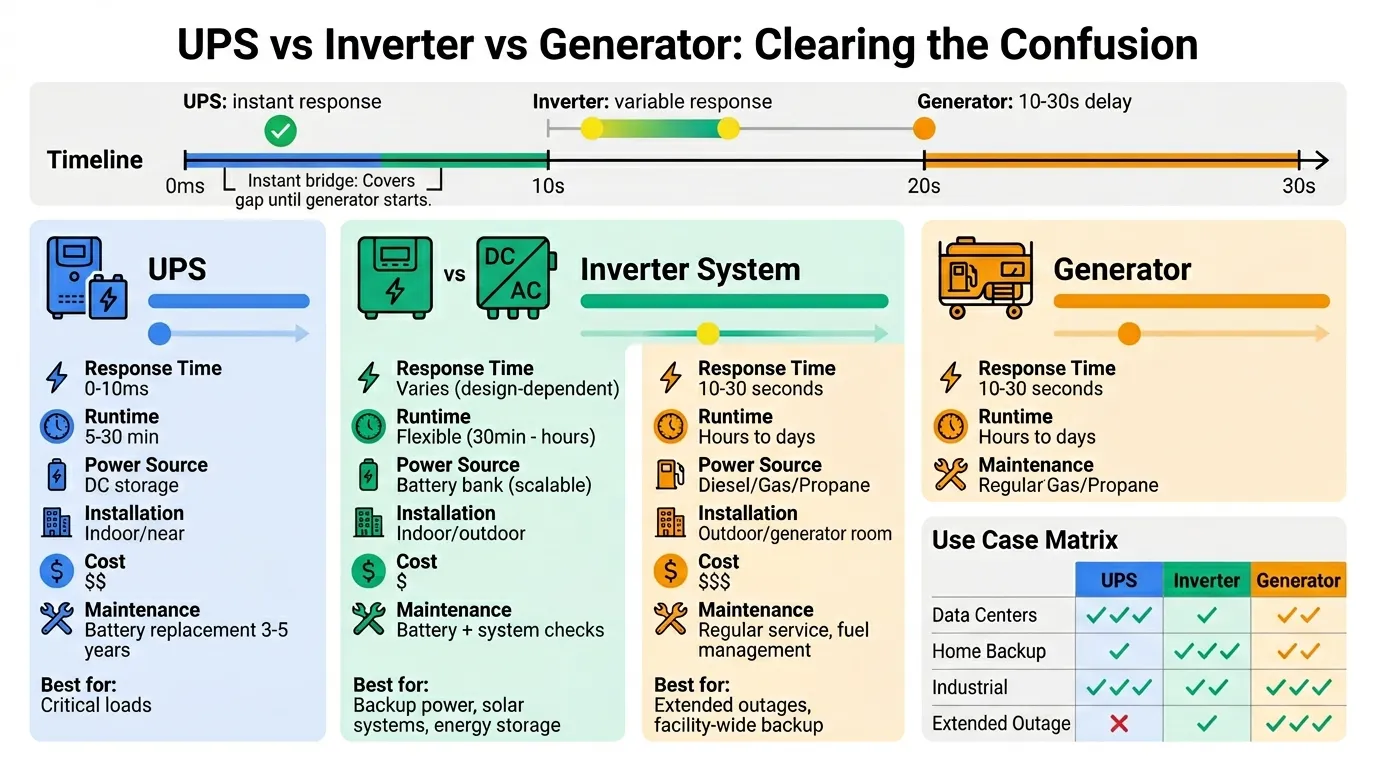
Σύνοψη Σύγκρισης Εξοπλισμού
| Εξοπλισμός | Κύριος Ρόλος | Απόκριση σε Διακοπή | Τυπική Διάρκεια Λειτουργίας | Καλύτερη Εφαρμογή |
|---|---|---|---|---|
| UPS | Άμεση εφεδρική + ρύθμιση | Άμεση (0-10ms) | 5-30 λεπτά | Ευαίσθητα και κρίσιμα φορτία που απαιτούν συνέχεια |
| Σύστημα Inverter | Μετατροπή DC σε AC | Διαφέρει ανάλογα με το σχέδιο | Ευέλικτη (εξαρτάται από την μπαταρία) | Εφεδρικά συστήματα, αποθήκευση ηλιακής ενέργειας, ευρύτερες ενεργειακές εφαρμογές |
| Γεννήτρια | Εκτεταμένη εφεδρική από καύσιμο | 10-30 δευτερόλεπτα | Ώρες έως ημέρες | Υποστήριξη διακοπής μεγάλης διάρκειας |
| Σταθεροποιητής Τάσης | Μόνο ρύθμιση τάσης | Καμία δυνατότητα εφεδρείας | N/A | Εξοπλισμός ευαίσθητος στην τάση σε περιοχές σταθερής συνέχειας |
Βασικοί Ηλεκτρολογικοί Όροι Σχετικοί με την Πλήρη Μορφή UPS
Για να γίνει ένα άρθρο σχετικά με Η συντομογραφία UPS πραγματικά χρήσιμο για τους ηλεκτρολόγους, θα πρέπει να βοηθήσει τους αναγνώστες να αποκωδικοποιήσουν τους τεχνικούς όρους που θα συναντήσουν κατά τη σύγκριση και την προδιαγραφή συστημάτων UPS.
Βαθμολογία VA και Συντελεστής Ισχύος
Τα συστήματα UPS βαθμολογούνται συνήθως σε VA (βολτ-αμπέρ) και μερικές φορές επίσης σε Watt. Αυτά σχετίζονται αλλά δεν είναι πανομοιότυπα:
- Βαθμολογία VA αντιπροσωπεύει την φαινόμενη ισχύ—το γινόμενο της τάσης και του ρεύματος
- Βαθμολογία Watt αντιπροσωπεύει την πραγματική ισχύ—την πραγματική ισχύ που καταναλώνεται από το φορτίο
- Η σχέση μεταξύ τους εξαρτάται από συντελεστής ισχύος (PF): Watts = VA × Συντελεστής Ισχύος
Παράδειγμα: Ένα UPS 1000VA με συντελεστή ισχύος 0,8 μπορεί να υποστηρίξει 800W πραγματικού φορτίου.
Γιατί αυτό έχει σημασία: Ο εξοπλισμός πληροφορικής έχει συνήθως συντελεστές ισχύος μεταξύ 0,9-1,0 (σύγχρονοι διακομιστές με διόρθωση συντελεστή ισχύος), ενώ ο παλαιότερος εξοπλισμός ή τα μικτά φορτία μπορεί να έχουν χαμηλότερους συντελεστές ισχύος. Να επαληθεύετε πάντα τόσο τις βαθμολογίες VA όσο και τις βαθμολογίες watt σε σχέση με τις πραγματικές απαιτήσεις φορτίου σας.
Χρόνος Λειτουργίας και Χωρητικότητα Μπαταρίας
Χρόνος εκτέλεσης είναι το χρονικό διάστημα που το UPS μπορεί να υποστηρίξει ένα δεδομένο φορτίο μετά την αποτυχία της εισερχόμενης ισχύος. Ο χρόνος λειτουργίας εξαρτάται από:
- Χωρητικότητα μπαταρίας (μετράται σε αμπέρ-ώρες, Ah)
- Χημεία μπαταρίας (VRLA έναντι Lithium-ion)
- Επίπεδο φορτίου (ποσοστό της βαθμολογίας UPS)
- Ηλικία και κατάσταση μπαταρίας
- Θερμοκρασία (οι μπαταρίες αποδίδουν άσχημα σε ακραία ζέστη ή κρύο)
- Απόδοση inverter
Σπουδαίος: Ο χρόνος λειτουργίας δεν είναι γραμμικός. Ένα UPS που παρέχει 15 λεπτά στο 50% φορτίου ΔΕΝ θα παρέχει 30 λεπτά στο 25% φορτίου—τα χαρακτηριστικά εκφόρτισης της μπαταρίας και οι καμπύλες απόδοσης του inverter επηρεάζουν τη σχέση.
Οι περισσότεροι κατασκευαστές παρέχουν καμπύλες χρόνου λειτουργίας ή αριθμομηχανές για τα μοντέλα UPS τους. Να επαληθεύετε πάντα τον αναμενόμενο χρόνο λειτουργίας για το συγκεκριμένο επίπεδο φορτίου σας.
Τεχνολογία Μπαταριών: VRLA έναντι Lithium-ion
Τα σύγχρονα συστήματα UPS χρησιμοποιούν δύο κύριες τεχνολογίες μπαταριών:
Μπαταρίες VRLA (Μολύβδου-Οξέος Ρυθμιζόμενες με Βαλβίδα):
- Διάρκεια ζωής: 3-5 χρόνια τυπικά (εξαρτάται από τη θερμοκρασία)
- Πλεονεκτήματα: Χαμηλότερο αρχικό κόστος, αποδεδειγμένη τεχνολογία, ευρέως διαθέσιμη
- Μειονεκτήματα: Βαρύτερες, μεγαλύτερο αποτύπωμα, ευαίσθητες στη θερμοκρασία, μικρότερη διάρκεια ζωής
- Ιδανικό για: Εφαρμογές ευαίσθητες στο κόστος, μέτριες θερμοκρασίες περιβάλλοντος
- Επίδραση θερμοκρασίας: Κάθε 10°C πάνω από τους 25°C μπορεί να μειώσει στο μισό τη διάρκεια ζωής της μπαταρίας
Μπαταρίες Lithium-ion:
- Διάρκεια ζωής: 8-15 χρόνια τυπικά (σημαντικά μεγαλύτερη από VRLA)
- Πλεονεκτήματα: Μεγαλύτερη διάρκεια ζωής, μικρότερο/ελαφρύτερο (εξοικονόμηση χώρου 50-80%), καλύτερη ανοχή στη θερμοκρασία, ταχύτερη επαναφόρτιση, υψηλότερος κύκλος ζωής
- Μειονεκτήματα: Υψηλότερο αρχικό κόστος (2-3× VRLA), απαιτεί εξειδικευμένο BMS (Σύστημα Διαχείρισης Μπαταρίας)
- Ιδανικό για: Κέντρα δεδομένων, εγκαταστάσεις με περιορισμένο χώρο, περιβάλλοντα υψηλής θερμοκρασίας, εφαρμογές που απαιτούν συχνή κυκλοφορία
- Αυξανόμενη υιοθέτηση: Όλο και πιο συνηθισμένο σε εταιρικά συστήματα UPS και συστήματα UPS κέντρων δεδομένων
Εξέταση του Συνολικού Κόστους Ιδιοκτησίας (TCO):
Ενώ οι μπαταρίες ιόντων λιθίου κοστίζουν περισσότερο εκ των προτέρων, η μεγαλύτερη διάρκεια ζωής τους συχνά οδηγεί σε χαμηλότερο TCO σε 10-15 χρόνια, λαμβάνοντας υπόψη:
- Λιγότερες αντικαταστάσεις μπαταριών (1-2 αντικαταστάσεις έναντι 3-4 για VRLA)
- Μειωμένο κόστος ψύξης (καλύτερη ανοχή στη θερμοκρασία)
- Χαμηλότερες απαιτήσεις συντήρησης
- Μικρότερο φυσικό αποτύπωμα (μειωμένο κόστος ακινήτων στα κέντρα δεδομένων)
Χρόνος Μεταφοράς και Υποστήριξη
Χρόνος μεταφοράς περιγράφει πόσο χρόνο χρειάζεται το UPS για να μεταβεί από την κανονική λειτουργία στη λειτουργία με μπαταρία. Αυτό έχει σημασία για την ευαισθησία του εξοπλισμού:
- Οι περισσότεροι εξοπλισμοί πληροφορικής: Μπορούν να ανεχθούν διακοπή 10-20ms
- Βιομηχανικοί PLC και έλεγχοι: Συχνά ανέχονται 20-50ms
- Ιατρικός και εργαστηριακός εξοπλισμός: Μπορεί να απαιτεί <4ms ή μηδενικό χρόνο μεταφοράς
- Παλαιότερος εξοπλισμός: Μπορεί να είναι πιο ευαίσθητος
Δυνατότητα υποστήριξης αναφέρεται στην ικανότητα του UPS να υποστηρίζει το φορτίο μέσω σύντομων διαταραχών χωρίς να μεταβαίνει σε μπαταρία—κοινό στους τύπους UPS line-interactive και online.
Διαμόρφωση Φάσης Εισόδου και Εξόδου
Τα συστήματα UPS διατίθενται σε διαφορετικές διαμορφώσεις φάσης:
Μονοφασικό UPS:
- Είσοδος: Μονοφασική (120V, 208V ή 230V τυπικά)
- Έξοδος: Μονοφασική
- Τυπικές ονομαστικές τιμές: 500VA έως 20kVA
- Εφαρμογές: Μικρά γραφεία, ντουλάπες δικτύου, μεμονωμένος εξοπλισμός
Τριφασικό UPS:
- Είσοδος: Τριφασική (208V, 400V, 480V τυπικά)
- Έξοδος: Τριφασική ή χωρισμένη σε πολλαπλά μονοφασικά κυκλώματα
- Τυπικές ονομαστικές τιμές: 10kVA έως 2000kVA+
- Εφαρμογές: Κέντρα δεδομένων, βιομηχανικές εγκαταστάσεις, μεγάλα εμπορικά κτίρια
Η διαμόρφωση φάσης πρέπει να ταιριάζει με το ηλεκτρικό σύστημα της εγκατάστασής σας και τις απαιτήσεις φορτίου.
Λειτουργίες Παράκαμψης
Πολλά συστήματα UPS περιλαμβάνουν δυνατότητα παράκαμψης:
Στατική παράκαμψη:
- Ηλεκτρονική μεταγωγή που δρομολογεί την ισχύ απευθείας από την είσοδο στην έξοδο
- Χρησιμοποιείται όταν το UPS είναι υπερφορτωμένο ή αντιμετωπίζει εσωτερικό σφάλμα
- Αυτόματη λειτουργία
Παράκαμψη συντήρησης:
- Χειροκίνητος διακόπτης που επιτρέπει την αφαίρεση του UPS για σέρβις
- Διατηρεί την ισχύ στο φορτίο κατά τη διάρκεια της συντήρησης του UPS
- Απαιτεί χειροκίνητη λειτουργία και διαδικασίες ασφαλείας
Η παράκαμψη είναι κρίσιμη για τη δυνατότητα σέρβις σε εφαρμογές κρίσιμης σημασίας—επιτρέπει τη συντήρηση του UPS χωρίς διακοπή του φορτίου.
Απόδοση και Απώλεια Ενέργειας
Η απόδοση του UPS επηρεάζει το λειτουργικό κόστος και τις απαιτήσεις ψύξης:
- Offline UPS: 95-98% αποδοτικό (ελάχιστη μετατροπή σε κανονική λειτουργία)
- Line-interactive UPS: 95-97% αποδοτικό
- Online UPS: 90-95% αποδοτικό (συνεχής διπλή μετατροπή)
Παράδειγμα: Ένα φορτίο 10kW σε ένα UPS αποδοτικότητας 92% σπαταλά 870W ως θερμότητα—απαιτώντας ψύξη και προσθέτοντας κόστος ηλεκτρικής ενέργειας 24/7.
Τα σύγχρονα online συστήματα UPS συχνά περιλαμβάνουν eco-mode ή high-efficiency mode που μειώνει τις απώλειες μετατροπής κατά τη διάρκεια σταθερών συνθηκών εισόδου, διατηρώντας παράλληλα γρήγορη δυνατότητα μεταφοράς.
Πού Χρησιμοποιούνται Συνήθως τα Συστήματα UPS
Κατανόηση Η συντομογραφία UPS γίνεται πιο πολύτιμο όταν βλέπετε πού αναπτύσσονται πραγματικά αυτά τα συστήματα. Ενώ οι βασικοί οδηγοί επικεντρώνονται στην οικιακή και γραφειακή χρήση, τα συστήματα UPS διαδραματίζουν κρίσιμο ρόλο σε πολλούς κλάδους.
Υποδομή Πληροφορικής και Κέντρα Δεδομένων
Τα συστήματα UPS είναι θεμελιώδη για τις λειτουργίες των κέντρων δεδομένων:
Προστατευόμενος εξοπλισμός:
- Διακομιστές και συστήματα blade
- Συστοιχίες αποθήκευσης (SAN/NAS)
- Διακόπτες και δρομολογητές δικτύου
- Τείχη προστασίας και συσκευές ασφαλείας
- Hosts εικονικοποίησης
Γιατί το UPS είναι κρίσιμο:
- Αποτρέπει τη διαφθορά δεδομένων κατά τη διάρκεια απροσδόκητων τερματισμών λειτουργίας
- Διατηρεί τη διαθεσιμότητα των υπηρεσιών κατά τη διάρκεια σύντομων διακοπών
- Γεφυρώνει στην ισχύ της γεννήτριας κατά τη διάρκεια εκτεταμένων διακοπών
- Προστατεύει από πτώσεις τάσης που μπορεί να προκαλέσουν επαναφορά των διακομιστών
Τυπική προσέγγιση: Κεντρικά συστήματα online UPS (50kVA έως 500kVA+) με πλεονασμό N+1, ενσωματωμένα με συστήματα γεννητριών κτιρίων.
Τηλεπικοινωνιακή και Επικοινωνιακή Υποδομή
Ο τηλεπικοινωνιακός εξοπλισμός απαιτεί εξαιρετικά υψηλή αξιοπιστία:
Προστατευόμενος εξοπλισμός:
- Σταθμοί βάσης κυψελών
- Εξοπλισμός δικτύου οπτικών ινών
- Συστήματα μεταγωγής φωνής
- Δρομολογητές κορμού διαδικτύου
- Συστήματα επικοινωνίας έκτακτης ανάγκης
Γιατί το UPS είναι κρίσιμο:
- Τα συστήματα επικοινωνίας πρέπει να παραμένουν σε λειτουργία κατά τη διάρκεια έκτακτων αναγκών
- Ακόμη και σύντομες διακοπές μπορούν να διακόψουν χιλιάδες κλήσεις ή συνδέσεις
- Οι απομακρυσμένες τοποθεσίες ενδέχεται να μην έχουν άμεση εφεδρική γεννήτρια
Τυπική προσέγγιση: Κατανεμημένα συστήματα online ή line-interactive UPS (5kVA έως 50kVA) με εκτεταμένους χρόνους λειτουργίας μπαταρίας (1-4 ώρες).
Βιομηχανικός Έλεγχος και Αυτοματισμός
Οι εγκαταστάσεις παραγωγής και επεξεργασίας χρησιμοποιούν συστήματα UPS για την προστασία της υποδομής ελέγχου:
Προστατευόμενος εξοπλισμός:
- Προγραμματιζόμενοι λογικοί ελεγκτές (PLC)
- Πίνακες διεπαφής ανθρώπου-μηχανής (HMI)
- Συστήματα SCADA και ιστορικά
- Κυκλώματα ελέγχου μεταβλητής συχνότητας (VFD)
- Συστήματα κλειδώματος ασφαλείας
- Όργανα διεργασίας
Γιατί το UPS είναι κρίσιμο:
- Η ξαφνική απώλεια ισχύος μπορεί να θέσει εκτός λειτουργίας ολόκληρες γραμμές παραγωγής
- Οι ανεξέλεγκτοι τερματισμοί λειτουργίας ενδέχεται να προκαλέσουν ζημιά στον εξοπλισμό ή το προϊόν
- Η απώλεια ορατότητας ελέγχου δημιουργεί κινδύνους για την ασφάλεια
- Οι διαδικασίες επανεκκίνησης μετά την απώλεια ισχύος μπορεί να διαρκέσουν ώρες
Τυπική προσέγγιση: Κατανεμημένα συστήματα line-interactive ή online UPS (3kVA έως 20kVA) που προστατεύουν πίνακες ελέγχου και σταθμούς χειριστών, ξεχωριστά από την κύρια ισχύ διεργασίας.
Ιατρικές και Υγειονομικές Εγκαταστάσεις
Τα περιβάλλοντα υγειονομικής περίθαλψης έχουν αυστηρές απαιτήσεις ποιότητας ισχύος:
Προστατευόμενος εξοπλισμός:
- Διαγνωστική απεικόνιση (MRI, CT, υπέρηχος)
- Συστήματα παρακολούθησης ασθενών
- Εργαστηριακοί αναλυτές
- Συστήματα ηλεκτρονικού ιατρικού αρχείου (EHR)
- Αυτοματισμός φαρμακείου
- Εξοπλισμός υποστήριξης ζωής (αν και συχνά σε ξεχωριστά κυκλώματα έκτακτης ανάγκης)
Γιατί το UPS είναι κρίσιμο:
- Η ασφάλεια των ασθενών εξαρτάται από τη συνεχή λειτουργία του εξοπλισμού
- Ο διαγνωστικός εξοπλισμός είναι εξαιρετικά ευαίσθητος στην ποιότητα ισχύος
- Η απώλεια δεδομένων μπορεί να θέσει σε κίνδυνο τη φροντίδα των ασθενών
- Οι κανονιστικές απαιτήσεις επιβάλλουν εφεδρική ισχύ για κρίσιμα συστήματα
Τυπική προσέγγιση: Συστήματα online UPS (10kVA έως 100kVA) για απεικόνιση και κρίσιμα συστήματα, line-interactive UPS (1kVA έως 10kVA) για σταθμούς εργασίας και εξοπλισμό δικτύου.
Εμπορικά Κτίρια και Γραφεία
Τα σύγχρονα εμπορικά κτίρια βασίζονται σε συστήματα UPS για τη συνέχεια των επιχειρήσεων:
Προστατευόμενος εξοπλισμός:
- Υποδομή δικτύου και συστήματα Wi-Fi
- Αίθουσες διακομιστών και ντουλάπες πληροφορικής
- Συστήματα ασφαλείας και ελέγχου πρόσβασης
- Συστήματα διαχείρισης κτιρίων (BMS)
- Έλεγχοι φωτισμού έκτακτης ανάγκης
- Συστήματα σημείου πώλησης
Γιατί το UPS είναι κρίσιμο:
- Διατηρεί τις επιχειρηματικές λειτουργίες κατά τη διάρκεια σύντομων διακοπών
- Προστατεύει τα συστήματα ασφαλείας και πρόσβασης
- Αποτρέπει την απώλεια δεδομένων σε κατανεμημένα συστήματα πληροφορικής
- Υποστηρίζει διαδικασίες εύρυθμου τερματισμού λειτουργίας
Τυπική προσέγγιση: Μίξη line-interactive UPS (1kVA έως 10kVA) για κατανεμημένα φορτία και κεντρικά online UPS (20kVA έως 100kVA) για κύριες αίθουσες πληροφορικής.
Χρηματοοικονομική και Επεξεργασία Συναλλαγών
Τα χρηματοπιστωτικά ιδρύματα έχουν μηδενική ανοχή για διακοπή λειτουργίας:
Προστατευόμενος εξοπλισμός:
- Διακομιστές επεξεργασίας συναλλαγών
- Δίκτυα ATM
- Πλατφόρμες συναλλαγών
- Συστήματα βάσεων δεδομένων
- Πύλες πληρωμών
Γιατί το UPS είναι κρίσιμο:
- Οι οικονομικές συναλλαγές δεν πρέπει να διακόπτονται κατά τη διάρκεια της διαδικασίας
- Κανονιστικές απαιτήσεις για την ακεραιότητα των συναλλαγών
- Απώλεια εσόδων ακόμη και από σύντομες διακοπές λειτουργίας
- Βλάβη της φήμης από διακοπές υπηρεσιών
Τυπική προσέγγιση: Πλεονάζοντα online συστήματα UPS (50kVA έως 500kVA+) με διαμορφώσεις 2N ή 2N+1, ενσωματωμένα με γεννήτρια και πολλαπλές τροφοδοσίες κοινής ωφέλειας.
Πώς να επιλέξετε το σωστό UPS: Ένα πρακτικό πλαίσιο επιλογής
Εάν κάποιος αναζητήσει Η συντομογραφία UPS, μπορεί να βρίσκεται σε πρώιμο στάδιο της ερευνητικής του διαδικασίας. Αλλά η επόμενη λογική ερώτηση είναι: “Πώς μπορώ να επιλέξω το σωστό UPS για την εφαρμογή μου;” Ακολουθεί μια συστηματική προσέγγιση.
Βήμα 1: Καθορίστε τις απαιτήσεις φορτίου σας
Προσδιορίστε τι χρειάζεται προστασία:
- Καταγράψτε όλο τον εξοπλισμό που απαιτεί προστασία UPS
- Καθορίστε την κατανάλωση ισχύος κάθε συσκευής (ελέγξτε τις πινακίδες ή τις προδιαγραφές)
- Υπολογίστε το συνολικό φορτίο σε Watt και VA
- Προσθέστε περιθώριο 20-25% για μελλοντική ανάπτυξη και παράγοντες ισχύος
Παράδειγμα υπολογισμού φορτίου:
5 × Διακομιστές @ 400W έκαστος = 2.000W
Βήμα 2: Καθορίστε τις απαιτήσεις χρόνου λειτουργίας
Κάντε την κρίσιμη ερώτηση: Τι πρέπει να συμβεί κατά τη διάρκεια μιας διακοπής ρεύματος;
Επιλογή A: Ασφαλής τερματισμός λειτουργίας
- Απαιτούμενος χρόνος λειτουργίας: 5-15 λεπτά
- Επιτρέπει χρόνο για αυτοματοποιημένες ή χειροκίνητες διαδικασίες τερματισμού λειτουργίας
- Πιο οικονομική προσέγγιση
- Κατάλληλο όταν: Οι διακοπές είναι σπάνιες ή υπάρχει εφεδρική γεννήτρια
Επιλογή B: Παραμονή κατά τη διάρκεια σύντομων διακοπών
- Απαιτούμενος χρόνος λειτουργίας: 15-30 λεπτά
- Καλύπτει τυπικές σύντομες διακοπές κοινής ωφέλειας
- Επιτρέπει χρόνο για εκκίνηση και μεταφορά γεννήτριας
- Κατάλληλο όταν: Οι σύντομες διακοπές είναι συχνές, δεν απαιτείται εκτεταμένη λειτουργία
Επιλογή Γ: Εκτεταμένη λειτουργία
- Απαιτούμενος χρόνος λειτουργίας: 30 λεπτά έως αρκετές ώρες
- Απαιτεί μεγαλύτερες συστοιχίες μπαταριών ή εξωτερικά ερμάρια μπαταριών
- Σημαντικά υψηλότερο κόστος
- Κατάλληλο όταν: Δεν υπάρχει εφεδρική γεννήτρια ή απαιτείται κρίσιμη λειτουργία 24/7
Ο χρόνος λειτουργίας επηρεάζει άμεσα το κόστος - καθορίστε μόνο αυτό που πραγματικά χρειάζεστε.
Βήμα 3: Επιλέξτε την κατάλληλη τοπολογία UPS
Χρησιμοποιήστε αυτό το δέντρο αποφάσεων:
Επιλέξτε Online (Διπλής Μετατροπής) UPS εάν:
- Το φορτίο είναι αποστολής κρίσιμης σημασίας (κέντρα δεδομένων, βιομηχανικός έλεγχος, ιατρικά)
- Η ποιότητα της εισερχόμενης ισχύος είναι κακή ή εξαιρετικά μεταβλητή
- Απαιτείται μηδενικός χρόνος μεταφοράς
- Ο προϋπολογισμός επιτρέπει υψηλότερο αρχικό και λειτουργικό κόστος
Επιλέξτε Line-Interactive UPS εάν:
- Το φορτίο είναι σημαντικό αλλά μπορεί να ανεχθεί χρόνο μεταφοράς 2-4ms
- Η εισερχόμενη ισχύς έχει διακυμάνσεις τάσης αλλά γενικά είναι αξιόπιστη
- Η σχέση κόστους-αποτελεσματικότητας είναι σημαντική
- Εφαρμογές: εξοπλισμός δικτύου, μικροί διακομιστές, πληροφορική γραφείου
Επιλέξτε Offline (Standby) UPS εάν:
- Το φορτίο δεν είναι κρίσιμο (επιτραπέζιοι υπολογιστές, οικιακό γραφείο)
- Η εισερχόμενη ισχύς είναι γενικά σταθερή
- Η χαμηλότερη τιμή είναι προτεραιότητα
- Ο χρόνος μεταφοράς 5-10ms είναι αποδεκτός
Βήμα 4: Λάβετε υπόψη τα ηλεκτρικά χαρακτηριστικά
Επαληθεύστε τη συμβατότητα:
| Παράγοντας | Τι να Ελέγξετε |
|---|---|
| Τάση εισόδου | Ταιριάξτε την τάση της εγκατάστασής σας (120V, 208V, 230V, 480V, κ.λπ.) |
| Τάση εξόδου | Ταιριάξτε τις απαιτήσεις του εξοπλισμού σας |
| Διαμόρφωση φάσης | Μονοφασικό ή τριφασικό |
| Συχνότητα | 50Hz ή 60Hz (ορισμένα UPS μπορούν να μετατρέψουν) |
| Συντελεστής ισχύος | Βεβαιωθείτε ότι η ονομαστική ισχύς σε Watt πληροί τις απαιτήσεις φορτίου |
| Ρεύμα εισόδου | Επαληθεύστε ότι το κύκλωμα της εγκατάστασης μπορεί να παρέχει το ρεύμα εισόδου του UPS. |
Βήμα 5: Αξιολογήστε Περιβαλλοντικούς και Φυσικούς Παράγοντες
Περιβάλλον εγκατάστασης:
- Εύρος θερμοκρασίας: Τα UPS και οι μπαταρίες έχουν όρια θερμοκρασίας (συνήθως 0-40°C)
- Υγρασία: Η υπερβολική υγρασία μπορεί να βλάψει τα ηλεκτρονικά
- Χώρος: Μετρήστε τον διαθέσιμο χώρο για τα UPS και τα ερμάρια μπαταριών
- Αερισμός: Τα συστήματα UPS παράγουν θερμότητα που απαιτεί επαρκή ροή αέρα
- Θόρυβος: Ορισμένα συστήματα UPS διαθέτουν ανεμιστήρες ψύξης που μπορεί να είναι ακουστικοί
- Φορτίο δαπέδου: Τα μεγάλα συστήματα UPS και οι συστοιχίες μπαταριών είναι βαριά
Προσβασιμότητα:
- Πρόσβαση σέρβις για συντήρηση
- Διαδικασίες αντικατάστασης μπαταρίας
- Προσβασιμότητα διακόπτη παράκαμψης
Βήμα 6: Σχεδιάστε για Παρακολούθηση και Διαχείριση
Τα σύγχρονα συστήματα UPS προσφέρουν:
- Συνδεσιμότητα δικτύου: SNMP, Modbus ή ιδιόκτητα πρωτόκολλα
- Απομακρυσμένη παρακολούθηση: Πίνακες ελέγχου και ειδοποιήσεις βασισμένες στο cloud
- Αυτόματη απενεργοποίηση: Ενσωμάτωση με διακομιστές για ομαλές απενεργοποιήσεις
- Παρακολούθηση μπαταρίας: Προληπτικές ειδοποιήσεις για αντικατάσταση μπαταρίας
- Μέτρηση ενέργειας: Παρακολούθηση της κατανάλωσης ενέργειας και της απόδοσης
Μην παραβλέπετε την παρακολούθηση—είναι απαραίτητη για την προληπτική συντήρηση και την αποφυγή απροσδόκητων αστοχιών.
Βήμα 7: Εξετάστε το Συνολικό Κόστος Ιδιοκτησίας
Αρχικό κόστος:
- Εξοπλισμός UPS
- Εγκατάσταση και θέση σε λειτουργία
- Αναβαθμίσεις ηλεκτρικής υποδομής, εάν χρειάζεται
Συνεχή κόστη:
- Κατανάλωση ενέργειας (απώλειες απόδοσης)
- Κόστος ψύξης (απαγωγή θερμότητας)
- Αντικατάσταση μπαταρίας (συνήθως κάθε 3-5 χρόνια)
- Προληπτική συντήρηση
- Συμβόλαια εγγύησης ή σέρβις
Ένα UPS χαμηλότερου κόστους με κακή απόδοση μπορεί να κοστίσει περισσότερο σε 5-10 χρόνια από ένα μοντέλο υψηλότερης απόδοσης.
Συνηθισμένα Λάθη Επιλογής UPS που Πρέπει να Αποφύγετε
- Υποδιαστασιολόγηση για το πραγματικό φορτίο: Μη συνυπολογισμός του συντελεστή ισχύος ή του ρεύματος εκκίνησης
- Αγνοώντας τις ανάγκες χρόνου λειτουργίας: Καθορισμός πολύ μικρής χωρητικότητας μπαταρίας
- Λάθος επιλογή τοπολογίας: Χρήση offline UPS για κρίσιμα φορτία
- Παραμέληση της μελλοντικής ανάπτυξης: Χωρίς περιθώριο χωρητικότητας για επέκταση
- Παραβλέποντας τα περιβαλλοντικά όρια: Εγκατάσταση σε πολύ ζεστές ή πολύ υγρές τοποθεσίες
- Παράλειψη παρακολούθησης: Χωρίς ορατότητα στην υγεία και την απόδοση του UPS
- Ξεχνώντας την πρόσβαση συντήρησης: Το UPS είναι εγκατεστημένο όπου δεν μπορούν να συντηρηθούν οι μπαταρίες
Πραγματική Μελέτη Περίπτωσης: Πώς ένα UPS Απέτρεψε μια Καταστροφή στην Παραγωγή
Σενάριο: Μια φαρμακευτική μονάδα παραγωγής υπέστη διακοπή ρεύματος 0,8 δευτερολέπτων κατά τη διάρκεια μιας κρίσιμης διαδικασίας παρτίδας.
Χωρίς προστασία UPS, το αποτέλεσμα θα ήταν:
- Άμεση διακοπή λειτουργίας των συστημάτων ελέγχου PLC
- Απώλεια δεδομένων διεργασίας και παρακολούθησης παρτίδας
- Ανεξέλεγκτη εκτροπή θερμοκρασίας στα δοχεία αντίδρασης
- Πιθανός κίνδυνος για την ασφάλεια από την απώλεια παρακολούθησης
- Απώλεια παρτίδας αξίας 180.000 €
- 12 ώρες διακοπής παραγωγής για καθαρισμό και επανεκκίνηση
- Πιθανές απαιτήσεις αναφοράς κανονιστικών ρυθμίσεων
Με προστασία UPS (online UPS 15kVA σε συστήματα ελέγχου):
- Τα συστήματα ελέγχου παρέμειναν σε λειτουργία καθ' όλη τη διάρκεια της διαταραχής
- Η διαδικασία συνεχίστηκε χωρίς διακοπή
- Δεν υπήρξε απώλεια παρτίδας ή περιστατικό ασφάλειας
- Καμία διακοπή παραγωγής
- Οι χειριστές δεν γνώριζαν τη διακοπή της παροχής ρεύματος
Επένδυση σε UPS: 8.500 € (εξοπλισμός + εγκατάσταση)
Αξία που παραδόθηκε σε ένα μόνο περιστατικό: 180.000 €+ (αποφυγή απώλειας παρτίδας)
Απόδοση Επένδυσης (ROI): Απέσβεση από το πρώτο περιστατικό που αποτράπηκε
Βασικό μάθημα: Για κρίσιμες διαδικασίες, η προστασία UPS δεν είναι έξοδο – είναι ασφάλεια που αποσβένεται την πρώτη φορά που αποτρέπει μια δαπανηρή διακοπή.
Συχνές Ερωτήσεις Σχετικά με την Πλήρη Μορφή του UPS
Τι σημαίνει η συντομογραφία UPS;
Το Η συντομογραφία UPS είναι Αδιάλειπτη Παροχή Ενέργειας—ένα ηλεκτρικό σύστημα εφεδρικής τροφοδοσίας που παρέχει άμεση ισχύ στον συνδεδεμένο εξοπλισμό όταν η κύρια πηγή τροφοδοσίας αποτύχει ή καταστεί ασταθής.
Τι σημαίνει UPS ως ακρωνύμιο στα Ηλεκτρολογικά;
Στα ηλεκτρικά συστήματα και την ηλεκτρική ενέργεια, UPS στα Ηλεκτρικά σημαίνει Αδιάλειπτη Παροχή Ενέργειας, ένα κρίσιμο στοιχείο υποδομής που έχει σχεδιαστεί για να προστατεύει ευαίσθητα φορτία από διακοπές ρεύματος και προβλήματα ποιότητας.
Τι σημαίνει UPS στα ηλεκτρικά συστήματα;
Στα συστήματα ηλεκτρικής ενέργειας, UPS σημαίνει Uninterruptible Power Supply (Αδιάλειπτη Παροχή Ενέργειας)—μια συσκευή που γεφυρώνει το χάσμα μεταξύ της κανονικής παροχής ρεύματος και των εφεδρικών πηγών, ή παρέχει αρκετό χρόνο λειτουργίας για ασφαλή τερματισμό του εξοπλισμού.
Είναι ένα UPS το ίδιο με έναν μετατροπέα;
Όχι. Ενώ όλα τα συστήματα UPS περιέχουν έναν μετατροπέα (inverter), δεν είναι όλοι οι μετατροπείς συστήματα UPS. Ένα UPS είναι μια ολοκληρωμένη λύση συνέχειας με αυτόματη λογική μεταγωγής, διαχείριση μπαταριών και παρακολούθηση, σχεδιασμένη για άμεση μεταγωγή (0-10ms). Ένας μετατροπέας είναι ένα στοιχείο μετατροπής ισχύος που μπορεί να χρησιμοποιηθεί σε διάφορες εφαρμογές πέρα από την απλή εφεδρική ισχύ.
Ποια είναι η διαφορά μεταξύ ενός UPS και ενός inverter;
Οι βασικές διαφορές είναι:
- UPS: Ειδικά κατασκευασμένο για άμεση συνέχεια (μεταφορά 0-10ms), περιλαμβάνει ενσωματωμένη παρακολούθηση και αυτόματη λειτουργία, συνήθως 5-30 λεπτά χρόνος λειτουργίας, βελτιστοποιημένο για φορτία IT και ελέγχου
- Σύστημα μετατροπέα (Inverter): Μετατρέπει το DC σε AC, ο χρόνος μεταφοράς ποικίλλει ανάλογα με το σχεδιασμό, μπορεί να παρέχει μεγαλύτερο χρόνο λειτουργίας με μεγαλύτερες μπαταρίες, ευρύτερο φάσμα εφαρμογών
Μπορεί ένα UPS να λειτουργήσει χωρίς μπαταρία;
Όχι. Η μπαταρία είναι απαραίτητη για εφεδρική λειτουργία κατά τη διάρκεια διακοπών ρεύματος. Ωστόσο, ορισμένα συστήματα UPS μπορούν να λειτουργήσουν σε “λειτουργία παράκαμψης” για να περάσουν την παροχή ρεύματος απευθείας στο φορτίο όταν η μπαταρία συντηρείται ή αντικαθίσταται.
Τι μέγεθος UPS χρειάζομαι;
Για να προσδιορίσετε το μέγεθος του UPS:
- Υπολογίστε το συνολικό φορτίο σε Watt (προσθέστε όλη την κατανάλωση ισχύος του εξοπλισμού)
- Προσθέστε περιθώριο 20-25% για ανάπτυξη και συντελεστή ισχύος
- Διαιρέστε με τον αναμενόμενο συντελεστή ισχύος (συνήθως 0,9) για να λάβετε την ονομαστική τιμή VA
- Παράδειγμα: φορτίο 2.400W → 3.000W με περιθώριο → 3.333VA ελάχιστο → επιλέξτε UPS 4.000-5.000VA
Πόσο διαρκεί ένα UPS;
Διάρκεια ζωής μπαταρίας UPS:
- Μπαταρίες VRLA (Μολύβδου-Οξέος): Συνήθως 3-5 χρόνια (εξαρτάται από τη θερμοκρασία, κάθε 10°C πάνω από τους 25°C μπορεί να μειώσει στο μισό τη διάρκεια ζωής)
- Μπαταρίες ιόντων λιθίου: 8-15 χρόνια (γίνονται όλο και πιο συνηθισμένες σε κέντρα δεδομένων και εταιρικές εφαρμογές)
Διάρκεια ζωής εξοπλισμού UPS: 10-15 χρόνια με σωστή συντήρηση και αντικατάσταση μπαταριών
Χρόνος λειτουργίας κατά τη διάρκεια διακοπής: 5-30 λεπτά για τα περισσότερα συστήματα (εξαρτάται από το επίπεδο φορτίου και τη χωρητικότητα της μπαταρίας)
Ποιος είναι ο κύριος σκοπός ενός UPS;
Οι κύριοι σκοποί ενός UPS είναι:
- Εφεδρική ισχύς: Διατηρήστε τον εξοπλισμό σε λειτουργία κατά τη διάρκεια διακοπών ρεύματος
- Ρύθμιση ισχύος: Σταθεροποιήστε την τάση και φιλτράρετε τον ηλεκτρικό θόρυβο
- Προστασία εξοπλισμού: Αποτρέψτε ζημιές από προβλήματα ποιότητας ισχύος
- Επιχειρηματική συνέχεια: Ενεργοποιήστε τον ασφαλή τερματισμό ή τη συνεχή λειτουργία
Πού χρησιμοποιείται ένα UPS;
Τα συστήματα UPS χρησιμοποιούνται συνήθως σε:
- Κέντρα δεδομένων και αίθουσες διακομιστών
- Τηλεπικοινωνιακή υποδομή
- Βιομηχανικά συστήματα ελέγχου
- Ιατρικές εγκαταστάσεις και διαγνωστικό εξοπλισμό
- Χρηματοπιστωτικά ιδρύματα και επεξεργασία συναλλαγών
- Εμπορικά κτίρια και γραφεία
- Οικιακά γραφεία και εξοπλισμό δικτύου
Ποιοι είναι οι τρεις κύριοι τύποι UPS;
Οι τρεις κύριοι τύποι UPS είναι:
- Offline (Standby) UPS: Απλούστερος σχεδιασμός, χρόνος μεταφοράς 5-10ms, καλύτερο για μη κρίσιμα φορτία
- Line-Interactive UPS: Καλύτερη ρύθμιση τάσης, χρόνος μεταφοράς 2-4ms, καλό για εξοπλισμό δικτύου και μικρούς διακομιστές
- Online (Double-Conversion) UPS: Συνεχής ρύθμιση ισχύος, μηδενικός χρόνος μεταφοράς, καλύτερο για κρίσιμα φορτία
Είναι το UPS AC ή DC;
Ένα UPS χρησιμοποιεί τόσο AC όσο και DC εσωτερικά:
- Εισαγωγή: Δέχεται AC ρεύμα από την παροχή
- Εσωτερικά: Μετατρέπει σε DC για αποθήκευση μπαταρίας
- Έξοδος: Μετατρέπει το DC πίσω σε AC για τον συνδεδεμένο εξοπλισμό
Το φορτίο βλέπει εναλλασσόμενο ρεύμα (AC), αλλά το UPS αποθηκεύει ενέργεια ως συνεχές ρεύμα (DC) στις μπαταρίες.
Ποια είναι η διαφορά μεταξύ ενός UPS online και ενός UPS offline;
Offline (Standby) UPS:
- Το φορτίο τροφοδοτείται κανονικά απευθείας από την παροχή ρεύματος
- Μεταβαίνει στην μπαταρία όταν διακοπεί η παροχή ρεύματος
- Χρόνος μεταγωγής 5-10ms
- Αποδοτικότητα 95-98%
- Χαμηλότερο κόστος
Online (Double-Conversion) UPS:
- Το φορτίο τροφοδοτείται πάντα μέσω του αντιστροφέα
- Δεν υπάρχει χρόνος μεταγωγής (πάντα σε αντιστροφέα με υποστήριξη μπαταρίας)
- Πλήρης απομόνωση από προβλήματα στην είσοδο ρεύματος
- Αποδοτικότητα 90-95%
- Υψηλότερο κόστος αλλά καλύτερη προστασία
Πώς επιλέγω μεταξύ των τύπων UPS;
Επιλέξτε με βάση την κρισιμότητα του φορτίου και τις ανάγκες ποιότητας ρεύματος:
- Online UPS: Φορτία αποστολής-κρίσιμης σημασίας (κέντρα δεδομένων, βιομηχανικός έλεγχος, ιατρικός εξοπλισμός)
- Line-Interactive UPS: Σημαντικά αλλά όχι αποστολής-κρίσιμης σημασίας (εξοπλισμός δικτύου, μικροί διακομιστές, πληροφορική γραφείου)
- Offline UPS: Μη κρίσιμα φορτία (επιτραπέζιοι υπολογιστές, εξοπλισμός οικιακού γραφείου)
Τι είναι η απόδοση ενός UPS και γιατί είναι σημαντική;
Η απόδοση του UPS είναι ο λόγος της ισχύος εξόδου προς την ισχύ εισόδου. Υψηλότερη απόδοση σημαίνει:
- Χαμηλότερο κόστος ηλεκτρικής ενέργειας (λιγότερη ενέργεια σπαταλάται ως θερμότητα)
- Μειωμένες απαιτήσεις ψύξης
- Μικρότερο περιβαλλοντικό αποτύπωμα
Τυπική απόδοση:
- Offline UPS: 95-98%
- Line-Interactive UPS: 95-97%
- Online UPS: 90-95% (ορισμένα σύγχρονα μοντέλα επιτυγχάνουν 96%+ σε eco-mode)
Μπορεί ένα UPS να προστατεύσει από κεραυνούς;
Τα συστήματα UPS παρέχουν κάποια προστασία από υπερτάσεις, αλλά δεν έχουν σχεδιαστεί ως κύρια προστασία από κεραυνούς. Για ολοκληρωμένη προστασία από κεραυνούς:
- Εγκαταστήστε κατάλληλες συσκευές προστασίας από υπερτάσεις (SPDs) στην είσοδο παροχής
- Χρησιμοποιήστε UPS για δευτερεύουσα προστασία και εφεδρική ισχύ
- Διασφαλίστε την κατάλληλη γείωση της εγκατάστασης
Ένα UPS προστατεύει από προβλήματα ποιότητας ρεύματος και παρέχει εφεδρική ισχύ — η προστασία από κεραυνούς απαιτεί μια πολυεπίπεδη προσέγγιση.
Τι σημαίνει το ακρωνύμιο UPS στην ηλεκτρολογία;
Το Ακρωνύμιο UPS στην ηλεκτρολογική μηχανική σημαίνει Αδιάλειπτη Παροχή Ενέργειας—αντιπροσωπεύοντας μια κατηγορία εξοπλισμού προστασίας ισχύος που παρέχει άμεση εφεδρική ισχύ και ρύθμιση για κρίσιμα φορτία.
Συμπέρασμα: Η κατανόηση της πλήρους μορφής του UPS είναι μόνο η αρχή
Τώρα ξέρετε ότι Η συντομογραφία UPS σημαίνει Αδιάλειπτη Παροχή Ενέργειας—αλλά το πιο σημαντικό, κατανοείτε:
✓ Πώς λειτουργούν τα συστήματα UPS και ποια εξαρτήματα περιέχουν
✓ Τις τρεις κύριες τοπολογίες UPS και πότε να χρησιμοποιήσετε καθεμία
✓ Πώς το UPS διαφέρει από τους αντιστροφείς, τις γεννήτριες και τους σταθεροποιητές τάσης
✓ Πού αναπτύσσονται συστήματα UPS σε διάφορους κλάδους
✓ Πώς να επιλέξετε το σωστό UPS για τη συγκεκριμένη εφαρμογή σας
✓ Βασικούς τεχνικούς όρους και προδιαγραφές που έχουν σημασία
✓ Πραγματική αξία και ROI της σωστής προστασίας UPS
Είτε προστατεύετε ένα οικιακό γραφείο, μια αίθουσα διακομιστών ή ένα βιομηχανικό σύστημα ελέγχου, η επιλογή της σωστής τοπολογίας και χωρητικότητας UPS είναι κρίσιμη για αξιόπιστη λειτουργία. Το ακρωνύμιο είναι απλό, αλλά η μηχανική πίσω από αυτό είναι εξελιγμένη — και η σοφή επιλογή μπορεί να αποτρέψει δαπανηρές διακοπές λειτουργίας και ζημιές στον εξοπλισμό.
Έχετε ερωτήσεις σχετικά με τα συστήματα UPS για τη συγκεκριμένη εφαρμογή σας; Η ομάδα των ειδικών μας στα συστήματα ισχύος είναι έτοιμη να σας βοηθήσει να σχεδιάσετε τη σωστή λύση. Προγραμματίστε μια δωρεάν διαβούλευση ή επικοινωνήστε μαζί μας σήμερα.
Σχετικά με την VIOX: Η VIOX ειδικεύεται σε λύσεις προστασίας ισχύος και ενέργειας για βιομηχανικές, εμπορικές και κρίσιμες εφαρμογές υποδομής. Με εκτεταμένη εμπειρία σε συστήματα UPS, αντιστροφείς και λύσεις ποιότητας ισχύος, βοηθάμε τους οργανισμούς να διατηρήσουν τον χρόνο λειτουργίας και να προστατεύσουν τον πολύτιμο εξοπλισμό μέσω σωστά σχεδιασμένων στρατηγικών προστασίας ισχύος.