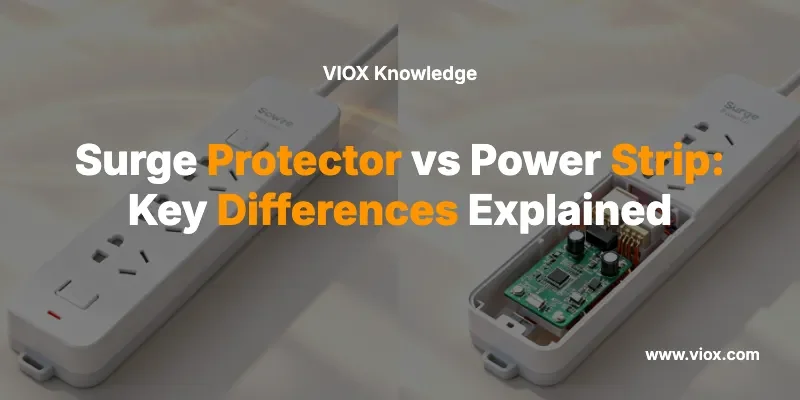
Walk into any electronics store and you’ll see dozens of six-outlet strips. Half say “surge protector” on the box. The other half don’t. The price difference? Maybe $10.
The protection difference? Everything.
That $15 power strip from the drugstore—the one your $2,400 computer is plugged into—offers zero protection against voltage spikes. And that “surge protector” you bought three years ago? Its metal-oxide varistors (MOVs) probably died after the first major surge, but the green light stayed on. You’ve been unprotected ever since, and you didn’t know it.
Here’s how to decode the labels, understand the specs that actually matter (joules, clamping voltage, UL 1449 ratings), and choose the right device for equipment worth protecting—or save money when you don’t need protection at all.
What Is a Power Strip?
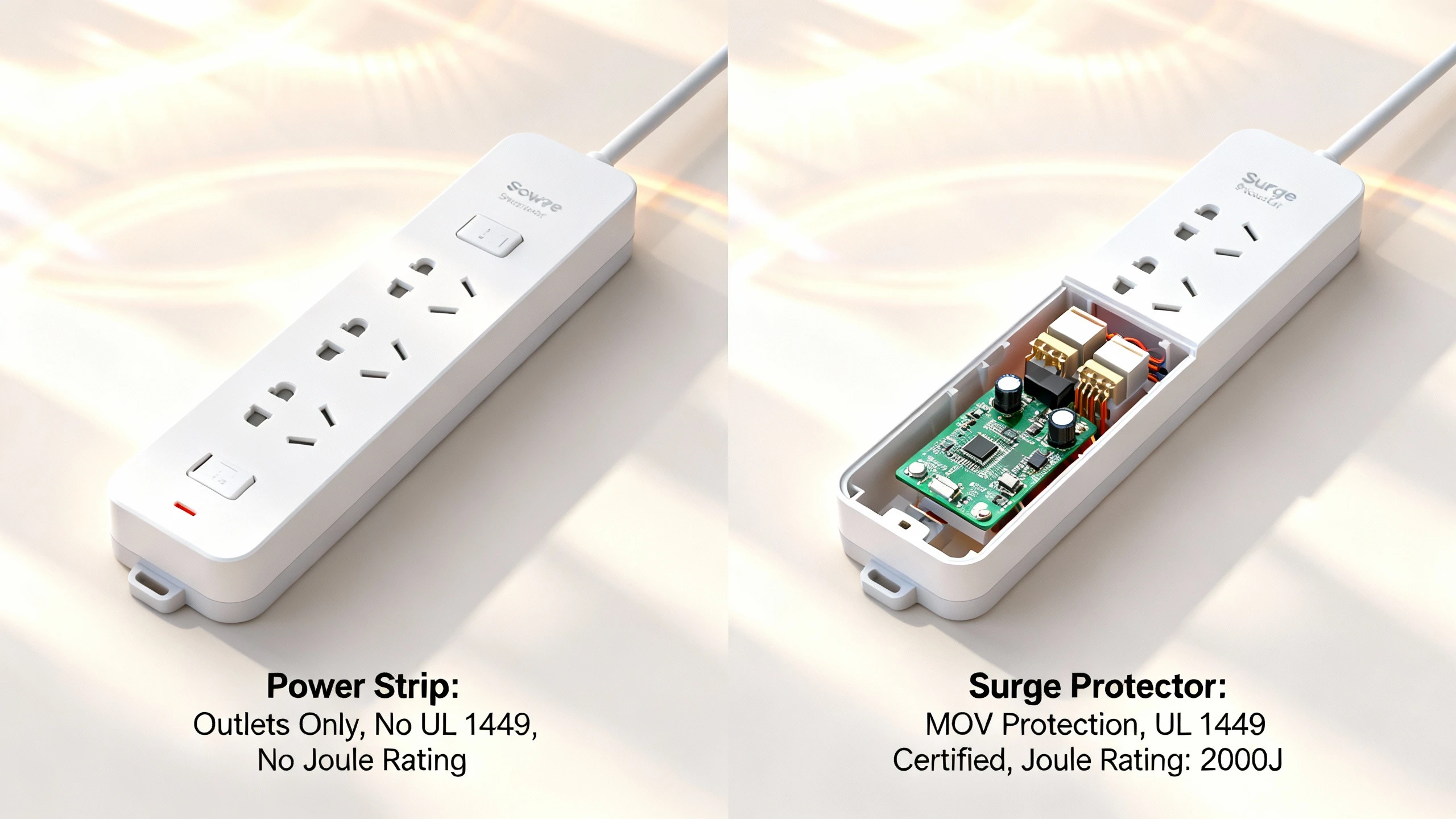
A power strip is outlet expansion, nothing more. Plug one device into the wall, get six outlets out. Some include an on/off switch or a basic circuit breaker rated for 15 amps (the strip’s internal wiring limit, not surge protection). That’s it.
What a power strip does:
- Multiplies available outlets
- May include an on/off switch for convenience
- May have a resettable 15A circuit breaker to prevent overload of the strip’s internal wiring
What a power strip does NOT do:
- Limit voltage spikes from lightning, utility switching, or motor startups
- Protect connected electronics from transient overvoltages
- Comply with UL 1449 (Surge Protective Devices standard)
- Contain any surge-limiting components (MOVs, gas discharge tubes, or silicon avalanche diodes)
If you see a six-outlet strip for $8–12 with no mention of “surge,” “joules,” or “UL 1449,” you’re looking at a basic power strip. It’s fine for low-value, surge-insensitive loads: desk lamps, phone chargers (which have internal protection), or a coffee maker. Not fine for a desktop workstation, home theater receiver, or network equipment.
Pro-Tip: A circuit breaker on a power strip protects the strip’s wiring from overload fire risk. It does not protect your devices from voltage spikes.
Hva er et overspenningsvern?
A surge protector (technically a surge protective device, or SPD) is a power strip with added non-linear components designed to clamp transient overvoltages and shunt surge current away from your equipment.
When a voltage spike arrives—whether from a lightning strike a few blocks away, utility transformer switching, or your HVAC compressor cycling on—the SPD’s internal components (typically MOVs) switch from high resistance to low resistance in nanoseconds, diverting the surge energy to ground and limiting the voltage your devices see.
Core technologies inside SPDs:
- Metal-Oxide Varistors (MOVs) — The workhorse. Ceramic semiconductors that clamp voltage spikes by conducting when voltage exceeds a threshold. Used in 90%+ of consumer and light-commercial SPDs.
- Gassutladningsrør (GDT-er) — Handle very high surge currents (tens of kiloamps) but with slower response time. Often paired with MOVs in hybrid designs.
- Silicon Avalanche Diodes (SADs) — Fast response, precise clamping, but lower energy capacity. Used in sensitive electronics and telecommunications.
Most cord-connected surge protectors you’ll buy are SPD-er av type 3 under UL 1449. They’re point-of-use devices meant to protect individual equipment or small clusters (a desk setup, an entertainment center).
Permanently installed Type 1 og SPD-er av type 2 go at your service entrance or distribution panel for whole-building protection; those are different products with much higher surge current ratings (25 kA to 100 kA+) and are typically specified by electrical engineers for commercial or high-value residential installations.
Pro-Tip: UL 1449 is the North American standard for SPDs; IEC 61643-11:2025 is the international equivalent. Both define test methods for surge current handling, voltage clamping, and temporary overvoltage (TOV) endurance. If a product doesn’t reference UL 1449 or IEC 61643, it’s not tested as an SPD.
The Silent Death: Why Surge Protectors Don’t Last Forever
Here’s what most people miss: MOVs degrade with each surge event. They’re sacrificial components. Every time an MOV clamps a voltage spike, it absorbs energy and suffers microscopic material degradation. After enough surge events—or one massive surge—the MOV’s clamping voltage drifts higher, its leakage current increases, and eventually it fails. Sometimes it fails open (no protection, but the strip still powers devices). Sometimes it fails short and triggers the strip’s thermal fuse, shutting down the outlets entirely.
The problem? Many SPDs show a green “protected” LED that indicates the circuit breaker hasn’t tripped and the outlets have power—not that the MOVs are still functional. You can have an SPD that’s been dead for two years, still glowing green, still delivering power, offering zero protection.
Industry rule of thumb: Replace surge protectors every 3–5 years, or immediately after a known major surge event (nearby lightning strike, utility fault). Some premium models include a “protection status” LED that goes out when the MOVs fail; if your unit has one and it’s off, replace the SPD immediately.
The Silent Death is why that $15 surge protector you bought in 2019 might be a $15 power strip today—and you’d never know until your equipment fails.
Pro-Tip: If you experience a nearby lightning strike or your surge protector’s outlets briefly cut out during a storm, replace the unit. The MOVs may have sacrificed themselves to save your equipment; don’t assume they can do it twice.
How to Tell the Difference: Reading the Label
You’re standing in the aisle. Two six-outlet strips in front of you. One says “surge protector,” the other doesn’t. How do you verify?
Look for these four things on the package or the device itself:
1. UL 1449 Listing
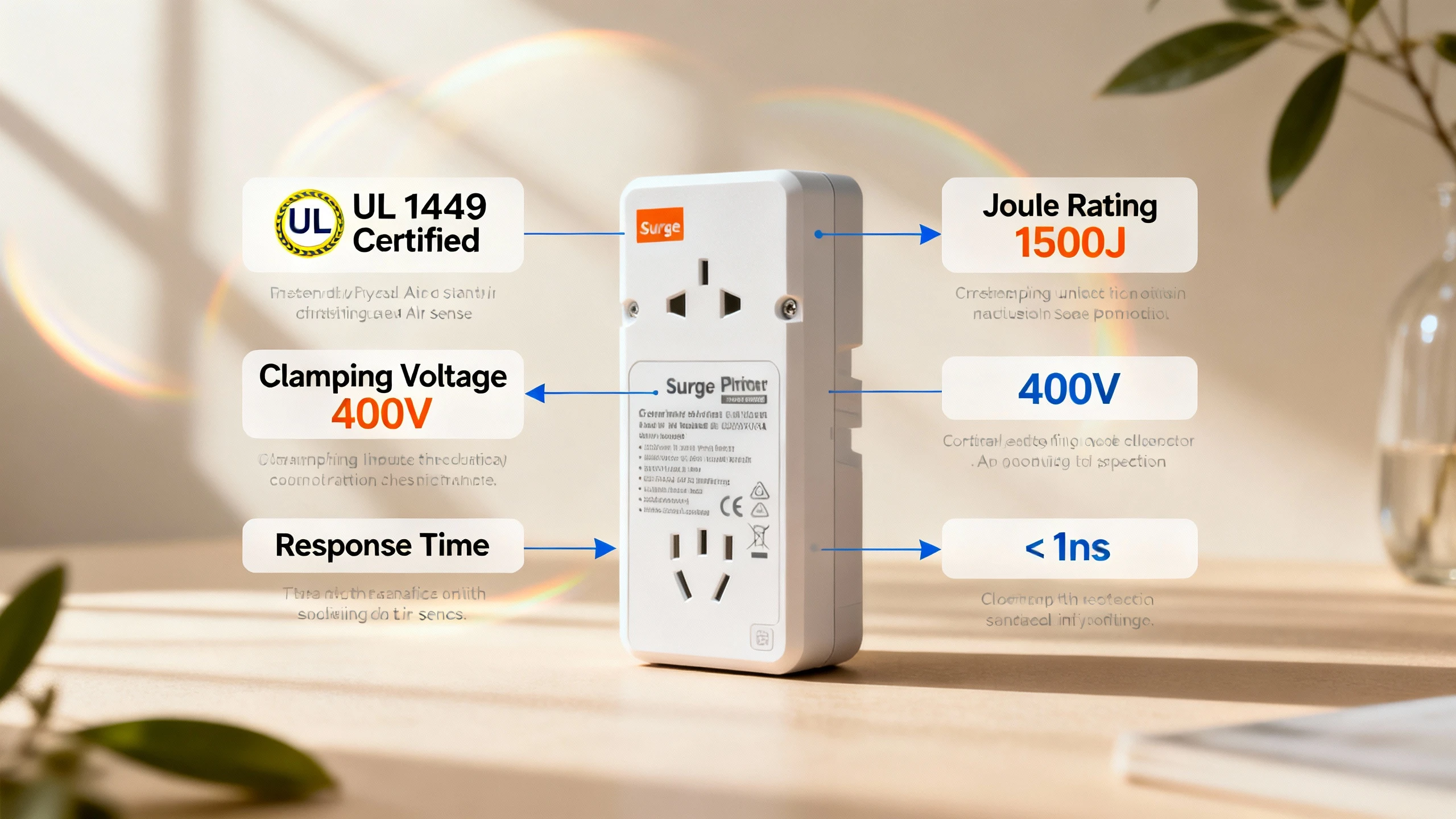
If the label says “UL 1449” or shows the UL mark with “Surge Protective Device,” it’s been tested as an SPD. Power strips without surge protection are listed under UL 1363 (Relocatable Power Taps) instead.
2. Joule Rating
Joules measure the total energy the SPD can absorb before its MOVs fail. Higher is better, but context matters:
- 300–600 joules: Minimal protection. Fine for low-value peripherals (desk lamp, basic printer).
- 600–1,500 joules: Moderate protection. Suitable for home office setups (desktop PC, monitor, router).
- 1,500–3,000+ joules: High protection. Recommended for high-value or sensitive equipment (workstations, home theater, network servers).
A basic power strip will have no joule rating because it has no surge absorption capacity.
3. Clamping Voltage (Voltage Protection Level)
This is the voltage threshold at which the SPD clamps the surge. Lower is better because your equipment sees less voltage stress.
- 330V: Excellent protection (hard to find in consumer units).
- 400V: Good protection. Most quality Type 3 SPDs.
- 500V: Acceptable protection. Common in budget SPDs.
- 600V+: Marginal protection. Avoid for sensitive electronics.
Again, a power strip has no clamping voltage spec because it doesn’t clamp.
4. Response Time
How fast the SPD reacts to a surge, measured in nanoseconds (ns). MOVs typically respond in less than 1 nanosecond; you’ll see specs like “< 1 ns” or “instantaneous.” GDTs are slower (100+ ns) but handle higher currents. For most consumer applications, MOV-based SPDs with sub-nanosecond response are adequate.
Power strips have no response time spec because there’s nothing to respond with.
Pro-Tip: If the package lists joules, clamping voltage, and UL 1449, it’s a surge protector. If it only lists “15A circuit breaker” and “6 outlets,” it’s a power strip.
When to Use a Surge Protector vs a Power Strip
Not every device needs surge protection. Here’s a decision framework based on equipment value, sensitivity, and replacement cost.
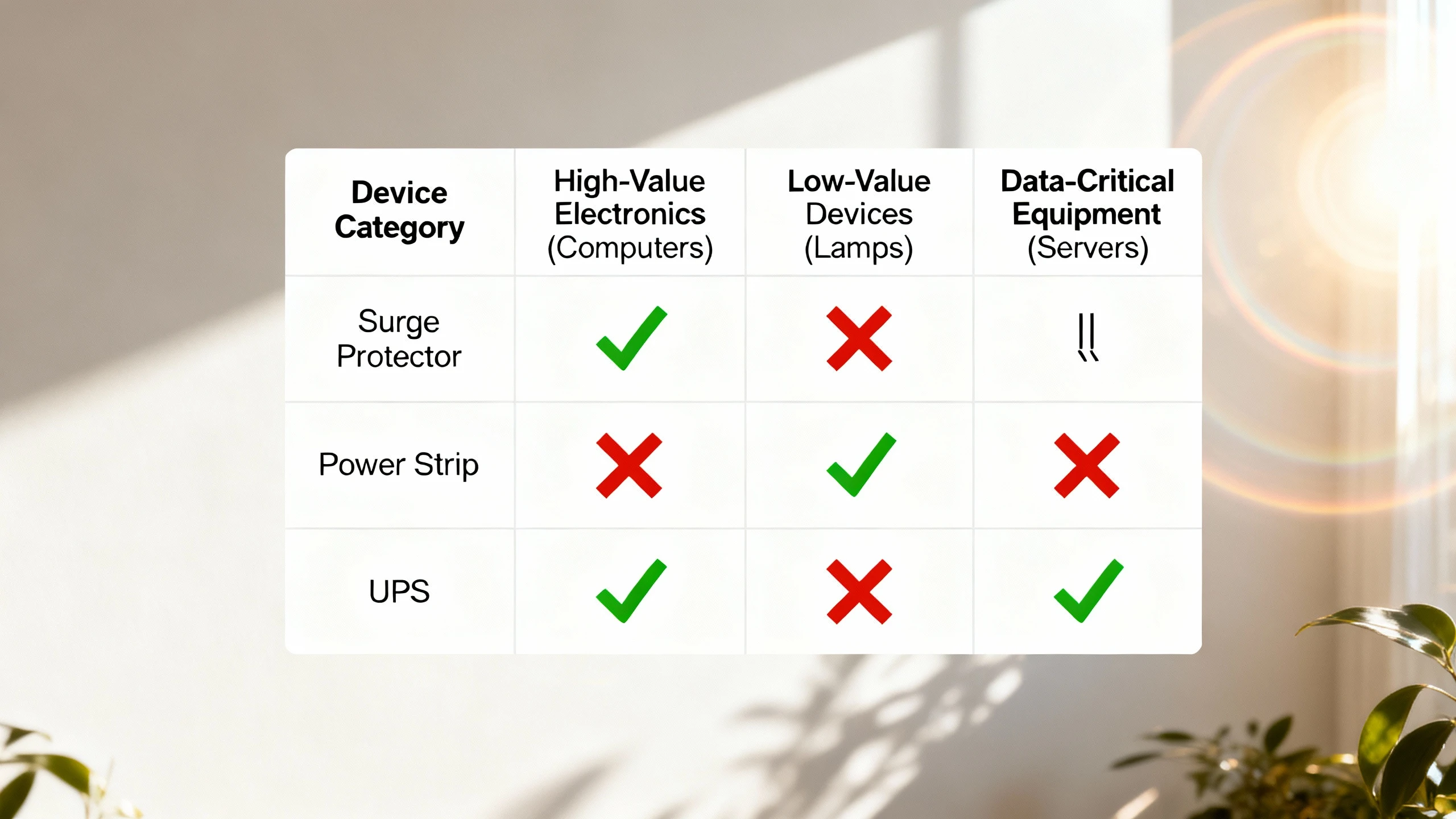
Use a Surge Protector (SPD) For:
High-value electronics:
- Desktop computers, workstations, and monitors
- Home theater receivers, 4K/8K TVs, gaming consoles
- Network equipment (routers, switches, NAS, modems)
- Audio/video production gear
- Medical or lab equipment in home offices
Sensitive electronics with data at risk:
- Computers with irreplaceable files
- External hard drives and RAID arrays
- Point-of-sale systems, kiosks
Areas with frequent lightning or utility issues:
- Homes in Florida, the Gulf Coast, or mountain regions (high lightning frequency)
- Rural areas with overhead distribution lines
- Buildings near industrial facilities with large motor loads (voltage transients from switching)
Use a Power Strip (No Surge Protection) For:
Low-value, non-electronic loads:
- Desk lamps, floor lamps
- Fans (non-variable speed)
Devices with internal surge protection:
- Modern phone/tablet chargers (most include basic MOV or capacitor filtering)
- USB charging hubs (check specs—some include surge protection, some don’t)
Resistive heating appliances (but watch the load):
- Coffee makers, toasters, space heaters—only if the total load stays well under 15A (1,800W at 120V). Many of these appliances draw 10–15A alone; don’t daisy-chain them or combine them on one strip.
Pro-Tip: Never plug a surge protector into another surge protector (daisy-chaining SPDs). It can create ground loop issues, exceed the first unit’s load rating, and in some configurations cause nuisance breaker trips or even fire risk. Plug SPDs directly into wall outlets.
The Load Limit Reality: Amps and Watts Matter
Both power strips and surge protectors have a maximum load rating, typically 15 amps (1,800 watts at 120V). This is the limit of the internal wiring and the strip’s circuit breaker, not the wall outlet’s capacity.
Common mistake: Plugging six devices into a strip without checking total load.
Eksempel:
- Gaming PC: 500W (4.2A)
- Monitor (32″ 4K): 60W (0.5A)
- External speakers: 40W (0.3A)
- LED desk lamp: 12W (0.1A)
- Phone charger: 18W (0.15A)
- Router: 12W (0.1A)
Total: 642W (5.35A)—well under 15A, safe to run on one strip.
Now swap the desk lamp for a space heater (1,500W / 12.5A). New total: 2,130W (17.75A). You’ve exceeded the strip’s rating. The breaker will trip, or worse, if the breaker is worn or defective, you’ve created a fire hazard.
Pro-Tip: Add up the wattage of everything you plan to plug in. Stay under 1,440W (80% of 1,800W) for continuous loads. Never plug space heaters, air conditioners, or other high-draw appliances into power strips or surge protectors—run them directly from wall outlets on dedicated circuits.
What About UPS (Battery Backup)?
A UPS (uninterruptible power supply) combines battery backup with surge protection. When utility power fails or voltage drops, the UPS switches to battery, keeping your equipment running long enough to save work and shut down gracefully.
When you need a UPS instead of just an SPD:
- Data integrity: Desktop computers, servers, NAS—anything where sudden power loss causes data corruption or loss of unsaved work.
- Uptime requirements: Home offices during remote work, medical equipment (CPAP machines), security systems.
- Voltage sag/brownout protection: Areas with unstable utility power. SPDs protect against spikes; UPS units also protect against sags and brief outages.
When an SPD alone is sufficient:
- Laptops, tablets, phones (they have internal batteries).
- TVs, gaming consoles, streaming devices—surge protection is valuable, but brief power loss just means rebooting.
- Network equipment if you’re okay with brief internet outages.
Most UPS units include surge protection (often 300–1,000 joules) as a built-in feature. Do not plug a UPS into a surge protector or vice versa—the UPS should plug directly into the wall. You can plug non-critical devices (monitors, speakers) into the UPS’s “surge-only” outlets (if it has them) or into a separate surge protector on a different wall circuit.
Pro-Tip: Size your UPS for runtime, not just surge protection. A 600VA UPS can keep a 300W desktop + monitor running for 5–10 minutes (enough to save and shut down); a 1500VA unit might give you 20–30 minutes. Check manufacturer runtime charts for your specific load.
Whole-Home Surge Protection: Type 1 & Type 2 SPDs
If you live in a lightning-prone area or have high-value equipment throughout your home, consider a whole-home surge protector installed at your electrical panel. These are Type 1 or Type 2 SPDs under UL 1449, rated for much higher surge currents (40 kA to 100 kA or more) than point-of-use Type 3 units.
What whole-home SPDs do:
- Clamp surges entering via utility service lines before they reach branch circuits.
- Protect hardwired equipment (HVAC, well pumps, garage door openers) that you can’t plug into a strip.
- Provide a first line of defense; pair with Type 3 SPDs at sensitive equipment for layered protection.
What they cost:
- Equipment: $150–$500 depending on surge rating and features (some include surge counters, diagnostic LEDs, or remote monitoring).
- Installation: $200–$500 for a licensed electrician to install at your main panel.
When to consider whole-home SPDs:
- You live in Florida, the Gulf Coast, or other high-lightning regions (25+ thunderstorm days per year).
- You’ve experienced equipment damage from surges in the past.
- You have high-value or hard-to-replace equipment (home automation, solar inverters, EV chargers).
- Your homeowner’s insurance offers discounts for surge protection (some carriers do).
Pro-Tip: Whole-home SPDs are not a substitute for point-of-use SPDs on sensitive equipment. Lightning energy can enter via multiple paths (utility lines, cable TV coax, phone lines), and a layered approach provides the best protection. Install a Type 2 SPD at your panel, then use Type 3 SPDs at critical equipment.
The Replacement Checklist: When to Buy a New Surge Protector
Replace your surge protector if any of the following apply:
- Age: It’s 3–5 years old, even if it appears to work fine. MOV degradation is cumulative and invisible.
- Post-surge event: You experienced a nearby lightning strike, or the SPD’s outlets briefly shut off during a storm.
- Protection LED is off: If your unit has a “protected” or “grounded” indicator that’s separate from the power LED, and it’s off or red, the MOVs have failed.
- Physical damage: Burn marks, melted plastic, or scorching near outlets or the cord.
- Outlets intermittently lose power: Internal wiring or breaker degradation.
Pro-Tip: Write the installation date on the surge protector with a permanent marker. Set a calendar reminder for 3 years out to evaluate replacement. For critical equipment, replace every 3 years regardless; for less critical setups, you can stretch to 5 years if there have been no known major surge events.
Safety Checklist: What Not to Do
❌ Never daisy-chain power strips or surge protectors. Plug them directly into wall outlets. Daisy-chaining creates overload risk, ground loop issues, and fire hazards. It’s also prohibited by the National Electrical Code (NEC) in many commercial settings and violates most product listings.
❌ Never plug high-current appliances into strips or SPDs. Space heaters, window AC units, hair dryers, microwaves, and other resistive heating or motor loads draw too much current. Run them from dedicated wall outlets.
❌ Never cover or enclose a power strip/SPD. They generate heat under load; blocking ventilation can cause overheating and fire.
❌ Never use a damaged strip/SPD. Frayed cords, cracked housings, loose outlets, or burn marks mean immediate replacement.
❌ Never assume the green light means protection is active. Many SPDs show a green power LED even when MOVs have failed. Look for a dedicated “protection” or “grounded” LED, or follow the 3–5 year replacement rule.
Pro-Tip: The National Fire Protection Association (NFPA) and UL both recommend against using power strips as permanent wiring solutions. If you need more outlets in a room, hire an electrician to install additional receptacles. Power strips and SPDs are meant for temporary or flexible equipment arrangements, not as substitutes for proper building wiring.
How VIOX Surge Protective Devices Deliver Reliable Protection
At VIOX, we engineer surge protective devices to IEC 61643-11 and UL 1449 standards for industrial, commercial, and demanding residential applications. Our SPD portfolio includes:
- SPD-er av type 2 for distribution panels and sub-panels (DIN-rail mount, 40 kA to 100 kA surge current rating).
- SPD-er av type 3 for point-of-use protection in control cabinets, server rooms, and equipment racks.
- Hybrid SPD designs combining MOVs with GDTs for high-energy coordination and longer service life.
- Remote monitoring options with dry-contact outputs for integration into building management systems (know when an SPD has reached end-of-life before equipment damage occurs).
Every VIOX SPD includes clear protection status indication—you’ll know when it’s time to replace. And unlike consumer-grade strips with vague “joule” claims, our datasheets provide complete test data: measured voltage protection level (clamping voltage), maximum discharge current (I_max), nominal discharge current (I_n), temporary overvoltage (TOV) withstand, and short-circuit current rating (I_SCC).
Whether you’re protecting a single workstation or an entire facility, VIOX SPDs are built for the engineers who demand transparency, repeatability, and compliance.
Final Takeaways
Power strips provide outlet expansion. Nothing more. They’re fine for low-value loads—lamps, chargers, coffee makers—but offer zero protection against voltage spikes.
Overspenningsvern (SPDs) add MOVs or other non-linear components to clamp transients and protect equipment. They’re essential for computers, network gear, home theater systems, and any electronics you can’t afford to replace. But they don’t last forever—MOVs degrade with each surge event, and most SPDs should be replaced every 3–5 years.
To identify real surge protection, look for UL 1449 listing, a joule rating, and a clamping voltage spec. If those aren’t on the package, you’re holding a power strip.
For data-critical or uptime-sensitive equipment, consider a UPS (battery backup + surge protection) instead of a standalone SPD. For whole-home protection in lightning-prone areas, install a Type 2 SPD at your electrical panel and layer with Type 3 SPDs at sensitive equipment.
Never daisy-chain strips or SPDs, never overload them, and never plug in high-current appliances. Follow the 15A (1,800W) load limit, and when in doubt, run dedicated circuits for high-draw equipment.
That $15 investment in a real surge protector—replaced every few years—can save you thousands in equipment replacement and days of lost productivity. Choose wisely, replace proactively, and your electronics will thank you.